Doored
- By
Bring your WoW content to life with customizable animated co-hosts, living banners, scene presets, and in-game tools for streamers and creators.
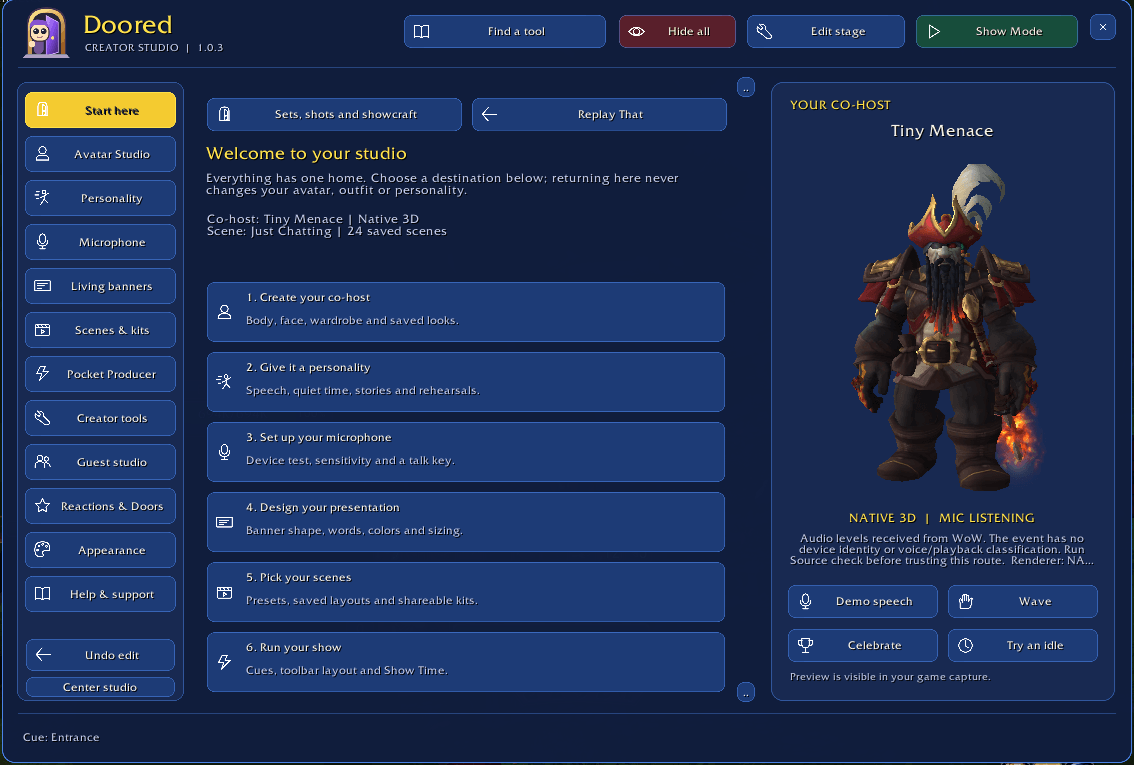
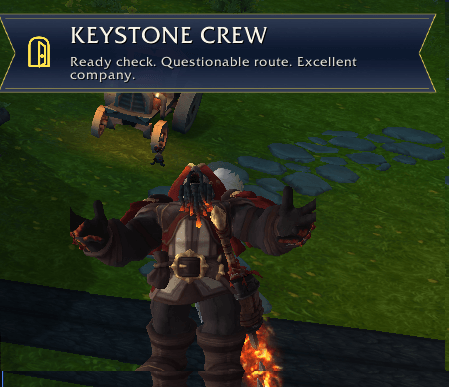
image2.png
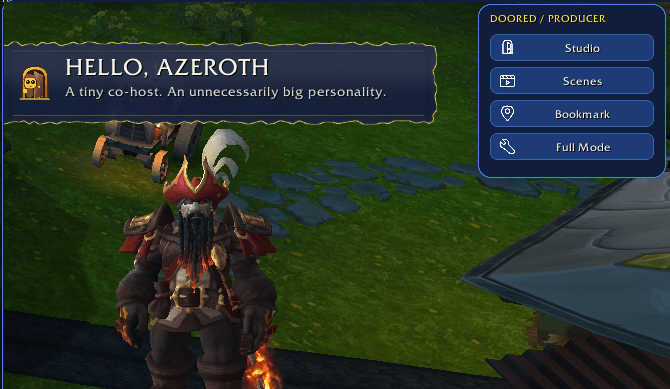
image.png
Description
🚪 Doored 🎬
Your Show. Your Co-Host. Absolutely No Guarantee of Professionalism.
You came to show off a house.
Your co-host put on a detective hat and started investigating your chat window.
Then it threw the banner, got hit by the return flight, and demanded a break.
Welcome to Doored. 👀
Doored turns your World of Warcraft screen into a customizable creator studio, complete with animated avatars, living banners, scene presets, presentation controls, and a co-host with considerably more personality than workplace supervision.
Built for streamers, video creators, housing showcases, guild hosts, tutorial makers, and anyone who believes their adventures deserve a little production value.
You bring the content. Doored brings the show. The confetti budget is apparently unlimited.
🎭 TWO WAYS TO MEET YOUR CO-HOST
🛡 Native 3D: Your character gets a second career
Put your actual WoW character model on screen as an animated presenter.
Keep your equipped appearance or build a separate preview outfit with supported WoW equipment. Save looks for game shows, house tours, raiding, M+ runs, or whatever deeply specific aesthetic you have committed to this week.
Adjust the camera, facing, size, lighting, and placement. Audition animations and mark them Looks great, Usable, or Avoid so your co-host can favor the performances that suit its model.
Equipment changes affect the preview only. They do not equip, unlock, purchase, or transmog anything on your actual character. Item appearances and animations depend on what the model supports.
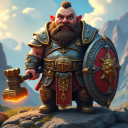
👑 Creator Avatar: Small body. Enormous character.
Build an original illustrated co-host with an oversized head, customizable proportions, and a wardrobe that takes its assignment seriously.
Choose from 24 WoW-inspired race styles, 13 class-inspired outfits, faction, body presentation, skin and eye colors, hair, facial hair, expressions, and accessories.
Glasses? Absolutely.
Crown? Naturally.
Cape, substantial shoulders, a spellbook, and a suspicious little companion? Now we're talking.
Save multiple looks and switch between them without starting over.
Creator Avatar is a layered animated character. Native 3D uses a real WoW model. Pick the presentation that fits your show.
😈 PERSONALITY WITH QUESTIONABLE JUDGMENT
Choose a starting personality such as Professional Host, Tiny Menace, Sleepy Guardian, Overenthusiastic Intern, or Unsupervised Goblin, then tune its energy, gestures, patience, mischief, and showmanship.
The co-host has 29 complete story routines, alongside individual gestures, reactions, and idle actions.
A few examples of its professional development:
- 🔍 UI Detective: Investigates a visible chat window, action bar, or quest tracker with a detective hat and magnifying glass.
- 💥 Screen Bonk: Charges toward the viewer, hits imaginary glass, leaves a temporary crack, and discovers the birds circling its head.
- 🪃 Banner Boomerang: Throws the banner across the screen. Discovers how boomerangs work. Regrets everything.
- 🎲 Dice Roll: Rolls the dice, evaluates the result, and behaves with exactly as much dignity as you would expect.
There are banner stomps, coin flips, juggling attempts, cookie breaks, dramatic exits, and a Producer-panel flip for those moments when the controls have apparently offended someone.
Comedy with memory adds follow-up performances. After a mishap, your co-host may return with safety equipment, repair tape, or a suspicious interest in inspecting its dice.
Every creator remains in charge. Choose permitted routines, adjust timing, rehearse performances, or tell the little menace to settle down.
Native 3D routines combine character animations with screen-positioned props and effects. Custom props are not individually attached to the model's fingers or bones.
🎤 OPTIONAL VOICE-RESPONSIVE ANIMATION
Give your co-host something to talk about.
Doored includes input-device selection, a live level meter, microphone testing, calibration, sensitivity controls, and Open microphone, Hold to talk, or Toggle to talk modes.
Avatar mic ON enables ongoing microphone-driven animation.
Test input (15s) checks the input temporarily.
Avatar mic OFF stops Doored's microphone response.
Speaking activity can drive talking and movement, with adjustable timing to keep short pauses from turning every sentence into an animation argument.
Microphone compatibility depends on WoW's voice service and your system's recording-device configuration. Some setups may not expose the intended microphone or may route an unwanted audio source. Use the built-in source check to verify the input; a moving meter alone is not proof that the correct microphone is working.
This is activity-driven animation, not word-perfect lip synchronization, facial tracking, or speech recognition. Doored does not record or transcribe your voice, and its controls do not mute OBS, Discord, or your physical microphone.
The studio, manual reactions, banners, and other presentation tools remain usable without microphone response.
🎨 LIVING BANNERS, NOT BORING RECTANGLES
Create banners directly on your WoW screen, with editable titles, subtitles, colors, icons, opacity, size, position, and entrance effects.
Choose from Lower third, Ribbon, Parchment, Speech bubble, Spotlight, and Nameplate styles, each with its own shape and surface treatment.
Slide one into view. Unroll an announcement. Reveal a title behind a curtain. Let the co-host sit on it.
Or let the co-host break it in half and pretend that was part of the plan.
Personal Phrasebook lets you write your own event messages and insert available details through simple controls. Save alternate lines, favorite the best ones, and reduce repetition.
Scheduled messages can display reminders in selected scenes, with timing and priority controls so every announcement does not fight for the same spotlight.
Your banner. Your wording. Your level of sarcasm. 💬
🎬 SCENES FOR THE WHOLE EVENING
Start with 24 scene presets, including Just Chatting, House Tour, Game Night, Guest Interview, Dungeon Ready, Crafting Corner, Fashion Check, Lore Lounge, Pet Spotlight, and Stream Wrap.
Customize them, duplicate them, or build your own.
Scenes remember avatar and banner placement, sizing, and presentation settings. Optional saved looks and personalities let your host dress for the occasion.
Game-show presenter one minute. Tavern regular the next. Tiny armored menace whenever management loses control.
Use Edit Stage to arrange everything, then Show Mode to remove editing handles and make stage objects click-through. Apply a layout to other scenes when you want consistent placement without replacing their wording or colors.
The stage and Producer controls are designed to remain available while decorating in Housing Edit mode.
🚪 GIVE YOUR CO-HOST A LITTLE SET
Choose an optional home for the performance:
The Doorway, The News Desk, The Tavern Corner, The Arcane Workshop, The Goblin Booth, or The Royal Balcony.
Customize the set's position, colors, scale, and transparency. Let it follow the avatar's home position or place it independently, with an optional attached banner.
These are screen decorations, not furniture placed in your actual house.
Director Shots add saved camera compositions and lighting. Switch from Host View to Interview View, set up a Victory View, or deliver a deeply unnecessary Suspicious Close-up.
Only Doored's avatar presentation changes. Your actual game camera stays yours.
🎥 POCKET PRODUCER: SMALL PANEL, BIG SHOW
Keep your presentation controls within reach without leaving a giant settings window on screen.
Pocket Producer supports horizontal, vertical, full, and compact layouts, with remembered placement and independent visibility.
The compact version keeps things simple:
Studio | Scenes | Bookmark | Full Mode
Expand for the Show Time clock, presentation cues, Focus Mode, rundown controls, and separate Hide producer bar and Hide all actions.
Build custom sequences combining avatar actions, banners, effects, routines, sets, camera shots, and pauses.
Big reveal. Dramatic reaction. Victory celebration. One cue instead of a frantic search through six windows.
🏆 REACT TO AZEROTH
Optional reactions and banner toasts can celebrate new mounts, new pets, newly acquired housing decor, epic equipment, achievements, and level-ups.
Guild options include achievement announcements and new-member welcomes. Character-state reactions can respond to AFK, death, and resurrection.
Visiting a home? A temporary Touring introduction can display the available homeowner and address information, then return to the existing scene presentation.
Choose your reactions, wording, effects, cooldowns, and banner destinations. Information is used when the game supplies it; missing details are not invented.
Your mount collection finally has a public-relations department. Its spokesperson may be holding a cookie. 🍪
🧠 FOCUS MODE: PLEASE BE NORMAL FOR A MINUTE
Sometimes you are explaining an important detail.
Sometimes the co-host has decided this is the correct moment to throw furniture.
Focus Mode keeps speech animation and live tour/game information active while holding automatic mischief and incidental announcements.
When you finish, held discoveries can be summarized instead of arriving as a celebration avalanche.
Protected screen areas also let you mark regions automatic routines should avoid. Reduced-motion and lower-effects options keep the presentation comfortable and manageable.
Entertaining when invited. Quiet when needed. Mostly employable.
📝 TOOLS FOR BEFORE, DURING, AND AFTER THE SHOW
Show Rundown organizes your segments, with scenes, outfits, personalities, headlines, and entrance cues. Move from the welcome to the tour to the interview without rebuilding the presentation.
Pre-show Ready Check checks Doored's local setup and links directly to relevant controls. Microphone enabled and speech detected are treated as different things.
Show Time and Bookmarks provide a local reference clock, recording offset, and timestamped notes for finding moments later.
Session Recap creates a copyable editing guide from selected bookmarks and events.
Replay That repeats a recent Doored presentation when you missed the banner or need another take.
Presenter arrows, highlight rings, and Pose Mode help with explanations, screenshots, and carefully arranged compositions.
These tools do not record gameplay, create video clips, or control your broadcast. Doored handles the presentation inside WoW.
🤝 BRING A GUEST. CHOOSE WISELY.
Guest Star lets an approved group member join the presentation as another avatar.
Guest Director gives a trusted participant access to a restricted selection of approved cues.
Both users need compatible Doored versions. Invitations require acceptance, access can be revoked, and permissions expire after reload or logout. Guest Star exchanges appearance and limited speaking activity, not microphone recordings.
Optional Audience Reactions let approved players or your current group request selected responses through supported emotes and fixed commands such as:
!doored applause!doored wave!doored boo!doored encore
Audience controls start off and use shared cooldowns.
No unrestricted text injection. No random guild member taking over your settings. No seventeen simultaneous encores because someone discovered copy and paste.
These are in-game interactions, not a Twitch or YouTube chat connection.
💾 EXPERIMENT WITHOUT LOSING YOUR FAVORITE SETUP
Save character looks, scene layouts, and display profiles. Create named Restore Points before trying something ambitious.
Use a Rehearsal Copy to experiment, then keep or discard the changes. Share supported presentation settings through Creator Kits without sharing microphone devices, keybindings, or guest permissions.
Rehearsals can return you to the Studio page you were using. Stop / repair restores temporary effects, and support reports help explain when a feature is waiting on a cooldown, microphone gate, current performance, or another setting.
Because "I liked it better before" should be recoverable.
✨ THE DOOR-FAMILY FINISH
Rounded windows, illustrated navigation, readable controls, theme previews, and eight coordinated interface palettes:
House of Liberty, Pumpkin Spice Latte, Easter, 4th of July, Halloween, Christmas, Super Hero, and Colorblind Safe.
Changing the interface theme asks whether your banner colors should follow. Your avatar's carefully chosen appearance stays independent.
Pin frequently used Studio sections, tuck others under Advanced, or use Find a tool to jump to settings without remembering where everything lives.
🔔 EVEN BETTER WITH THE DOOR FAMILY
Doored works on its own. Optional connections add presentation reactions for:
🚪 DoorStep: Live tour-stop information and guide-themed presentations.
🎲 DoorNight: Game-night information, scores, and results.
🔔 DoorBell: Accepted visitor welcomes and entry alerts.
📷 DoorCam: Accepted visitor notifications, including identified earlier visits.
Enable these under Reactions & Doors > Connections. Use current compatible versions of the connected addons; Doored adds presentation without taking over their tours, scores, or visitor checks.
🔧 READY FOR YOUR ENTRANCE?
Type /doored or click the Doored minimap button.
Choose your avatar, pick a personality, arrange a scene, and rehearse a cue. Test microphone support separately before relying on voice response during a show.
/doored producer opens Pocket Producer./doored workshop opens the additional showcraft tools./doored report opens the support area.
Everything is presented inside your WoW client, so you can see and position it while playing. Visible settings and editing controls can also appear in your game capture. Show Mode removes editing handles; it does not create a separate private production screen.
Whether you stream, record tutorials, showcase houses, host guild nights, or simply want a tiny co-host judging your adventures, the stage is yours.
🎬 Doored: You bring the content. Your co-host brings the personality and questionable professionalism.
Doored Team