Don't Touch My RAM Forever
- By
Monitor RAM usage from every loaded addon in WoW Forever, with live sorting, resizing, memory percentages, and simple performance controls.
Description
Don’t Touch My RAM Forever
Don’t Touch My RAM Forever is a lightweight addon memory monitor built for World of Warcraft: Forever.
It shows the RAM usage of every currently loaded addon in a clean, sortable window so you can quickly see which addons are using the most memory.
No external profiler, no complicated setup — just open the window and check your addon memory usage.
Features
- Displays all currently loaded addons
- Shows memory usage in KB / MB
- Shows each addon’s percentage of total addon RAM
- Sort by:
- Addon name
- Memory usage
- Ascending and descending sorting
- Automatic memory refresh
- Pause / Resume automatic updates
- Manual Refresh button
- Collect GC button for manual Lua garbage collection
- Total loaded addon count
- Total addon memory usage
- Adjustable window size
- Adjustable window scale
- Adjustable background opacity
- Adjustable border opacity
- Adjustable border thickness
- Bottom-right resize handle
- Lockable main window
- Optional minimap button
- Draggable minimap button
- Settings window keeps its own normal UI scale
- Settings and window positions are remembered between sessions
Memory Overview
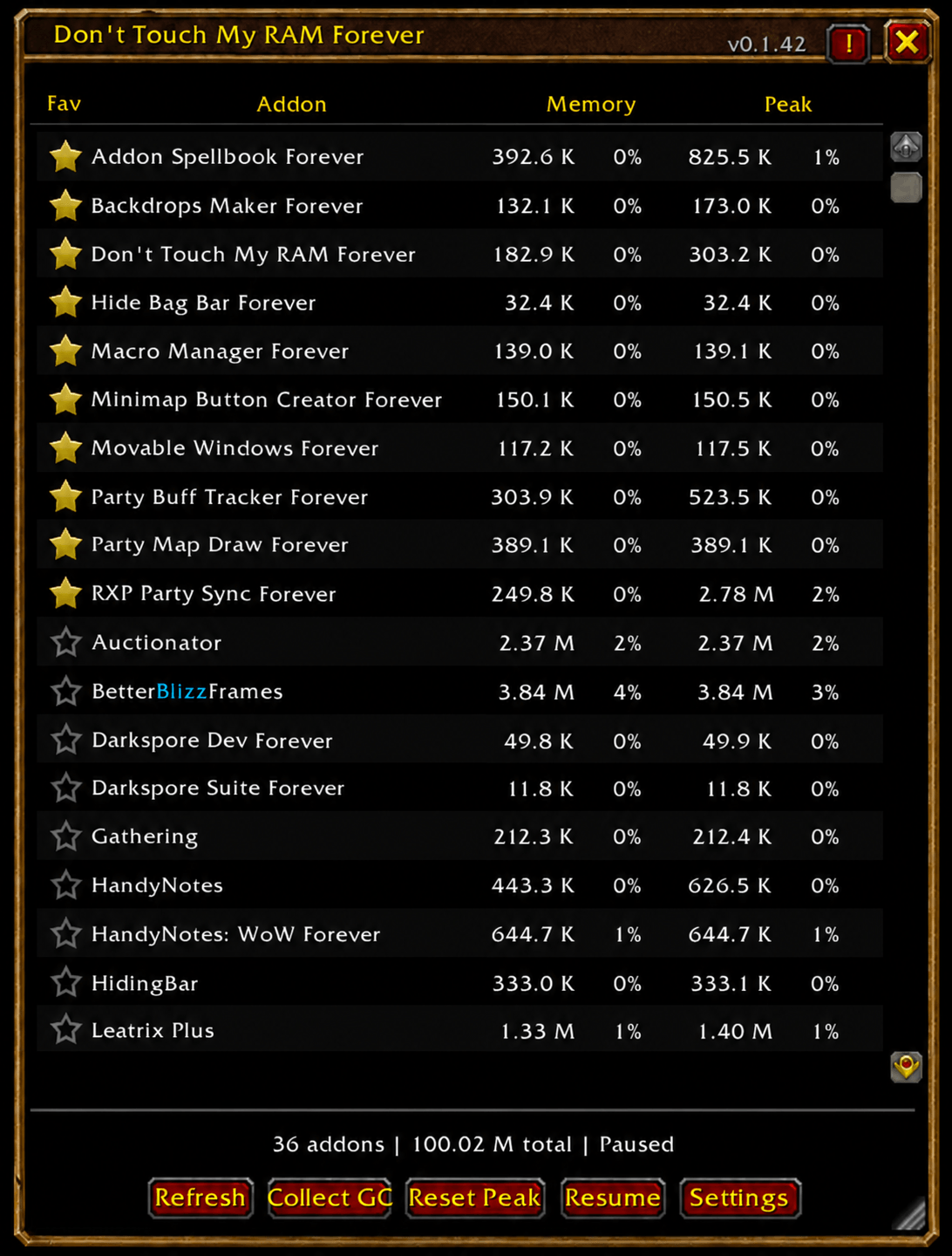
The main window gives you a simple overview of your loaded addons.
Each row displays:
Addon — the addon name
Memory — current RAM usage and its percentage of total addon memory
This makes it easy to identify which addons are taking the largest share of your addon memory.
Click the column headers to change the sorting order.
Automatic Refresh
Memory usage can update automatically while the window is open.
Use Pause if you want to freeze the current values for comparison.
Use Refresh at any time to manually update the list.
Collect GC
The Collect GC button manually triggers Lua garbage collection.
This asks the WoW client to reclaim Lua memory that is no longer being referenced.
It can be useful when testing addons or checking how much temporary memory can be released.
A small hitch may occur when garbage collection runs, especially if a large amount of memory has accumulated.
Resizable Window
The main monitor can be resized in two ways:
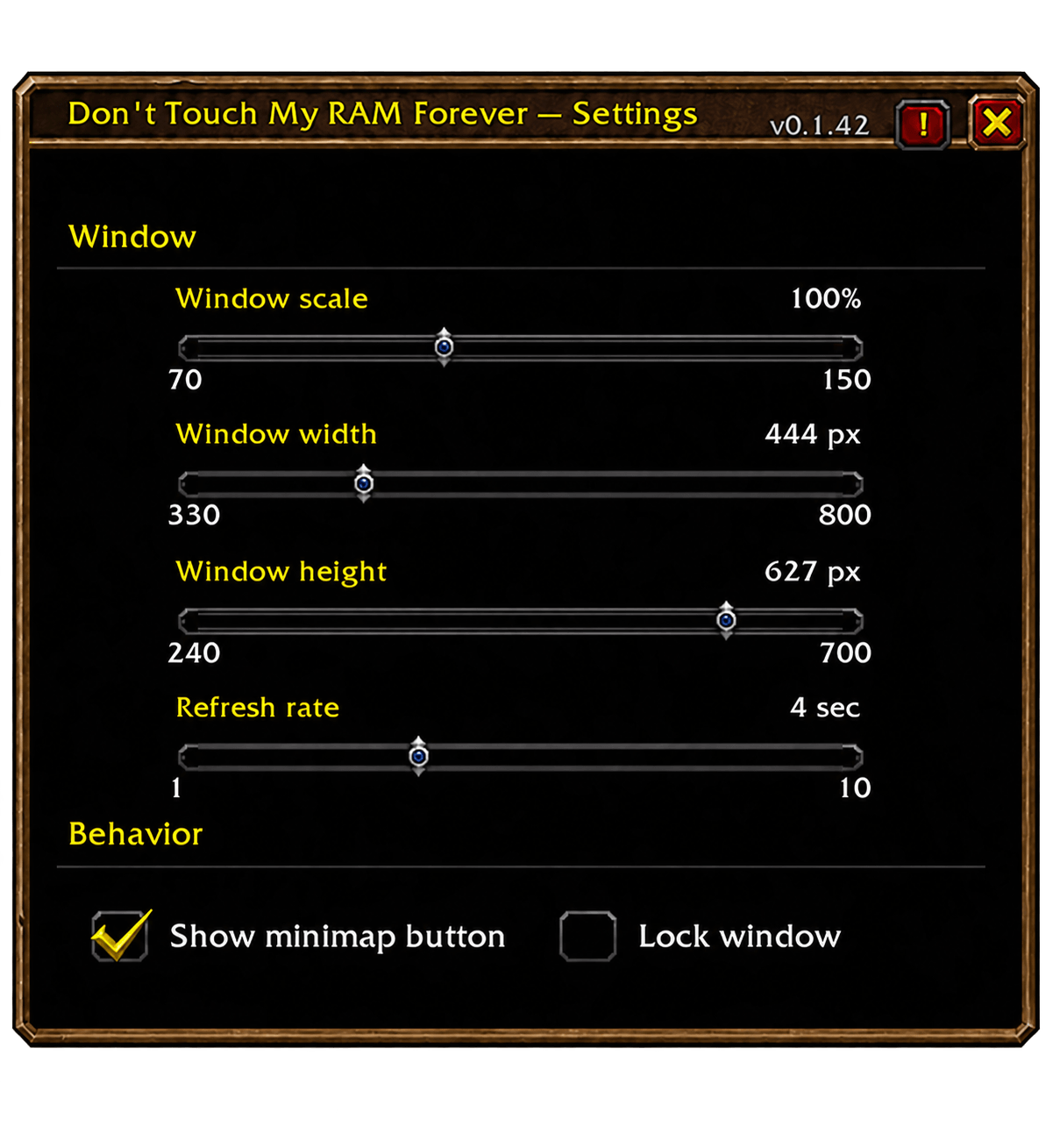
- Use the Width and Height sliders in Settings
- Drag the bottom-right resize handle
The addon list and columns reflow live while resizing.
The number of visible addon rows automatically adjusts to the available window height.
Lock Window
Enable Lock main window in Settings to prevent accidental movement or resizing.
When locked:
- The main window cannot be dragged
- The resize handle is disabled
- The resize handle is hidden
Minimap Button
An optional minimap launcher is included.
Left-click — Show or hide the RAM monitor
Right-click — Open Settings
Drag — Move the button around the minimap
The minimap button can be disabled completely from Settings.
Appearance Settings
The main window can be customized with:
- Window scale
- Window width
- Window height
- Background opacity
- Border opacity
- Border thickness
The Settings window itself is not affected by the main window scale, so it remains readable even when the monitor is made very small.
Sliders also support mouse-wheel adjustment for precise changes.
Commands
Open or close the addon with:
/ram
/dtmrf
/addonusage
Built for WoW Forever
Don’t Touch My RAM Forever is designed specifically for the World of Warcraft: Forever client and uses the addon APIs available there.
The Don't Touch My RAM Forever Team