DodoSays
- By
Memory-game helper for Azta'rec in Venomfall Deeps: tap the safe quarters while he preaches, and it calls them back while he echoes.
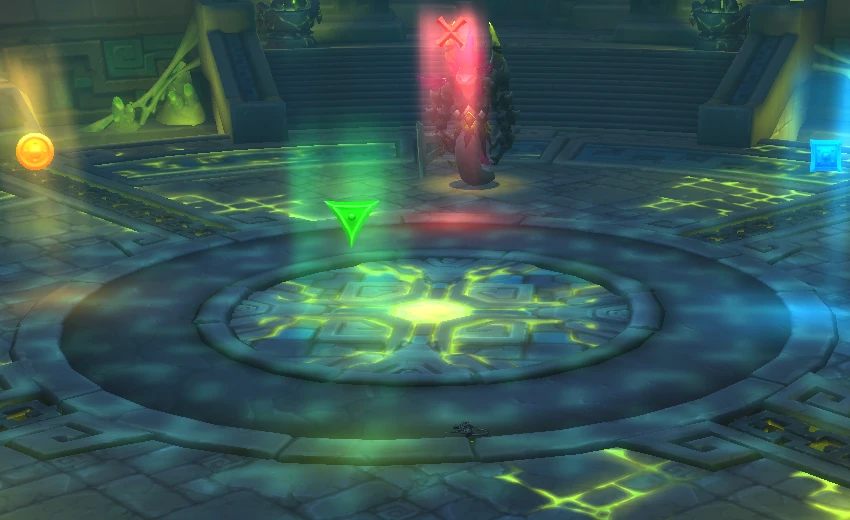
image-1786859199754.webp
Description
Azta'rec splits the room into quarters three times a fight. First he preaches and shows which quarter is safe, one wave at a time. Then he echoes the whole run back with no telegraph at all - same order, no warning.
DodoSays does not read the room. It cannot: the client stopped handing out player positions in there. You tap the safe quarter while he preaches, and it calls them back while he echoes.
How to use
Before the pull, drop raid markers on the floor: cross toward the boss, then square, diamond, circle going clockwise. Any rotation works, as long as the ground matches the board.
Changed in 0.14: the third one used to be the green triangle. Venomfall Deeps has a green floor and the marker was hard to pick out against it, so it is now the purple diamond. Upgrading? Repaint that marker, and re-set the key under Key Bindings > DodoSays > Safe: Diamond - the client drops a binding when the name behind it changes. Macros you already made keep working.
While he preaches, tap the quarter that stayed safe. Three ways in: click the board, bind keys under Key Bindings > DodoSays, or run /dodosays diamond from a macro. The last one is there for ring addons like OPie, which can hold a macro but not a keybinding.
You do not have to write those macros. Click the minimap murloc and press Create 4 macros: it makes Dodo Cross / Square / Diamond / Circle, each carrying its own raid marker as the icon, ready to drag onto a bar. Pressing it again refreshes them rather than making more.
While he echoes, watch the middle of the screen. Each wave shows the marker to stand in, the one coming after it at 60% size, and a bar that empties as the wave lands.
The board only accepts taps while he is preaching. Outside that it stays on screen but greys out.
Sound
Each call can also be heard, which matters because during the echo your eyes belong on the floor rather than on a HUD. Four settings, in the options panel:
| Setting | What you hear |
|---|---|
| Silent | Nothing |
| Chime | Blizzard's raid-warning chime - the long-standing default |
| Voice (Chinese) | The marker spoken aloud |
| Voice (English) | The marker spoken aloud |
Sound fires on each call of the echo, together with the cast bar - never during the sermon while you are still tapping. The heads-up before the echo starts is deliberately silent: your eyes are on the board at that point, and a spoken quarter there would land on top of the tap you were making and name a different one.
Swapping in your own voices takes no code: the files live in Sounds/<language>/<marker>.ogg, named after the quarter (cross.ogg, square.ogg, diamond.ogg, circle.ogg). Drop a replacement over any of them and it is used as-is.
Commands
/ds |
list every command |
/dodosays cross |
tap that quarter - also square, diamond, circle |
/ds panel |
settings, or click the minimap button |
/ds sim 5 |
rehearse a five-wave round with no boss needed |
/ds go |
lock the rehearsal and play it back at the real cadence |
/ds show / hide |
the board |
/ds where |
what map the client thinks you are on |
/ds and /dodosays are the same command. Inside a macro prefer the long one: /ds is short enough that another addon may claim it too, and whichever loaded last wins - silently.
/ds sim drives exactly the same code a real pull does, so if it works in the rehearsal it works in the fight.
Notes
Everything is timed off events the client still hands out. Spell ids, spell names and cast timestamps all come back secret in this encounter, so nothing here depends on reading them. The wave lengths are measured live and corrected every round.
The addon stays completely asleep outside this one encounter.
The voice lines are synthetic. Both languages were generated with OpenAI's gpt-4o-mini-tts (voice "coral") specifically for this addon - no human recording and no third-party voice pack is bundled.
DodoSays Team