DodoInspect
- By
Four languages. At-a-glance item overlays: Raider.IO style item level gradient, junk and consumable tags, and a character gear panel with enchant and gem checks.
Weixin Image_20260619011936_130_63.png
Weixin Image_20260619014513_131_63.png
Description
At-a-glance item overlays for the default Blizzard UI — bags, the character frame and the inspect window — plus a gear summary panel and a target info line, all tied together by a Raider.IO–style item-level gradient. No minimap button, no dependencies, and every feature toggles on or off independently.
🌍 Four languages: English · 中文 · Français · Español — switch in options or with
/dins en | cn | fr | es.
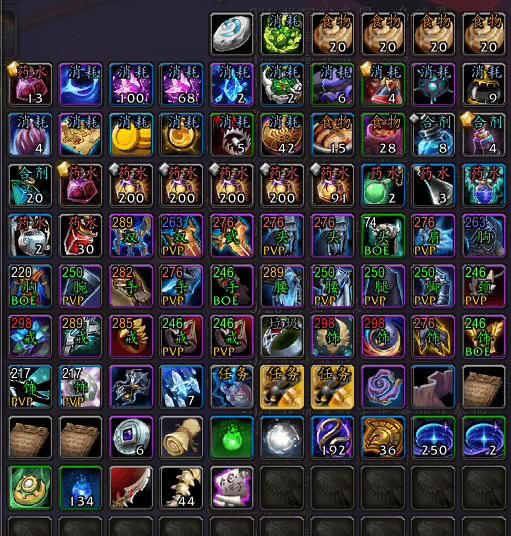
🎒 Bags
- Item level (top-left) on a Raider.IO gradient — white → green → blue → purple → pink, then legendary orange rising through amber and gold to hot red at the season cap.
- Slot label (center) and a BOE / set tag (bottom-left).
- Type tags for anything that isn't gear: junk, quest, food, flask, potion, consumable — each color-coded.
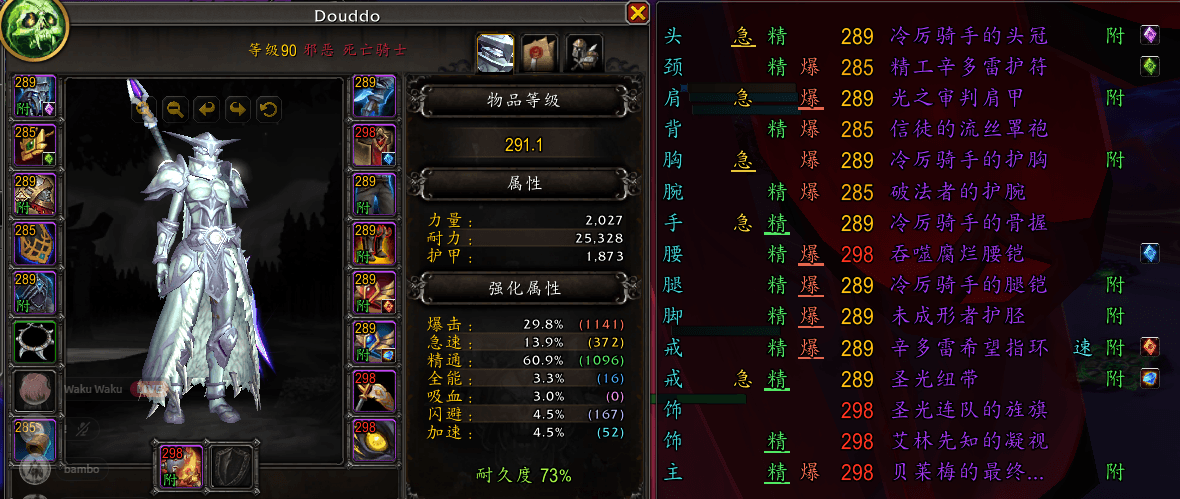
🧍 Character frame
- Every slot shows item level + enchant state (green = enchanted, red = missing) + gem icons.
- Average durability at the bottom of the stats pane, colored red → yellow → green so you see at a glance when to repair.
- Secondary stats in three aligned columns — name · percentage (one decimal) · the underlying rating, color-matched to the gear panel.
- Item Level recolored with the gradient and shown to one decimal.
📋 Gear summary side panel
One row per slot, docked to the character frame: slot abbreviation, a secondary-stat grid with the dominant stat underlined, item level, item name, enchant tag, gem sockets and tertiary stats (speed / leech / avoidance). Hover anything for the full tooltip.
🔍 Inspect window
The same gear overlays on another player's equipment, plus a compact stat panel. (Only friendly / same-faction players can be inspected — a Blizzard rule.)
🎯 Target info
A line above the target frame for any player: item level, race, class, spec and hero talent. Friendly players in range get the full line; hostile players show race + class everywhere, and spec inside battlegrounds / arenas.
🌍 Languages
Slot labels, type tags and the durability label ship in English, 中文 (Chinese), Français (French) and Español (Spanish). Race / class / spec / hero-talent names always follow your game client's language. Pick a language under Esc → Options → AddOns → DodoInspect, or with /dins en, /dins cn, /dins fr, /dins es. The choice is saved per account.
⚙️ Options & compatibility
Bags, character-slot overlays, stats-pane extras, the side panel, the inspect window and the target line each toggle independently — so DodoInspect sits happily beside ElvUI, SimpleItemLevel, bag replacements and the like: switch off whatever overlaps, keep the rest. Color thresholds and overlay positions live in Config.lua.
The DodoInspect Team