DeSync - Lag Monitor & Disconnect Alarm
- By
Stop running on the spot! DeSync is a real-time heartbeat monitor that instantly detects lag spikes, 'ghost' disconnects, and server desyncs. Don't risk a Hardcore death—get alerted and auto-warn your party the exact second your connection drops!
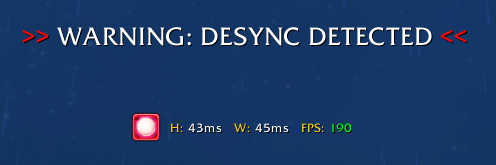
DeSync Detected! (Glow)

DeSync Status Bar (Green)
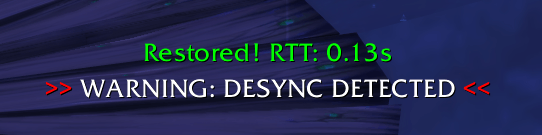
Network Re-Synced! (Round Trip Time)
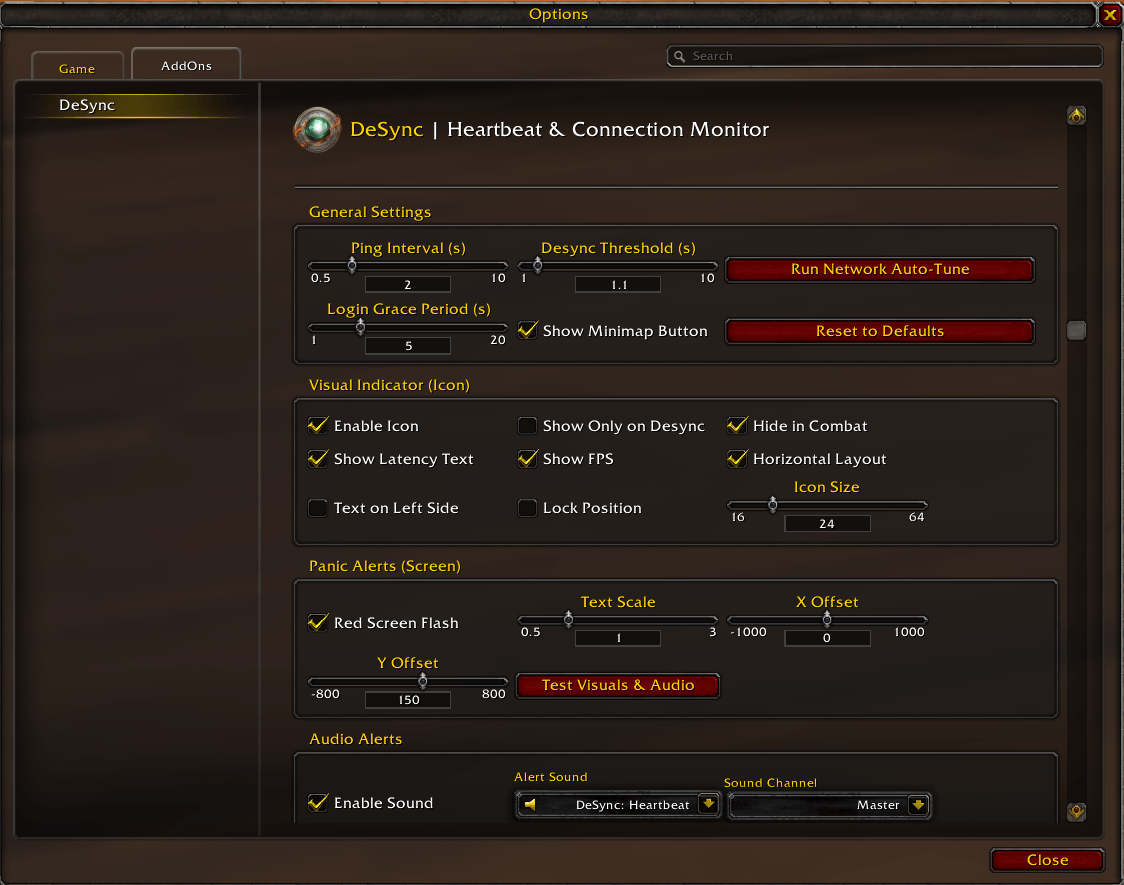
DeSync Options Screen
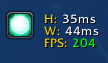
DeSync Status Bar Vertical Layout

DeSync Status Bar Vertical Layout (Without FPS)
Description
DeSync - Lag Monitor & Disconnect Alarm | v1.0.9

Have you ever run halfway across a zone, only to realize the world has stopped moving?
We’ve all been there: you’re questing, traveling, flying, or mid-pull when you realize your spells will not cast. You restart the client, log back in, and discover your character is nowhere near where you thought they were — sometimes surrounded by mobs, sometimes dead, and sometimes at a graveyard.
Blizzard’s native latency display is often too slow to warn you about a “silent” or “ghost” disconnect.
DeSync was built to solve this exact frustration.
Don’t Just Guess — Know.
DeSync acts as a real-time heartbeat monitor for your connection. It sends lightweight addon-message heartbeats and watches for responses. If that communication route stops responding beyond your safety threshold, DeSync alerts you immediately.
- Avoid that Hardcore Death: On Hardcore or Soul of Iron realms, every second counts. DeSync gives you the warning you need to stop pulling and find a safe spot before the server officially drops you.
- Protect Your Group: Automatically broadcast a chat warning when your connection drops, and send a recovery message when you stabilize.
- Discord-Ready Alerts: Hear the alarm, tab out, and tell your teammates you are lagging before they find out the hard way by watching your character run into a wall.
- Save Your Progress: Catch a desync early, stop moving, wait for recovery, or restart the client before your character wanders into danger.

Why DeSync is Essential
- Detect “Ghosting” Quickly: When the server stops responding to DeSync’s heartbeat, your status icon turns red and warning alerts can fire.
- Sequence-Aware Monitoring: Heartbeats are tracked individually, so delayed replies cannot hide a missing heartbeat.
- Automated Chat Warnings: Send customizable disconnect and recovery messages to your group.
- Network Auto-Tune: Run a short diagnostic to estimate a safer panic threshold from your response time, jitter, and observed loss.
- Audio & Visual Panic Alerts: Use sound, on-screen warning text, status icon changes, and optional screen flashes to make disconnect warnings hard to miss.
- Lightweight Performance: Built to be small and efficient, whether you are pushing Retail content or surviving Classic Era Hardcore.
Core Features
Smarter Heartbeat Monitoring
- Sequence-aware heartbeats track individual replies.
- Detects stalled addon-message communication and warns when your client appears to stop receiving responses.
/desync statusshows route, response time, acknowledgement age, observed loss, and send-failure diagnostics.- Login grace period helps avoid false alarms during loading screens and world transitions.
Panic Alerts You Can Actually Notice
- Customizable on-screen desync warning text.
- Adjustable warning font, scale, screen position, text color, and symbol color.
- Optional prefix and suffix symbols.
- Optional raid marker icons before or after warning text.
- Optional screen-edge flash alerts with configurable color, intensity, pulse behavior, and repeat timing.
- Audio and visual test mode via
/desync test.
Recovery Alerts
- Optional recovery message when your connection responds again.
- Customizable on-screen recovery text.
- Default recovery text now uses clearer wording:
Re-Synced! Delay: - Recovery chat alerts can notify your group when you are safely responding again.
Automated Chat Alerts
- Disconnect & Recovery Alerts: Send a customizable warning when you desync and a follow-up message when your connection recovers.
- Smart Channel Routing: Choose
PARTY,RAID, orINSTANCE_CHAT. DeSync checks your group state and suppresses broadcasts when the selected channel is unavailable. - Anti-Spam Throttle: A customizable cooldown prevents repeated chat spam during unstable connections.
Network Auto-Tune
- Run a five-heartbeat diagnostic from the settings panel.
- Estimates a conservative threshold based on response time, jitter, and observed loss.
- Useful if your connection is naturally high-latency, wireless, regional, or inconsistent.
System Health Snapshot
- Dynamic latency coloring helps separate healthy, unstable, and critical states.
- Optional FPS counter helps distinguish hardware stutters from network issues.
- Minimap tooltip shows current heartbeat state and diagnostics.
Interface & Customization
Designed to feel native to the Blizzard UI, with classic styling and familiar options.
- Horizontal or vertical indicator layouts.
- Text can be placed on either side of the icon.
- Icon-only mode.
- Show only during desync.
- Hide in combat.
- Lock position.
- Dedicated reset buttons for icon settings, warning message, warning settings, recovery message, and global defaults.
Native Localization
DeSync is localized for a global player base and adapts to the user’s client language.
- English
- German (
deDE) - French (
frFR) - Spanish (
esES) - Portuguese (
ptBR) - Italian (
itIT) - Russian (
ruRU)
Getting Started
- Install: Drop the
DeSyncfolder into your World of Warcraft AddOns directory. - Calibrate: Type
/desyncand click Run Network Auto-Tune while your connection is stable. - Position: Drag the Pearl icon somewhere visible and lock it if desired.
- Configure Alerts: Customize the warning text, symbols, raid markers, screen flash, sound, and chat alerts.
- Play with Confidence: You will have a much clearer signal when your connection stops responding.
Supported Commands
/desync— Opens the configuration panel./desync test— Triggers a simulated desync to test visual, audio, and chat alert settings./desync status— Prints heartbeat route, response time, acknowledgement age, observed loss, and send-failure diagnostics.
Known Limitations
Detection Scope
DeSync measures the round-trip health of World of Warcraft’s addon-message service. This is a strong signal for connection loss and server communication stalls, but it cannot prove that every world-action subsystem — including movement, combat actions, or instance state — is processing normally.
In plain language: DeSync can tell you when the heartbeat stops responding, but no addon can fully prove that every server-side gameplay system is synchronized.
Boss Encounter Restrictions
Blizzard’s addon communication rules differ depending on which version of WoW you are playing.
- Modern Retail WoW: Addon communication is heavily restricted during official boss encounters. To prevent false alarms, DeSync may pause heartbeat monitoring while a boss encounter is active. The UI reports this paused state and monitoring resumes when the encounter ends.
- Classic Era, Hardcore, SoD, TBC Anniversary, Wrath, Cataclysm, and MoP Classic: DeSync is designed to continue monitoring safely in normal group and raid contexts. Solo boss-edge cases may still require heartbeat pauses depending on client restrictions.
You remain protected during normal leveling, travel, open-world content, trash pulls, dungeons, raids outside restricted windows, and PvP contexts where addon communication is available.
Automated Chat Alerts in Solo Play
Blizzard blocks fully automated SAY and YELL messages to prevent chat spam. If chat alerts are enabled but you are not in a valid Party, Raid, or Instance group, DeSync safely suppresses the broadcast instead of causing native chat errors.
Frequently Asked Questions
Q: Why is the icon green but I’m still lagging?
DeSync monitors heartbeat response health. You may still experience local input lag, low FPS, server-side ability delay, or temporary gameplay lag while the addon-message route is still responding.Q: Does this work on Hardcore, SoD, Classic, and Retail?
Yes. DeSync includes support for Classic Era, Hardcore, Season of Discovery, TBC Anniversary, Wrath Classic, Cataclysm Classic, Mists of Pandaria Classic, and Retail.Q: Will this slow down my game?
No. DeSync uses lightweight heartbeat messages and the Ace3 framework. It is designed to have a tiny footprint.Q: Can I test my alert setup safely?
Yes. Use/desync testto trigger a bounded simulation of the visual, audio, and configured chat alerts.Q: Will “Reset to Defaults” move my minimap icon?
No. DeSync preserves your minimap button position when resetting addon settings.Q: Can I customize the warning text?
Yes. You can customize the on-screen warning message, recovery message, prefix/suffix symbols, symbol color, raid marker icons, warning font, screen flash, and more.
Compatibility
- WoW Classic Era / Hardcore / Season of Discovery: Fully supported.
- Burning Crusade Classic Anniversary: Fully supported.
- Wrath of the Lich King Classic: Fully supported.
- Cataclysm Classic: Fully supported.
- Mists of Pandaria Classic: Fully supported.
- Retail / Mainline: Fully supported.
The DeSync - Lag Monitor & Disconnect Alarm Team