Decor Map Pins
- By
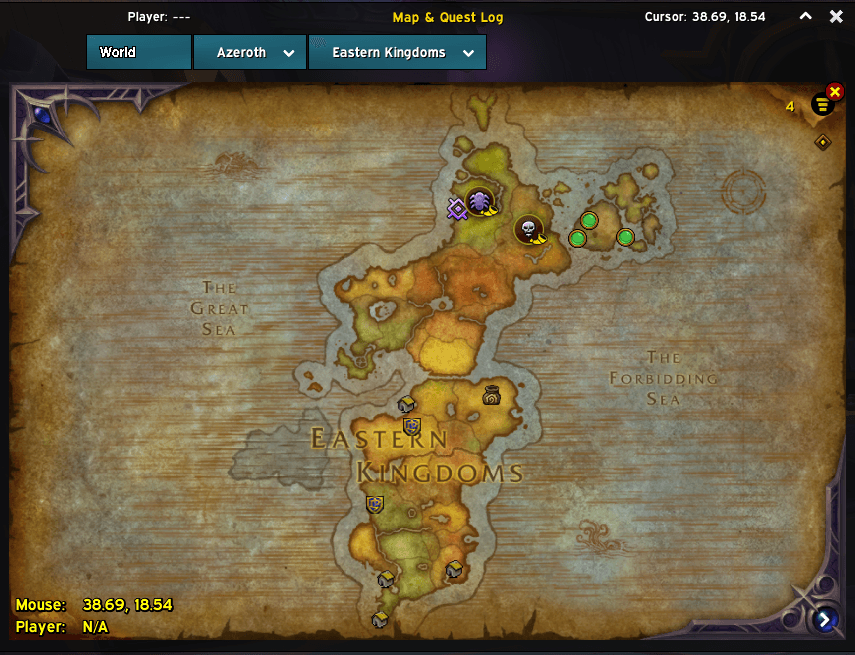
Displays Housing Decor vendor icons across Continent, Zone, and Capital City maps (ElvUI compatible)
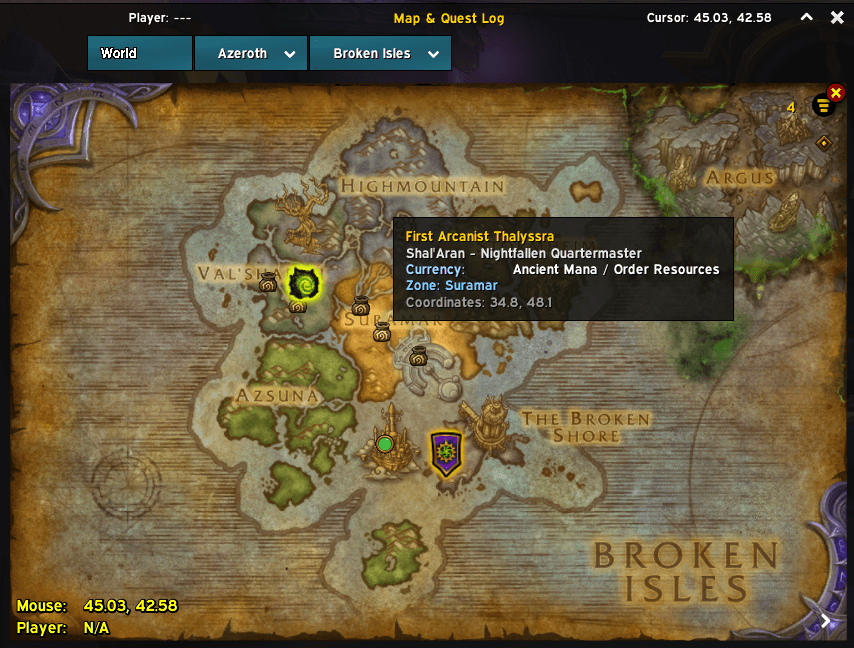
DecorMapPins4.png
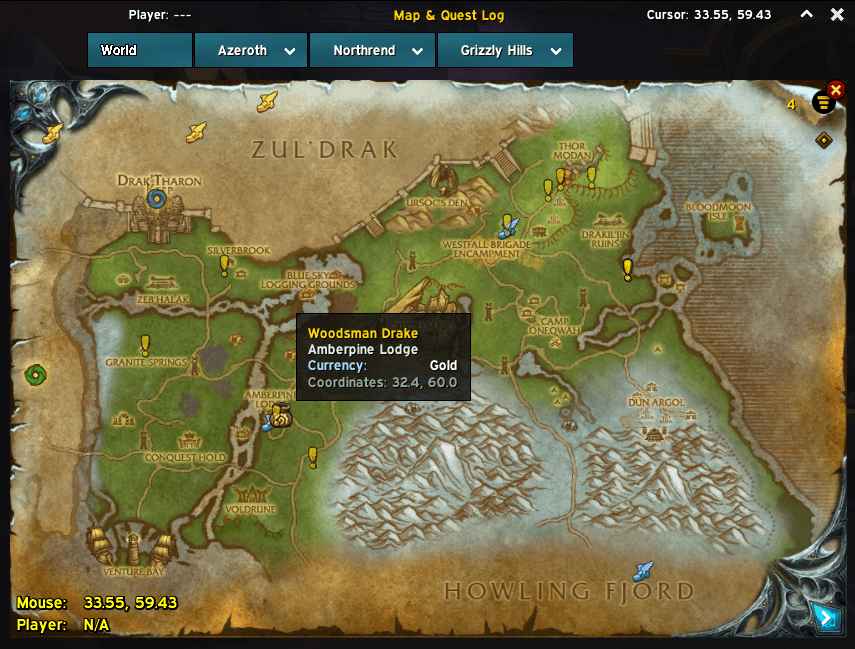
DecorMapPins3.png
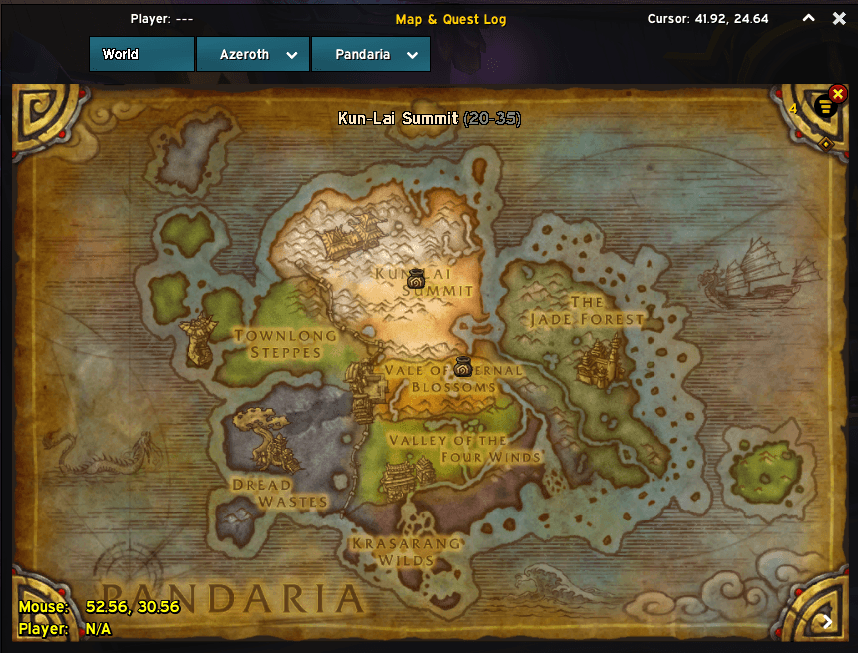
DecorMapPins2.png
DecorMapPins1.png
Description
# Decor Map Pins
**Decor Map Pins** is a World of Warcraft AddOn that places Housing Decor vendor icons directly on your World Map — no more hunting through wikis or asking in chat. Every vendor in the pre-loaded database is pinned with their exact coordinates, currency requirement, and location note, covering expansions from **Classic** all the way through **The War Within**, and forward into **Midnight / Quel'Thalas**.
The addon uses the official **Housing Decor icon** on both the World Map pins and in the in-game AddOn List menu.
---
## Key Features
### 🗺 Multi-Level Map Zoom Support
Pins automatically project and scale across all three map levels:
- **Continent maps** — see every vendor for an entire region at a glance (pins rendered at 22 px).
- **Zone maps** — full-size pins (28 px) precisely placed within each zone.
- **Capital City & Micro-zone maps** — including Garrisons (Lunarfall / Frostwall), Class Order Halls, Dalaran, Boralus, Dazar'alor, Dornogal, and Silvermoon City.
The coordinate projection uses Blizzard's `C_Map.GetWorldPosFromMapPos` / `C_Map.GetMapPosFromWorldPos` pipeline, so pins placed on zone maps appear correctly when you zoom out to the continent view without any manual offset configuration.
### 🧩 Full ElvUI Compatibility
Built on Blizzard's native `MapCanvasDataProviderMixin` and registered via `WorldMapFrame:AddDataProvider`. Pins use the `PIN_FRAME_LEVEL_AREA_POI` frame level type, so they render cleanly on top of ElvUI's skinned World Map without clipping, z-order conflicts, or frame-level issues.
### ⚔️ Smart Faction & Class Filtering
- **Faction filtering** — Alliance-only vendors (e.g. Stormwind, Boralus, Lunarfall) are hidden on Horde characters and vice versa. Neutral vendors are always shown.
- **Class filtering** — All 12 Legion Class Order Hall vendors are gated to the specific class you are currently playing (e.g. the Death Knight quartermaster in Acherus only appears on your Death Knight).
### 💬 Rich Tooltips with Currency Info
Hovering a pin shows a tooltip with:
- Vendor name (gold text)
- Subzone / location note (grey)
- Required currency (e.g. *Voidlight Marl*, *Resonance Crystals*, *Dragon Isles Supplies*, *War Resources*, *Order Resources*, *Trader's Tender*, *Honor*, or *Gold*)
- Zone name when viewing a continent or parent map
- Exact normalized coordinates
- A green *"Saved via Auto-Harvest / User Custom"* tag for any pins you or the harvester added
### 🤖 Zero-Wait Auto-Harvester
Every time you open a merchant window (`MERCHANT_SHOW`), the addon checks — after a 0.3 s delay to allow item data to cache — whether that merchant sells Housing Decor items. Detection uses three complementary checks:
1. `C_Housing.IsDecorItem` / `C_Item.IsDecorItem` (modern API, when available)
2. Item type/subtype string containing `"Decor"`
3. Tooltip line scan via `C_TooltipInfo.GetMerchantItem` for `"Housing Decor"` or `"Room Decor"` text
If a new vendor is detected and is not already in the database, their name and coordinates are saved automatically to `DecorMapPinsDB` and the map refreshes instantly — no reload required.
---
## Slash Commands
Use `/dmp` or `/decormappins` in chat.
| Command | Description |
|---|---|
| `/dmp add [optional note]` | Saves your current **target NPC** (or your player position if you have no target) as a Decor Vendor pin. Optionally pass a note, e.g. `/dmp add Ironforge Auction House Wing`. |
| `/dmp list` | Prints all auto-discovered and manually saved vendors to chat, showing their map name, MapID, name, coordinates, and note. |
| `/dmp clear` | Removes all custom / auto-harvested vendor pins from `DecorMapPinsDB` and refreshes the map immediately. Built-in database pins are unaffected. |
Duplicate detection prevents the same vendor being saved twice — the addon checks both the built-in `VendorData` table and `DecorMapPinsDB.customVendors`, matching by name (case-insensitive) or by proximity (within 1.2 coordinate units).
---
## Supported Expansions & Regions
The built-in database (`Data.lua`) covers the following expansions and regions:
| Expansion | Regions / Hubs |
|---|---|
| **Midnight** | Silvermoon City (The Bazaar, profession shop signs, Epic Edition vendors, Delves vendor), Eversong Woods, Zul'Aman, Harandar, Voidstorm |
| **The War Within** | Dornogal (Forgegrounds, Foundation Hall, Brawler's Guild), Isle of Dorn, The Ringing Deeps, Hallowfall, City of Threads (Azj-Kahet), Undermine, Tazavesh / K'aresh |
| **Dragonflight** | Valdrakken (Bank, The Parting Glass, Obsidian Enclave), The Waking Shores, The Azure Span, Thaldraszus, The Forbidden Reach, Amirdrassil / Bel'ameth |
| **Shadowlands** | The Maw (Ve'nari's Refuge) |
| **Battle for Azeroth** | Boralus, Tiragarde Sound, Stormsong Valley, Dazar'alor, Zuldazar, Nazmir, Mechagon (Rustbolt) |
| **Legion & Class Order Halls** | Dalaran (Broken Isles), Azsuna, Val'sharah, Highmountain, Thunder Totem, Suramar, The Vindicaar (Argus) — plus all 12 class-filtered Order Hall quartermasters (Death Knight, Demon Hunter, Druid, Hunter, Mage, Monk, Paladin, Priest, Rogue, Shaman, Warlock, Warrior) |
| **Warlords of Draenor & Garrisons** | Talador, Shadowmoon Valley, Spires of Arak, Lunarfall (Alliance Garrison), Frostwall (Horde Garrison), Stormshield (Ashran) |
| **Mists of Pandaria** | Valley of the Four Winds (Halfhill), Kun-Lai Summit, Vale of Eternal Blossoms |
| **Wrath of the Lich King** | Borean Tundra, Grizzly Hills, Sholazar Basin |
| **Classic — Eastern Kingdoms** | Stormwind City, Ironforge, Undercity, Blasted Lands, Silverpine Forest, Searing Gorge, Burning Steppes, Duskwood, Loch Modan, Northern Stranglethorn, Ruins of Gilneas, Twilight Highlands |
| **Classic — Kalimdor** | Orgrimmar, Thunder Bluff, Darnassus, Dustwallow Marsh, Felwood |
> Vendors with a `faction` field are only visible to characters of the matching faction. Vendors with a `class` field (Order Halls) are only visible to the matching class.
---
## Installation
### CurseForge App (recommended)
Search for **Decor Map Pins** in the CurseForge App and click **Install**. The app handles updates automatically.
### Manual Installation
1. Download the latest release `.zip` from the [Releases](../../releases) page.
2. Extract the `DecorMapPins` folder into:
```
World of Warcraft\_retail_\Interface\AddOns\DecorMapPins\
```
3. Launch (or `/reload`) World of Warcraft. The addon will appear in your AddOn list with the Housing Decor icon.
---
## Author & Credits
**Author:** Aurora Avery
Community contributions are very welcome! If you find a Housing Decor vendor that is missing from the database, or encounter a bug, please open a **GitHub Issue** or leave a comment on the **CurseForge page**. Include the vendor's name, zone, and approximate coordinates (shown in your map tooltip or via `/dmp add`) and it will be added to the next release.
Decor Map Pins Team