Vendor Currency Helper
- By
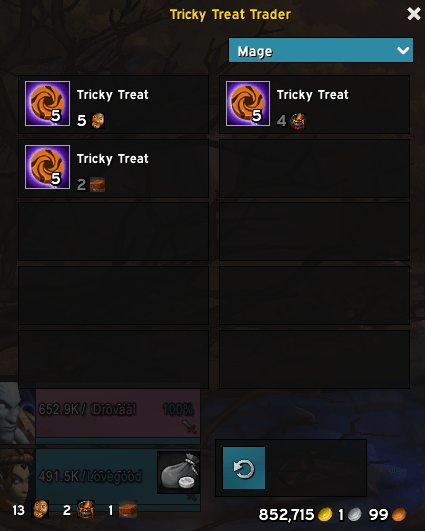
Displays your owned amount of vendor-specific currencies and holiday tokens in the bottom-left of the Merchant window.
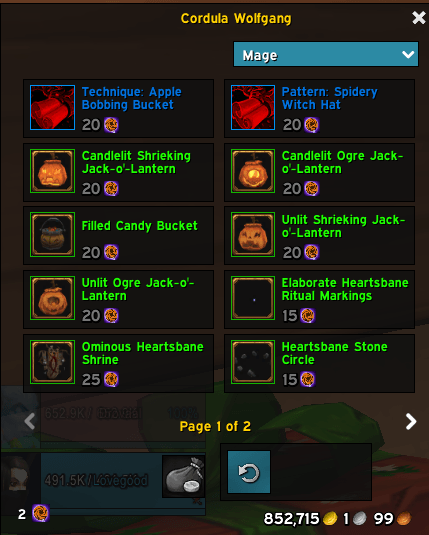
Vendor Currency Helper screenshot.png
Description
Never lose track of your holiday tokens again.
VendorCurrencyHelper is a lightweight World of Warcraft (Retail) addon that automatically detects whatever alternative currency or bag-item currency a merchant requires — think Hallow's End Tricky Treats, Love is in the Air Love Tokens, or any other seasonal/reputation token — and displays your current owned quantity cleanly in the bottom-left corner of the MerchantFrame, sitting on the same horizontal axis as the standard gold display.
No configuration needed. Open a vendor, see your balance.
-
Automatic currency detection — scans every item on the vendor at open time and identifies all non-gold cost currencies, whether they live in the Currency Tab (e.g. Valor Points, Flightstones) or your bags / Warband storage (e.g. Tricky Treats, holiday event tokens).
-
Up to 3 distinct currencies shown side-by-side — each displayed as a count + 16 px icon, neatly tiled from left to right inside the frame, matching the clean aesthetic of the native gold display on the right.
-
Interactive tooltips — hovering over any currency slot shows the full item or currency tooltip so you always know exactly what you're spending.
-
Real-time quantity updates — listens to
BAG_UPDATE_DELAYEDandCURRENCY_DISPLAY_UPDATEso the count refreshes instantly after every purchase without reopening the vendor. -
ElvUI & custom skin compatible — the display frame is parented to
MerchantFrameat a high frame level (FrameLevel 100,FrameStrata HIGH), ensuring it renders on top of UI overhaul skins without manual z-order fiddling. -
Automatically hides on gold-only vendors — if no alternative currency is detected the entire display disappears, so it never clutters standard shops.
| Command | Description |
|---|---|
/vch |
Re-scans the currently open vendor and refreshes the display. Also prints detected currencies to chat in debug mode — useful for verifying detection at any vendor. |
/vch debug |
(Alias — both forms trigger debug output.) Prints to chat: the number of items scanned, each detected currency type (currency:ID or item:ID), the raw cost fields returned by the API, and the current owned count. Use this when fine-tuning or reporting an issue. |
Tip: Run
/vchimmediately after opening a vendor if the display looks empty or stale. The0.2 stimer that fires onMERCHANT_SHOWcovers most cases, but some servers with high item counts may need a manual nudge.
- Search for VendorCurrencyHelper in the CurseForge or Wago Addons client.
- Click Install. The client handles placement and future updates automatically.
- Download the latest release ZIP from the project page.
- Extract the folder so the structure looks like:
World of Warcraft/ └── _retail_/ └── Interface/ └── AddOns/ └── VendorCurrencyHelper/ ├── VendorCurrencyHelper.toc └── Core.lua - Launch (or reload) the game. The addon will appear in your AddOns list at the character select screen.
Requires World of Warcraft Retail (interface version 11.x / 12.x). Not compatible with Classic or Classic Era.
| Situation | Behaviour |
|---|---|
| Standard gold-only vendor | Display hidden automatically |
| Currency Tab token vendor | Shows currency icon + quantity from the Currency Tab |
| Bag / Warband item-currency vendor | Shows item icon + bag count (including Warband bank) |
| Vendor with mixed gold + currency costs | Shows only the alternative currency entries |
| More than 3 distinct currencies on one vendor | Shows the first 3 detected; remaining are silently skipped |
| ElvUI / other UI overhaul installed | Renders above the skin via FrameStrata HIGH + FrameLevel 100 |
The display doesn't appear at a seasonal vendor. Run /vch while the vendor is open. The debug output will show exactly what cost fields the API returned. Some vendors serve their items in batches — the 0.2 s delayed scan handles this, but a manual /vch forces an immediate re-check.
Counts don't update after buying items. Ensure no other addon is blocking BAG_UPDATE_DELAYED or CURRENCY_DISPLAY_UPDATE. A /reload will reset everything cleanly.
The frame overlaps another element in my custom UI. The frame is anchored BOTTOMLEFT of MerchantFrame and stretches right. If you use a UI skin that significantly resizes or repositions MerchantFrame, the relative anchor will follow it correctly. If you need a pixel-level nudge, reach out via the issue tracker with a screenshot.
Vendor Currency Helper Team