Deathward - Hardcore Survival Alarms
Survival alarms for Hardcore mode: danger marks on nameplates, warnings before you pull, breath, fatigue, falls, kit check, escape panel and an OBS counter.
muestra-2-huida-en.png
muestra-2-huida.png
banner-en.png
banner.png
muestra-1-placas-en.png
muestra-1-placas.png
Description
Follow me live and support the project:




Deathward is a small survival-alarm addon for Hardcore mode: one life. It warns you before you pull something dangerous, marks dangerous enemies on their nameplates, alerts you when you run out of air, hit fatigue or walk into a high level zone, and gives you an escape panel and a stream counter. It works on its own: it does not need Sherpa.

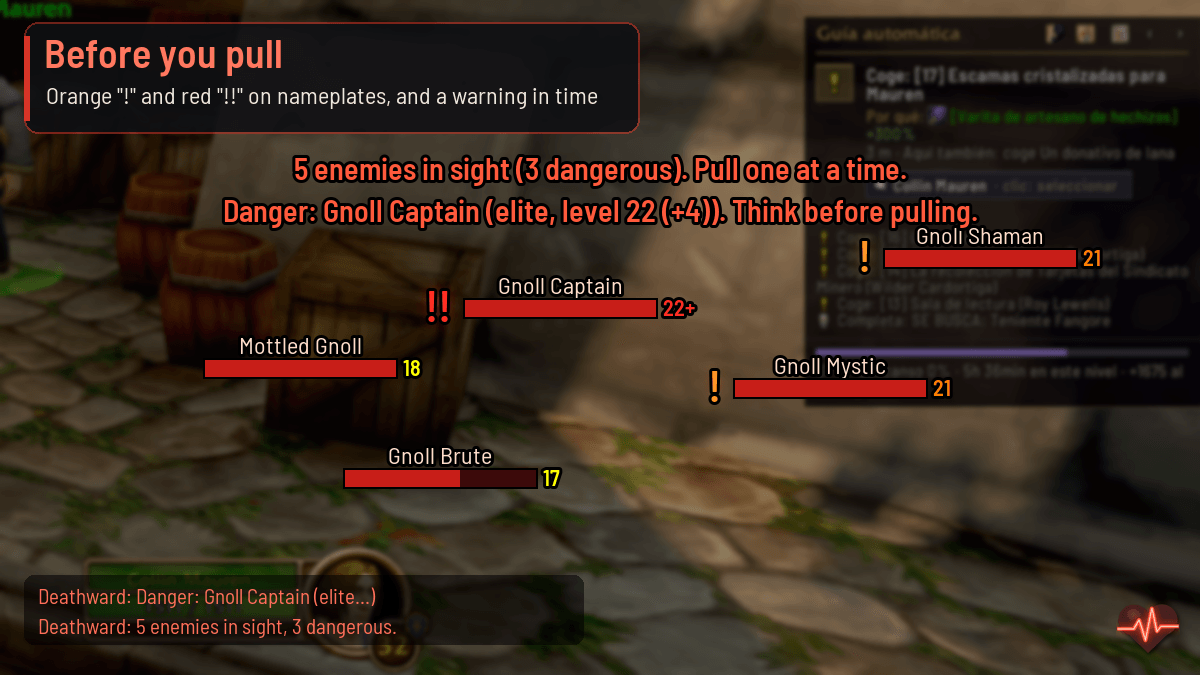
- When you target an elite, rare, boss, skull or an orange or red level enemy, it tells you what it is and how many levels above you it is.
- Many enemies in sight: if you see 4 or more, or 2 dangerous ones, it tells you to pull one at a time.
- Enemies are counted through their nameplates: turn them on with the V key.

- Orange "!": rare or high level.
- Red "!!": elite, boss, skull or very high level.
- You see it at a glance before getting close, without targeting anyone.

- Breath: when you are running out of air under water.
- Fatigue: when you swim into deep water, so you turn back in time.
- Long fall: if you have been falling for a while, so you use Slow Fall, Levitate or whatever you have.
- High level zone: when you enter a zone 2 or more levels above you.
- Out of potions: when you use the last one.
- Strong warnings show big in the middle of the screen, with sound and in chat (all of it can be turned off).

- When you leave an inn or a city it warns you if you carry fewer than 3 potions, 5 bandages or 10 food or drink.
/deathward kitshows what you carry at any time.

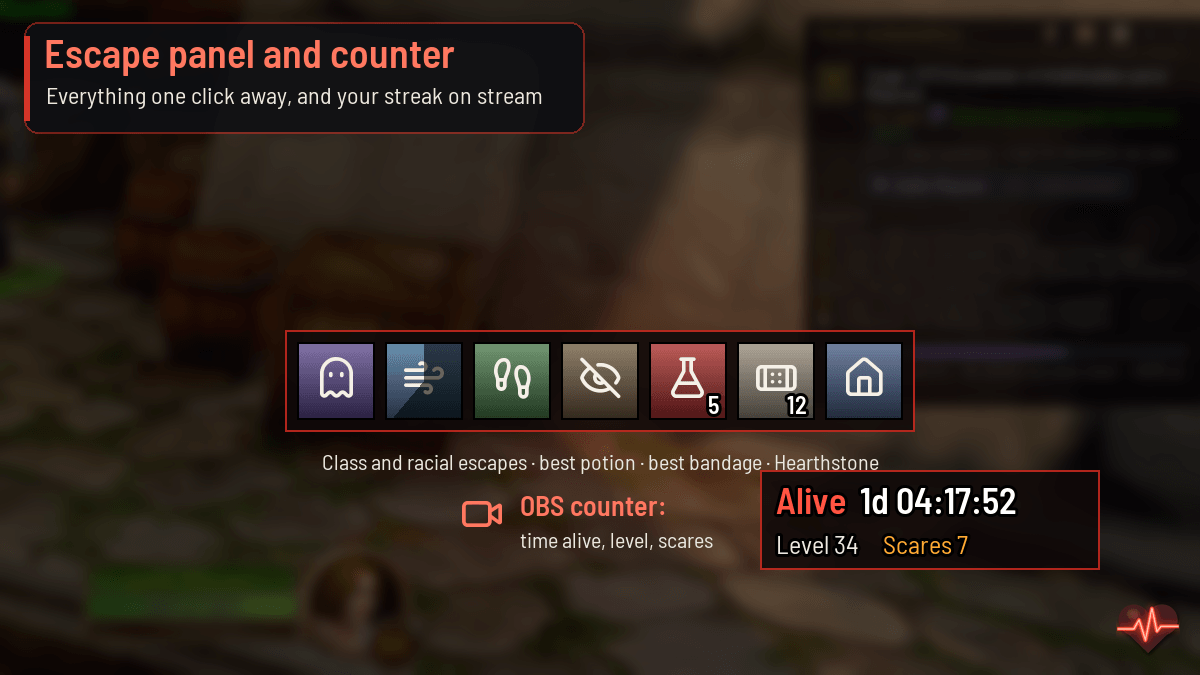
- Your class and racial escapes (Vanish, Feign Death, Divine Shield, Blink…), your best healing potion, your best bandage and your Hearthstone, with their cooldowns.
- It rebuilds itself when you learn spells or your bags change (out of combat, as the game requires).
- Shift + drag to move it.

- Time alive, level and scares in big letters, with or without a background. Drag it anywhere to fit your OBS layout.
- A scare is ending a fight below 25% health and still being alive.

/deathwardor/dw: options (also in Options > AddOns)./deathward kit: what you carry./deathward scan: count enemies in sight./deathward escapeand/deathward counter: show or hide the panel and the counter./deathward counter 0: reset scares./deathward test: turn it on for a normal character./deathward diag: status.

- Install it with the CurseForge app or unzip it into
World of Warcraft\_forever_\Interface\AddOns</code> (you get theDeathwardfolder). - In game:
/deathward. - It only turns on for Hardcore characters; to try it first,
/deathward test. - With Sherpa Hardcore installed they share the work: it handles target, enemies in sight, kit and escape panel, and Deathward handles nameplates, alarms and the counter. Nothing is repeated.
- It is a new addon: close the game completely before logging in (/reload is not enough).
Free, in English and Spanish. MIT License. Not affiliated with Blizzard Entertainment.
Español
Deathward es un addon pequeño de alarmas de supervivencia para el modo Hardcore: una sola vida. Te avisa antes de tirar de algo peligroso, marca los enemigos peligrosos en sus placas, salta cuando te queda poco aire, cuando entras en fatiga o en una zona de nivel alto, y te deja un panel de huida y un contador para el directo. Va solo: no necesita Sherpa.

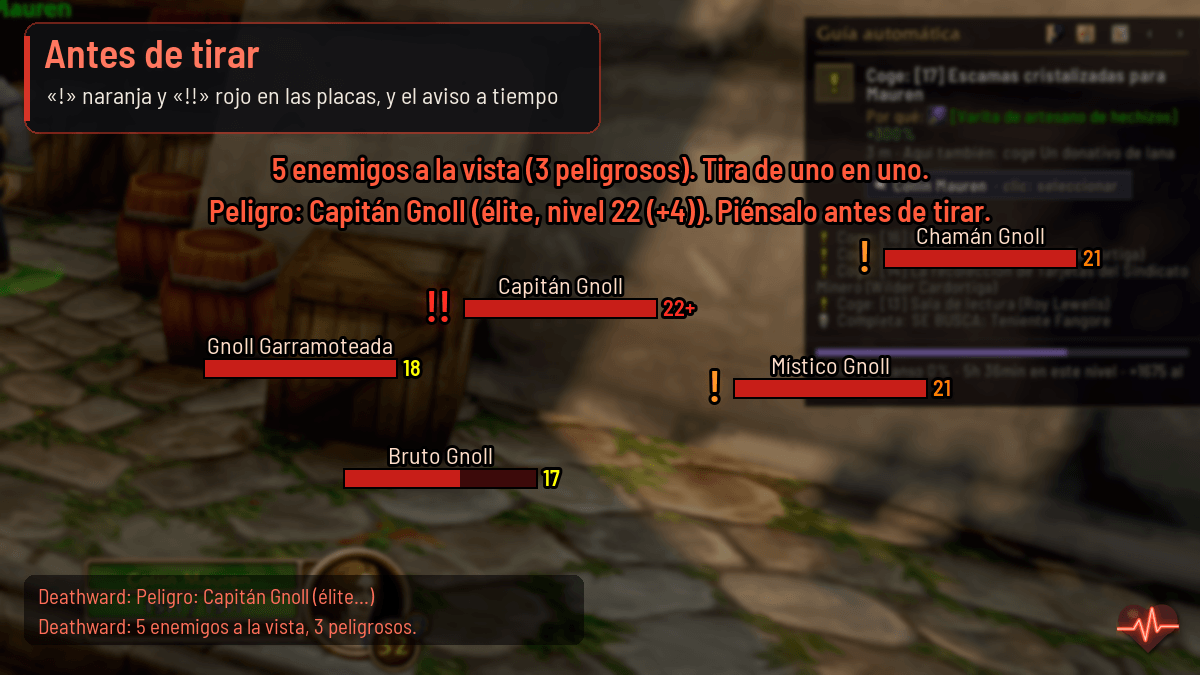
- Al marcar un élite, raro, jefe, calavera o un enemigo de nivel naranja o rojo, te avisa con qué es y cuántos niveles te saca.
- Muchos enemigos a la vista: si ves 4 o más, o 2 peligrosos, te dice que tires de uno en uno.
- Para contar enemigos usa sus placas de nombre: actívalas con la tecla V.

- «!» naranja: raro o nivel alto.
- «!!» rojo: élite, jefe, calavera o nivel muy alto.
- Lo ves de un vistazo antes de acercarte, sin marcar a nadie.

- Respiración: cuando te queda poco aire bajo el agua.
- Fatiga: cuando nadas hacia aguas profundas, para que des la vuelta a tiempo.
- Caída larga: si llevas un rato cayendo, para que uses caída lenta, levitar o lo que tengas.
- Zona de nivel alto: al entrar en una zona 2 o más niveles por encima de ti.
- Sin pociones: cuando gastas la última.
- Los avisos fuertes salen grandes en el centro de la pantalla, con sonido y en el chat (todo se puede apagar).

- Al salir de una posada o ciudad te avisa si llevas menos de 3 pociones, 5 vendas o 10 de comida o bebida.
/deathward kitte dice lo que llevas en cualquier momento.

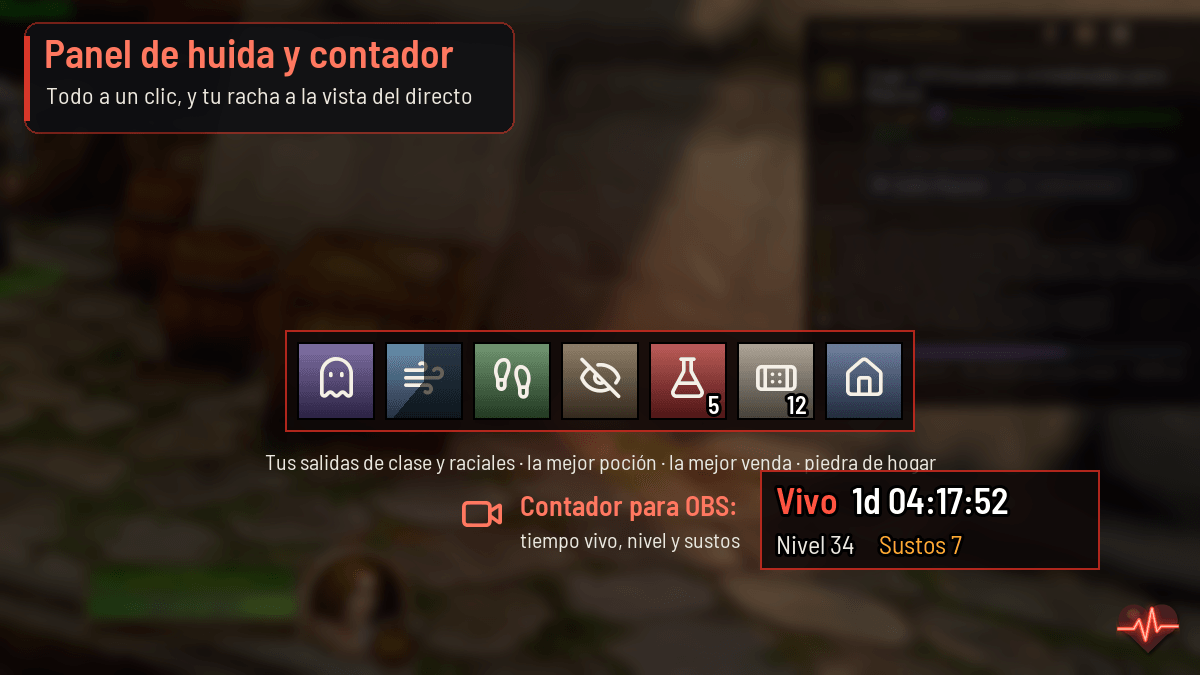
- Tus salidas de clase y raciales (desvanecerse, fingir muerte, escudo divino, traslación…), la mejor poción de vida, la mejor venda y la piedra de hogar, con su recarga.
- Se rehace solo cuando aprendes hechizos o cambian tus bolsas (fuera de combate, como manda el juego).
- Mayús + arrastrar para moverlo.

- Tiempo vivo, nivel y sustos en letra grande, con o sin fondo. Arrástralo donde quieras para encajarlo en OBS.
- Un susto es acabar un combate con menos de un 25 % de vida y seguir vivo.

/deathwardo/dw: opciones (también en Opciones > AddOns)./deathward kit: lo que llevas./deathward mirar: cuenta los enemigos a la vista./deathward huiday/deathward contador: enseñar u ocultar el panel y el contador./deathward contador 0: sustos a cero./deathward prueba: activarlo en un personaje normal./deathward diag: estado.

- Instálalo con la app de CurseForge o descomprime el zip en
World of Warcraft\_forever_\Interface\AddOns</code> (queda la carpetaDeathward). - En el juego:
/deathward.
Gratis, en español e inglés. Licencia MIT. No está afiliado a Blizzard Entertainment.
Deathward - Hardcore Survival Alarms Team