Death Recap TBC – PvP & PvE Death Recap
- By
Modern death recap for TBC Anniversary with CC tracking, duration timers, colored CC tags, scrollable 30-event history, spell tooltips, and saved window position. Clean Blizzard-style UI. PvP optimized.
WoWScrnShot_3_NEWGRAPH_v2.02.1.jpg
WoWScrnShot_1_v2.01.1.jpg
WoWScrnShot_2_v2.01.1.jpg
Description
DeathRecap – TBC Anniversary Edition
Retail-Style Death Recap + Advanced CC & Damage Graph System for WoW Burning Crusade Classic (2.5.5.65895)
DeathRecap brings a modern Retail-style death recap system to TBC Classic — now enhanced with full Crowd Control tracking, critical hit indicators, and a complete 30-event damage graph system built for TBC Anniversary PvP.
See exactly how you died.
See what CC locked you down.
See when you were crit.
See the full burst pattern that ended you.
No combat log digging.
No guesswork.
Just clean, competitive clarity.
DeathRecapTBC evolves based on player feedback.
Have ideas? Found a bug? Want beta access?
Join the community:
💀 https://discord.gg/WxzPCTXr6s
What Happens When You Die
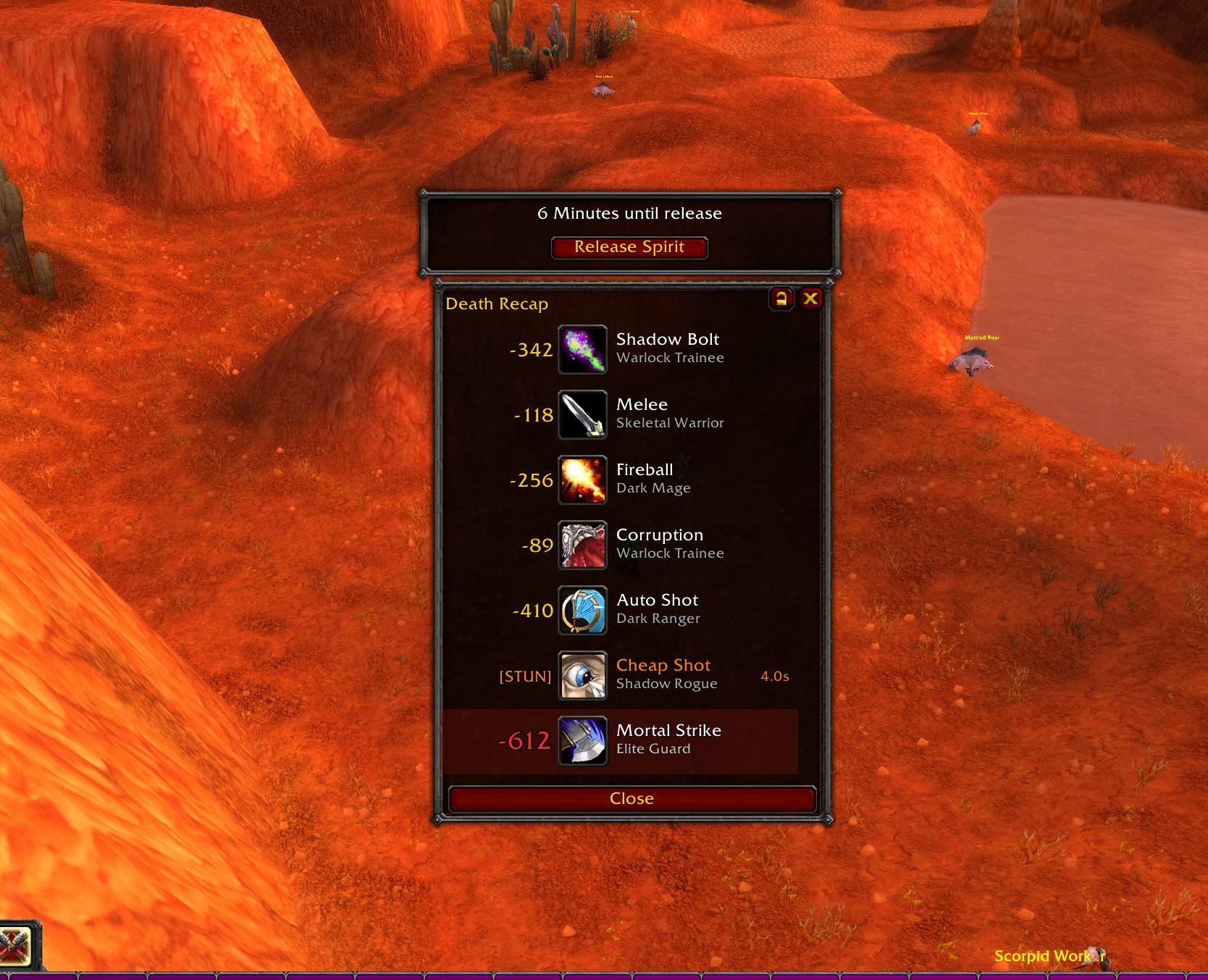
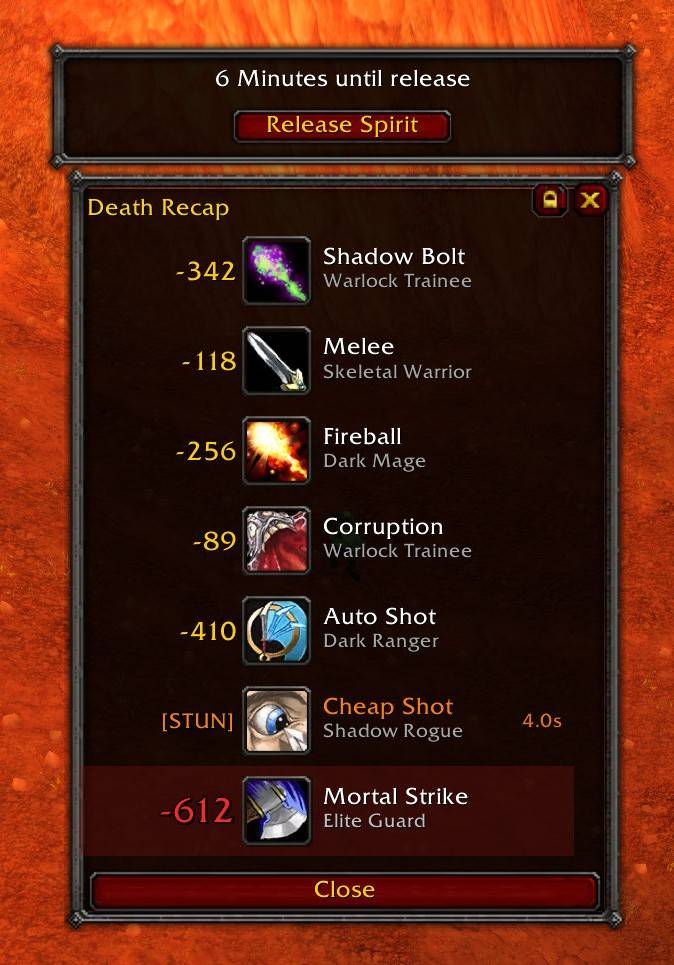
DeathRecap automatically displays:
• Killing Blow Source (highlighted)
• Last 7 Events (scroll up to 30 total)
• Ability / Spell Icons (Blizzard-style bordered)
• Exact Damage Numbers
• Attacker Names
• CC Events with Colored [TYPE] Tags
• CC Duration Tracking
• Critical Hit Indicators
• Overkill Indicators
The recap window opens instantly on death
Closes automatically when releasing spirit or resurrecting
Blizzard’s default death popup remains untouched
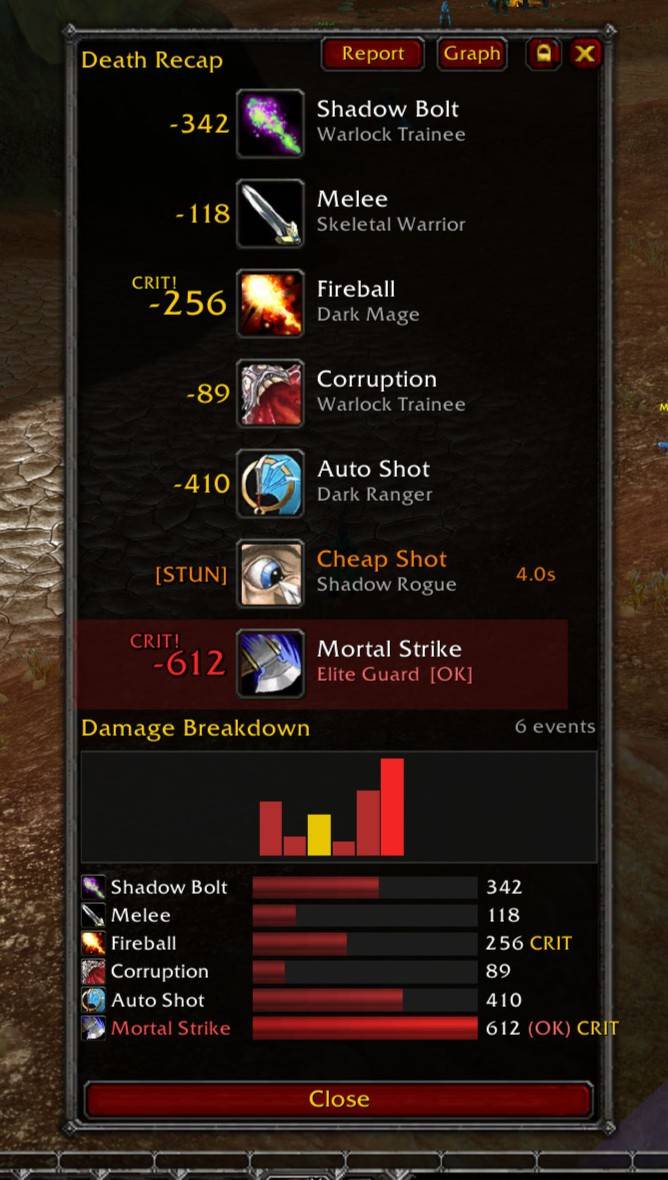
NEW: CRIT! Tag & Wobble Animation (v2.02.1)
Critical hits now stand out clearly during your death recap:
• “CRIT!” tag displayed above critical damage
• Killing blow crits → red CRIT! tag (10pt)
• Regular crits → gold CRIT! tag (9pt)
• Damage number scales up to match killing blow size
• Outline added for clarity and visibility
Wobble animation behavior:
• Repeats every 1 second for the first 3 seconds
• Then pulses every 5 seconds for emphasis
You don’t just see the damage.
You feel the burst.
NEW: Full Damage Breakdown Graph System
The Damage Breakdown has been completely overhauled.
• Expanded from 7 bars → supports full 30-event death log
• Damage graph visualization above the bar list
• Vertical bar graph shows the burst pattern visually
• Bar colors:
-
Red → Normal hits
-
Gold → Critical hits
-
Bright Red → Killing blow
• Scrollable bar list with its own scrollbar
• DB button renamed to “Graph”
• Event count label in top-right corner
• “No damage events recorded.” message when empty
• Graph now pulls from the full 30-event circular buffer
You can now visually see:
Was it a single global?
A stacked burst window?
Or layered pressure over time?
Ability Icons in Damage Breakdown
Each breakdown row now includes:
• Spell icon (cropped texcoords)
• Quickslot-style gold border frame
• Blizzard-consistent icon styling
Clean.
Recognizable.
Professional.
Tooltips on Damage Breakdown & Graph
Hover over any:
• Damage bar row
• Graph bar
And see a full detailed tooltip:
• Inline 20x20 ability icon
• Spell name
• Source
• Damage
• Overkill
• Absorbed
• Resisted
• Blocked
• Critical Hit flag
• Killing Blow flag
Same depth and clarity as the main event tooltips.
Overkill Display Update
• Overkill tag shortened to (OK) inside breakdown bars
• Full overkill amount visible in hover tooltip
Cleaner layout.
More readable.
No clutter.
Full CC Tracking System (TBC Anniversary Database)
Built specifically for TBC:
• Covers all classes
Warrior, Rogue, Mage, Warlock, Priest, Druid, Hunter, Paladin, Shaman
• Includes racials, engineering items, and common NPC CC
• Tracks:
Stun, Fear, Silence, Root, Disorient, Incap, Knockdown, Knockback, Banish, Sleep, Mind Control, Snare, Disarm
• CC entries replace damage numbers with colored [TYPE] tags
• Each CC type has a unique color
• Shows exact CC duration (example: 4.0s)
• If CC was active at death → shows elapsed time with + (example: 3.2s+)
Toggle anytime with:
/drtbc cc
CC tracking is enabled by default and saved between sessions.
Built for Arena & Competitive PvP
Perfect for:
• 2v2 Arena
• 3v3 Arena
• 5v5 Arena
• Battlegrounds (WSG, AB, EOTS, AV)
• World PvP
Analyze burst chains.
Track CC layering.
Identify kill setups.
Understand exactly why you couldn’t press a button.
This is high-level PvP analysis — inside TBC.
Improved UI & Window Control
• Lock / Unlock button next to close (X)
• Locked by default
• Position saved between sessions
• Tooltip explains lock state
• Blizzard dialog-style border
• Action bar-style gold quickslot borders
• Mouseover spell tooltips
• FauxScrollFrame-style scrollbars
• 7 visible rows, scroll to 30 events
Anchored below the Release Spirit popup (top-center, 200px down).
Performance Optimized for TBC Engine
Engineered specifically for Burning Crusade Classic:
• Lightweight 30-event circular buffer
• Tight combat log filtering
• No OnUpdate loops
• Low CPU usage in Arena
• Minimal memory footprint
Smooth FPS.
No bloat.
Competitive-ready.
🛠 Slash Commands
/drtbc recap — Show last death recap (30 events + graph)
/drtbc test — Preview test recap (includes crit + CC example)
/drtbc cc — Toggle CC tracking
/drtbc reset — Clear stored events
Death Recap TBC – PvP & PvE Death Recap Team