Deadeye Forever
- By
Auto-Shot Timer, Clipping, Weaving - everything to optimize your DPS
Deadeye-UI.png
Description
Deadeye Forever
Hunter shot timing, Auto Shot tracking and an immersive fantasy HUD for WoW Forever.
🇬🇧 English description
🇩🇪 Deutsche Beschreibung weiter unten
English
What is Deadeye Forever?
Deadeye Forever is a Hunter combat HUD built specifically around one of the most important parts of ranged Hunter gameplay: Auto Shot timing.
Instead of adding another collection of generic action bars, Deadeye Forever presents your ranged combat rhythm as a compact Hunter-themed instrument.
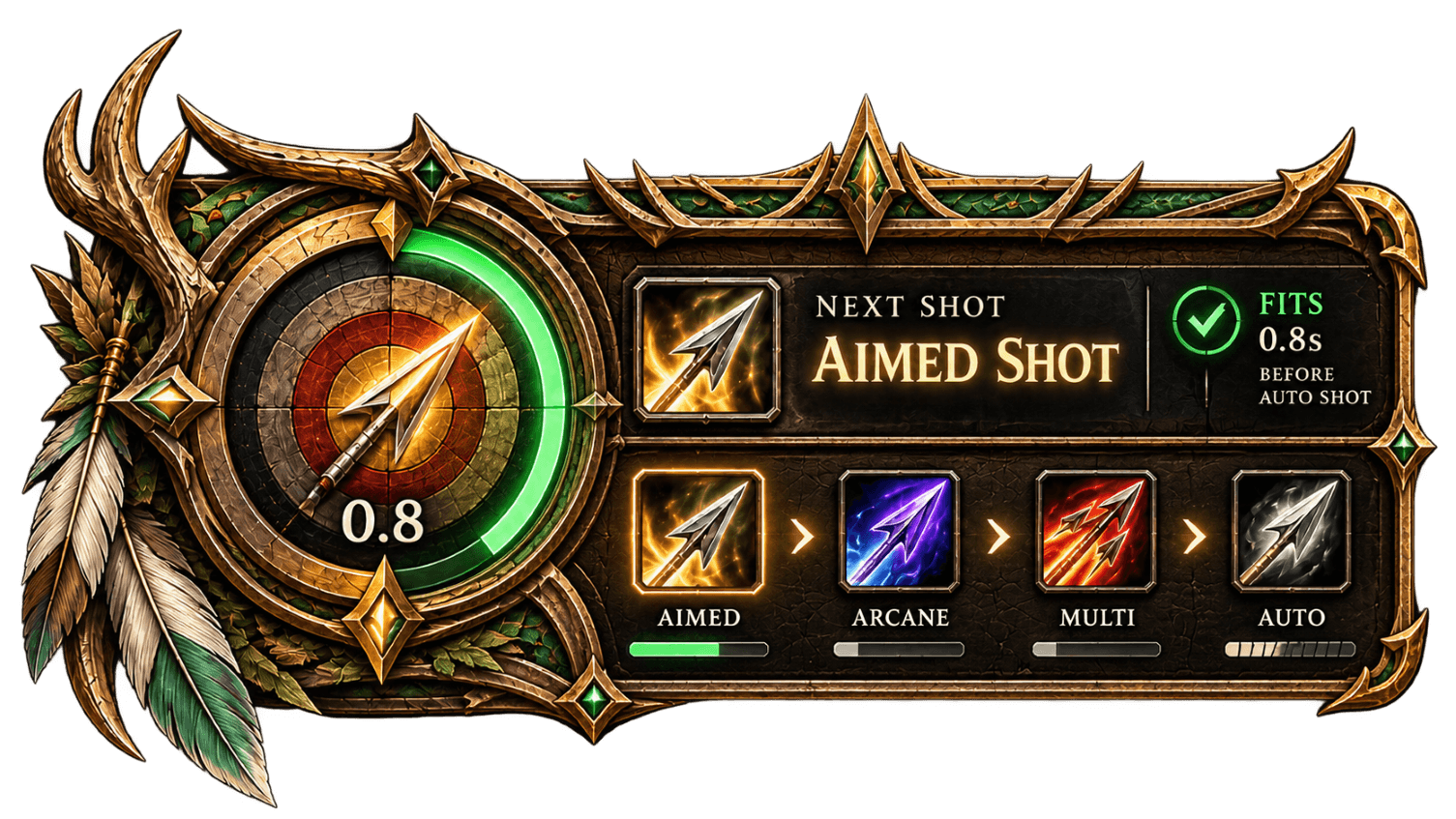
The large target dial tracks the current Auto Shot cycle, while the right side of the HUD displays relevant shots, their availability and a contextual recommendation for what to do next.
The goal is simple:
Move when it is safe. Stop when the shot is coming. Weave abilities between Auto Shots without losing your rhythm.
Features
Auto Shot Timing
Deadeye Forever detects actual Hunter Auto Shots and uses them to synchronize the central timing display.
The large target dial shows the remaining time until the next expected Auto Shot.
The timing ring uses two clearly separated zones:
- Green – MOVE: Safe part of the shot cycle for movement and ability weaving.
- Dark Bordeaux – STAND: The next Auto Shot is approaching. Stop moving and allow the shot to fire.
If the expected shot does not happen, for example because the Hunter is moving, Deadeye Forever does not invent a new cycle. The display waits at READY until an actual Auto Shot is detected.
Dynamic Shot HUD
The right side of the interface contains dedicated shot slots.
Deadeye Forever automatically checks which Hunter abilities are actually learned.
Abilities that are not yet available to your character remain visually disabled instead of pretending to be usable.
Currently supported and/or prepared shot slots include:
- Aimed Shot
- Arcane Shot
- Multi-Shot
- Auto Shot
The system is designed to grow with your Hunter as additional shots become available through levels, talents or specialization choices.
Next Shot Recommendation
The upper section of the HUD provides a contextual NEXT SHOT recommendation.
For supported abilities Deadeye Forever can distinguish between states such as:
- FITS – the ability can safely be used inside the current green timing window.
- WAIT – the ability is currently unavailable, but will become ready within the usable timing window.
- STAND – the critical Auto Shot window has begun.
- READY – the Auto Shot should fire as soon as the Hunter is able to shoot.
The recommendation system is intentionally focused on shot timing, not on replacing Blizzard's action bars or range indicators.
Ability Availability
The four small bars below the shot icons use one consistent meaning:
- Full green: learned and ready
- Filling: cooldown in progress
- Dark: unavailable or not yet learned
The large central target handles Auto Shot timing separately, keeping timing and ability availability visually distinct.
Hunter-Themed Interface
Deadeye Forever uses a completely custom fantasy interface created specifically for the addon:
- ornate bronze and gold frame
- green Hunter accents
- target and arrow motif
- animated Auto Shot timing ring
- integrated shot slots
- compact combat information without covering the entire screen
The HUD was designed to feel like an actual Hunter instrument rather than a standard addon window.
Controls
ALT + Left Mouse Drag
Move the main HUD.
Right-click the Minimap Icon
Open the options window.
Left-click the Minimap Icon
Show or hide the main HUD.
The Minimap Icon can be moved around the minimap and its position is saved.
Options
The current options include:
- HUD scaling from 10% to 120%
- configurable Auto Shot stand / safety window
- Minimap Icon visibility
- Demo Mode
- position and size reset
- sensor/debug information
HUD position and scale are saved between sessions and /reload.
More configuration options and a fully redesigned Hunter-themed options interface are planned.
Current Development
Deadeye Forever is under active development.
The current focus is on building a reliable foundation for:
- Auto Shot timing
- movement windows
- shot weaving
- learned-ability detection
- contextual shot recommendations
- future Aimed Shot
FITS / CLIPSanalysis - additional Hunter abilities and specializations
The addon is being tested directly on WoW Forever.
Commands
/df
Show or hide Deadeye Forever.
/df options
Open the options window.
/df debug on
Enable debug output.
/df debug off
Disable debug output.
/df debug
Display current sensor information.
/df reset
Reset HUD position and scale.
Created by Leandarh Valinor
Deutsch
Was ist Deadeye Forever?
Deadeye Forever ist ein Kampf-HUD für Jäger, das sich gezielt um einen der wichtigsten Bestandteile des Fernkampfs kümmert: das Timing des automatischen Schusses.
Statt einfach noch weitere Aktionsleisten auf den Bildschirm zu legen, stellt Deadeye Forever den Schussrhythmus des Jägers als kompaktes, eigenes Instrument dar.
Die große Zielscheibe verfolgt den aktuellen Autoschuss-Zyklus. Die rechte Hälfte des HUDs zeigt relevante Schüsse, deren Verfügbarkeit und eine situationsabhängige Empfehlung für die nächste Aktion.
Das Ziel ist einfach:
Bewegen, solange es sicher ist. Stehen bleiben, wenn der Schuss kommt. Fähigkeiten zwischen Autoschüsse einweben, ohne den Rhythmus zu verlieren.
Funktionen
Autoschuss-Taktgeber
Deadeye Forever erkennt tatsächlich abgefeuerte Autoschüsse und synchronisiert daran die zentrale Zeitanzeige.
Die große Zielscheibe zeigt die verbleibende Zeit bis zum nächsten erwarteten Autoschuss.
Der Timing-Ring besitzt zwei klar getrennte Bereiche:
- Grün – MOVE: Sicheres Zeitfenster für Bewegung und das Einweben von Fähigkeiten.
- Dunkles Bordeaux – STAND: Der nächste Autoschuss steht unmittelbar bevor. Jetzt stehen bleiben und den Schuss auslösen lassen.
Kommt der erwartete Autoschuss nicht, beispielsweise weil der Jäger weiterläuft, erfindet Deadeye Forever keinen neuen Zyklus. Die Anzeige bleibt auf READY, bis tatsächlich ein Autoschuss erkannt wurde.
Dynamisches Schuss-HUD
Auf der rechten Seite befinden sich die vorgesehenen Plätze für wichtige Jägerschüsse.
Deadeye Forever prüft automatisch, welche Fähigkeiten der Charakter tatsächlich gelernt hat.
Noch nicht erlernte Fähigkeiten werden sichtbar deaktiviert, anstatt fälschlicherweise als verfügbar dargestellt zu werden.
Aktuell unterstützte bzw. vorbereitete Schussplätze sind:
- Gezielter Schuss
- Arkaner Schuss
- Mehrfachschuss
- Automatischer Schuss
Das System ist darauf ausgelegt, mit dem Jäger mitzuwachsen, wenn durch Stufen, Talente oder Spezialisierungen weitere Fähigkeiten hinzukommen.
Empfehlung für den nächsten Schuss
Der obere Bereich des HUDs zeigt eine situationsabhängige NEXT SHOT-Empfehlung.
Für unterstützte Fähigkeiten unterscheidet Deadeye Forever verschiedene Zustände:
- FITS – die Fähigkeit passt sicher noch in das aktuelle grüne Zeitfenster.
- WAIT – die Fähigkeit ist noch nicht bereit, wird aber innerhalb des nutzbaren Zeitfensters verfügbar.
- STAND – das kritische Autoschuss-Fenster hat begonnen.
- READY – der Autoschuss sollte ausgelöst werden, sobald der Jäger wieder schießen kann.
Das Empfehlungssystem konzentriert sich bewusst auf das Schusstiming. Es soll weder die Blizzard-Aktionsleisten noch deren Reichweitenanzeige ersetzen.
Verfügbarkeit der Fähigkeiten
Die vier kleinen Balken unter den Schusssymbolen besitzen eine einheitliche Bedeutung:
- Voll grün: gelernt und bereit
- Füllt sich: Abklingzeit läuft
- Dunkel: nicht verfügbar oder noch nicht gelernt
Das eigentliche Timing des Autoschusses wird separat durch die große Zielscheibe dargestellt.
Eigenständiges Jäger-Design
Deadeye Forever verwendet ein vollständig eigenes Fantasy-Interface, das speziell für dieses Addon entworfen wurde:
- aufwendiger Bronze-/Goldrahmen
- grüne Jäger-Akzente
- Zielscheiben- und Pfeilmotiv
- animierter Autoschuss-Ring
- integrierte Schussplätze
- kompakte Kampfinformationen ohne den gesamten Bildschirm zu verdecken
Das HUD soll sich wie ein echtes Instrument des Jägers anfühlen und nicht wie ein gewöhnliches Addon-Fenster.
Bedienung
ALT + linke Maustaste ziehen
Hauptfenster verschieben.
Rechtsklick auf das Minimap-Symbol
Optionsfenster öffnen.
Linksklick auf das Minimap-Symbol
Hauptfenster ein- oder ausblenden.
Das Minimap-Symbol kann um die Minimap verschoben werden. Seine Position wird gespeichert.
Optionen
Aktuell stehen unter anderem zur Verfügung:
- HUD-Skalierung von 10% bis 120%
- einstellbares Stand-/Schussfenster
- Minimap-Symbol ein-/ausblenden
- Demo-Modus
- Position und Größe zurücksetzen
- Sensor-/Debuginformationen
Position und Skalierung des HUDs bleiben über Sitzungen und /reload hinweg erhalten.
Weitere Optionen sowie ein vollständig neu gestaltetes Optionsfenster im aufwendigen Jäger-Design sind geplant.
Aktuelle Entwicklung
Deadeye Forever befindet sich in aktiver Entwicklung.
Der derzeitige Schwerpunkt liegt auf einer stabilen Grundlage für:
- Autoschuss-Timing
- Bewegungsfenster
- Einweben von Schüssen
- automatische Erkennung erlernter Fähigkeiten
- situationsabhängige Schussempfehlungen
- zukünftige
FITS / CLIPS-Analyse für Gezielter Schuss - weitere Jägerfähigkeiten und Spezialisierungen
Das Addon wird direkt unter WoW Forever getestet.
Befehle
/df
Deadeye Forever ein- oder ausblenden.
/df options
Optionsfenster öffnen.
/df debug on
Debugausgabe einschalten.
/df debug off
Debugausgabe ausschalten.
/df debug
Aktuellen Sensorstatus anzeigen.
/df reset
Position und Skalierung des HUDs zurücksetzen.
Created by Leandarh Valinor
Deadeye Forever Team