Wow_MMBgFoQt8U.png
Wow_ukTvqh7qFz.png
Description
DaylightUI Addon Skins
Your other addons' windows in the Daylight UI look: the window shell, your font, text colors and accent, and Daylight UI's buttons, boxes and scroll bars.
Requires Daylight UI with its Window Skins module on.
Addons it skins
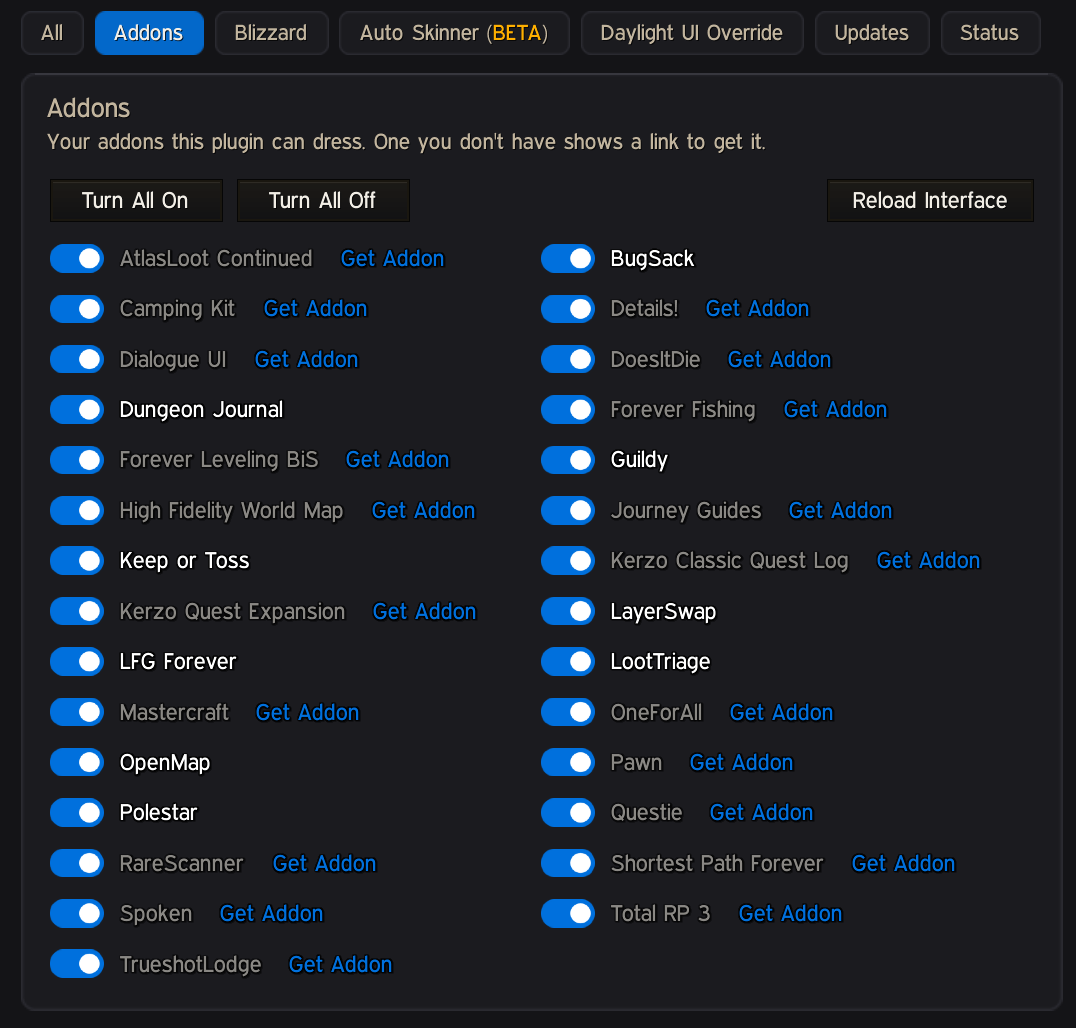
BugSack · Camping Kit · Dialogue UI · DoesItDie · Dungeon Journal · Forever Fishing · Forever Leveling BiS · Guildy · High Fidelity World Map · Journey Guides · Keep or Toss · Kerzo Classic Quest Log · Kerzo Quest Expansion · LayerSwap · LFG Forever · LootTriage · Mastercraft · OneForAll · OpenMap · Polestar · Questie · RareScanner · Shortest Path Forever · Spoken · Total RP 3 · TrueshotLodge
Only the ones you have installed are skinned; the rest are skipped. Nothing to set up: each takes the Daylight UI look the next time you open its windows.
Polestar: the Daylight UI look goes on Polestar's own "Polestar" skin only. Its other looks (Vellum, Beacon and the rest) are yours to use and stay as Polestar draws them.
The game's own windows
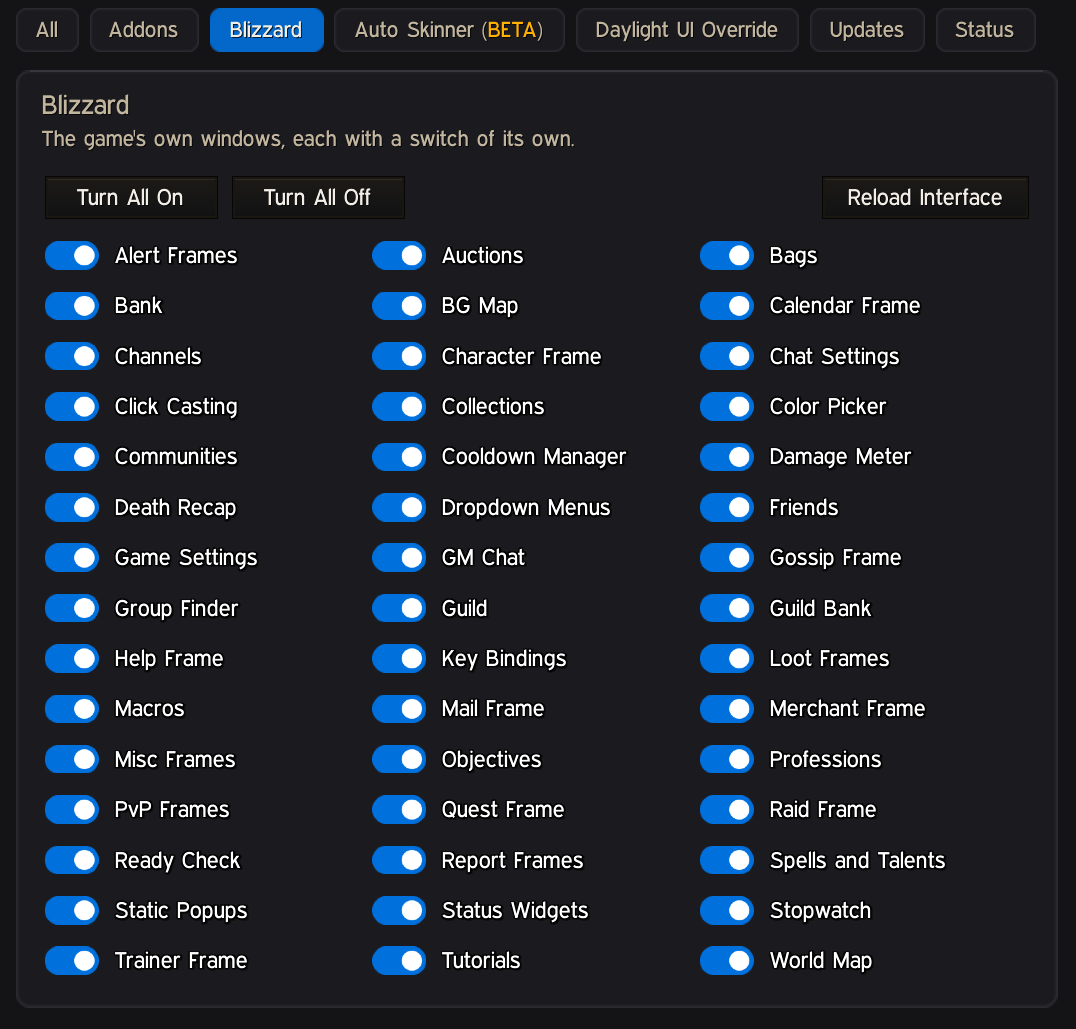
The game windows Daylight UI's Window Skins leave bare get the same look: the ready and role checks, queue, invite and PvP popups, the color picker, the "Return to graveyard" button and death recap, the stopwatch and Quick Keybind, chat settings and the channels window, the zone map (Shift-M), alert and level-up toasts, help, report and friend windows, icon pickers, help tips and more. Also the Options window (Esc > Options), every setting in it and the addon pages inside it, and the dungeon-ready dialog. New in 1.12.0: the profession window, the character window (and currency transfer), Collections tabs, the Calendar panels, Click Casting, the Cooldown Manager settings, guild bank tabs, confirm boxes' gold and item lines, the map pin button, and the game's own gossip, quest, vendor, trainer, mail, social, bag and bank windows whenever Daylight UI's own version is switched off. With Daylight UI 1.8.4, which dresses the gossip, quest, vendor, trainer, mail, social, character and spellbook windows itself when you pick them, those are left to Daylight UI so nothing is dressed twice. New in 1.12.2: new-player tutorials, battleground status bars, voice chat toasts, GM chat, the subscription offer, the game's damage meter and more. Edit Mode stays the game's.
All pop-up menus (right-click menus and dropdowns, any addon's) and every addon's AceConfig settings lose the game's gold.
New in 1.16.0
- New skins: Details! (meter windows in Daylight UI's meter look), AtlasLoot Continued and Pawn.
- Overlap window: on = the addon keeps its own, off = Daylight UI (still the default; your choices are kept).
- /skins: every addon's state at a glance, a copyable report, and retry. A skin that errors switches itself off cleanly and is retried after updates.
- LayerSwap: a Layer Button row in its menu, and its menus close on an outside click.
New in 1.15.0
- No doubled borders on game windows Daylight UI now dresses itself (the Battle.net friend toast, the layering notice, the master looter, the profession window). The game's trainer is dressed again with Daylight UI's NPC module off.
- Keep or Toss 2.0: its new journal in its Minimal dark look with Daylight UI's window shell and your font (a switch on its page).
- Updates followed: Polestar 0.4.1 (guide text size, Completed quest XP overlap, Arcade window), Questie 12.10.0 (QuestieTrace's windows), Dungeon Journal 2.0.10, Mastercraft 2.0.5 (Looking For Crafter), Kerzo Classic Quest Log 6.5.0, Kerzo Quest Expansion 2.1.0, LFG Forever 2.2.0.
- LayerSwap: its mini bar can fade in on hover like Daylight UI's minimap buttons.
New in 1.14.5
- Smoother looting with addons that mark bag slots (Polestar, Keep or Toss): closed bags and bank no longer repaint every slot after each loot.
New in 1.14.4
- Auto Skinner (BETA): on All windows, your addons that have no skin of their own and have windows are listed on their own. Turn one on for a basic Daylight UI look: the window frame, title and close button, the game's standard buttons, boxes and scroll bars, your font, Daylight UI's heading color, and its menu look on copies of the game's dropdown menus. The addon's own art stays, and every one starts off. Auto Skinning is in beta and may not skin an addon that isn't supported yet properly. These are not bugs, it's a beta test.
- Questie: its settings no longer raise a Lua error as their buttons are drawn.
New in 1.14.3
- Daylight UI 1.9.2's Custom gradient accent reaches skinned windows, every one of its colors in gradient text. An addon's own Accent can pick it too, and its colors are on Look and Feel > General.
- Dungeon maps: with OpenMap 0.8.10 and Dungeon Journal, Dungeon Journal's map shows inside dungeons again (OpenMap's stays everywhere else).
New in 1.14.2
- Kerzo Classic Quest Log: the ∞ mark before WoW Forever quests no longer shows as an empty box in Daylight UI's font.
- Polestar: a note on its settings that only its house "Polestar" skin takes the Daylight UI look; its other looks are free to use.
New in 1.14.0
- Ready for today's addon updates: Forever Leveling BiS 1.3.2 (its windows, My gear on Daylight UI's character window, the new Wish list), Polestar 0.4.0 (its new skins are left as Polestar draws them), OneForAll 6.2.10, Shortest Path Forever 1.41 (Journey stops, Farming tour, Forever profile, the right-click menu, nearby services), Trueshot Lodge, Forever Fishing, Dungeon Journal 2.0.9, LFG Forever 2.1.0, Does It Die, Dialogue UI, Journey Guides and Spoken.
- More overlaps handed to Daylight UI (asked once, switch any back): Polestar's vendor, loot, gossip, error, flight-map and guide-quest switches, OneForAll's tooltip at the mouse, Journey's guide-quest auto accept and turn in, and ForeverCore's quest list.
- Daylight UI 1.9.1: tooltips dressed for Questie and RareScanner follow its separate tooltip opacity.
New in 1.13.0
- One page of switches: All windows now has two grids, Addons and Blizzard, A to Z, with Turn all on, Turn all off and Reload interface. Nothing is cut off: the grid fits as many columns as your window allows.
- Get Addon: an addon you don't have shows "Get Addon" in your accent. Click it for its CurseForge link to copy.
- A switch per game window: the old "Game windows" switch is now one switch each: Bags, Character Frame, Chat Settings, Guild Bank, Mail Frame, World Map and the rest. If you had Game windows off, they all start off.
- Look and Feel: one page in place of a page per addon, in tabs: General (Daylight UI's own font, accent and window settings, right there to change), Text, Window, Controls and Extras. Under each tab, Applies to lists the addons it reaches, each with its Custom Settings switch; click a name to show its settings.
- Custom Settings is the new name for "Use my own settings" (and Custom background opacity, Custom border size, Custom link colors).
- Update alert: a chat line when a newer version is out (once a session; switch it off under Updates).
New in 1.12.0
- Gradients: with "Use Daylight UI's settings" on, skinned windows keep your Daylight UI accent as it is, Daylight or class gradient included. Each addon's own page can pick Daylight UI's accent, Daylight gradient, Class color, Class gradient or Custom, plus Gradient window borders. Skinned windows follow Daylight UI 1.8.4's window background color (Daylight, class or custom), OpenMap's and Mastercraft's panels included.
- New skins: Mastercraft (kept on its flat Classic style while skinned) and High Fidelity World Map (its HD/SD button, blend slider, cave map window and settings).
- More game windows (see above), every one built to the full Daylight UI standard.
- Text in other alphabets (Greek, Korean, Chinese…) keeps a font that can draw it instead of empty boxes.
- Updates followed: LayerSwap 1.14.25, Mastercraft 2.0.1, Kerzo Classic Quest Log 6.4.1, Dungeon Journal 2.0.8, Daylight UI 1.8.4.
- OpenMap: the game's map pin button places a pin again.
New in 1.11.0
- Guildy skinned throughout: its window, tabs, lists, menus, member card, score panel, dialogs, options and level-60 banner, in the Daylight UI look. Its tabard, portraits, charts and class colors stay. Blizzard's guild window it sits on stays hidden underneath.
- Words the game already translates use the game's own wording on non-English clients.
New in 1.10.1
- In your language: Addon Skins' options and Override window in German, French, Spanish, Russian, Korean and Simplified Chinese (machine drafts, corrections welcome).
- Korean, Chinese and Russian clients: words in skinned windows no longer turn into boxes or go blank.
- The game's language menus (Settings > Languages) show the language names again instead of blank bars.
New in 1.10.0
Three more addons
- Kerzo Classic Quest Log: skinned throughout, its theme kept on Dark while skinned (given back when you turn the skin off).
- Kerzo Quest Expansion and LFG Forever (its new Player ratings tab too).
Your font, everywhere
- Every text in a skinned window is in Daylight UI's font from the first time it opens, and stays in it when the addon refreshes. Tabs and buttons are measured again so nothing gets cut short. Item counts keep the game's number font.
- Buttons keep Daylight UI's font after you hover them (the game menu's Options and Exit Game).
Toasts
- Every alert toast (a recipe learned, an achievement, a dungeon done, a new pet or mount…) is in Daylight UI's look every time it shows, and a recipe's toast shows the item it makes.
Fixes
- The game's settings dropdowns are Daylight UI's; RareScanner's option trees lose their gold; Kerzo's options no longer overlap their footer.
- Windows are dressed the moment they open, with no flash of their old look.
1.9.0
- TrueshotLodge skinned throughout, the game's own windows (above), clean icon tabs, and more of Dungeon Journal, Polestar, Camping Kit, Questie and OpenMap.
Daylight UI Override
Some addons do things Daylight UI already does (OneForAll's chat and minimap tools, Questie's nameplate icons, Total RP 3's tooltip, and so on). The first time you log in with one of them, a window lists each overlap with Daylight UI picked. Switch any back to the addon if you'd rather keep its version.
Nothing is lost: the addon's own setting is switched off and kept, and can be given back at any time.
Settings
Daylight UI options > Plugins > Addons:
- All windows: switch the skin off for any one addon or any one game window;
- Look and Feel: give an addon a look of its own (font, outline, shadow, size, window opacity, border, bevel, and for some its text colors and accent) with Custom Settings, or change Daylight UI's own look on its General tab;
- change the Override choices on the addon's Extras tab, or Give everything back;
- open the Override window again with Show the choices again on the All windows page.
It never changes other addons' files. It only changes their settings for features you hand over to Daylight UI, and puts them back as they were when you give them back.
Copyright (c) 2026 Glowey. All rights reserved. Free to download and play with. Addons of your own that run alongside it are welcome.
DaylightUI Addon Skins Team