Daylight Essentials
- By
Small combat aids for DaylightUI: your healers' mana (works in combat), a combat timer and alert, a pet reminder, and your taunt and dispel cooldowns at the cursor.
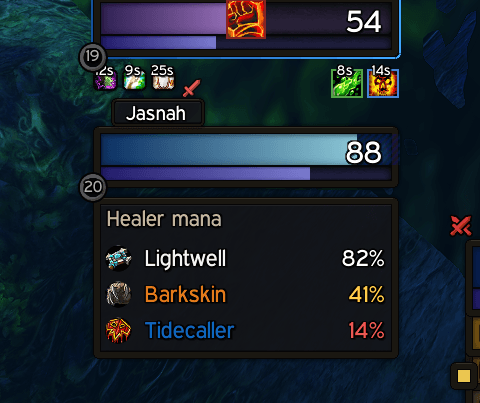
Display all players with the Healer Role's mana in party or raid.
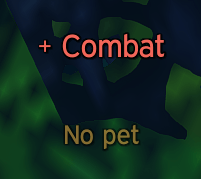
Popup text for combat state change and if you're missing your pet or it has died.
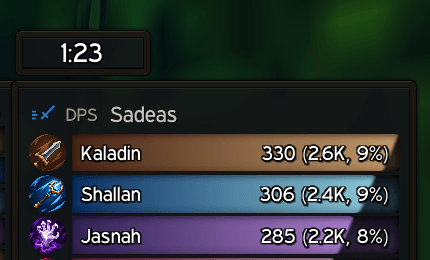
A Simple combat timer.
Description
Daylight Essentials
Small combat and play aids for Daylight UI on WoW: Forever, in the Daylight UI look. Each one has its own switch and settings page, so you only run what you want.
Requires Daylight UI.
What's in it
Healer Mana
Your group's healers and the mana each has left, with class icon, name in class color and mana in percent (yellow when low, red when nearly out). It keeps working in a fight, when the game hides other players' mana from addons. Healers are the players given the healer role; with no roles set, it lists priests, druids, shamans and paladins (or nobody, if you prefer). New in 1.4.0: a healer's line glows red below 20% mana. The box widens to fit long names, so nothing is cut off. While a healer drinks, their line becomes their mana bar, filling as they drink, with "Drinking" on it; a dead or offline healer's line is grayed out with "Dead" or "Offline".
Combat Timer
How long you've been fighting, and the last fight's length for a few seconds after. Tenths of a Second and the window behind it are your choice.
Combat Alert
"+ Combat" as a fight starts and "- Combat" as it ends, in the middle of the screen. Other words, a sound and the size are your choice.
Pet Reminder
For hunters and warlocks: "No pet" or "Pet is passive" until it's sorted. Quiet while you're mounted, flying, dead, resting in a town (your choice) or under Demonic Sacrifice. Its sample shows on every character in test mode, so you can place it from anyone. New in 1.4.0: it glows while it shows.
Cursor Cooldowns
- Your taunt and dispel cooldowns as small icons beside the mouse pointer while they cool down, with the game's own sweep and countdown.
- Ready at the Cursor (new): pick up to six abilities, and their icons show in a line beside the pointer while each is ready to cast (off cooldown and usable now). Choose the side (top left through left, 8 spots) and the icon size (24 px to start). Picks are kept per class. New in 1.4.0: an icon glows for a moment as it becomes ready.
Enemy Nearby (new)
- A small list of enemy players seen near you lately: level and name in class color, newest at the top. Names fade while unseen and leave after a minute (your choice).
- Click a name to target that player. In a fight the list keeps its order, and players seen during it are added below.
- Kill on Sight: right-click a name, or use
/dui kos add Name,/dui kos remove Name,/dui kos list. Shared by all your characters, and marked in red. - New in 1.4.0: the alert glows while it's up, red for Kill on Sight.
- Alerts: a line mid-screen and a sound when someone on your Kill on Sight list shows up, and, if you like, when any new enemy does.
- Windowless if you prefer just the names. Rests in battlegrounds and dungeons unless you ask otherwise.
- It sees players through nameplates, your target, focus and mouseover, so keep enemy nameplates shown (the switch is on its page).
Secondary Stats (new)
- A small box of the stats that matter for how you play: attack power, crit, hit and haste for melee; ranged stats for hunters; spell power, spell crit and mana regen for casters and healers; armor, defense, dodge, parry and block for tanks. Auto picks by your group role or your class.
- Custom: pick up to six stats of your own, resistances included, in your order.
- Crit, haste, armor, dodge and the like stay live in a fight; stats the game gives in parts keep their numbers from before it, dimmed (your choice).
- Hit turns green when it's enough to never miss your current target, matching the game's Hit Chance tooltip (5% melee and 4% spells at your level, 8% and 17% against raid bosses).
- Dock it flush against the minimap (the default), the damage meters or Daylight UI's chat, at the corner you pick. It slides out of that edge and back in from a fold tab, like Daylight UI's damage meter. By the minimap it slides Daylight UI's buffs aside at a top corner and its debuffs at a bottom one (new in 1.3.5); by the damage meters it steps out of the threat meter's way as your group grows; by the chat it can fade with the chat window. Or set it free anywhere.
- Windowless (just the text) docked or free. Per-stat name colors (crit gold, hit blue, haste green…), your class color or plain; a heavier outline and a text shadow you can size; one list or one line.
- Fold Away in Combat (new in 1.4.0): docked, it folds when a fight starts and comes back after.
- Whisper windows: it steps aside while a whisper conversation is open, and comes back when it closes.
Buff Manners (new)
- One prompt offering the buff you can give to whoever needs it most: a player who just buffed you, then your target, your group (checked again at a ready check), then players right beside you (friends and guildmates first).
- Click it or press its key (Key Bindings > AddOns > Daylight Essentials) and the buff goes out; your own target comes back to you. Nothing is ever cast by itself, and it hides in a fight.
- Mages give Arcane Intellect; priests Fortitude (Divine Spirit and Shadow Protection are choices); druids Mark of the Wild (and Thorns for tanks); paladins Kings first or Wisdom or Might by class, never over a blessing of their own; warlocks Unending Breath while swimming.
- Thanks: a /thank and/or a line in say or a whisper ("Thanks for the buff!", "Thank you, Name!", "Much appreciated!" or your own with
/dui manners line). For a class with no buffs to give, or a player who already has yours, the prompt still shows who buffed you and offers the thank-you on its own. Only buffs cast on you count, not auras that are there while someone is near (paladin auras, Trueshot Aura). - Skips PvP-flagged players while you aren't flagged, and can be quiet in towns, dungeons and raids. Right-click the prompt for Not Now or Never Offer;
/dui manners never Name,/dui manners allow Name,/dui manners list. - The idea comes from Manners by fpsacha.
Halo
- Hold a key and your own spells, items and macros open in a Halo around the cursor. Point at one or scroll to it, then let go to use it. Let go in the middle to close it without using anything. Works in a fight.
- Its own key: Set Key on its page takes the next key or mouse button you press, without touching your key bindings (or bind it under Key Bindings).
- Up to four Halos (new in 1.2.0): the base Halo, plus a Shift, Alt and Ctrl Halo. Hold the modifier with Halo's key to open that one. Each has its own slots, its own color (rim, highlight and label) and a label of up to 16 letters.
- Fill the slots by dragging spells, items or macros onto them in Edit Halos (a tab per Halo, or
/dui halo edit). - Choose the shape (circle or arc), the number of slots (2 to 12), the Halo's size, the icon size and where it opens (around the cursor or the screen's center).
Stance / Aura / Form (new in 1.7.0)
- Your stance, form or paladin aura by name on your player frame ("Battle Stance", "Bear Form", "Devotion Aura"). Turn it on from its page, and set its position, size and nudges right there.
- Shaman weapon imbues (new in 1.7.1): Rockbiter, Flametongue, Frostbrand or Windfury Weapon, both hands when they differ.
- Always readable: white or dark, whichever reads best across your health bar's colors, gradients included.
Nameplate Dmg Text (new in 1.3.0)
- Damage numbers pop off enemy nameplates as they're hit, in Daylight UI's font, colored by school (fire orange, frost blue…), crits bigger with a quick pop, misses, dodges and parries as words.
- Spell icons (new in 1.5.0): the spell's icon left or right of each number, at the size you pick. The game doesn't say which spell landed a hit, so it's worked out from your own and your pet's casts: right nearly always, a guess now and then.
- On You (new in 1.5.0): damage taken and healing received in the same look, left and right of the screen's middle or on your player frame, with a minus or plus. They keep showing in a group.
- Quieter off your target: numbers on other enemies are smaller and fainter, or show on your target only.
- Motion: Fountain, Rise, Fall or Rainfall, set apart for hits, crits and misses, each starting above, below, left or right of the plate (new in 1.5.0); how long they stay, their height, size, and short (1.2K) or full numbers.
- See and place it: a live preview on its page shows a nameplate with numbers coming off it as you change the settings; in Design mode, drag where the numbers start.
- Turn Off Daylight UI's Combat Text: all of Daylight UI's combat text (damage numbers and the scrolling text around you) switches off while it's on, so no hit shows twice, and comes back as it was when it's off.
- Only yours and your pet's: the game gives addons no combat log on Forever, only each hit on a nameplate without who struck it. Alone, that's yours and your pet's; in a group (new in 1.3.1) the nameplate numbers pause and the game's own damage numbers show instead, which are only yours and your pet's. Off to start: turn it on on its page.
New in 1.8.0
- Halo Bar: a row of slots you step through with the D-pad or LB / RB, in a fight too, and a list to choose each slot's spell, item or macro.
- Controller support: Halo, its editor and Set Key, the tours, and two new key bindings (Buff Manners: Not Now, Secondary Stats: Show or Fold Away).
- Nameplate Dmg Text: your pet's hits show their own icons.
New in 1.6.0
- A welcome on first launch: what Essentials adds, what shows from the start, Halo's key to pick, and that Nameplate Dmg Text stands in for Daylight UI's combat text when it's on. Open Options takes you to its pages.
- Update alert: a chat line when a newer version is out (once a session; switch it off under Updates).
Also new in 1.2.0
- In your language: Daylight Essentials speaks German, French, Spanish, Russian, Korean and Simplified Chinese (machine drafts, corrections welcome; words the game already translates use the game's own wording), with fixes for non-English clients (Cursor Cooldowns, Kill on Sight, Buff Manners, Secondary Stats).
- Window Opacity follows Daylight UI's, or set your own on each part's page.
Also new in 1.1.0
- Fades in with Daylight UI on login and /reload, instead of popping in (when Daylight UI's fade-in is on).
- Nothing is cut off: every box sizes itself to its text, and every options page fits its words.
- All text in American English.
How to use it
- Everything is on from the start and shows itself when it's needed.
- Move things:
/dui unlockshows samples to place;/dui lockwhen you're done./dui testshows them too. - Settings: Daylight UI options > Plugins > Essentials, one page per part.
- Key bindings: Key Bindings > AddOns > Daylight Essentials (Buff Manners and Halo).
Copyright (c) 2026 Glowey. All rights reserved. Free to download and play with.
Daylight Essentials Team