DART - T2 Bshout
Automated T2 Battle Shout swaps for Warriors. Equip T2, shout, and automatically restore your previous gear nearly instantly..
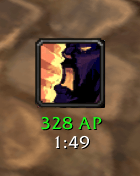
image.png
Screenshot 2026-09-30 111610.jpg
Description
DART - T2 Bshout
T2 Battle Shout, automated.
Press one button and DART instantly swaps your selected T2 pieces, gets your Battle Shout out, and puts your previous gear back on.
The entire process is designed to happen as fast as possible. Once the shout goes out, your normal gear is restored immediately, greatly reducing the chance of getting stuck in T2 and accidentally starting a fight in your shout set.
FEATURES
- Near-instant gear swaps
- Automatically restores your exact previous gear after the shout.
- Won't allow the shout until your T2 gear is actually equipped.
- Detects your Battle Shout cast restores your previous gear automatically.
- Can queue while in combat.
- Designed to prevent getting stuck in T2 after using the shout.
- 10-second rest period prevents accidental double-presses.
- Can cancel an active or queued operation.
BATTLE SHOUT TRACKING
Displays information about the Battle Shout currently affecting you:
- Attack power
- Remaining duration
- Whether it's a full-strength T2 shout for you
- Accounts for your Improved Battle Shout talent
- Works with anyone's Battle Shout, not just your own
- Flashes when you have no Battle Shout active and enough rage to cast one as a reminder (Can get rid of your weakaura reminder)
All tracking features can be individually enabled or disabled.
PARTY MESSAGES
Optional automatic party messages:
When pressed during combat:
Drop combat for T2 Bshout
When your T2 shout goes out:
T2 Bshout is out!
Both messages can be customized or disabled. Messages are only sent while grouped.
KEYBINDS
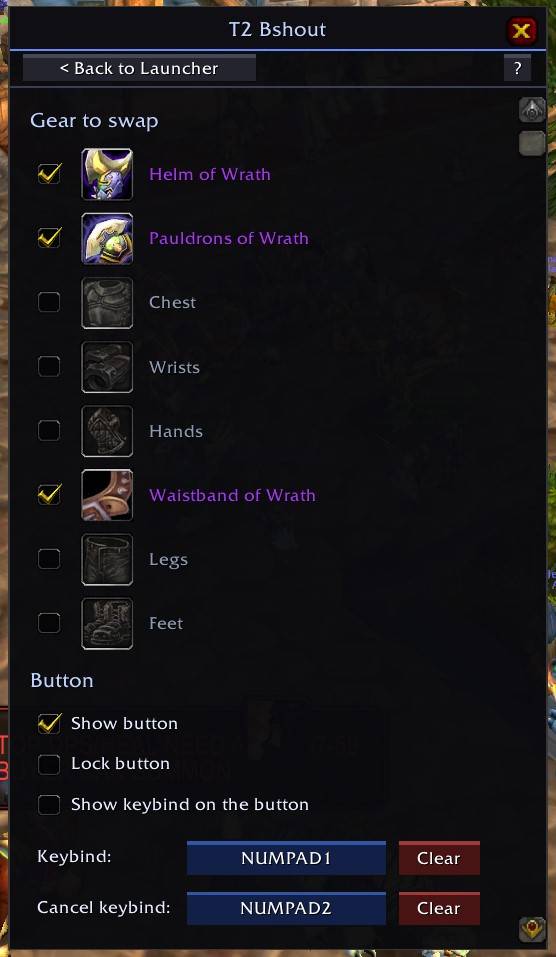
Separate keybinds for the main button and cancel function.
Supports:
- Keyboard keys
- Shift / Ctrl / Alt combinations
- Extra mouse buttons
- Mouse wheel
GEAR HANDLING
Select the T2 pieces you want to use:
Head · Shoulders · Chest · Wrists · Hands · Waist · Legs · Feet
- Remembers exactly what you were wearing, including empty slots.
- Restores your previous gear automatically.
- Waits for equipment changes to be confirmed before continuing.
- Missing pieces are reported without stopping the rest of the swap.
- Manual changes made during the process are respected.
- Warns if your bags don't have enough room.
- Gear can be selected from your bags or dragged directly onto a slot.
- Right-click a slot to clear it.
BUTTON & SETTINGS
Right-drag the button to move, lock/unlock, or hide it.
Settings are saved per character.
/dart → T2 Bshout
Hover the ? in the settings panel for a quick in-game guide.
The DART - T2 Bshout Team