ApexFury
- By
Devastation Evoker sound alert for Rising Fury in WoW Midnight. Predicts 4 stacks from Dragonrage, Animosity and empower casts. Set stack alerts and thresholds, with custom sounds, a status overlay and LibSharedMedia support.
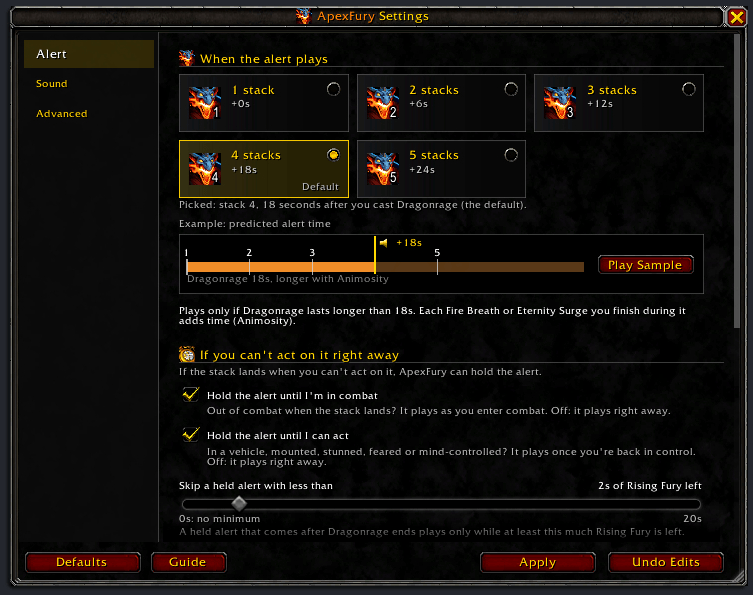
01-ApexFury-alert-settings.png
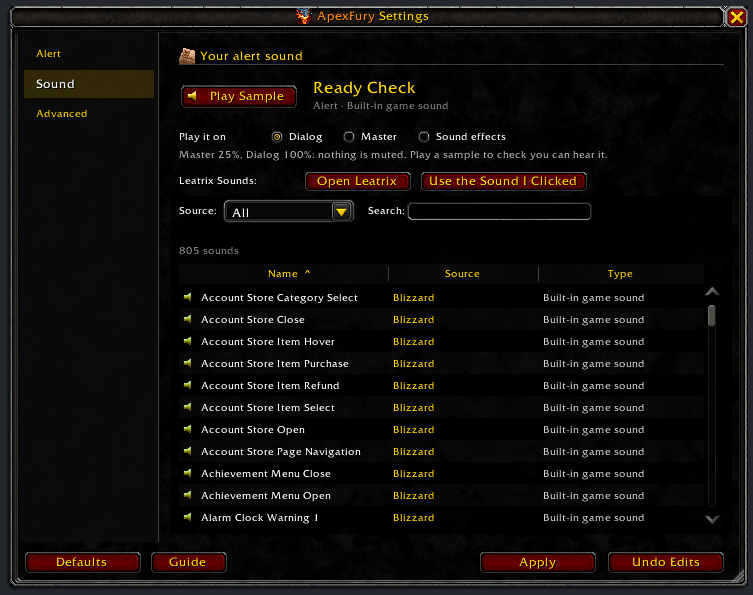
02-ApexFury-sound-pick.png
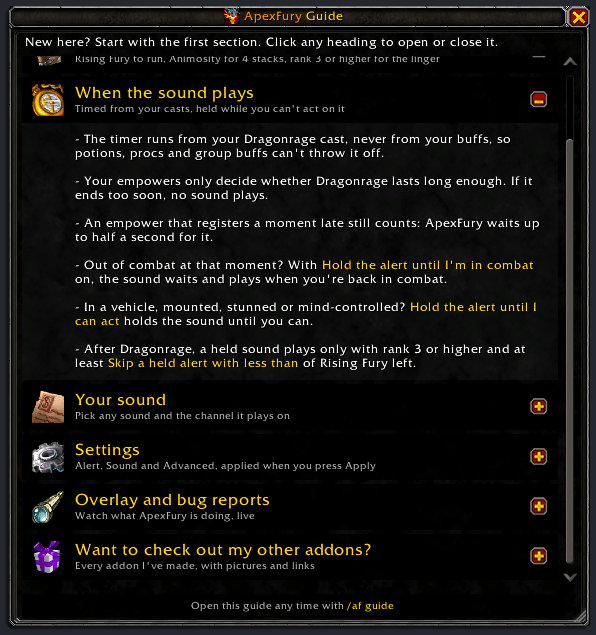
03-ApexFury-guide-when.png
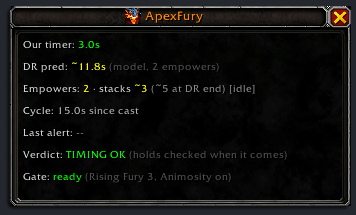
04-ApexFury-overlay.png
Description
ApexFury
Sound alert at 4 stacks of Rising Fury for Devastation Evokers in WoW Midnight (12.1).
It times your 4th stack and sounds an alert for your trinket window.
The problem
Blizzard hides Rising Fury from addons, and since 12.1 every aura during combat, encounters, Mythic+ and PvP. ApexFury never reads your stacks: it times your Dragonrage cast and your empowers, then plays the sound the moment your 4th stack would land.
How it works
- Dragonrage starts a timer for your 4th stack: 18 seconds by default (a stack every 6s).
- Empowers inside Dragonrage (Fire Breath, Eternity Surge) extend it through Animosity. They don't move the alert; they decide whether Dragonrage lasts long enough. With none, it ends too soon and ApexFury stays silent.
- At the 4th-stack moment, the sound plays.
- Out of combat at that moment? With Hold the alert until I'm in combat on (the default), it plays when you're back in combat. Once Dragonrage has ended, it plays only with Rising Fury rank 3 or higher and at least your "Skip a held alert with less than" time left; otherwise it is dropped.
Prerequisites
ApexFury checks your class, spec and talents at login and whenever they change. It switches off, and says so in chat, unless you're a Devastation Evoker with Rising Fury. Without Animosity it warns you and keeps running, since 3-stack alerts still work. Late-loading talents are checked again on their own; no /reload needed.
| What you need | Why |
|---|---|
| Devastation Evoker | Dragonrage exists only on Devastation. Other specs and classes switch the alert off; it comes back when you change spec. |
| Rising Fury talent (rank 1+) | Without it, the buff this addon tracks doesn't exist at all. The addon stays off. |
| Animosity | Without it Dragonrage stays at 18 seconds, so you only reach 3 stacks and a 4-stack alert can't play. Set the alert to 3 stacks. |
| Rising Fury rank 3 or higher (recommended) | Keeps your stacks 4 seconds each after Dragonrage ends. Without it, alerts play only during Dragonrage. |
Edge cases it handles:
- Tip the Scales empowers count toward Animosity too.
- An empower right at the 4th-stack moment. ApexFury waits up to half a second for a late one, and plays once if it extended Dragonrage.
- Other buffs (trinket procs, potions, group buffs) can't throw the timing off: it uses only your casts.
- Rising Fury linger after Dragonrage ends. Won't alert if your stacks have already faded below your "Skip a held alert with less than" setting.
- Vehicles, mounts, possession, stuns and CC. Hold the alert until I can act (on by default) holds the sound until you can act again, as long as Rising Fury is still up. Turn it off to hear it regardless.
Install
CurseForge: https://www.curseforge.com/wow/addons/apexfury
Manual: Drop the ApexFury folder into your Interface/AddOns/. No dependencies.
Slash commands
/af settings - Open or close the settings window
/af guide - Open or close the feature guide
/af changelog - Open or close the changelog: what changed in each version
/af addons - Every addon by Cobanyte, with CurseForge links and pictures (also /af other, /af more)
/af debug - Open or close the debug log window
/af reset windows - Put every window back to its default place and size
/af status - Print the current settings and the talent check to chat
/af scan [name] - List active player buffs (find spell IDs)
/af overlay - Open or close the on-screen status overlay
/af channel [dialog|master|sfx] - Show or change the audio channel
/af reset - Restore every setting to its default
/af version - Print the addon version
/af help - Show this help
/af alone opens the settings. /apex and /apexfury work too.
Guide and what's new
The first time you log in, the guide opens: a short tour in the order you'll need it. Click a heading to open or close it; /af guide or the Guide button in the settings reopens it.
After an update, a What's new window lists what changed since the version you last played. /af changelog opens it any time.
Settings
Open with /af, Options > AddOns > ApexFury, or ApexFury in the addon list on the minimap (right-click there shows the overlay). Three pages: Alert, Sound and Advanced. Changes take effect when you press Apply; Undo Edits or closing the window drops them. Defaults asks first and still needs Apply. Drag the bottom-right corner to resize. After a login or /reload, open it out of combat the first time.
Alert
- A status card says whether ApexFury is ready on this character, with tiles for Devastation, Rising Fury and Animosity.
- Enable alerts (on by default)
- The stack to alert at, as tiles showing the time after your cast (default 4, +18s), with a timeline of the predicted alert and Play Sample.
- Hold the alert until I'm in combat (on by default; an alert that comes out of combat waits for combat)
- Hold the alert until I can act (on by default; waits while you're in a vehicle, mounted, possessed, or stunned/CC'd; plays when you can act again)
- Skip a held alert with less than (default 2s of Rising Fury left)
- Tell me when a newer version is out (on by default; one chat line when a newer ApexFury is out)
Sound
Play Sample plays your sound the way the alert will. "Play it on" picks the channel: Dialog (the default, nearly empty in combat), Master or Sound effects. The line under it says when a game setting mutes the alert.
Type to search the list. Filter by source. Click any row to hear it on your chosen channel and pick it, then press Apply.
Advanced
- The timing numbers ApexFury uses, locked until you press Edit Timing Overrides. Restore Addon Timing Defaults puts them back.
- Show Overlay, Open Debug Log, and Log every cast for bug reports (off by default; records every cast and empower to the debug window).
Library support
ApexFury picks up sounds from whatever you already have. No config required.
| Source | What you get |
|---|---|
| Built-in game sounds (always on) | Hundreds of in-game sounds, auto-categorized into UI / Combat / Voice / Item / Alert / Effect |
| Sound packs, through LibSharedMedia-3.0 (optional) | Every shared sound from your installed addons, filterable by pack. |
| Leatrix Sounds (optional) | About 275,000 sounds. Press Open Leatrix, click a row in its list, press Use the Sound I Clicked, then Apply. They don't show in ApexFury's search. |
The default sound is Blizzard's ready check.
Overlay
/af overlay toggles a movable on-screen status window. Seven lines, each with a hover tooltip:
- Status. Idle, counting down, fired, suppressed, or holding (for combat, a vehicle exit and so on, or half a second for a late empower). It also says when alerts are off or a sound failed to play.
- DR remain. Dragonrage time left, then the estimated Rising Fury linger. "read" is the game's own timer, taken out of combat after your cast and each empower; it stays until it runs out or you cast an empower. Otherwise it is an estimate.
- Empowers + stacks. Empowers this Dragonrage, stacks so far, and in brackets the stacks you'll have when it ends if you cast nothing more. Also shows whether you're in combat.
- Cycle. Seconds since your Dragonrage cast, then the exact moment the sound played or the alert was dropped, and why. Frozen once the cycle resolves.
- Last alert. How long ago the last sound played. Blank after two minutes.
- Verdict. Whether the alert's timing checks pass right now, or what would stop it. The combat and can-act holds are checked when the moment comes.
- Talent gate. Whether your spec, Rising Fury rank, and Animosity are good. Tells you why the addon is inactive if it is.
Troubleshooting
No sound playing.
/af status. IfAlerts: no, open/af, tick Enable alerts and press Apply.- If
Hold until in combat: yesand you're testing on a target dummy, make sure you actually pulled it (auto-attack on, or just hit it once). - Open
/af> Sound and press Play Sample. The line under Play it on says if a game volume setting mutes it. If your sound's pack is uninstalled, the alert plays the default sound and the line under your sound says so: reinstall the pack or pick another sound. - Still nothing? Try
/af channel master. The default Dialog channel follows your Dialog Volume slider.
Alert is firing too late or too early.
- Open the overlay (
/af overlay). The Verdict line shows whether the alert's timing checks pass right now, and why not. - Verbose mode (
/af, Advanced, tick Log every cast for bug reports, press Apply) writes every cast and empower to the debug window./af debugopens it.
Finding a buff's spell ID.
/af scanlists every active player buff with its spell ID, and/af scan furyfilters by name. Run it out of combat and outside Mythic+ or PvP; while the game hides aura data it tells you so instead of listing.
License
GPL-2.0. See LICENSE.
Issues / feedback
Found a bug? Tick Log every cast for bug reports in /af > Advanced, reproduce it, then run /af debug, press Copy Last 250 and send the text with a line about what you were doing. The log holds the addon version, your WoW build and your settings.
- Email: hackythings@gmail.com
- BugSack errors: whisper them to Figment-Illidan in game.
- CurseForge: comment on the project page for questions and feedback.
- GitHub: open an issue for bugs you can reproduce.
ApexFury Team