CooldownManagerUtils
- By
Adds a Buff Reminders tab to the Cooldown Manager and shows icons for tracked buffs you are missing.
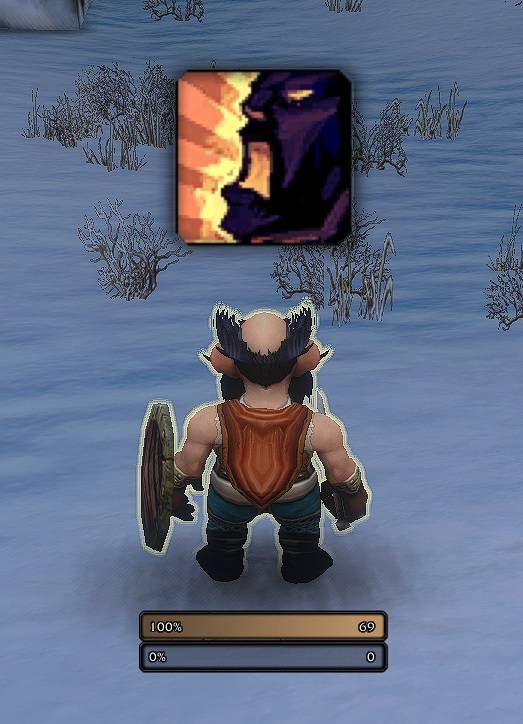
Buff Reminder in HUD
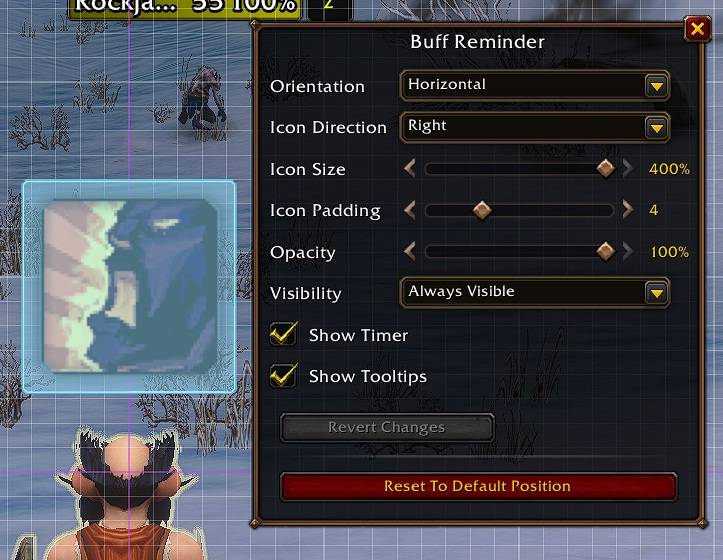
3.jpg
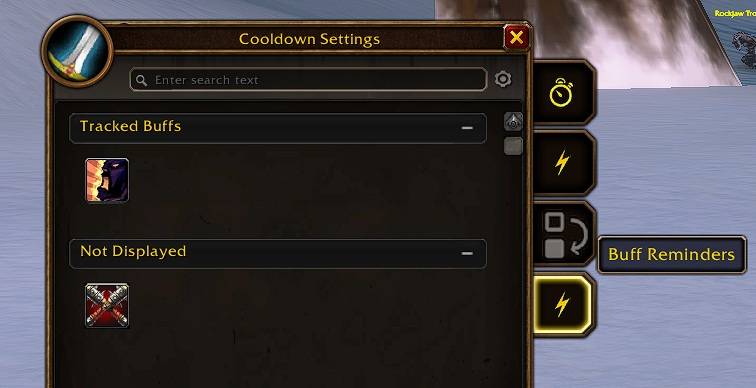
BuffReminder in CooldownManager
Description
Cooldown Manager Utils adds missing-buff reminders to World of Warcraft's built-in Cooldown Manager.
Features
- Adds a Buff Reminders tab to the side tabs of Blizzard's Cooldown Manager settings.
- Lists active spells from all class spellbook tabs (on Retail: class and current specialization) that apply a buff to your character, independently of Blizzard's Auras tab.
- Also covers temporary weapon enchants cast by you, such as the Shaman weapon imbues (Rockbiter, Flametongue, Frostbrand, Windfury, Earthliving) and the Paladin rites. The reminder shows while the enchant is missing from your weapons.
- Sorts buffs into two groups, Tracked Buffs and Not Displayed, by drag and drop.
- Shows a reminder bar with an icon for every tracked buff that is currently missing on your character. The bar is hidden while nothing is missing.
- Shows the remaining cooldown on a reminder icon (greyed out, with swipe and optional timer) while the buff spell is still on cooldown.
- Shows the spell tooltip when hovering a reminder icon.
- Makes the reminder bar movable in Edit Mode and snaps it to other Edit Mode elements, screen edges, and the grid like Blizzard's own frames.
- Clicking the bar in Edit Mode opens its settings: orientation, icon direction, icon size (50–400%), icon padding, opacity, visibility, timer, and tooltips.
- Keeps a separate reminder selection for each specialization.
Usage
- Open Blizzard's Cooldown Manager settings.
- Select the Buff Reminders tab, the fourth tab on the side of the window.
- Drag a buff from Not Displayed to Tracked Buffs to get a reminder while it is missing.
- Drag buffs within Tracked Buffs to change their order on the reminder bar.
- Drag a buff back to Not Displayed to remove its reminder.
The search box of the Cooldown Manager also filters the Buff Reminders tab by buff name. Each group can be collapsed by clicking its header.
To move the reminder bar, open Edit Mode. The bar then shows all tracked buffs, with active buffs greyed out, and can be dragged to a new position. The position is saved as soon as you release the bar.
Notes
- Passive spells and spells without a player buff are excluded. Class and specialization flyouts are included.
- The game does not tell add-ons directly which buff a spell applies. Spells the game does not flag as buffs (for example Thorns) are learned automatically the first time their buff from you lands on your character; they then appear in the list.
- A buff also counts as active when an aura with the same name is on you, so other ranks or IDs of the same buff are recognized.
- Weapon enchant spells learn their exact enchant the first time you cast them. Until then, any temporary weapon enchant counts as active for them.
- The list of available buff spells is not refreshed during combat; it updates as soon as combat ends. Reminders themselves keep updating in combat.
- When the game does not reveal whether an aura is active, for example in combat or in restricted content, the last known state is kept instead of showing a false reminder.
- While an aura is hidden this way, its reminder still appears when the buff runs out: the add-on uses the last known expiration time, or the cast time plus the buff's remembered duration if you cast it during combat. The duration is remembered whenever the game reveals the buff, for example out of combat.
- A buff that is cancelled or dispelled while it is hidden cannot be detected; its reminder appears once the game reveals the aura again, usually when combat ends.
- Reminder selections are saved per character and specialization.
- Bar position and all bar settings are saved per Edit Mode layout in the add-on's own saved variables: account layouts and presets account-wide, character layouts per character. Switching the Edit Mode layout switches the bar along with it. A layout the add-on has not seen yet starts with a copy of the previous layout's bar settings. Changes are saved immediately and are not affected by Blizzard's "Revert Changes".
Localization
Locale files exist for all World of Warcraft client locales:
deDE, enUS, esES, esMX, frFR, itIT, koKR, ptBR, ruRU, zhCN, and zhTW.
The CooldownManagerUtils Team
Owner