Screenshot 2026-11-20 165220.png
Description
Consumable Macros
One key for health, one for mana, one for bandages, in World of Warcraft: Forever. Each key always uses the best item in your bags.
Out of combat, the Health key eats your food and the Mana key drinks your water. The moment combat starts they switch to your best potion. You never have to drag a new item onto your bars when you run out, level up or loot something better. The Bandage key uses your best bandage, on yourself or on a friendly target if you choose.
Separate keys for separate cooldowns
Healthstones, Dark and Demonic Runes and mana gems don't share the potion cooldown, so they get keys of their own: Health+ and Mana+. You can drink a potion and use a Healthstone in the same fight. If you'd rather have one key, tick Use with the potion and they go off together on the potion key.
You set the priority
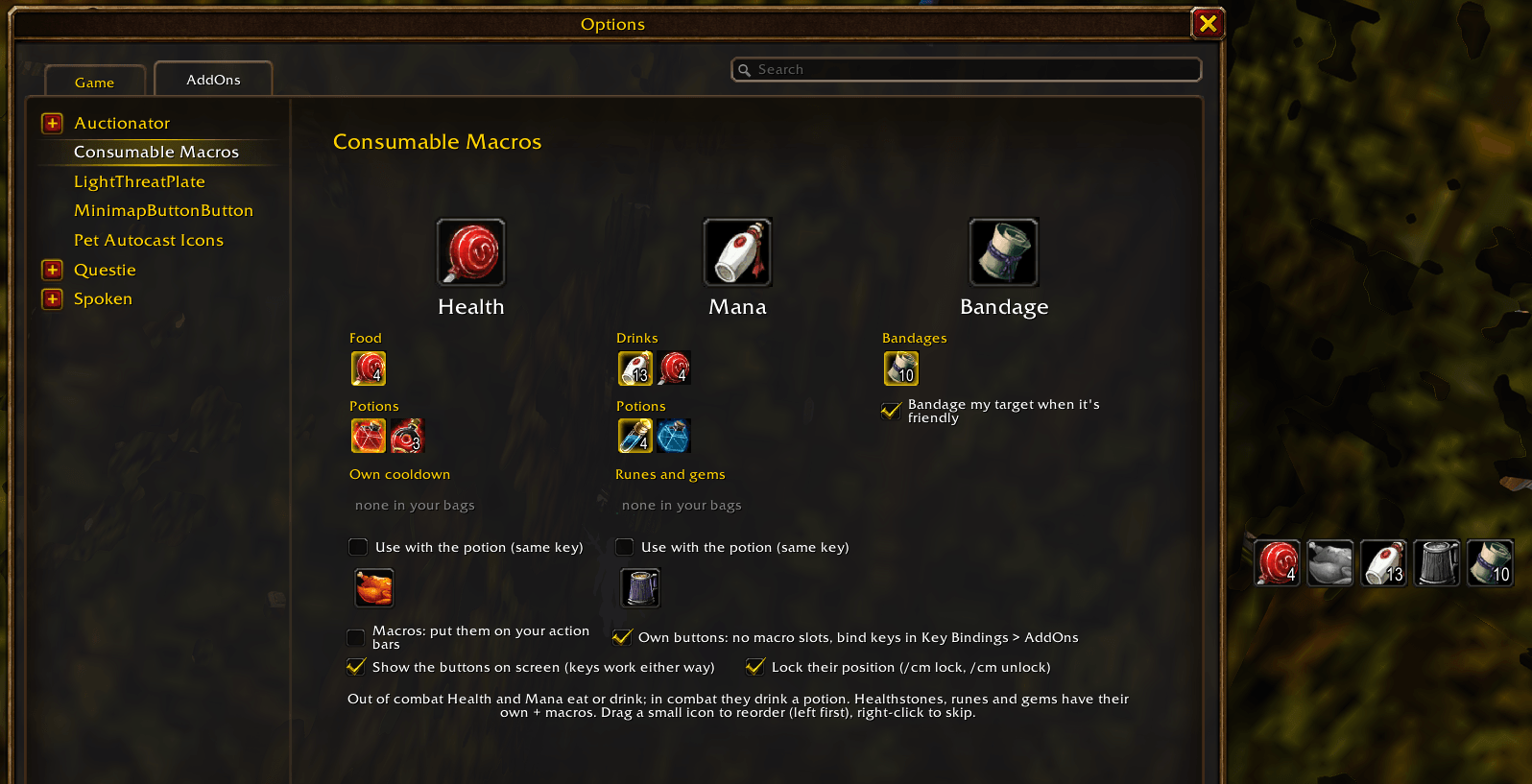
The settings page shows every consumable in your bags, grouped as Food, Potions, Own cooldown, Drinks, Runes and gems, and Bandages.
- Drag an icon onto another to change the order. The leftmost item is used first.
- Right-click an item to skip it, for example to save your best potions for raids. Right-click it again to use it again.
- The item in use right now has a gold border.
- New items go into the list where they fit: conjured food and water first (it disappears anyway), then the biggest heal first.
- Items above your level are skipped until you can use them.
Items the addon doesn't know by name are recognised from their tooltip, so new WoW Forever consumables are picked up too.
Macros or buttons: your choice
- Macros: the addon keeps the macros CM Health, CM Mana, CM Bandage (plus CM Health+ and CM Mana+) up to date. Drag them from the settings page onto your action bars. They go in the General tab by default, so every character shares the same slots, or in your character's tab if you untick the box.
- Own buttons: no macro slots used. The addon shows its own small bar of buttons (a button with nothing in your bags hides itself), and you bind keys in Key Bindings › AddOns › Consumable Macros. Type
/cm unlockto drag the bar where you want it or drag a button onto another to swap them, and/cm lockwhen you're done (or use the checkbox in the settings). You can hide the bar and keep just the keys.
Settings
Everything is in Options › AddOns › Consumable Macros, or type /cm.
Light by design
- The addon does nothing until your bags change, your level changes or combat ends.
- Nothing runs every frame while you play, and nothing is sent to the server.
- Macros can't be edited during a fight, so bag changes during combat are applied the moment it ends. Until then the keys keep using what they had.
Commands
| Command | What it does |
|---|---|
/cm |
open the settings |
/cm unlock / /cm lock |
move the button bar or rearrange its buttons, then lock it |
/cm update |
refresh the macros now |
/cm reset |
put the order back to the default and stop skipping items |
/consumables works too.
Consumables Macros Team