LightThreatPlates
- By
Screenshot 2026-10-31 092923.png
Screenshot 2026-10-31 093438.png
Description
# LightThreatPlate
**Lightweight threat for World of Warcraft: Forever, right on Blizzard's own nameplates.**
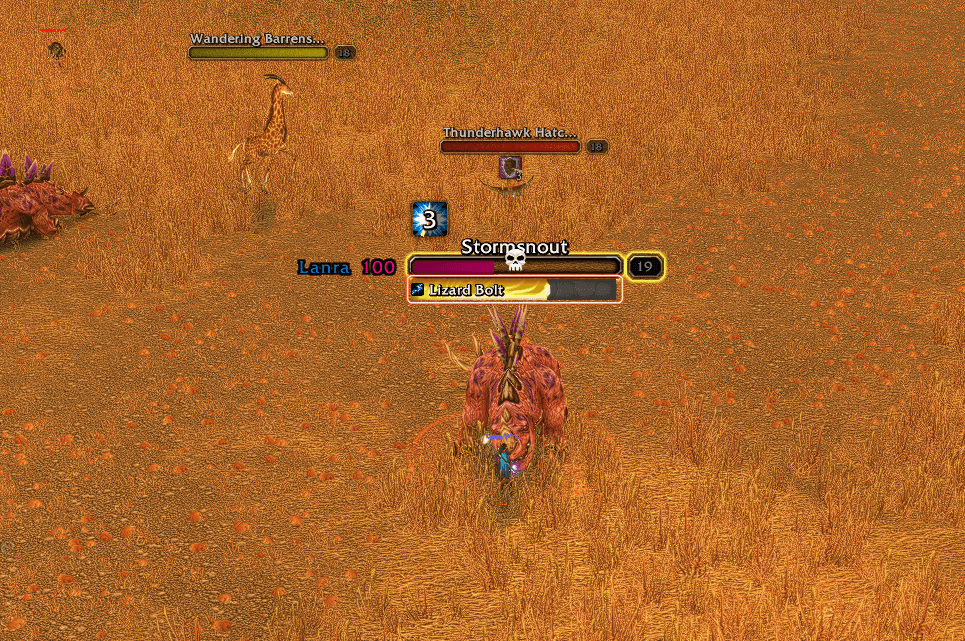
No new nameplates, no heavy frames: LightThreatPlate adds a few small things to the nameplates you already have.
## What it shows
- **Your threat number** next to every enemy NPC you're fighting, in a colour that tells you where you stand:
- **teal**: you're below the tank
- **lavender**: you're about to pull it
- **hot pink**: it's on you
- **Who the enemy is targeting**, left of the number, on enemy NPCs and enemy players:
- shown as the first letters of the target's first name (you choose how many; 5 by default) or as initials ("Lanra Windrun" → "L.W", "Bear of Darkshore" → "B.o.D"; one-word names keep their first letters)
- in the target's class colour, or one colour of your choice for everyone
- NPC targets are gray by default
- **Health bar colours** on enemy NPCs fighting you:
- **hot pink**: it's targeting you
- **teal**: it has no target or is crowd-controlled
- **otherwise**: Blizzard's normal colour
Other mobs and enemy players are never recoloured.
## Tidier nameplates (optional)
- Raid marker on top of the health bar, making room for the text.
- Enemy buffs under the health bar, or under the cast bar while the enemy casts.
- Crowd-control icon pushed clear of the level box.
Each one can be switched off, and switching it off puts Blizzard's layout back exactly as it was.
## Settings
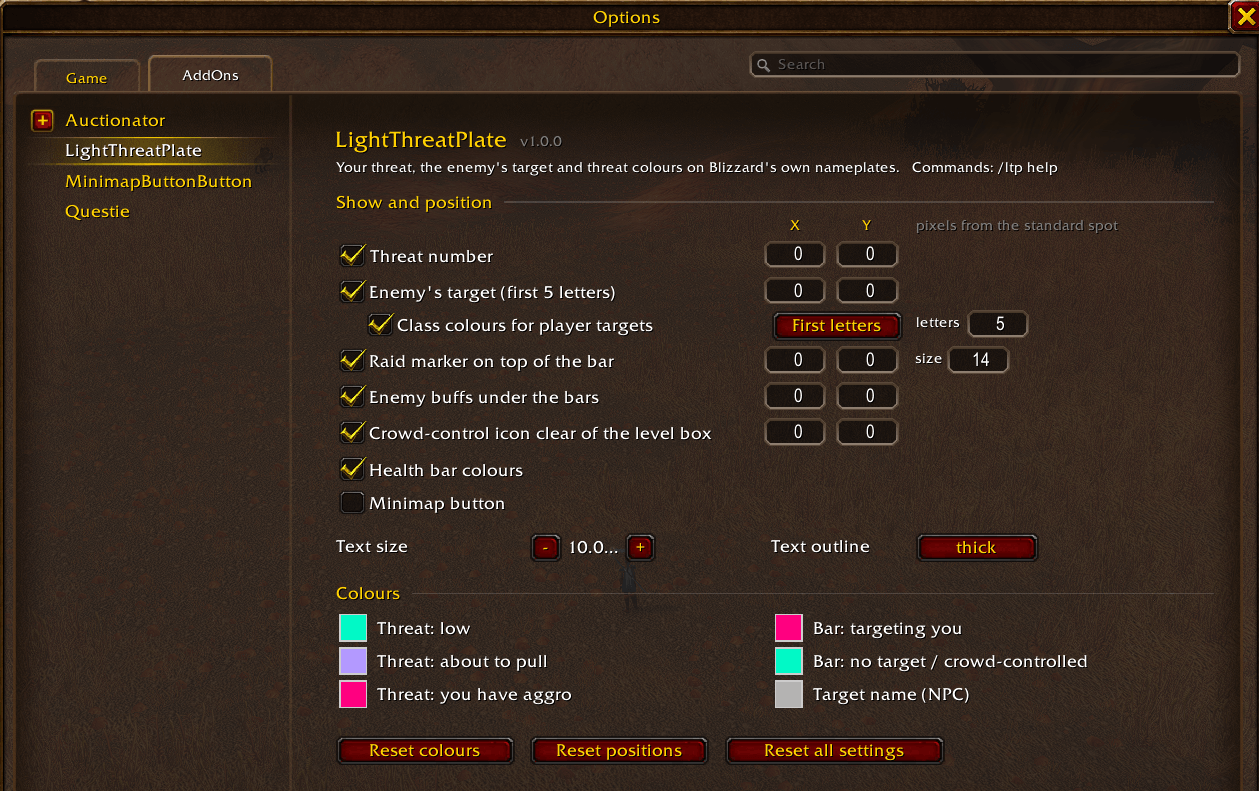
Open **Options → AddOns → LightThreatPlate** or type **/ltp**. A **minimap button** is available too; it's off until you turn it on, in the settings or with `/ltp minimap`.
- turn the threat number, target names and bar colours on or off
- choose first letters or initials for target names, how many letters, and class colours or not
- pick every colour with the colour picker
- move the threat number, target name, raid marker, buffs and crowd-control icon by typing X / Y values (0, 0 is the standard spot)
- set text size, outline and marker size
- turn the minimap button on or off
## Light by design
- Updates twice a second, and only while you're in combat. Everything else reacts to game events.
- Nothing is sent to the server.
- Built for WoW Forever's rules on hidden combat values: the addon never reads a hidden value, it only hands it to the game to display. So it keeps working in dungeons.
## Commands
| Command | What it does |
|---|---|
| `/ltp` | open the settings |
| `/ltp minimap` | turn the minimap button on or off (off by default) |
| `/ltp threat` / `names` / `class` / `bars` / `marker` / `buffs` / `cc` `[on\|off]` | toggle a feature |
| `/ltp move threat` / `name` / `marker` / `buffs` / `cc` `<x> <y>` | fine-tune a position, e.g. `/ltp move name -4 0` |
| `/ltp letters <n>` / `/ltp initials [on\|off]` | how target names are shortened |
| `/ltp size <n>` | text size |
| `/ltp reset` | everything back to default |
| `/ltp probe` | diagnostics. Please include this with bug reports, ideally run in combat |
`/LTP` and `/Ltp` work too.
LightThreatPlates Team