Classic Trade Skill Frame
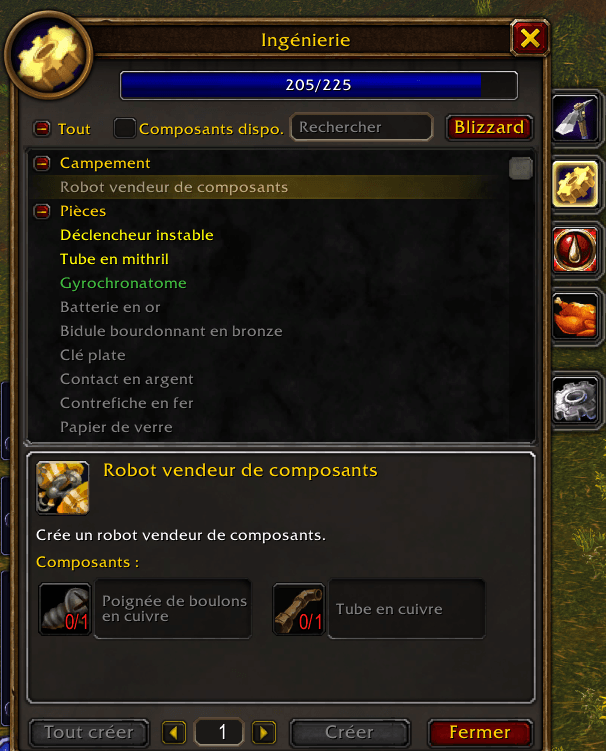
Brings back the classic TBC-style profession window to WoW Forever, with recipe categories, difficulty colors, reagent counts and one-click crafting.
tskill.png
Description
**The classic TBC-style profession window, back in WoW Forever.**

WoW Forever ships with a brand-new profession window. If you miss the old one, ScalopeTradeSkillFrame brings back the familiar TBC / Classic layout: one compact window, the recipe list on top, the recipe details below.

### Features

**Recipe list**
- Recipes grouped by collapsible categories, with an "All" button to expand or collapse everything
- Classic difficulty colors: orange, yellow, green, grey
- Number of crafts you can make shown next to each recipe, e.g. `[11]`
- "Have Materials" filter and a search box
- Shift-click a recipe to link it in chat

**Recipe details**
- Result icon with tooltip and quantity produced
- Required tools, shown in red when missing
- Cooldown, description and reagents with `owned/required` counts

**Crafting**
- Create and Create All buttons, with a quantity selector
- Druids and Shamans: your form is cancelled automatically before crafting, just like the Blizzard window (out of combat)

**Professions**
- One tab per profession on the right side, to switch professions in one click
- The Professions key (K by default) opens the window directly on your last used profession
- Options panel (gear tab) to choose the order of the profession tabs
- "Blizzard" button to switch back to the default window at any time

**Other**
- Movable window, position saved
- English and French (follows your game client language)
- No library and no dependency

### Commands

| Command | Description |
|---|---|
| `/stf` or `/stf help` | Show the command list |
| `/stf on` / `/stf off` | Enable / disable the TBC window |
| `/stf key` | Toggle the Professions key (K) takeover |
| `/stf options` | Open the profession order options |
| `/stf blizzard` | Switch to the Blizzard window |
| `/stf reset` | Reset the window position |

### Notes

- Made for WoW Forever.
- The Blizzard window stays open in the background (invisible), because closing it would end the crafting session.
- Fishing, Herbalism and Skinning have no recipes and therefore no tab.
Classic Trade Skill Frame Team