CheaperBuffs
- By
WoW Forever addon that saves you mana by using the cheapest buff for the target's level.
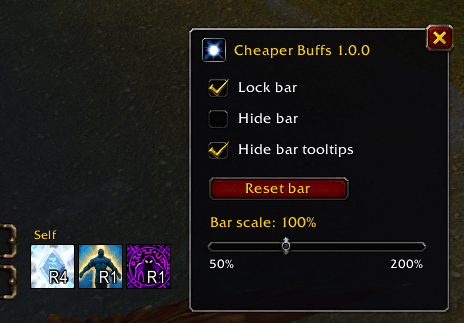
Screenshot of buff bar and minimap button options window.
Description
Stop wasting mana on max rank buffs your target can't use. Cheaper Buffs looks at your target's level and gets your class buffs ready at the highest rank that target can actually receive.
Why you'd want this
In Forever, a buff rank has a minimum target level. A target must be at least the rank's trainer level minus 10. Here are two examples:
- Power Word: Fortitude Rank 6 is trained at level 60, so it needs a target of level 50 or higher.
- Divine Spirit Rank 1 is trained at level 30, so a level 1 character can't receive it at all.
Cheaper Buffs works this out for you every time you change targets. Low-level friends get the lower rank, which also costs you less mana.
Supported classes and buffs
Only buffs with more than one rank are included. Single-rank buffs like Blessing of Kings have nothing to choose between.
| Class | Buffs |
|---|---|
| Priest | Power Word: Fortitude, Divine Spirit, Shadow Protection |
| Mage | Arcane Intellect, Dampen Magic, Amplify Magic |
| Druid | Mark of the Wild, Thorns |
| Paladin | Blessing of Might, Blessing of Wisdom, Blessing of Light, Blessing of Sanctuary |
Other classes don't get a bar. The addon simply stays quiet.
Installing
Close World of Warcraft.
Extract the zip. You should end up with a folder named
CheaperBuffscontainingCheaperBuffs.toc.Put that folder in your Forever client's AddOns folder:
- Live client:
World of Warcraft\_forever_\Interface\AddOns\ - Beta client:
World of Warcraft\_classic_beta_\Interface\AddOns\
If you're not sure which folder is yours, open the Battle.net launcher. Pick Forever and use Show in Explorer.
- Live client:
Start the game. On the character screen, click AddOns and make sure Cheaper Buffs is ticked.
If the addon doesn't show up in the list, fully quit and restart the game. A /reload won't find new addon folders.
The final path should look like this:
...\Interface\AddOns\CheaperBuffs\CheaperBuffs.tocIt should not look like ...\AddOns\CheaperBuffs\CheaperBuffs\CheaperBuffs.toc.
Using it
The bar
After you log in, a small bar appears near the middle of your screen. It has one button for each buff you've learned.
- The header along the top shows who you're buffing. It reads
Target Lv 14,Self, orTarget Lv ?. - The number in the corner of each button is the rank it will cast. For example,
R3means Rank 3. - Hover over a button to see the spell and why that rank was chosen. You can turn these tooltips off with Hide bar tooltips in the options window.
Casting
Click a button, or press a key you've bound to it. One press casts one buff. The addon picks the rank, and you decide when to cast.
| Your target | What the button does |
|---|---|
| A friendly player or NPC | Casts the highest rank you know that their level allows |
| Nothing, or an enemy | Casts your highest rank on yourself |
| A friend too low for every rank you know | The button goes grey and shows low, and clicking does nothing |
What the button colours mean
| Look | Meaning |
|---|---|
Normal icon, white R3 |
Ready. It will cast Rank 3. |
Yellow R6? |
The game hid the target's level, so it uses your highest rank. |
Grey icon, red low |
The target is too low for any rank you know. |
| Red tint over the button | Waiting for combat to end (see below). |
Minimap button and options
Cheaper Buffs puts a round button on the edge of your minimap. Click it to open the options window, and click it again (or press Escape) to close the window. Drag the button to move it around the minimap.
| Option | What it does |
|---|---|
| Lock bar | When ticked, the bar can't be dragged. |
| Hide bar | When ticked, the bar is hidden. Untick it to bring the bar back. |
| Hide bar tooltips | When ticked, hovering over the bar's buttons shows no tooltip. The rank number on each button still shows. |
| Reset bar | Moves the bar back to its starting spot and sets the scale to 100%. |
| Bar scale | Drag the slider to make the bar smaller or bigger, from 50% to 200%. |
The options window can be dragged too, and /cbuffs options opens it without the minimap button.
In combat
The game locks addon buttons during combat, so the buttons can't change rank while you're fighting.
If you switch targets mid-fight, the affected buttons turn red. The header also adds (updates after combat). Until then, a button still holds whatever it had before the fight. That rank might be too high for your new target.
As soon as combat ends, everything updates on its own. You don't need to do anything.
Tip: Buff before the pull.
Moving the bar
When you first install the addon, the bar is unlocked. The header has a blue strip.
- Drag the blue header to wherever you like.
- Type
/cbuffs lockto lock it in place. The blue strip disappears.
You can also lock it with the Lock bar box in the options window.
You can't move, hide, or resize the bar during combat. If you change those options mid-fight, the window says the change will apply when combat ends, and it does. If you lose the bar off-screen, click Reset bar or type /cbuffs reset.
Key bindings
Open Game Menu → Options → Key Bindings → AddOns → Cheaper Buffs.
Each button gets its own binding, labelled with the buff's name after you log in. Buttons are numbered left to right in the order shown in the table above. For example, a priest's button 1 is Power Word: Fortitude.
Slash commands
You can type /cbuffs or /cheaperbuffs.
| Command | What it does |
|---|---|
/cbuffs |
Show the list of commands |
/cbuffs options |
Open or close the options window |
/cbuffs lock |
Lock the bar so it can't be dragged |
/cbuffs unlock |
Unlock the bar so you can drag it by the header |
/cbuffs show |
Show the bar |
/cbuffs hide |
Hide the bar |
/cbuffs reset |
Move the bar back to its starting spot and set the scale to 100% |
/cbuffs minimap |
Hide or show the minimap button |
/cbuffs mode id |
Cast by spell ID (the default) |
/cbuffs mode name |
Cast by name and rank, like Power Word: Fortitude(Rank 3) |
/cbuffs probe |
Print a report about your game client, for troubleshooting |
Troubleshooting
The addon isn't in the AddOns list. Check the folder path in the installing section above, then fully restart the game.
The AddOns list says "Out of date." The game's interface number changed after this version was made. Tick Load out of date AddOns for now and look for an update.
There's no bar.
- Your class might not be supported, or you might not have learned any of the listed buffs yet. For example, paladins get Blessing of Might at level 4.
- You might have hidden it. Type
/cbuffs show.
The minimap button is gone. Type /cbuffs minimap to bring it back. Some minimap addons also collect or hide buttons, so check their settings too.
It cast the wrong rank. Type /cbuffs mode name and try again. Some game builds handle lower ranks better when cast by name.
A button says "R6?" for everyone. The game is hiding target levels from addons in that situation. The addon falls back to your highest rank, which is the same as casting the spell normally.
My settings and bar position reset between sessions. Settings are saved in CheaperBuffsDB. Early Forever beta builds were known to lose saved addon data. If this keeps happening on a current build, it may be the game client rather than the addon.
Something else is wrong. Type /cbuffs probe and include the output when you report the problem. The report shows:
- your game build and interface number
- which game functions the addon could find
- for each buff rank, whether the spell exists, whether you know it, and its level
Known limits
This release (1.0.0) was built and tested in a simulated game environment, not the real client. Please run /cbuffs probe once and report anything that looks off.
- Spell data: The spell IDs and trainer levels come from the original 1.12 game data. If Forever changed any of them, the probe will show it. They can be edited in
Data.lua. - Level rule: The target-level rule (trainer level minus 10) comes from the original game and is being retested on Forever.
- Group buffs: Prayer of Fortitude, Arcane Brilliance, and Gift of the Wild aren't included.
- No auto-casting: The addon never casts anything by itself. Every buff is one button press by you.
Files
| File | Purpose |
|---|---|
CheaperBuffs.toc |
Tells the game how to load the addon |
Data.lua |
The buff list: spell IDs and trainer levels for each rank |
Logic.lua |
Works out which rank fits a given target level |
Core.lua |
Saved settings, events, slash commands, and the probe report |
Buttons.lua |
The bar, buttons, tooltips, and bar settings |
Options.lua |
The options window and the minimap button |
Libs</code> |
Embedded libraries for the minimap button (see Credits) |
Bindings.xml |
Adds the key binding entries |
README.md |
This file |
Credits
The minimap button uses these libraries, included unchanged in the Libs folder from the LibDBIcon-1.0 v12.1.1 package:
- LibDBIcon-1.0 by Funkeh
- LibDataBroker-1.1
- CallbackHandler-1.0
- LibStub
Each library belongs to its own authors and keeps its own license.
Cheaper Buffs is a fan-made addon and is not affiliated with Blizzard Entertainment.
CheaperBuffs Team