


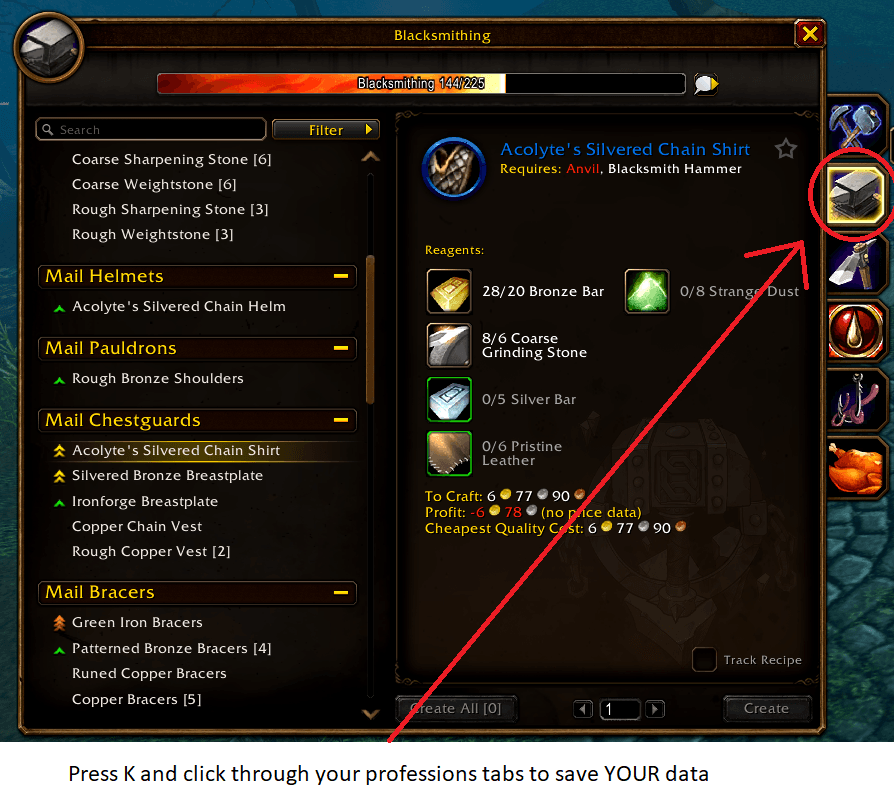
LFW save your data.png
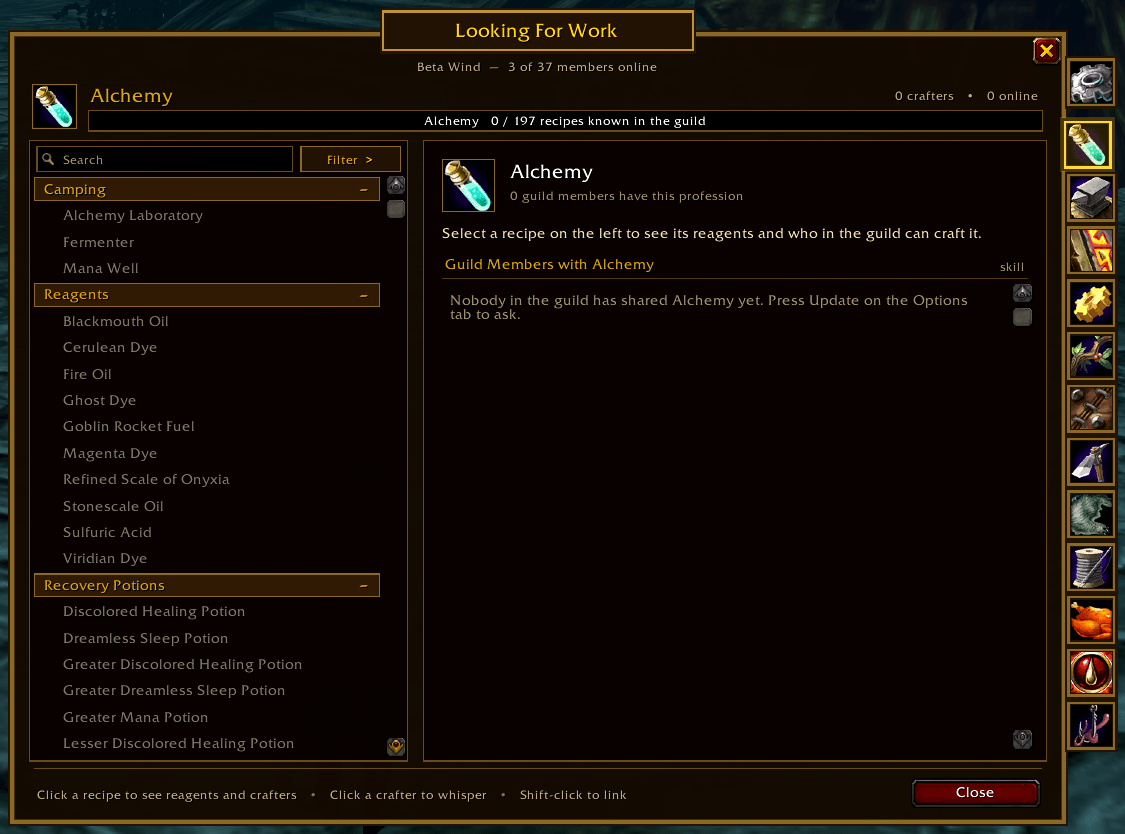
Has option to show unknown recipes
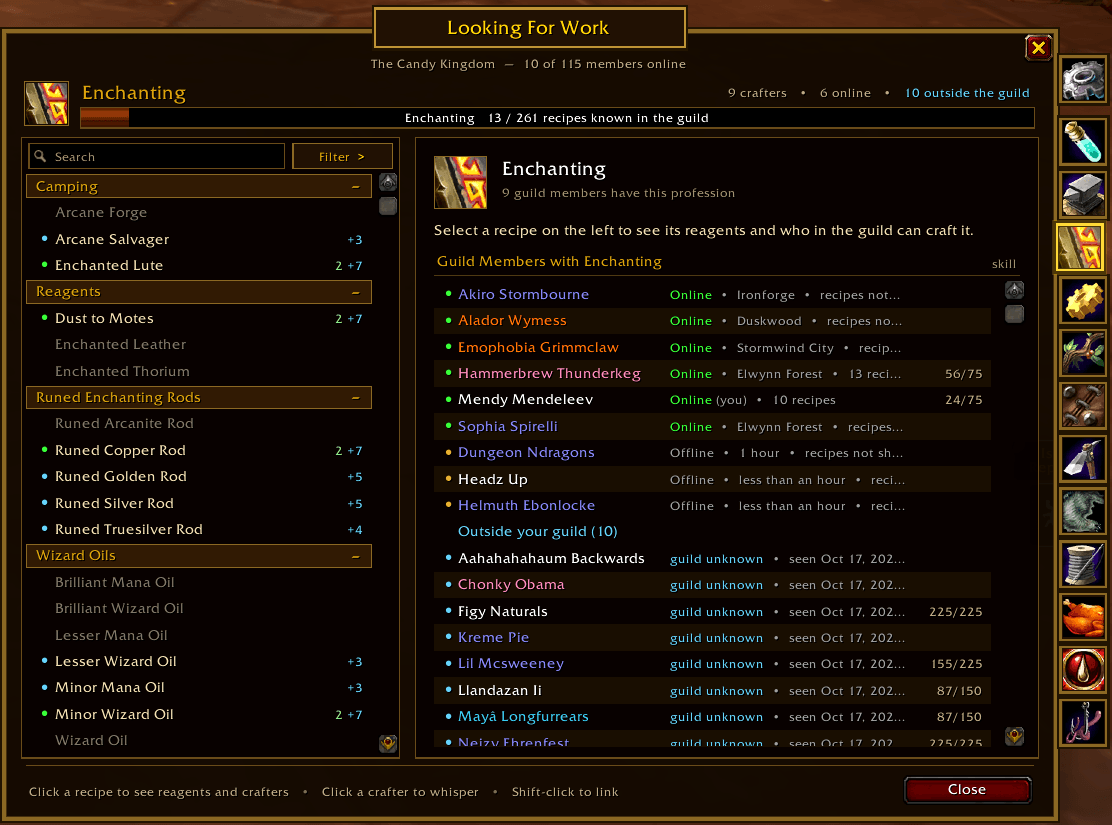
Enchanting tab with guild and non-guild enchanters
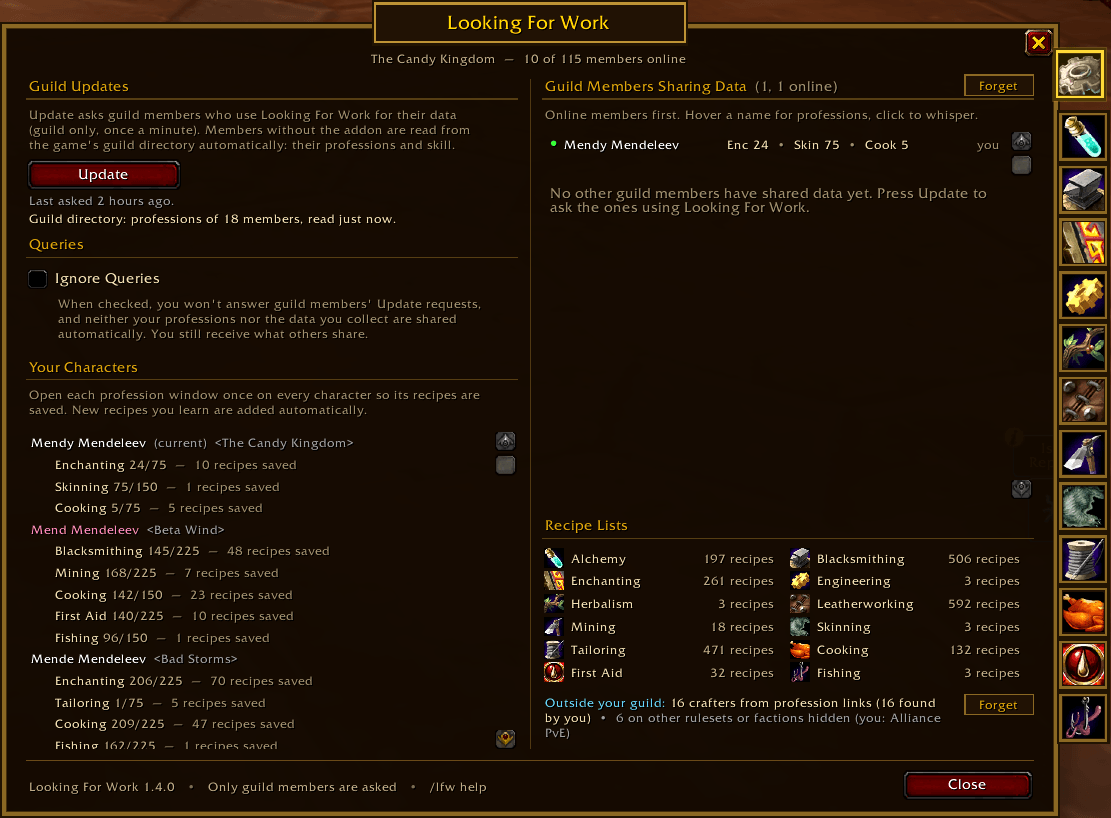
Main menu that shows all guild crafters with this addon
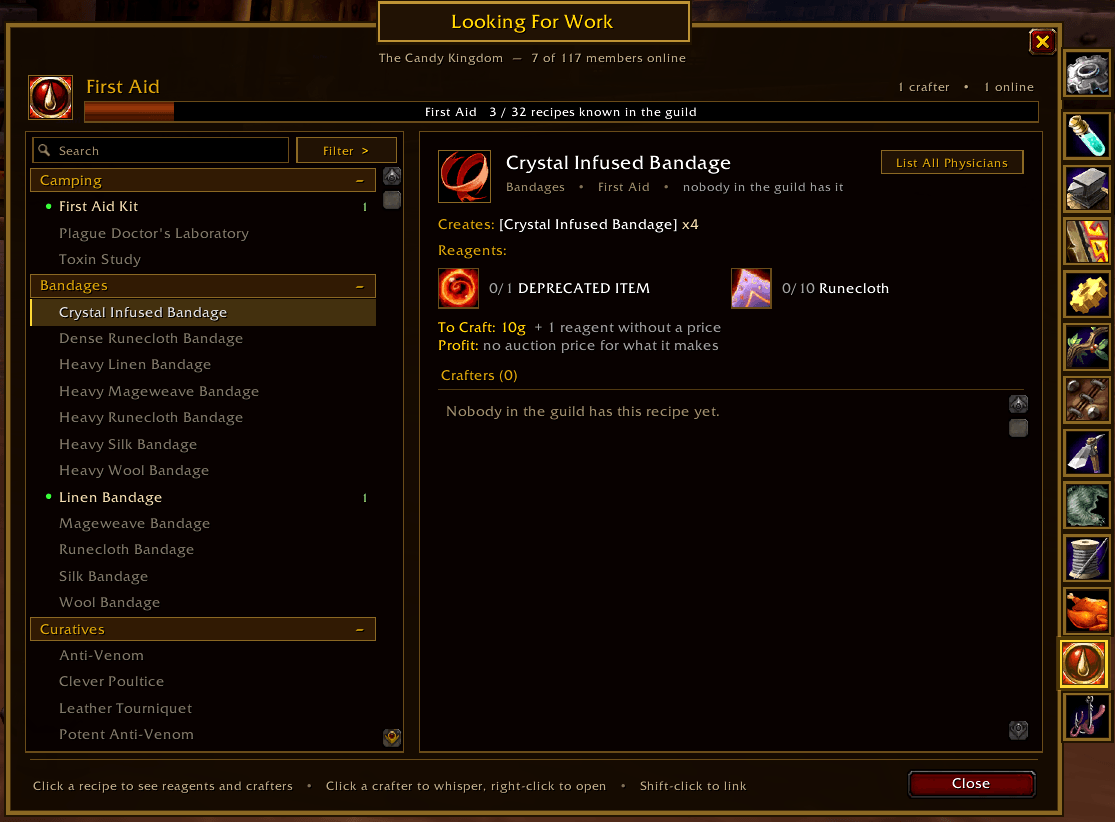
What you see when you have a recipe selected. Click the recipe again or the List All Physicians button to see crafters.
Description
Looking For Work
A WoW Forever addon for finding who in your guild can craft a recipe, whether they are online or offline.
Features
- Saves your professions: open a profession window once and Looking For Work saves its whole recipe list (learned and unlearned recipes, with categories, reagents, tools and what each recipe makes) plus which recipes your character knows. Recipes you learn later are added automatically.
- Guild sharing: guild members who also use Looking For Work share their professions with each other, so you can see what offline members can craft too.
- Window laid out like the WoW Forever profession window (
/lfw):- A tab for every profession down the right-hand edge (Alchemy, Blacksmithing, Enchanting, Engineering, Herbalism, Leatherworking, Mining, Skinning, Tailoring, Cooking, First Aid, Fishing), with the Options tab on top
- Left: search box, Filter button and every recipe grouped under collapsible category bars, including the ones nobody in the guild has (shown in grey)
- A dot in front of each recipe: green = an online guild member has it, gold = only offline members have it, none = nobody has it. The number on the right is how many members have it
- Right: click a recipe to see its icon, description, what it creates, tools required, reagents (with how many you have in your bags) and the crafters list: each member's First-name Last-name in class colour, Online / Offline status (zone when online, how long ago when offline) and their skill
- To Craft and Profit under the reagents, from Auctionator prices (see below)
- The bar at the top shows how many of the profession's recipes are known somewhere in the guild
- Options tab:
- Update asks your guild for their professions
- Ignore Queries (unchecked by default): when checked you don't answer other members' Update requests and your professions are not shared automatically
- Your Characters: every character you have logged in with, its professions and whether each one's recipes are saved yet
- Guild Members Sharing Data: everyone you have data for, online first, with a Forget button to clear it
- Recipe Lists: how many recipes are saved for each profession
Installation
- Copy the
LookingForWorkfolder into:
World of Warcraft\_forever_\Interface\AddOns\LookingForWork\/reloador restart the game.
The libraries it needs (LibStub, CallbackHandler, AceComm-3.0 with ChatThrottleLib, AceSerializer-3.0, LibCompress, LibDataBroker-1.1 and LibDBIcon-1.0) are included in the Libs folder, so nothing else has to be installed. See Libraries and licences below.
Getting started
- On each of your characters, open every profession window once (default key K, then click the profession). This saves the full recipe list and what that character knows.
- Open
/lfw, go to the Options tab and press Update. - Click a profession tab, then a recipe, to see who can make it.
How guild sharing works (and why it stays light)
- Guild only. All messages go over the GUILD addon channel. Nothing is sent to whispers, groups, raids or public channels, and data from anyone not on your guild roster is ignored.
- Update sends one small request listing which version of each member's data you already have. Only members whose data you are missing or have an older copy of reply, after a short random delay so replies don't all arrive at once. Each reply goes to the whole guild channel, so one reply updates every addon user at the same time.
- Update can be pressed once a minute (the button shows a countdown).
- Recipe lists (the full list of every recipe in a profession) are only sent when someone's list is smaller than yours. If several members could send the same list, the first one announces it and the others stand down, so it goes out once.
- Missing recipe lists are requested automatically. Shared data says how big the sender's recipe lists are. If a guild member's data arrives for a profession whose list you don't have (or yours is smaller, or is missing recipes they know), your addon asks that member for it. The same list is asked for at most once every 10 minutes unless the member's list has grown since, and if someone else already asked, you just receive their answer.
- A list that grows is shared again. When someone opens a profession window and their recipe list gets bigger, that counts as a change to their data, so it's shared and guild members fetch the bigger list. A list that has grown is never held back by the "sent recently" limits.
- Learning a recipe isn't the same as having the list. Learning a profession or recipe with the window closed only saves the recipe's name. These name-only entries don't count toward a list's size, so a full list from someone who has opened the window always replaces them.
- Automatic sharing: when your own professions change (new recipe, skill-up, newly scanned profession), your data is shared once, a minute later, and at most once every 5 minutes. Turned off by Ignore Queries.
- Members only ever send their own characters' data, never other people's.
- Recipe lists are sent compressed when the member who asked for them can read compressed lists (version 1.3.0 and later). A 592-recipe Leatherworking list goes out as about 12 KB instead of 46 KB: roughly 49 addon messages instead of 186, and about a quarter of the time. Compression is done by the game itself (LibCompress uses the game's built-in Deflate), so it costs almost no CPU. Older versions are still sent plain lists. Member data is already small and is never compressed.
- Messages are queued through ChatThrottleLib (part of Ace3), which keeps the send rate under the game's limits. Nothing is sent during combat; it waits until combat ends.
- Your own alts in the same guild are shared too, so guild mates can see what your offline alts can craft.
Offline members: you see an offline member's recipes once you have received their data, which happens whenever you and they (or one of their alts) are online with the addon at the same time. It is saved, so it stays available after they log off.
Every recipe, even ones nobody has
The game lists every recipe of a profession in its profession window, including ones you haven't learned. Looking For Work saves that full list whenever anyone opens the window, and shares it with the guild. So a profession tab shows every recipe as soon as one guild member with the addon has opened that profession.
Until then the tab shows the recipes known by members who have shared their data, plus a note on how to get the full list.
Opening someone's profession link, or a guild member's profession from the guild directory, also saves its full recipe list (see below).
Crafters who don't use the addon
Looking For Work also collects profession data about people who don't run it. This collected data is kept separately from what members share themselves, and the owner's own data always wins: collected data is only used for a profession where the person hasn't shared a recipe list.
Profession links
- Links posted in chat (Trade, General, guild, whispers, party, raid…) are noticed automatically: Looking For Work saves who has which profession, the channel, and the link itself. WoW Forever's links only say whose profession it is, not which recipes they know, so nothing more can be read without opening it.
- When you open a link (click it in chat, or right-click the person in a crafter list), their full recipe list and skill are read, including the recipes they don't know. Guild members' links work the same way, so asking a guild mate without the addon to link their profession fills in their recipes.
The game's guild directory (guild members only, addon or not)
- Which guild members have which profession, offline members included. It's read shortly after login and whenever you open the window (at most every 10 minutes). The directory only lists offline members while "show offline members" is on, and only under an expanded profession, so Looking For Work switches that on and opens each profession for a moment while reading, then puts everything back.
- It covers the nine main professions; Cooking, First Aid and Fishing aren't in the directory.
- Members found this way are listed under each profession, and under a recipe as "has Enchanting, recipes unknown" until their recipes are known (for example from a profession link).
- On WoW Forever the directory reports skill 1 for everyone, so its skill isn't used. Its "open this member's profession" doesn't open anything, and its "who knows this recipe?" question stops being answered after a few minutes of use, so neither is used either.
What each collected entry records
- Who it's about: First-name Last-name, realm (if not yours), class, faction and ruleset, and their guild if known, with the date it was checked. Guild mates' guild is always known. For others it's checked when you open their profession: read directly if they're near you (nameplate, target, group), otherwise with a quiet
/whofor their exact name (no Who window, nothing in chat), which only finds them while they're online. Targeting or mousing over them updates it too. - How it was obtained (profession link, guild directory, guild directory recipes, linked in chat) and the channel for chat links.
- When it was last updated, who collected it, and when they last linked their profession.
- Hover a crafter to see all of it.
Crafters outside the guild
- Only people on the same ruleset (PvE, PvP, RP or Hardcore) and faction as the character you're logged in on are shown, because nobody else can trade or craft with you. Switching characters switches who you see. Each person is tagged when they're seen: the ruleset of the realm you're on, and their faction from their race (or yours, since chat and links only reach your faction). People whose ruleset or faction can't be told are left out. The Options tab shows how many are hidden.
- They appear in blue: a "+2" next to a recipe's crafter count, and an "Outside your guild" section in the crafter list showing their guild (if known) and when they were seen.
- Filter → Include crafters outside the guild hides or shows them.
Sharing collected data
- Data you collect about people outside the guild is shared with guild mates who use 1.4.0 or later, labelled with who collected it. Only people on the same ruleset and faction as the character you're on are sent, since those are the only ones your guild mates can deal with. Data about guild members isn't shared, because their own addon or the guild directory is the better source.
- It's shared in increments ("everything after number N"), so nothing is sent twice. Each entry keeps the date it was observed, and a received entry only replaces yours if it's newer, so old data never overwrites new data. Dates in the future are treated as "now", so a wrong clock can't block later updates.
- Ignore Queries also stops sharing collected data. Forget next to Outside your guild on the Options tab (or
/lfw forget outside) deletes it.
Crafting cost and profit (Auctionator)
When Auctionator is installed, the recipe panel shows two lines under the reagents, like Auctionator does in the game's own profession window:
- To Craft: the total cost of the reagents. Each reagent uses the cheaper of its vendor price (if Auctionator has seen it at a vendor) and its latest auction house price.
- Profit: what the crafted item sells for on the auction house (times how many the recipe makes), minus the auction house's 5% cut, minus the To Craft cost. Shown in red when you would lose money.
Hover either line for a breakdown: each reagent's price (and whether it's a vendor or auction price), the sale price, the auction house cut, and how old the oldest price is.
- Recipes that don't make an item (most enchants) show To Craft only.
- Reagents Auctionator has no price for are listed as "without a price", and the profit is marked as an estimate.
- If Auctionator isn't installed, the panel says so. Auctionator needs at least one auction house scan for prices to appear; prices refresh whenever you close the auction house.
Prices come from the same places as AH Lookup: Auctionator.API.v1.GetAuctionPriceByItemID (and GetVendorPriceByItemID), falling back to Auctionator's saved price table.
Libraries and licences
| Library | Used for | Licence |
|---|---|---|
| LibStub, CallbackHandler-1.0, AceComm-3.0 (with ChatThrottleLib), AceSerializer-3.0 | guild messages | Ace3 licence (BSD-style, Libs/Ace3-LICENSE.txt) |
| LibCompress | compressing recipe lists | GNU GPL v2 (Libs/LibCompress/LICENSE) |
| LibDataBroker-1.1, LibDBIcon-1.0 | minimap button | see each library |
LibCompress is licensed under the GPL v2. If you publish Looking For Work, check that the licence you publish it under is compatible with that. LibDeflate (zlib licence) can replace it if needed; only the compression calls in Comm.lua would change.
Names
WoW Forever names are "First-name Last-name". On WoW Forever UnitName() returns the first name and surname as two separate values, so Looking For Work joins them (or uses GetUnitName()) to always save the complete name. Members are matched by their character GUID, so names with spaces or hyphenated last names are never a problem. Names and classes are kept in step with the guild roster.
Commands
| Command | Effect |
|---|---|
/lfw or /lookingforwork |
Open / close the window |
/lfw <profession> |
Open a profession tab, e.g. /lfw tailoring |
/lfw find <text> |
Search every profession (names, tooltip text, reagents, players); opens the one with the most matches |
/lfw update |
Ask your guild for their professions (same as the Update button) |
/lfw ignore |
Turn Ignore Queries on/off |
/lfw minimap |
Show / hide the minimap button |
/lfw forget outside |
Forget crafters collected from outside your guild |
/lfw options |
Open the Options tab |
/lfw debug |
Show version, saved counts, and turn debug messages on/off |
/lfw help |
Show help |
Minimap button
A blank-note button sits on the edge of the minimap, like other addons' buttons:
- Left-click: open or close Looking For Work (same as
/lfw) - Right-click: ask your guild for updates (same as
/lfw update); the result is shown in chat - Drag: move it anywhere around the minimap; the spot is remembered
Hovering it shows these three actions, and how long until you can ask your guild again if Update is on cooldown. /lfw minimap hides or shows it. Minimap button collector addons can manage it too, since it's a standard LibDataBroker launcher.
Looking For Work also appears in the game's Options → AddOns list and in the addon compartment (the button by the minimap), where left-click and right-click work the same way.
Tips
- Search matches recipe names, tooltip text, what a recipe creates, reagent names and crafter names:
- Tooltip text covers the recipe's own tooltip and the tooltip of the item it makes, so
defensefinds Enchant Bracer - Minor Deflect (its tooltip says it increases Defense) andintellectfinds food whose tooltip says it gives Intellect. - Hover a recipe while searching to see why it matched, e.g. Found by search — Tooltip: Permanently enchant bracers to increase Defense by 1.
- Typing a guild mate's name shows everything they can make.
- Tooltip text covers the recipe's own tooltip and the tooltip of the item it makes, so
- Filter: show or hide recipes nobody has, show only recipes with an online crafter, expand or collapse all categories.
- List All Enchanters (List All Tailors, List All Miners…) at the top right of a recipe goes back to the profession overview: every guild member with that profession, their skill and how many recipes they have, plus the crafters outside your guild. Clicking the selected recipe again does the same.
- Click a crafter to whisper them; right-click to open their profession from their saved link. Shift-click a recipe, its icon or a reagent to link it in chat.
- Members who have a profession but haven't shared their recipes yet are listed under a recipe as "has Enchanting, recipes unknown".
Saved data
Everything is stored account-wide in the LookingForWorkDB SavedVariable:
LookingForWorkDB = {
    settings = { ignoreQueries = false, showUnowned = true, onlineOnly = false },
    catalog  = {   -- every recipe of each profession
        enchanting = { cats = { ["Camping"] = 1, ... },
                       recipes = { [1230643] = { n = "Enchanted Lute", c = "Camping",
                                                 r = { {4470, 1}, ... }, o = <item made>, q = "tools" } } },
    },
    players  = {   -- by character GUID
        ["Player-1234-0ABCDEF1"] = { name = "John Smith", class = "MAGE", guild = "Realm|Guild", rev = 7,
                                     profs = { enchanting = { lvl = 24, max = 75,
                                                              k = "1cq7.8.2t9...",   -- known recipes, compact
                                                              n = 70 } } },          -- how many
    },
    seen = {       -- collected data, by character GUID
        ["Player-9-00ABCDEF"] = { name = "Tessa Reed", realm = "OtherRealm", class = "PRIEST", gname = "Their Guild",
                                  updated = 1792000000,
                                  profs = { enchanting = { k = "...", n = 2, t = 1792000000, src = "link",
                                                           by = "John Smith", link = "trade:...", ch = "Trade" } } },
    },
    sync = { lastQuery = ..., lastSent = { ... }, observer = "...", collectRev = 12, collectSeen = { ... } },
    collapsed, icons, positions,
}
Changes
1.4.2
- New List All Crafters button on a recipe (List All Enchanters, List All Tailors, …): goes back to the full list of everyone with the profession.
1.4.1
- Opening the profession of a crafter outside your guild now updates their guild: read directly if they're near you, otherwise with a
/whofor their exact name (the game only lets addons use/whoright after a click, such as opening a link; it only finds people who are online). The/whoruns quietly: the Who list (in the Group Finder window on WoW Forever) doesn't open and nothing is printed in chat, and it's skipped while the Group Finder window is open or you're in combat. The date it was checked is shown in their tooltip, and a changed guild is shared with guild mates. - Fix: right-clicking quickly through crafters could save one person's profession (and name and guild) under another person, or save it twice. The window's owner is now matched to the right click by name, and nothing is saved if it can't be told. Names from a person's own chat line now correct a wrong saved name. Records already damaged this way (two records with the same name on one realm) are removed once at login; they come back the next time those people link their profession.
1.4.0
- Crafters who don't use the addon, kept as collected data separate from what members share (the owner's own data always wins):
- Profession links posted in chat are noticed automatically (profession, channel, link). Opening a link saves the person's full recipe list.
- The game's guild directory: which guild members have which profession, offline members included (read automatically).
- Right-click a crafter to open their profession from their saved link.
- Each entry records who it's about (First-name Last-name, realm, class, guild if known), how and when it was obtained, and who collected it.
- Crafters outside your guild show in blue in recipe lists and crafter lists, with their guild and the date they were seen. Only those on the same ruleset (PvE, PvP, RP, Hardcore) and faction as your current character are shown. Filter option to hide them.
- Sharing collected data: what you collect about people outside the guild is shared with guild mates on 1.4.0 or later, in increments, and only ever replaces older data.
- Guild member data that 1.3.0 saved from profession links is moved to collected data automatically.
- When every recipe is hidden, the list says which filter or search is hiding them.
- Fix: all addon messages are sent at one priority, so pieces of long messages can no longer arrive interleaved and garbled.
- Compatible with 1.2.x and 1.3.0: they ignore the new messages and keep sharing as before.
1.3.0
- New minimap button: left-click opens Looking For Work, right-click asks your guild for updates, drag to move it around the minimap. Its tooltip lists all three.
- The addon's icon in the AddOns list and the minimap button use icon 1505929 (Inv_misc_noteblank2b).
- Recipe lists are sent compressed (LibCompress, using the game's built-in Deflate) to members who can read them, about 4 times smaller and faster to share. Older versions are still sent plain lists, so mixed guilds keep working.
/lfw minimapshows or hides the button.- The addon compartment entry now works the same way (right-click asks for updates).
- Uses far less memory in large guilds. In a 1,000-member guild where everyone knows every recipe, memory drops from about 60–100 MB to about 11–13 MB, and the SavedVariables file shrinks by a similar proportion.
- Each member's known recipes are stored in the same compact form used to send them to guild members (about 2–4 KB per member instead of about 40 KB). Saved data from earlier versions is converted automatically at login.
- For the recipe list, only two numbers are kept per recipe (how many crafters, how many online). Names are looked up when you click or hover a recipe.
- When guild members log on or off, online counts are adjusted rather than recounted.
- Long crafter lists and the Guild Members list on the Options tab only create rows for what's on screen, so a recipe with 1,000 crafters opens without a stutter.
- Fully compatible with guild members on 1.2.x: nothing about the messages between versions changed. Going back to an earlier version after installing this one needs Forget then Update on the Options tab, because older versions can't read the compact saved data.
1.2.2
- Author listed as MendeleevForever.
1.2.1
- Fix: a profession could show every recipe under "Other", with no categories and no unknown recipes, when a guild member's recipe list didn't reach you. Recipe lists are now requested and shared automatically:
- Shared data says how big the sender's recipe lists are, and if a member's list is bigger than yours (or has recipes yours lacks), your addon asks them for it, even when their data arrived through automatic sharing rather than an Update.
- Opening a profession window that adds recipes to your list shares your data again, so guild members learn your list grew.
- A list that has grown is never held back because a smaller one was sent in the last two minutes, and the 10-minute limit on asking again doesn't apply when the member's list has grown.
- Name-only entries (from learning a recipe with the window closed) don't count as a recipe list and aren't marked as complete when received, so they're filled in later. Entries already saved this way are repaired on login.
- When a guild member presses Update and their list is better than yours, you ask them for it too.
- Fix: recipes received from guild members could show a generic placeholder icon. Recipe icons are now shared, and the icon of the item a recipe makes is used before the recipe spell's icon.
- When a recipe is learned, its details are read from the game straight away when the game provides them.
- The header bar says when a profession's recipe list hasn't been received yet.
1.2.0
- To Craft and Profit lines in the recipe panel, using Auctionator's prices, with a hover breakdown per reagent.
1.1.0
- Search also looks through recipe tooltips and the tooltip of the item each recipe makes, so you can search for a stat or effect (
defense,intellect,fire resistance) that isn't in the recipe's name./lfw finddoes too. - Hovering a recipe during a search shows which text matched.
- Tooltip text is read in the background when you open a profession tab, so searching stays quick.
1.0.0
- First release.
Looking For Work Team
