ChatLink Biggins
- By
Ultra-lightweight, dedicated World of Warcraft addon designed to make web links shared in chat clickable.
UI
Description
ChatLink Biggins
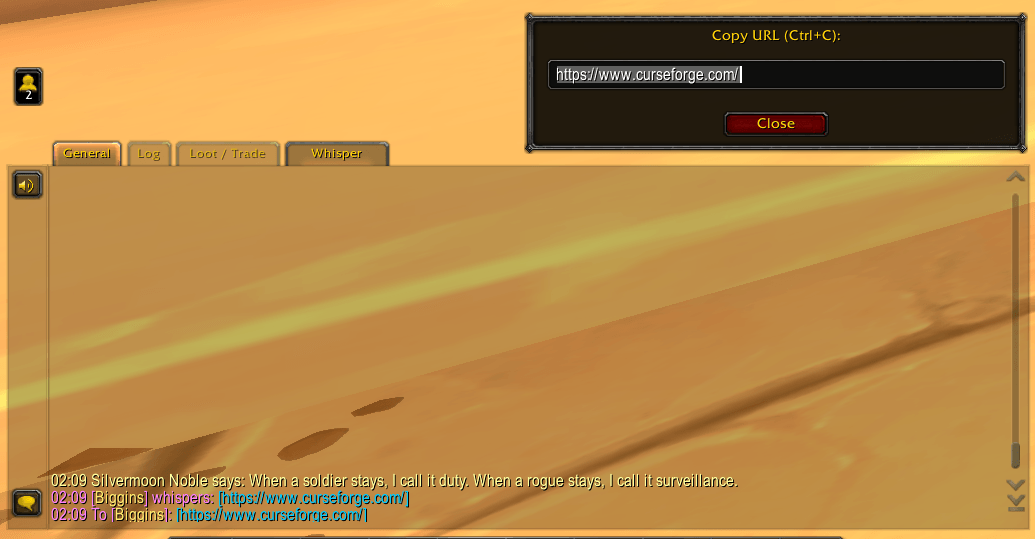
ChatLink Biggins is an ultra-lightweight, dedicated World of Warcraft addon designed to make web links shared in chat clickable for instant, frictionless copy-pasting (Ctrl+C -> Enter).
Why ChatLink Biggins?
Many legacy chat addons bundle dozens of megabytes of unwanted features (custom spellbook journals, minimap icons, language filters, chat re-skinning) that conflict with modern Blizzard Edit Mode and risk throwing Lua errors.
ChatLink Biggins does exactly one job with zero bloat and 100% native Blizzard styling.
Key Features
- Draggable Blizzard Factory Dialog: Authentic Blizzard factory dialog frame that is freely draggable with left-click. Position is automatically remembered across sessions and reloads, with a 1-click
[ Reset Position ]button in settings. - Single-Pattern Protocol Isolation: Matches standard web protocols (
https://andhttp://) with strict boundary isolation ([^%s|]+). Eliminates pattern collisions, chat loops, and false positives completely. - Sentence Punctuation Stripping: Automatically trims trailing punctuation (
.,;:!?)[]'") so links copied at the end of sentences remain clean and valid in your browser. - Pipe Escape Protection: Safely respects WoW's internal
|escape sequences, ensuring item links, spell links, and player names immediately adjacent to a URL are never corrupted. - Fast 0.001ms Exit: For messages without web links, the filter exits immediately via substring check without creating any string allocations or garbage collector churn.
- Modern Blizzard Canvas Settings UI: Integrated directly into
Game Menu -> Options -> AddOns -> Biggins AddOns -> ChatLinkwith top-right[ Defaults ]button, master toggle, and dynamic control attenuation. - Zero Overhead & Zero Dependencies: Under 30 KB memory footprint, 0.00% CPU overhead, and zero external Ace3 bloat.
How It Works
- A player shares a web link starting with
https://orhttp://in any chat channel (Guild, Raid, Party, Whisper, Communities, Say, or General). - The link is automatically highlighted in cyan (e.g.
[https://discord.gg/xyz]). - Click the link in chat -> A native Blizzard popup opens with the full URL already selected and focused.
- Press
Ctrl+Cand tapEnter(which dismisses the box). - Paste the link directly into your web browser!
Slash Commands
Commands are available via /chatlink or /clb:
| Command | Action |
|---|---|
/clb |
Opens the settings panel in the game menu |
/clb toggle |
Toggles ChatLink Biggins master enable state |
/clb brackets |
Toggles [ ] brackets around chat links |
/clb reset |
Resets popup dialog position to screen center |
/clb status |
Displays current addon configuration in chat |
/clb defaults |
Restores all settings to default values |
Part of the Biggins AddOns Suite
ChatLink Biggins is part of the Biggins AddOns suite for World of Warcraft. Every addon in the suite is built from the ground up for maximum CPU efficiency, zero garbage collector churn, and seamless native Blizzard UI integration.
ChatLink Biggins Team