LazySpeed Biggins
- By
High-performance, zero-allocation flight and swim speedometer featuring a sleek nameplate HUD, modular visibility triggers, and classic Blizzard Gold styling.
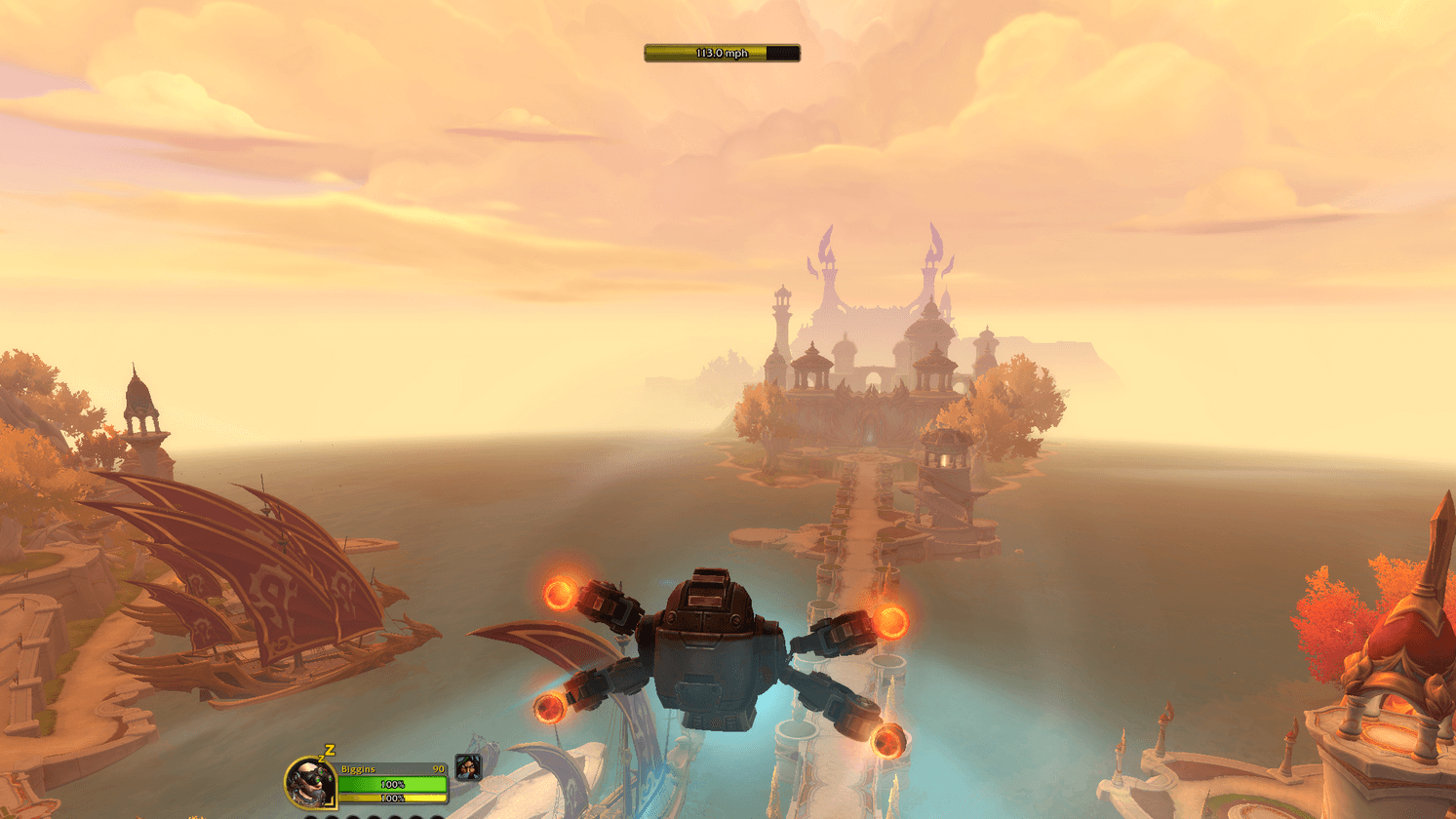
HUD.png
Description
LazySpeed Biggins
LazySpeed Biggins is an ultra-lightweight, high-performance flight, swim, and movement speedometer for World of Warcraft: Midnight and The War Within.
Engineered with a sleek, modern nameplate-style HUD and a classic Blizzard Metallic Gold border, it provides real-time velocity telemetry without ever cluttering your screen or impacting your frame rates.
Credits & Attribution
This project is a modernized, ground-up performance re-architecture of the classic addon LazySpeed by Darthterac.
Huge thanks and full credit go to Darthterac for creating the original concept and mathematical foundation! If you enjoy this addon, please check out and support Darthterac's original work.
What Makes LazySpeed Biggins Different?
While traditional speedometers run continuous background timers that churn through memory, LazySpeed Biggins was built from the ground up for extreme CPU efficiency and zero memory overhead:
- Zero-Allocation C++ Rendering Pipeline: Formats speed telemetry directly inside Blizzard's native C++ engine via
FontString:SetFormattedText()using pre-cached static format string pointers. It generates 0 bytes/sec of Lua garbage, eliminating micro-stutters. - True Script Detachment Engine (
OnUpdate = nil): When you are on foot, standing still, or in combat, the update script is completely detached from the game engine. Zero background CPU cycles are consumed while raiding, doing dungeons, or idling in town. - Stationary "Dirty Check": Automatically skips redundant text reformatting and status bar redraws while standing still.
- Memory Footprint: Less than 20 KB total memory usage.
Key Features
- Sleek Nameplate HUD: A compact 180px x 20px status bar featuring centered high-contrast typography (
12pt OUTLINE) overlaid directly on the dynamic fill bar for a clean, modern aesthetic. - Modular Visibility Triggers: Choose exactly when your speedometer wakes up:
- Show While Flying / Skyriding: Automatically appears during Skyriding, Dragonriding, and Steady Flight.
- Show While Swimming: Automatically tracks swim speed and aquatic mount velocity (Seahorses, Turtles, Otters).
- Show While on Ground: Tracks on-foot movement and ground mounts.
- Hide During Combat (Killswitch): Instantly hides and detaches during combat to keep your interface clean.
- Contextual Color Grading:
- Flight & Ground: Smoothly transitions from Cruising Green -> High-Speed Yellow -> Max Thruster Red.
- Swimming: Dynamic Deep Ocean Blue -> Electric Cyan gradient.
- Fully Draggable: Simply left-click and drag the frame anywhere on your screen. Your custom position saves automatically across sessions.
In-Game Configuration
Configure your preferences via the native Blizzard Settings panel (Game Menu -> Options -> AddOns -> LazySpeed Biggins) or by typing:
/lazyspeed(or /lsb)
Configurable Options:
- Speed Units:
- Miles per Hour (mph) (Default)
- Yards per Second (y/s)
- Kilometers per Hour (km/h)
- Percentage (%)
- Custom Sizing Sliders:
- Bar Width: 100px - 300px (1px step)
- Bar Height: 14px - 36px (1px step) with dynamic proportional font scaling
- Behavioral Triggers:
- Toggle Skyriding / Flight visibility
- Toggle Swimming visibility
- Toggle Ground movement visibility
- Toggle In-Combat hide killswitch
- Reset to Defaults:
- In-panel button or
/lazyspeed defaultsto restore all options to defaults.
- In-panel button or
Installation
CurseForge App (Recommended)
Simply search for LazySpeed Biggins in the CurseForge App and click Install.
Manual Installation
- Download the latest release
.zip. - Extract the archive into your World of Warcraft AddOns folder:
World of Warcraft\_retail_\Interface\AddOns\- Ensure the folder is named
LazySpeedBigginsand containsLazySpeedBiggins.toc. - Launch World of Warcraft (or type
/reloadin-game).
License
Licensed under the MIT License - free to use, modify, and distribute.
LazySpeed Biggins Team