SummonPet Biggins
- By
Ultra-lightweight, event-driven companion pet summoner featuring zero movement CPU usage, smart stealth and instance dismissal, and native Blizzard UI integration.
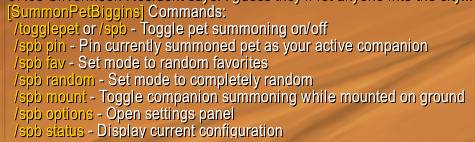
commands.png
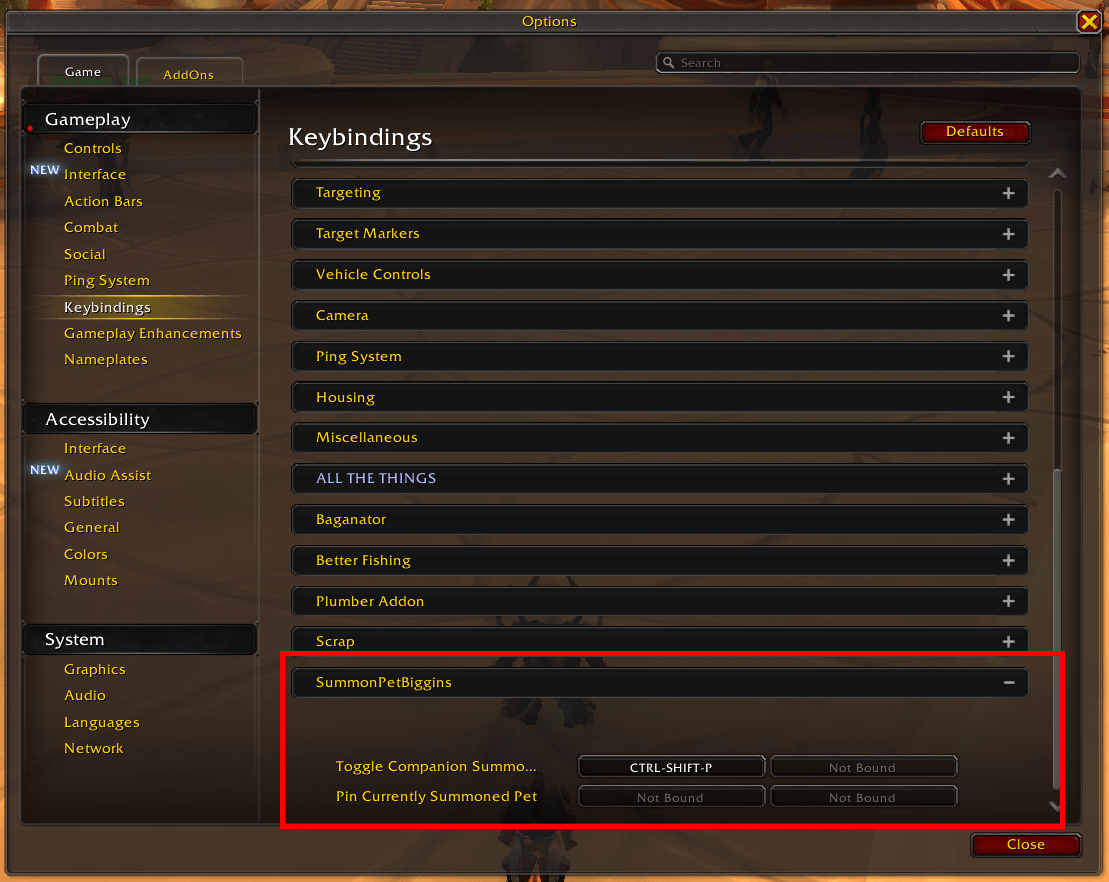
keybinds.png
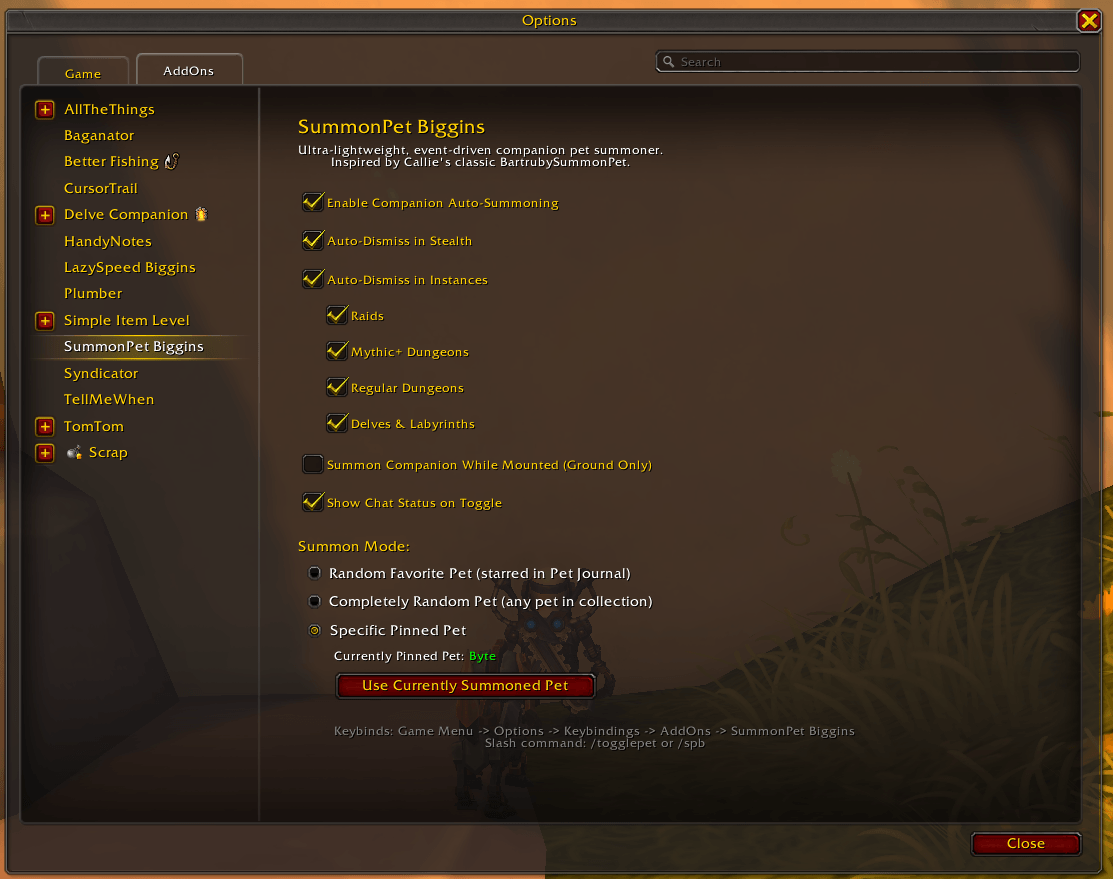
options.png
Description
SummonPet Biggins
SummonPet Biggins is an ultra-lightweight, high-performance companion pet summoner for World of Warcraft: Midnight and The War Within.
Engineered from the ground up to keep your favorite companion pet by your side automatically, it delivers flawless pet management with 0% movement CPU usage, zero library bloat, and clean native Blizzard UI integration.
Credits & Attribution
This project is a modernized, ground-up performance tribute inspired by the classic addon BartrubySummonPet by Callie (Caliaha).
Huge thanks and full credit go to Callie for creating the original concept and keeping companion pet summoning alive for so many years! If you enjoyed the classic Bartruby utility, you will feel right at home with SummonPet Biggins.
What Makes SummonPet Biggins Different?
While legacy companion summoners rely on continuous movement key hooking (MoveForward, Strafe, Turn) or heavy Ace3 framework overhead, SummonPet Biggins was built for extreme CPU efficiency and zero UI clutter:
- 0.00% Movement CPU Usage: Purely event-driven. It completely eliminates movement and camera key hooks. The addon sleeps dormant while you run, jumping into action for mere microseconds only when game state changes (dismounting, dropping combat, exiting stealth, or zoning).
- Zero PetJournal Taint: Never touches, hooks, or alters Blizzard's native Pet Journal frames. It operates with 100% execution cleanliness and is fully compatible with pet collection addons like Rematch.
- Zero External Library Bloat: Standalone pure Lua with no Ace3 dependencies, weighing in at under 20 KB total memory usage.
- Real-Time Setting Reactivity: Toggling options inside instances immediately updates your pet's summoned state in real time without requiring a
/reload.
Key Features
- Native Game Engine Keybinding: Binds directly in Game Menu -> Options -> Keybindings -> AddOns -> SummonPetBiggins. Assign hotkeys to toggle auto-summoning or pin your active pet without consuming action bar slots or writing custom macros.
- 1-Click Pet Pinning: Summon whatever companion pet you want in-game, then click
[ Use Currently Summoned Pet ](or type/spb pin) to lock it in. No searching through thousands of journal entries or dragging icons. - 3 Flexible Summon Modes:
- Random Favorites: Automatically summons a random favorite companion from your Pet Journal stars.
- Completely Random: Summons any pet from your entire collection.
- Specific Pinned Pet: Keeps your chosen companion (e.g. Byte) summoned at all times.
- Granular Instance Auto-Dismiss: A master killswitch with dedicated, indented sub-toggles ordered by challenge level:
- Raids (Default: ON)
- Mythic+ Dungeons (Default: ON - keeps screen clutter zero on Mythic dungeon entry)
- Regular Dungeons (Default: OFF)
- Delves & Labyrinths (Default: OFF)
- Smart Stealth Dismissal: Automatically dismisses your companion the instant you enter Stealth (Rogues and Druids) and re-summons upon exiting stealth.
- Mounted Summoning & Touchdown Watcher: Optional "Summon Companion While Mounted (Ground Only)" setting allows your companion to run alongside ground mounts. Features an intelligent touchdown watcher that seamlessly summons your pet the instant you touch down from flight while continuously running.
In-Game Configuration
Configure your preferences via the native Blizzard Settings panel (Game Menu -> Options -> AddOns -> SummonPet Biggins) or by typing:
/togglepet
(or /spb options)
Slash Commands:
| Command | Action |
|---|---|
/togglepet or /spb |
Toggle companion auto-summoning on or off |
/spb pin |
Pin your currently summoned pet as your active companion |
/spb fav |
Switch summon mode to Random Favorites |
/spb random |
Switch summon mode to Completely Random |
/spb mount |
Toggle companion summoning while mounted on the ground |
/spb options |
Open the native settings panel |
/spb status |
Display current addon configuration and zone diagnostics |
/spb help |
Display list of available commands |
Installation
CurseForge App (Recommended)
Search for SummonPet Biggins in the CurseForge App and click Install.
Manual Installation
- Download the latest release
.zipfrom the Files tab. - Extract the archive into your World of Warcraft AddOns folder:
World of Warcraft\_retail_\Interface\AddOns\ - Ensure the folder is named
SummonPetBigginsand containsSummonPetBiggins.toc. - Launch World of Warcraft (or type
/reloadin-game). - Open Game Menu -> Options -> Keybindings -> AddOns -> SummonPet Biggins to assign your hotkeys.
License
Licensed under the MIT License - free to use, modify, and distribute.
SummonPet Biggins Team