Description
Calg's Portals
Making portals for tips? Stop watching chat — let the addon catch your customers.
It reads the Trade and world channels for people asking for a portal, invites the genuine buyers to your party, and casts the right portal with a single click. You keep porting; it keeps the queue full.
What it does
- Never miss a tip. It reacts the instant someone asks, so a "LF portal to IF" that scrolls past while you're busy never costs you a sale.
- It tells you out loud. A spoken "portal request" the moment one needs you, so you can watch your cooldowns instead of the chat window. Three voices to choose from, each with a preview button — and it only speaks when there's really something to do: with auto-invite on it waits until they've actually joined, so a declined invite never makes a sound. Mute it any time with
/port sound. - And nudges you if you're tabbed out. The same moment flashes the taskbar and opens the window if you'd closed it, so a customer can't arrive unnoticed. The flash is separate from the voice — mute one and keep the other.
- Clears up after itself. A finished customer files into history on its own after a few seconds rather than waiting on a Done click. Set it to 0 if you'd rather close every one by hand.
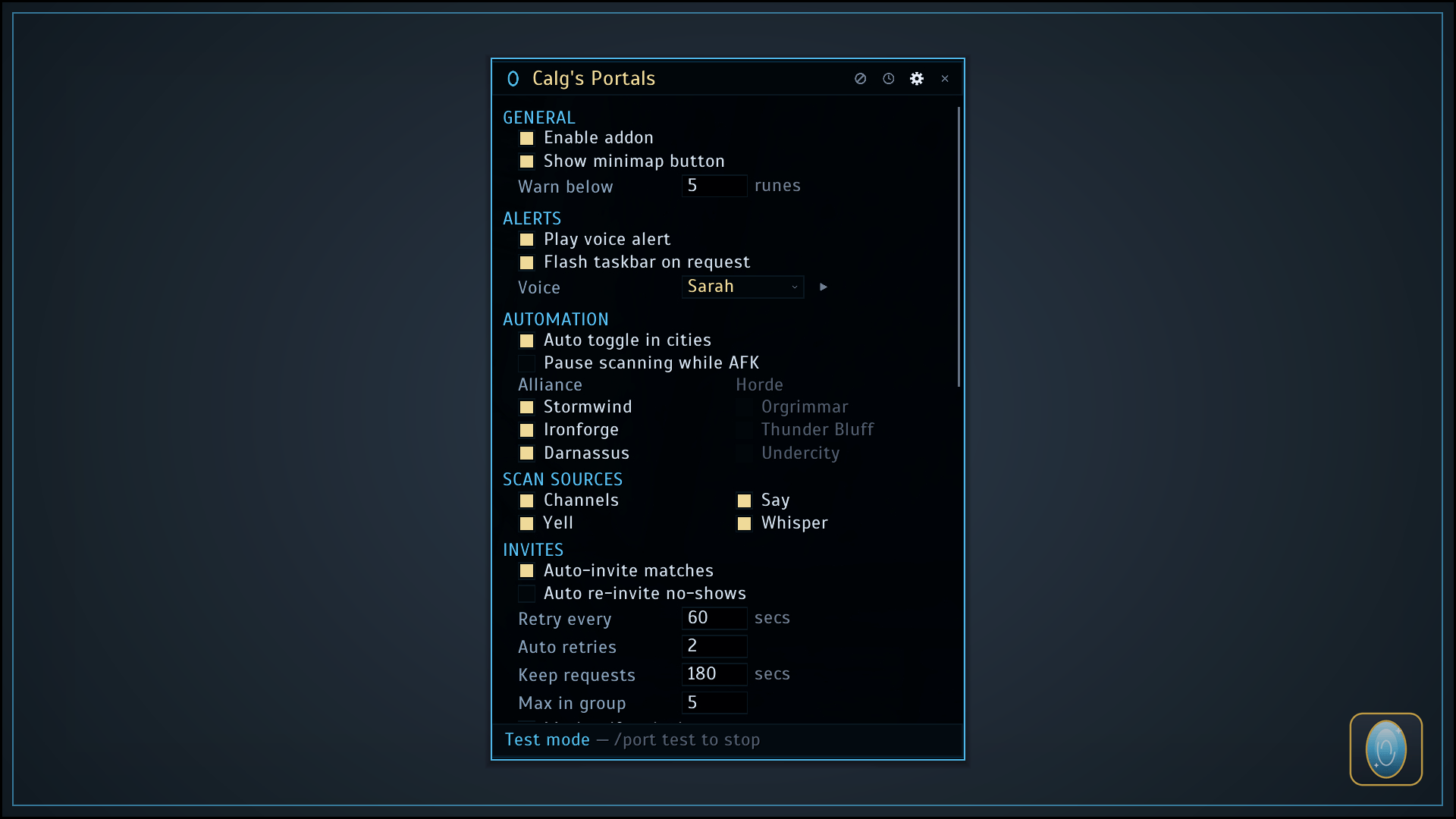
- Knows where they want to go. It reads the requested city out of the message — Stormwind, Ironforge, Darnassus, Orgrimmar, Thunder Bluff or Undercity — and lights that portal on the row. No city named? Every portal you know lights up — and it can whisper to ask them outright the moment they join, so you're not guessing.
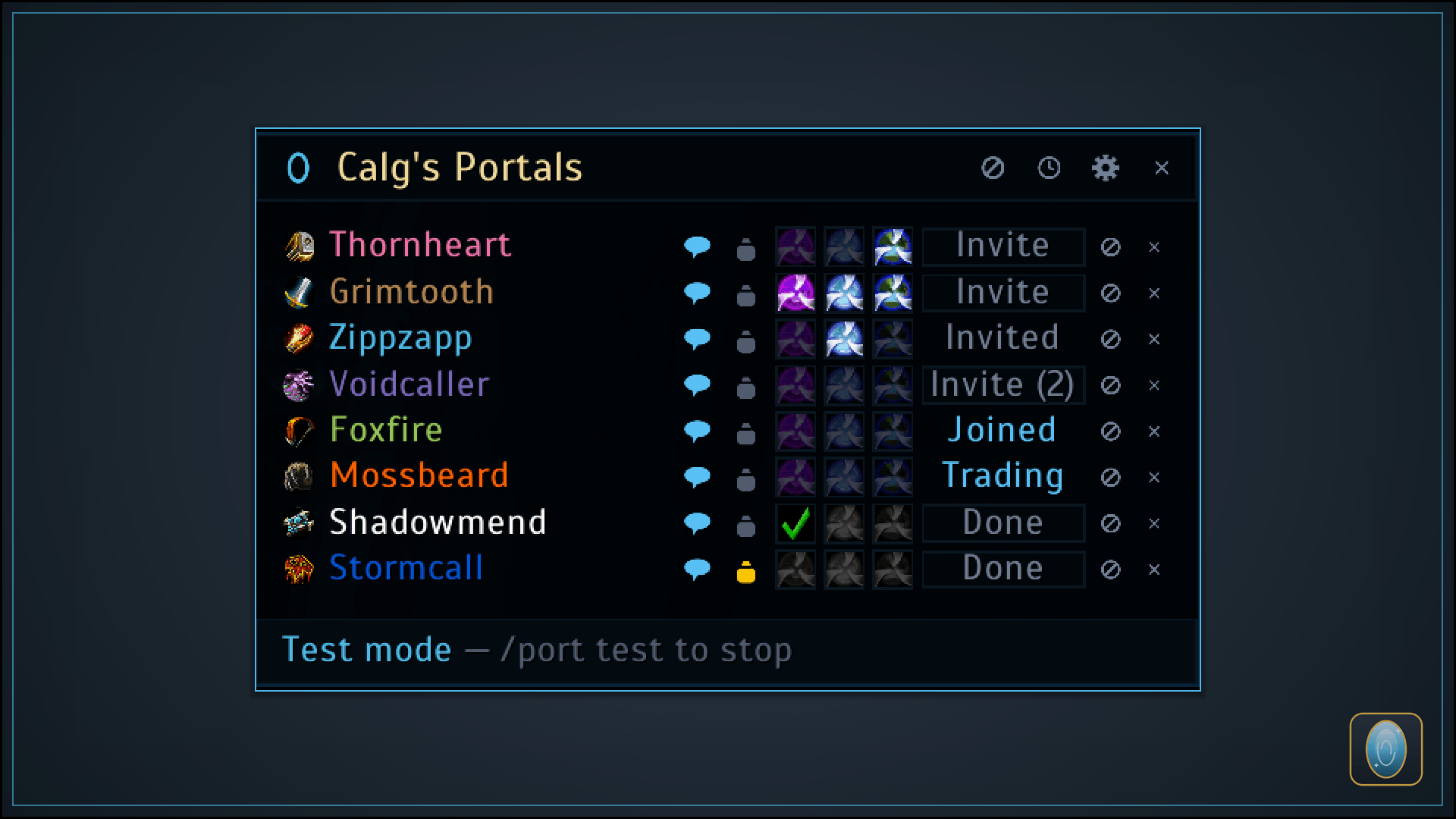
- One-click casting. Every row shows your faction's three portals: the requested one lit, the others dimmed but ready if they change their mind, each with a live cooldown countdown. Once they take the portal it turns into a green tick. (Casting is always your click — never automatic.)
- Smart matching, not spam. It only bites on people actually looking for a portal — other mages advertising portals, "portals up" spam and price adverts are filtered out.
- Invite from the row — or go hands-free. Every request appears with an Invite button; flip on auto-invite and the button presses itself. Busy in another group, or just slow to answer? The row hands the button straight back so you can try again the moment they're free — or switch on auto re-invite and let it keep nudging them for you.
- Follow every sale at a glance. Each row walks the whole story — Invited, Joined, Trading, Done — with what they said, where they're headed, and the tip they've paid, all on hover. Click the tip icon to open a trade with them on the spot.
- The queue never moves under your cursor. Rows sit in the order people asked and stay there for the whole job, so the button you're reaching for is still there a second later. Only finished customers drop to the bottom, ready for a Done.
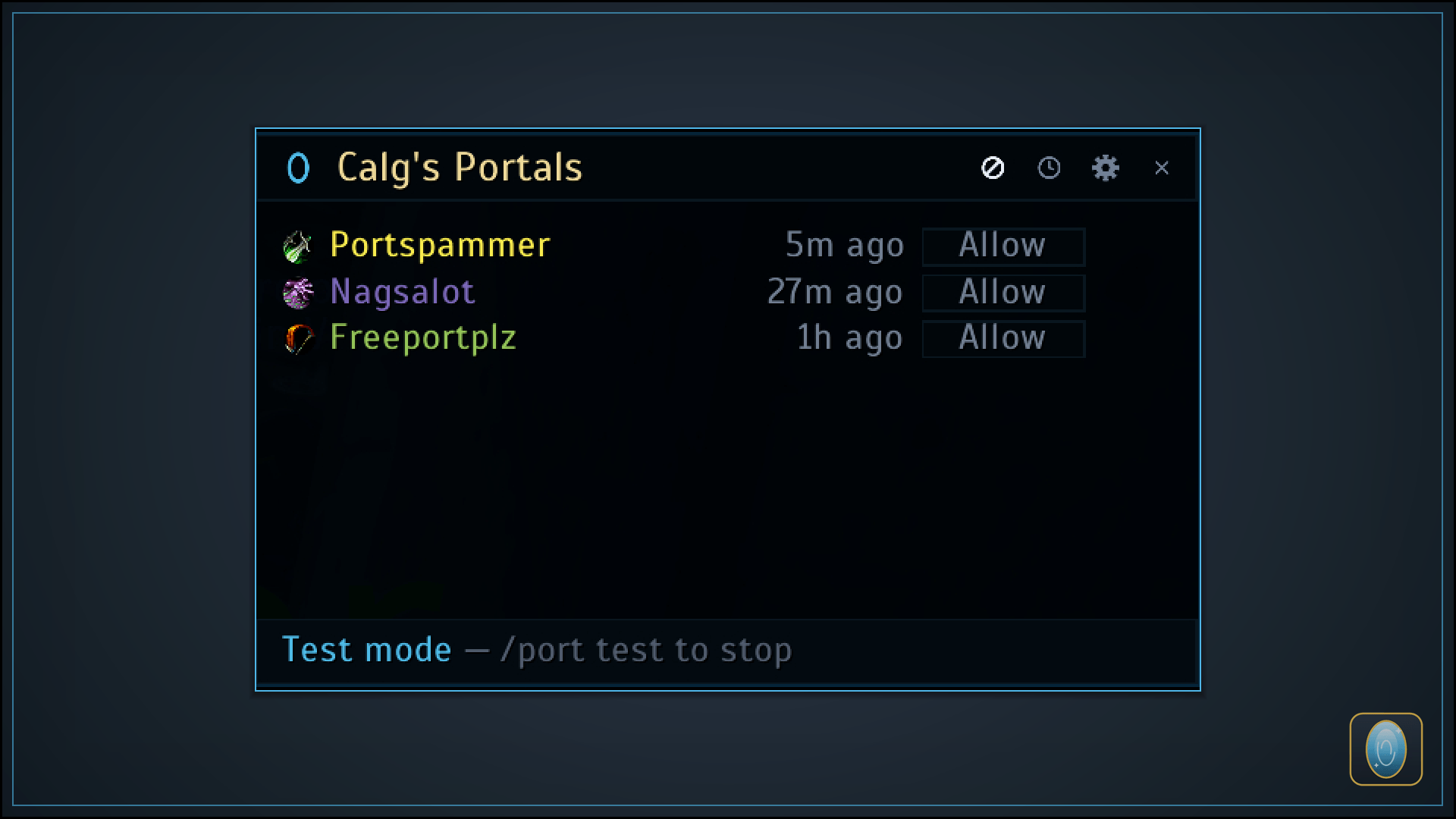
- Two ways to say no. Dismiss a request with the × and they're free to ask again later. Use the ⊘ instead and they're also blocked, so a repeat shout in Trade can't reopen the row — silently, because whispering someone you've stopped listening to makes no sense. How long a block lasts is yours to set: until the end of the day (the default), 24 hours, 7 days, 30 days, or forever. The matching button in the title bar lists everyone you've blocked and when each one lifts, with Allow to let one back in — or one Clear in the settings to lift the lot.
- Never caught short. The footer counts the Rune of Portals in your bags and turns red when you drop below your warning level, so you find out you're running dry before a customer does.
- A running tally of your day. The footer counts requests seen, players served and gold tipped — today, across reloads and relogs — with hover breakdowns like average, largest and smallest tip.
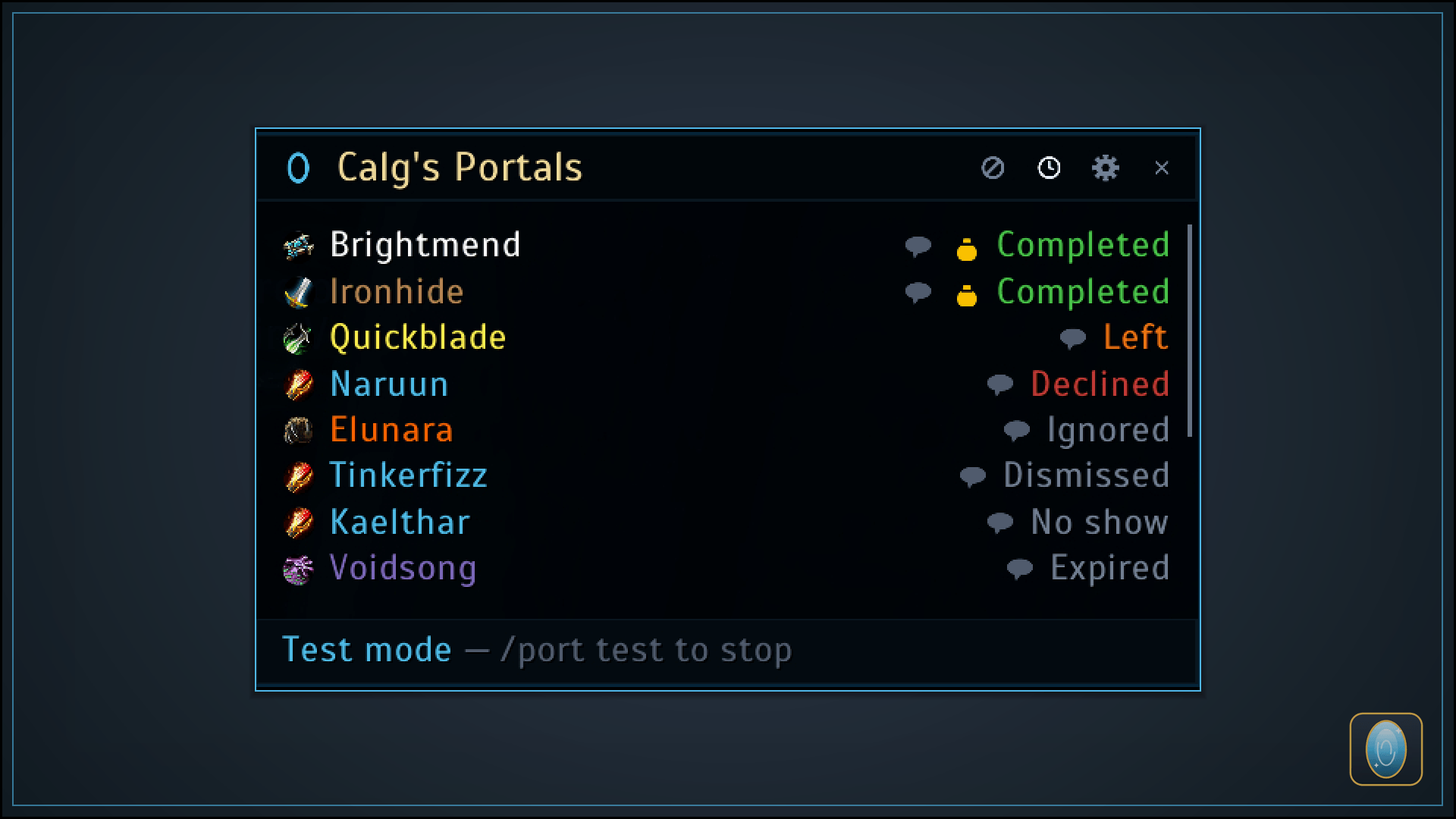
- A history book. The clock button replays past customers — who they were, what they asked for, what they tipped, and how it ended: Completed, Left, Declined, No show, Expired, Dismissed or Blocked. Every row carries the ⊘ as well, so the third time somebody leaves without paying you can block them from there instead of waiting for them to ask again. Kept as long as you choose (90 days out of the box), and binned in one click when you want a clean slate.
- Finish on your terms. Customers stay listed until you hit Done — which thanks them, removes them from the group, and files the sale into history. No one is ever auto-kicked.
- Whispers on autopilot. Add a message, pick the moment it fires — invite sent, joined, portal cast, portal taken, tipped, finished and a dozen more — and write it in your own words. It ships silent, so nothing goes out that you didn't write, and you can hang two or three lines off the same moment to send them one after another. Drop in a token like
{name}or{dest}and it fills itself in as it sends. - Easy to find in a crowd. Optionally marks you with a raid icon (star by default) the moment a customer joins, so they walk straight to your portal.
- Knows when to work. It only runs while you're a mage leading your group in a capital city, and quietly pauses when you head out to level or raid — or the moment you go AFK, so you're never inviting customers you're not there to serve. It picks straight back up when you are.
Lightweight, movable, and drawn from scratch to feel at home in Classic.
Message tokens
Any whisper you write can carry tokens, which are swapped for the real thing as the message is sent. Write them in curly braces:
Hi {name}, portal to {dest} going up now — {me}
| Token | Becomes |
|---|---|
{name} |
The customer's name |
{me} |
Your name |
{dest} |
The city they asked for, or Unknown if they didn't say |
{tip} |
The gold in the trade that just completed, e.g. 2g 50s |
{tiptotal} |
Everything they've tipped you this request |
{queue} |
How many customers are in the queue right now |
A token with nothing to show yet — a tip before they've traded you anything — simply disappears, so a message never goes out with a gap in it. Unrecognised tokens vanish the same way.
Getting started
Type /port or click the minimap button to open it, set your cities and messages, and choose approve-first or auto-invite — then go make portals. /port help lists everything, and /port test runs a full simulated queue (live view and history) so you can watch the whole flow safely before you go live.
It ships switched off, so a fresh install never starts answering people on its own. Turn it on with /port on, or shift-click the minimap button -- that's the master switch, remembered per character, and separate from whether the window happens to be open. Once it's on the window comes to you: when a request arrives, and when you walk into a city it's watching.
Built for WoW Classic Era, mages only. Your settings, messages, daily tally and history are saved between sessions, and no one is ever auto-kicked — invites are always yours to manage. Found a bug or have an idea? Leave a comment — feedback is always welcome.
Font
The panels are drawn in Scada by Jovanny Lemonad, bundled with the addon and used for every
label in it, so the layout looks the same on your machine as it does on mine. Nothing outside the
addon is touched. Licensed under the SIL Open Font License 1.1 — the
full text ships in Media/Fonts/OFL.txt.