BPS - Bronze per Second
- By
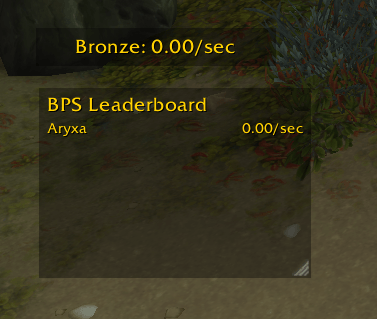
Lightweight, movable HUD that tracks your Bronze earnings in real time. View per-second, per-minute, per-hour rates, or your session total, and optionally show a resizable leaderboard for party/raid members who also use the addon.
bps-0.2.0.png
Description
BPS - Bronze per Second
Usage
- The BPS window shows:
Bronze: <value>with/sec,/min,/hour, or no suffix for total. - Right-click the window to cycle units (sec -> min -> hour -> total).
- Drag the window (when unlocked) to reposition it.
Slash commands
/bpsor/bps help— show help/bps unit sec|min|hour|total— set display unit/bps lock— lock the frame to prevent moving/bps unlock— unlock the frame to allow moving/bps reset— restart session tracking (resets baseline and time)/bps show— show the window/bps hide— hide the window
Leaderboard
- Default is off (hidden).
/bps lb show— enable and show the leaderboard window/bps lb hide— disable and hide the leaderboard window/bps lb unit sec|min|hour|total— set leaderboard display unit (sorting is descending by the selected metric)/bps lb limit <n>— set how many rows are visible; window resizes accordingly (mouse-wheel to scroll if there are more rows)
When visible, the leaderboard always shows your own stats even if you are solo (not grouped).
Notes
- Rate is averaged over your current session (from login or last
/bps reset). - Bronze is tracked using Blizzard currency info when available, with chat-based fallback to catch immediate gains.
- Leaderboard shows group/raid members who also run this addon. Entries update every ~3 seconds via addon messages and expire if stale.
- The leaderboard window is resizable (drag the corner). Use the mouse wheel to scroll.
- If you are not in a group, the leaderboard will show only your entry.
BPS - Bronze per Second Team