BGStatsCopy
- By
A lightweight World of Warcraft addon that lets you instantly copy battleground or arena scoreboard data into a clean, tab‑separated text format — perfect for spreadsheets, logs, analysis, or PvP content creation.
CopyStats3.png
COPYSTATS1.png
Description
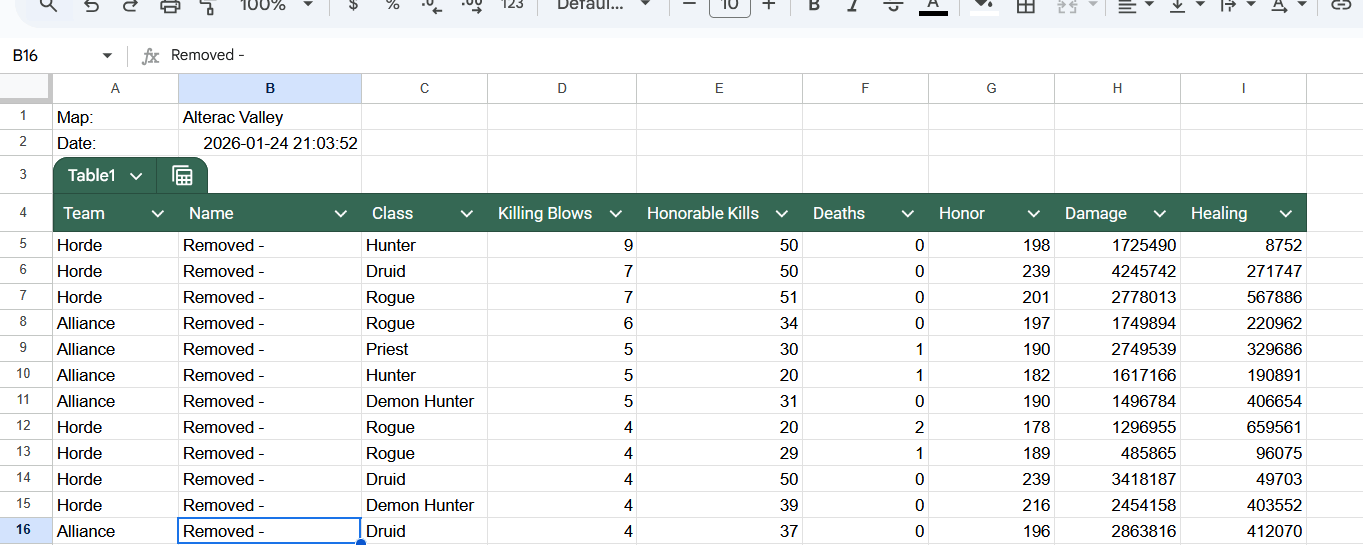
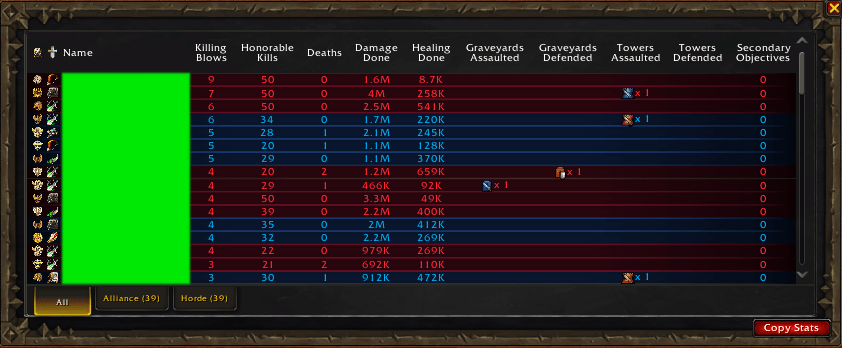
BGStatsCopy adds a **“Copy Stats”** button directly onto the scoreboard and match results screen. With one click, you get a fully formatted export of all players, including damage, healing, KBs, HKs, deaths, honor, and team.
---
## ⭐ Features
- Adds a **Copy Stats** button to:
- Modern PvP Scoreboard
- Classic WorldStateScoreFrame
- End‑of‑Match Results Screen
- `/bgcopy` to open the export window anytime
- `/bgcopyoffset X Y` to adjust the button’s position (useful for custom UI layouts)
- Clean, scrollable, movable export window
- Automatically highlights all text for quick **Ctrl+C** copying
- Outputs a **tab‑separated table** ideal for:
- Excel / Google Sheets
- Data analysis
- PvP logs
- Guild reports
- Content creation
- Works in **battlegrounds and arenas**
- Lightweight and zero‑configuration
---
## 📋 How It Works
1. Open the scoreboard (`H`) or wait for the match results screen.
2. Click **Copy Stats**.
3. A window appears with all battleground data formatted cleanly.
4. Press **Ctrl+C** to copy.
5. Paste anywhere (Discord, Sheets, Notepad, etc.).
You can also type:
`/bgcopy`
…to open the export window manually.
If your UI addon moves the scoreboard, adjust the button position with:
`/bgcopyoffset X Y`
Example:
`/bgcopyoffset -5 12`
---
## 📊 Exported Data Includes
- Team (Alliance / Horde)
- Player name
- Class
- Killing Blows
- Honorable Kills
- Deaths
- Honor gained
- Damage done
- Healing done
- Map name
- Timestamp
All fields are separated by **tabs**, making them sortable in any spreadsheet.
---
## 📦 Installation
1. Download the ZIP.
2. Extract it so your folder looks like:
Interface/AddOns/BGStatsCopy/
BGStatsCopy.toc
BGStatsCopy.lua
3. Restart WoW.
---
## 🧪 Compatibility
- Retail
- Classic Era
- Classic Hardcore
- Cataclysm Classic
- Supports both modern and legacy scoreboards
- Compatible with custom UI addons (ElvUI, TukUI, GW2UI, etc.) via `/bgcopyoffset`
---
## 🛠️ Known Limitations
- Scoreboard must have data loaded (open it once if needed).
- Custom UI skins may require adjusting the button position with `/bgcopyoffset`.
---
## 💻 Author
Gravebear
The BGStatsCopy Team