Preview.png
Description
CharInspectPlus
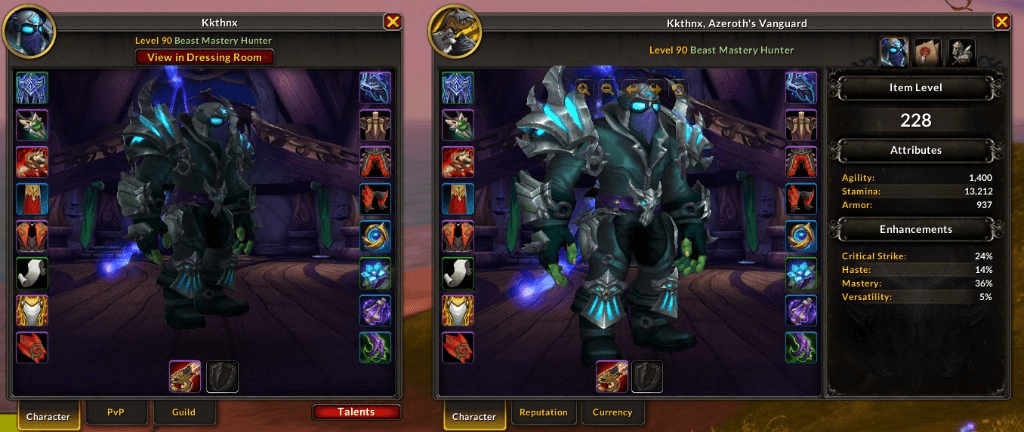
A clean, set-and-forget reskin of the Character and Inspect frames — bigger model, tidier item slots, and a class-themed backdrop, with zero configuration.




Overview
The default Character and Inspect frames waste a lot of space: a small model tucked behind heavy borders, mismatched item-slot sizing, and a plain backdrop. CharInspectPlus quietly rebuilds both into something cleaner and more readable — without changing how they work.
It strips the default clutter, lets the character model fill the whole frame, standardizes every equipment slot to a uniform size, and drops in a class-themed dressing-room background so each character (and inspect target) feels distinct. The stats panel stays exactly where Blizzard put it, just framed by a tidier layout.
- Set-and-forget — no options, no slash commands, no setup. Install it and your frames are better.
- Both frames covered — the same polish is applied to your own Character frame and the Inspect frame.
- Combat-safe — frame resizing is deferred whenever you're in combat, so it never touches a secure frame at the wrong time.
- Midnight-ready — built for the current client, with a defensive guard against the 12.0 Secret Values model so inspecting inside instances can't throw errors.
- Performance-first — pure event-driven setup that runs once when each frame loads, with globals localized for clean, low-overhead code.
Installation
Via an addon manager (recommended)
- CurseForge — search for CharInspectPlus and install.
Manual
- Download the latest release from the Releases page.
- Extract the
CharInspectPlusfolder intoWorld of Warcraft\_retail_\Interface\AddOns. - Restart the game (or
/reloadif already in-game).
There is nothing to configure — CharInspectPlus applies its layout the moment the Character and Inspect frames load.
Getting Started
Just open your Character frame (default hotkey C) or inspect another player. The enhanced layout is applied automatically. That's the whole workflow — there are no commands to learn and nothing to enable.
Features
Character Frame
- Full-size model — the model scene is expanded to fill the inset, with background, border, and overlay draw layers removed for a clean stage.
- Uniform item slots — every equipment button is stripped of its default art and resized to a consistent
37x37, neatly anchored to the edges of the frame. - Class-themed backdrop — the Paper Doll tab swaps in the dressing-room artwork for your class; other tabs fall back to the standard marble background.
- Readable item level — the item-level value is enlarged with a subtle shadow so your iLvl is easy to read at a glance.
- Tidied titles list — the Title Manager list has its row backgrounds cleaned up for a flatter, less noisy look.
Inspect Frame
- Matching polish — the same full-size model, uniform slots, and class-themed background applied to inspected players.
- Smart resizing — the frame grows for the Paper Doll tab and shrinks back for other tabs, with the backdrop updated to match.
- Correctly placed talents button — the talents toggle is re-anchored under the frame and kept at its proper size.
Built for the Current Client
- Combat-aware — any frame resize that would land mid-combat is skipped, since these are secure frames; the layout settles correctly once you leave combat.
- Secret Value safe — unit class lookups used for the class backdrop are guarded against Midnight's Secret Values, so inspecting party members inside dungeons and raids stays error-free.
How It Works
- Wait — the Character module hooks
PLAYER_LOGIN; the Inspect module waits forBlizzard_InspectUIto load viaADDON_LOADED. - Strip — default textures, insets, and borders are removed from the model scene and item slots using a lightweight texture-stripping helper.
- Re-layout — the model is expanded to fill the inset, equipment slots are resized and re-anchored, and the stats/talents elements are repositioned.
- Theme — on the Paper Doll tab, the backdrop is set to the class dressing-room art; switching tabs swaps the size and background to suit.
All of this happens through Blizzard-supported hooks (hooksecurefunc, HookScript) and is gated behind InCombatLockdown() so it never fights the secure environment.
Contributing
Contributions, bug reports, and ideas are welcome! Open an issue or a pull request. When filing a bug, including your client version, the affected frame (Character or Inspect), and a /reload-able repro helps a ton.
Support
Appreciate the work that goes into CharInspectPlus? Consider showing your support:
- PayPal — paypal.me/Kkthnx
- Patreon — patreon.com/Kkthnx
- Battle.net / Balance —
Kkthnx#1105orJRussell20@gmail.com - In-game gold — Kkthnx on Area 52 (US)
License
Released under the MIT License.
Developed and maintained by **Josh "Kkthnx" Russell**. Built with love for a cleaner character screen.
CharInspectPlus Team

Owner