Belphie's Chat
- By
Easier chat for WoW: Forever: short channel tags, shorter names, a time on each line, alerts for words you watch, a history of what you typed that survives a logout, and chat copied out of the game.
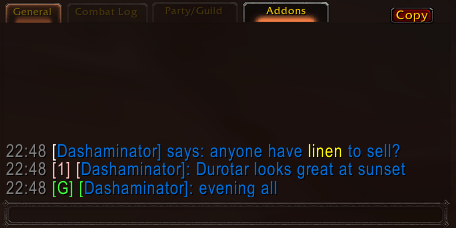
Short channel tags, [1] for General and [G] for guild, a time on each line, and a watched word coloured. Surnames in plain text are cut to the first name, as the game already does in chat links.
Description
Forever's chat is the modern client's chat carrying vanilla's crowds. Trade scrolls past faster than you can read it, channel names take a third of every line, the arrow keys walk your character away while you type, and anything you want to keep has to be screenshotted. Belphie's Chat fixes the parts of that an addon can reach.
What it does
- Short channel tags. "[1]" where the game writes "[1. General - Durotar]", "[2]" for Trade, "[G]" for guild, or letters if you prefer ("[TR]").
- A time on each line, 14:05 or 02:05 PM. If you already use the game's own chat timestamps, it adds none, so a line never shows two times.
- Alerts for the words you watch. Watch "linen" and the word is coloured wherever it is said, in any case, the chat tab it lands in flashes, and a sound plays if you want one. Your own name is watched from the start, and your own lines never set it off.
- A history of what you typed. Up and Down step back through what you sent, slash commands included, and it is still there after a reload or a logout. Left and Right move the cursor. No Alt needed for any of it.
- Shorter names in plain text. The game already cuts surnames from a player's clickable name, but they still show in plain text ("Grumsh Redmane is now being ignored."). Belphie's Chat cuts those too, to the first name or the first name and an initial, and only for names it has seen on a real player, so Thunder Bluff is never taken for a person.
- Copy chat out of the game.
/ccopens the chat tab you are on as your chat shows it, already selected: Ctrl+C, and paste it anywhere./cc allfor every tab, raw mode for the game's own text and links, and a Copy button beside the chat window. - The rest: the chat box above or below the chat window, Tab to complete a name, a longer scrollback, and old lines fading as the game does, after a time you choose, or never.
Every setting is in one window: /bchat, or Settings on its row in the Addon Launcher (/blib), or Options > AddOns >
Belphie's Chat. A word typed in the search at the top of the launcher finds any of them, and a click opens the window
on that page.
What the game keeps for itself
/cast, /use, /target and the game's other protected commands cannot be brought back by an addon: the game
refuses them. So they stay out of Belphie's Chat's history, and the game's own Alt+Up recalls them for the session.
Belphie's Chat says so the first time.
Commands
| Command | |
|---|---|
/bchat |
the settings window |
/bchat help |
every setting as a typed command |
/bchat check |
what Belphie's Chat found on your client, if something looks wrong |
/cc |
copy the chat tab you are on (/cc 1000 for more lines, /cc all for every tab) |
/cc raw |
the game's own text, with its colour codes and links, or as your chat shows it |
/cc button |
show or hide the Copy button |
Requirements
BLib, which the CurseForge app installs with it; keep it updated alongside this addon.
Version support
Built for WoW: Forever. 1.0.0 was tested on its beta: in towns, in a guild and in a dungeon. 1.0.1 adds only the settings search, and was tested on retail (12.1.5): the beta closed on 24 October, and there is no Forever client to test on until launch.
Belphie's Chat Team