Battleground Map Forever
- By
Battleground maps for Arathi Basin, Darkspear Islands, Warsong Gulch and Alterac Valley on WoW Forever: capture and win timers, flag carriers with health, enemy team, your raid on the map and a match history with full scoreboards.
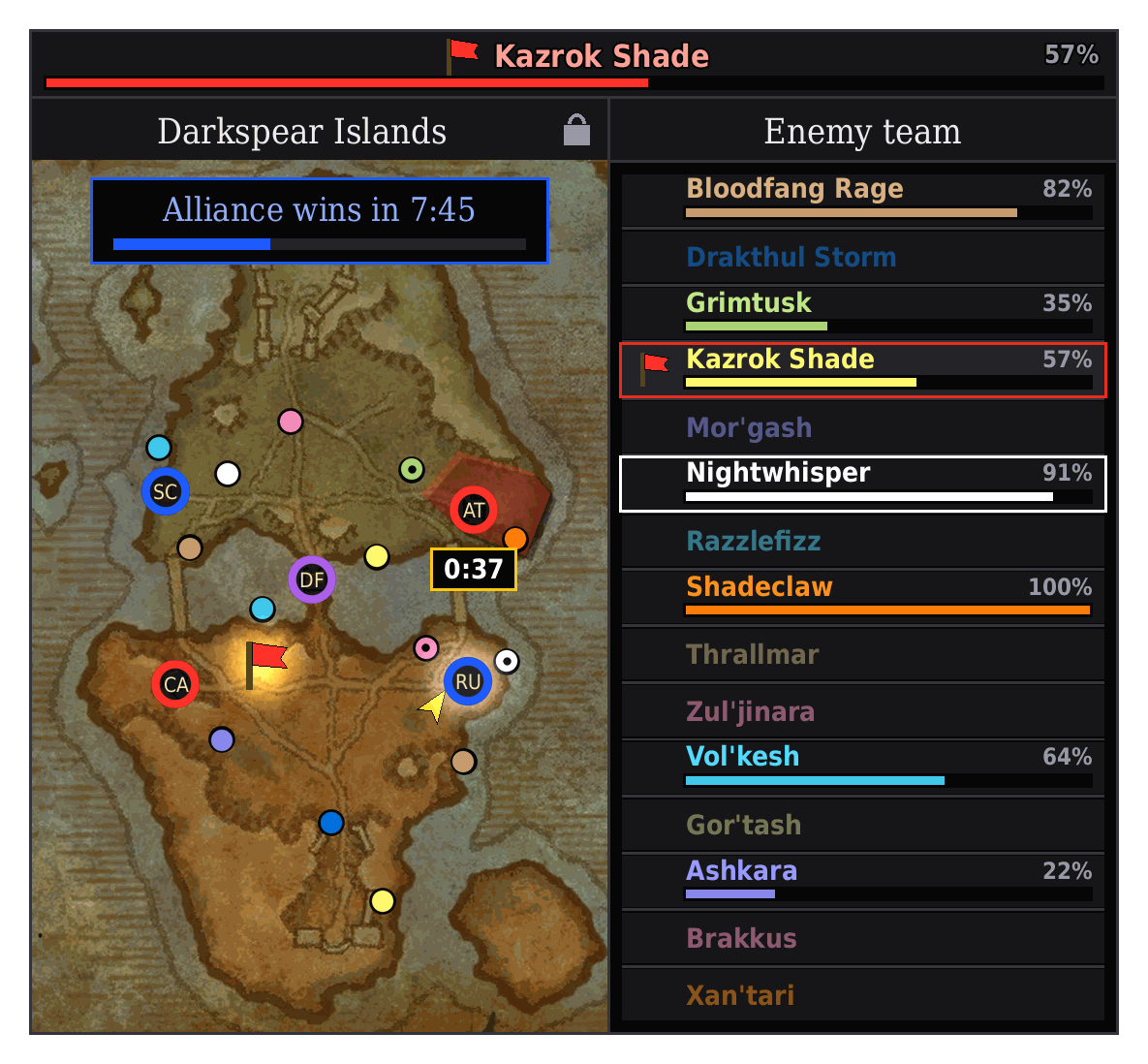
BattlegroundMapForever_Darkspear_dark.png
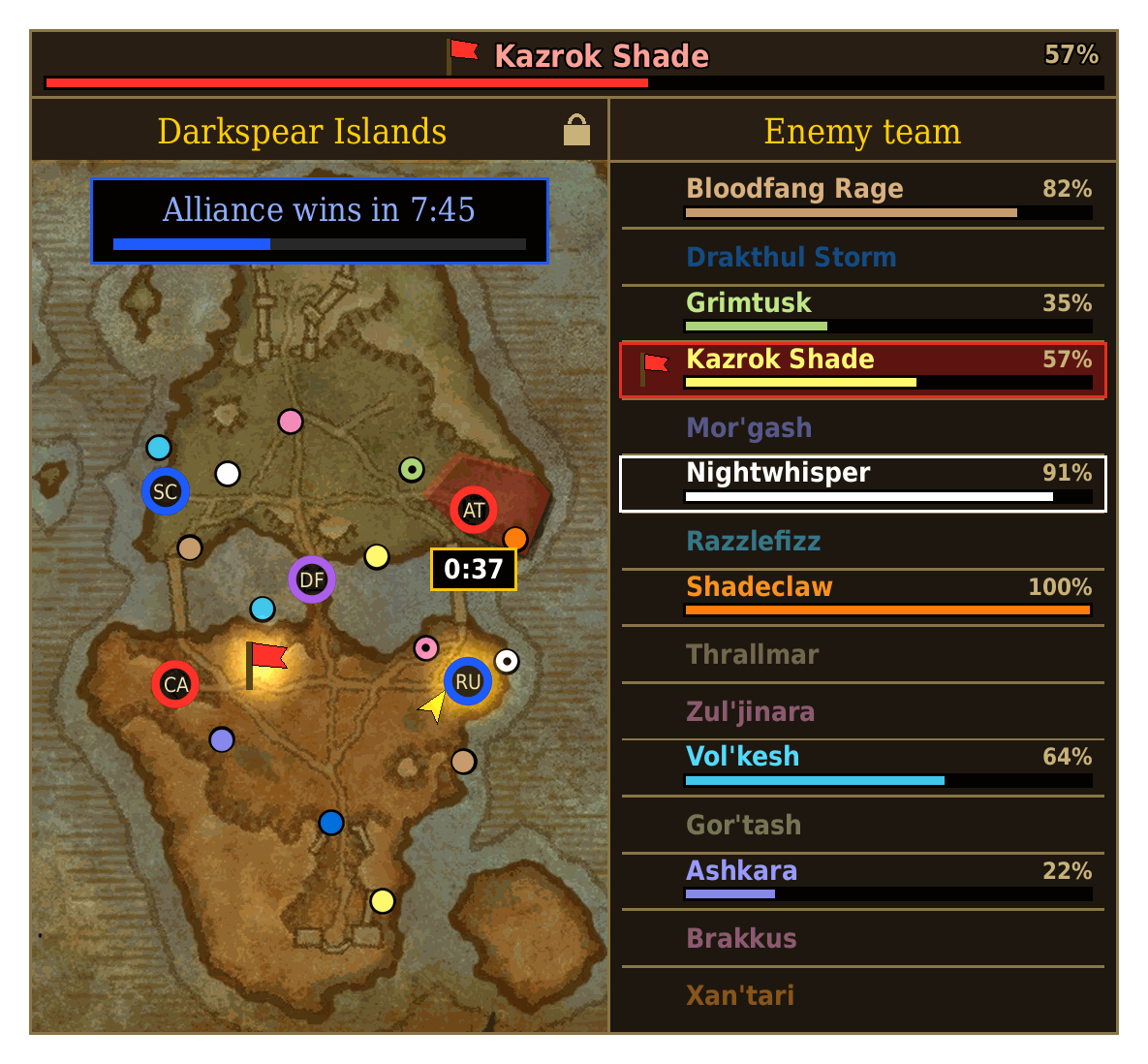
BattlegroundMapForever_Darkspear_classic.png
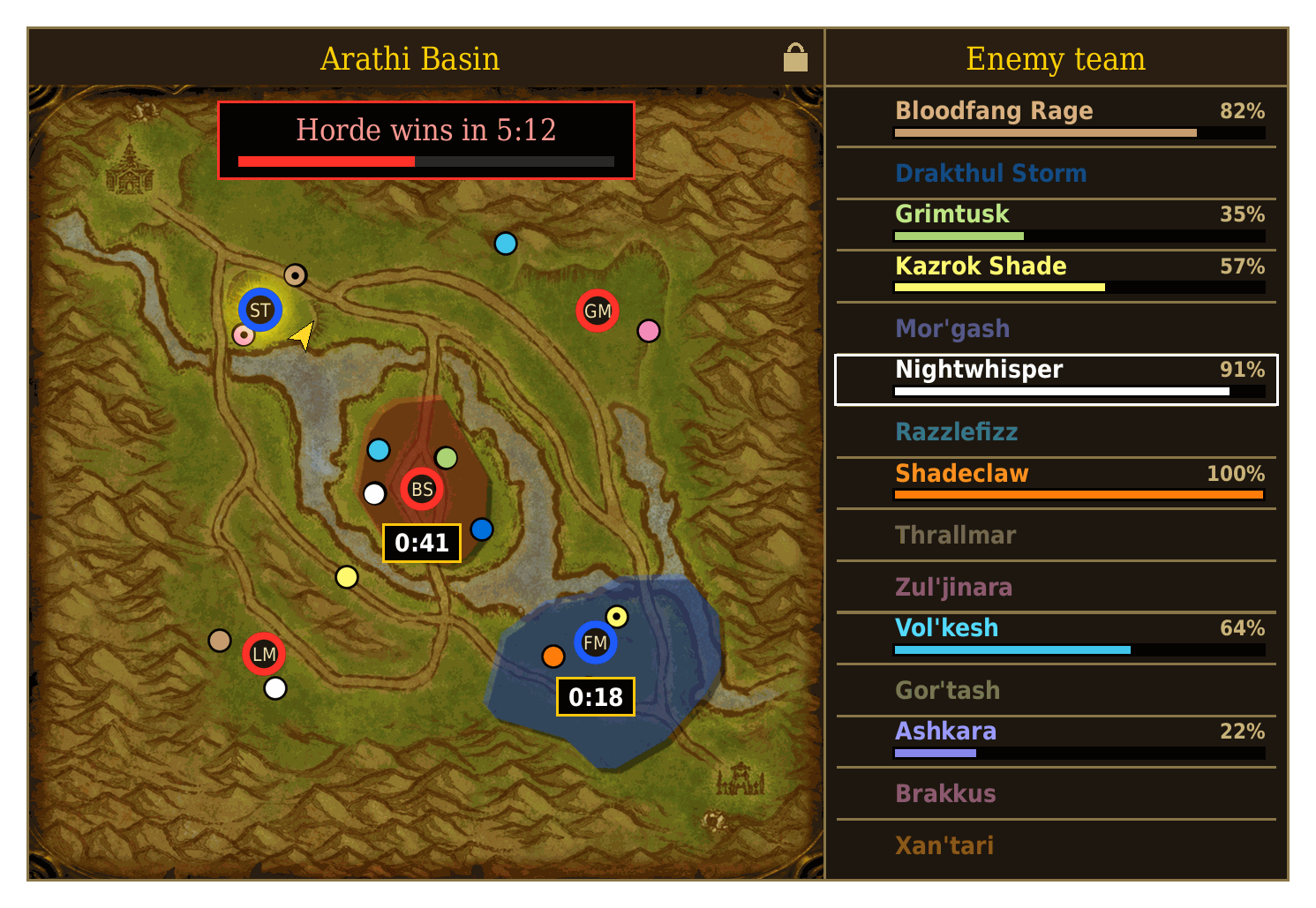
BattlegroundMapForever_Arathi_classic.png
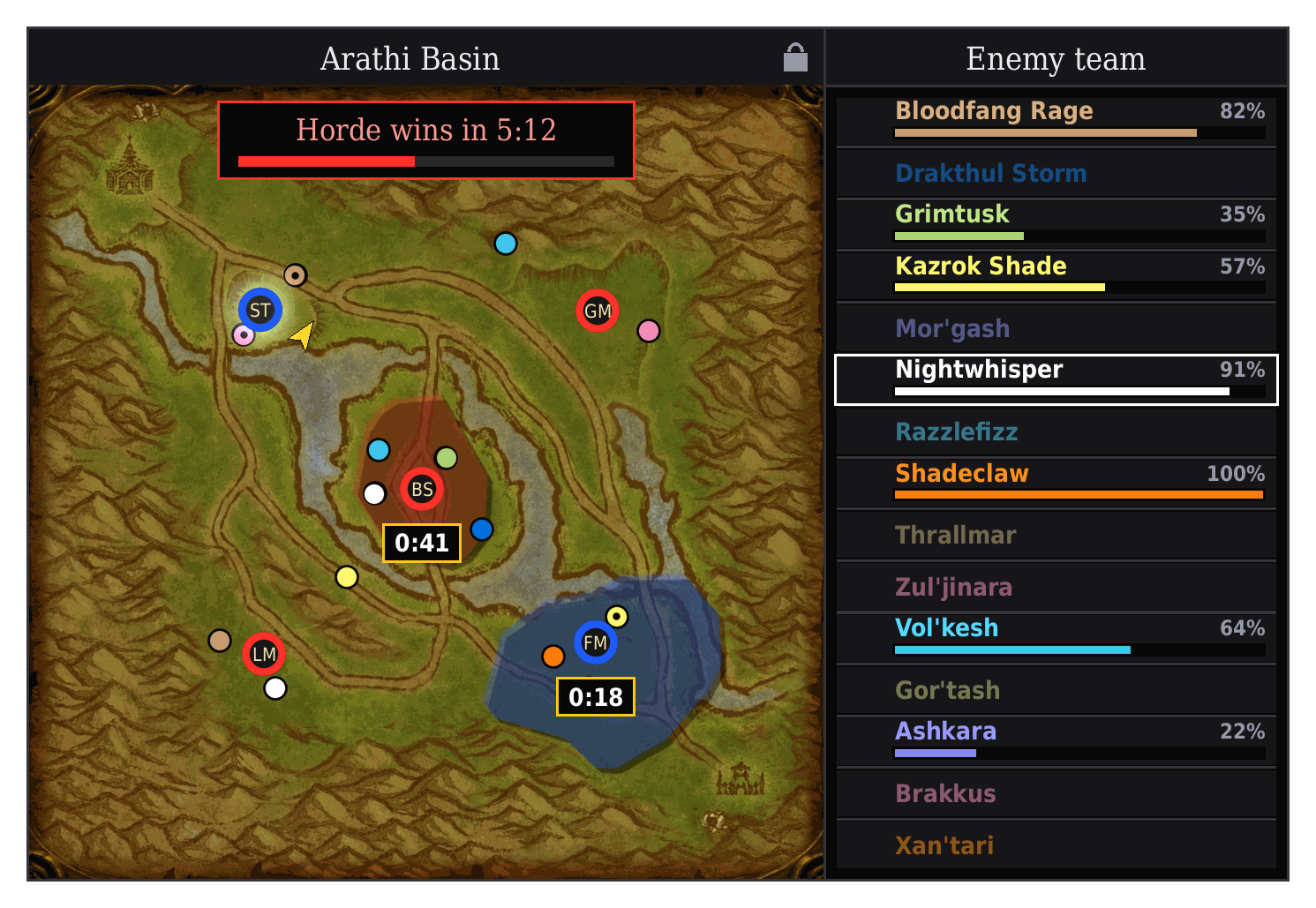
BattlegroundMapForever_Arathi_dark.png
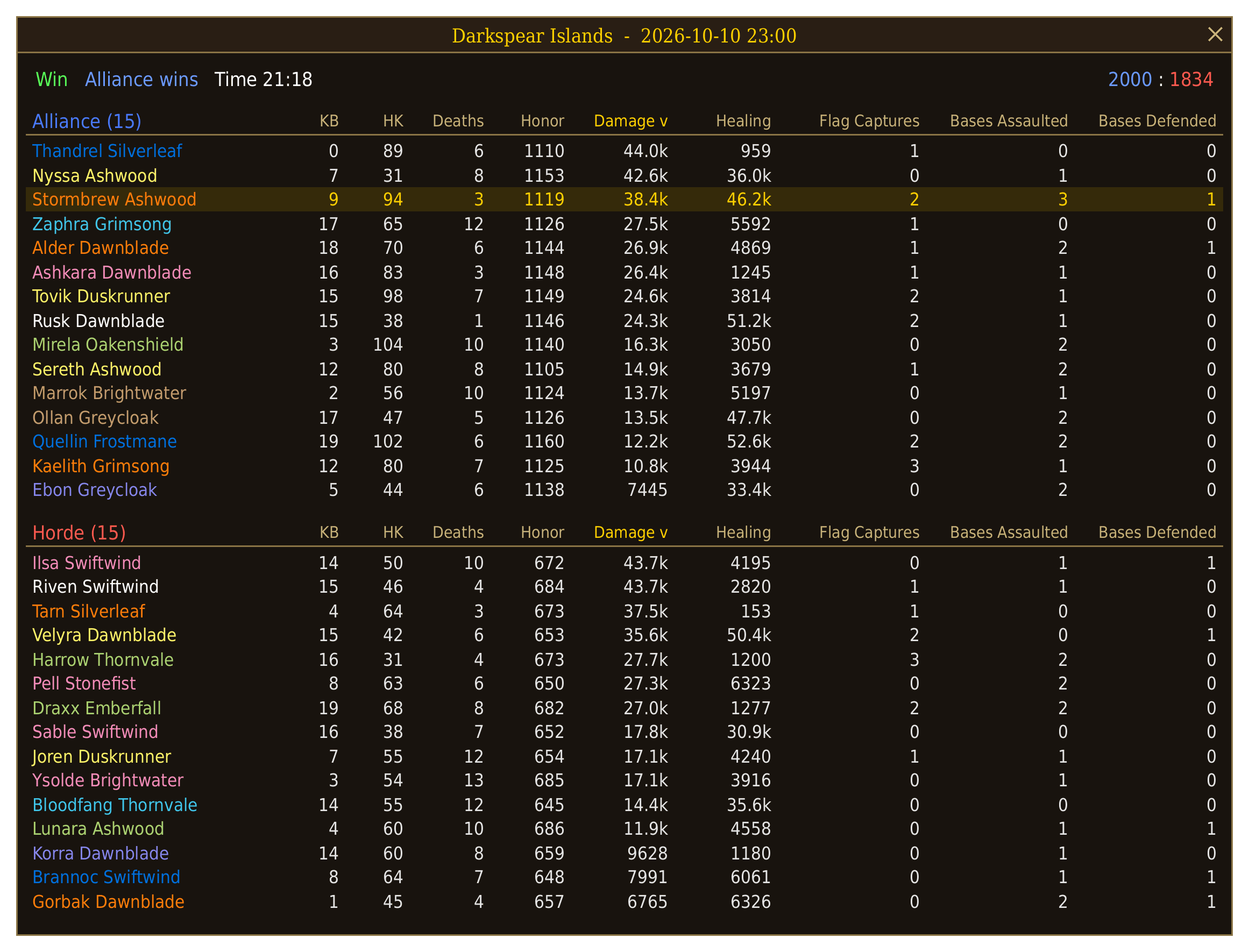
BattlegroundMapForever_MatchDetails_classic.png
Description
Battleground Map Forever (formerly QuickCall)
Battleground maps for Arathi Basin, Darkspear Islands, Warsong Gulch and Alterac Valley: base state, capture and win timers, flag carriers with health, the enemy team in class colors with health bars, and your team on the map.
Every battleground has its own window - own position, size and lock. It appears automatically when you enter the battleground and hides again when you leave.
Arathi Basin
- Base state: every base shows its owner's color - neutral, contested, Alliance or Horde.
- Capture timers: an assaulted base lights up in the attacker's color with a countdown right below it. When the base falls, the timer flashes in the new owner's color and disappears. The timers come from the game's own base data.
- Win timer on top of the map, e.g.
Horde wins in 4:32. It appears once the first base is taken, is calculated from the bases both teams hold and their current scores, and has a progress bar towards 2000. Hover it to see both scores. - Your base glows with a dashed outline, detected automatically - also when you stand between two bases (the last base you entered stays marked).
- Hover a base to see its name.
Darkspear Islands
Everything from Arathi Basin, plus the flag in the middle:
- Flag carrier bar on top of the window: the carrier's name in his faction color (blue or red) with the flag and his health - even when he is far away from you.
- The flag on the map: you see where the carrier runs or where the flag lies, just like on the world map.
- Flag respawn timer: after a capture the flag clock counts down 20 seconds, then pulses with "possible respawn" until the flag is back - the game brings it back 20-25 seconds after a capture.
- Capture timers: a new assault restarts the 60 seconds, a defense ends them. Joined a running match? Assaults already in progress are picked up.
Warsong Gulch
- A map of Warsong Gulch with 26 named areas - hover an area to see its name.
- Flag carrier bar on top: our carrier on the left, theirs on the right above the enemy list - both with health.
- The flags on the map, just like on the world map.
Alterac Valley
Classic Alterac Valley (40 vs 40) in its own window:
- Towers, bunkers and graveyards in their owner's color - graveyards round, towers and bunkers square, with a short label. Hover for the full name, status and time left.
- An assaulted objective glows in the attacker's color and gets a 5 minute capture timer. Even with everything assaulted at once, no timer covers another objective.
- Towers and bunkers taken by the other side are shown as destroyed.
- On top: towers standing and graveyards held per side.
- Your raid as small dots in class color, below the objectives and timers.
Enemy team (Arathi Basin, Darkspear Islands, Warsong Gulch)
Beside every map you see the whole enemy team in class color - 15 players in Arathi Basin and Darkspear Islands, 10 in Warsong Gulch - separated by thin lines.
- Whenever the game gives data for an enemy - your target, focus, mouseover, his nameplate, or he carries a flag - his name lights up and a health bar with percent appears.
- Your target gets a white frame, an enemy flag carrier a red row with a red frame and the flag icon - so you always see whether the carrier is your target (then his frame turns white).
- Click any name to target him - in combat too.
- Players who leave are marked "(left)".
Team mates on the map
- Your group or raid is shown on all maps as dots in class color, you as the small arrow of the world map. Members of your own party get a black center, like on the game's map. The positions are drawn by the game itself.
- In Warsong Gulch your own flag carrier gets the flag icon beside his dot, so you always see where he is.
Match history
Every finished battleground - Alterac Valley included - is saved (last 50 per character, can be switched off in the options):
- Right-click the minimap button and choose "Show match history" (or type
/bgmh) to open the list: date, battleground, win or loss, duration, final score and your own killing blows, honor kills and deaths - with your win rate on top, overall and per battleground. 10 matches per page, 5 pages. - Click a match to see the full scoreboard: every player of both teams in class color with killing blows, honor kills, deaths, honor, damage, healing and the battleground's own columns (flag captures and returns, bases or towers and graveyards assaulted and defended). Click a column title to sort by it, the team name to sort by name. Alterac Valley's 40 vs 40 scrolls with the mouse wheel.
Options - no chat commands needed
Click the minimap button to open the options - one card per battleground (Arathi Basin, Darkspear Islands, Alterac Valley, Warsong Gulch), then General and the match history:
- Show or hide each battleground's window
- Capture timers and win timer on or off, per battleground
- Window size for each battleground, with a Preview button: places the window anywhere outside a battleground, filled with sample data so you see its full size
- Enemy team list, flag carrier bar and team mates on the map on or off
- Dark skin for all windows
- Window transparency (0-50 %)
- Lock or unlock the windows
- Show or hide the minimap button
- Record match history on or off, and a button to open it
Click the minimap button for the options, right-click it for a menu with the options and the match history, drag it to move it around your minimap. Hidden it by accident? Type /bgm to open the options again.
Moving the windows
Unlock the windows in the options (or with the lock icon in each title bar), drag them by the title bar or the flag carrier bar above the window, then lock them again. Positions and settings are saved per character. Windows can't be moved or resized in combat (the click-to-target buttons don't allow it) - a change made in combat is applied right after.
Commands
/bgm,/bgmap- open the options/bgma//bgmd//bgmw//bgmv- show or hide the Arathi Basin, Darkspear Islands, Warsong Gulch or Alterac Valley window/bgmscale [ab|ds|wsg|av] 50-150- window size in percent, per battleground or all/bgmatoggle//bgmdtoggle//bgmwtoggle//bgmvtoggle- keep the Arathi / Darkspear / Warsong / Alterac window permanently off/bgmh,/bgmhistory- open the match history/bgmzone- shows the zone, base, flag carriers and flag positions your client reports (for troubleshooting)
The old QuickCall commands (/qc, /qca, /qcw, ...) still work.
New version notice
Outside battlegrounds the addon tells other users its version every 10 seconds (guild, raid or party, and a hidden channel that never shows in your chat). If someone has a newer version, you get a short note in chat. Inside battlegrounds nothing is sent.
Coming from QuickCall?
QuickCall is now Battleground Map Forever. Install the new version and keep the old QuickCall folder for one login: your positions and settings are taken over, then a reminder tells you to delete the old folder.
Why there are no calls anymore
Up to version 5.4 QuickCall sent callouts to your battleground chat. WoW Forever blocks addons from communicating inside battlegrounds: they can't send chat or addon messages, and chat typed by players is hidden from them. So the addon shows everything the game lets it read - and sends nothing inside a battleground.
Good to know
- Zone and base detection works on English, German, French, Spanish, Portuguese, Russian, Korean and Chinese clients for Arathi Basin, Warsong Gulch and Alterac Valley. Darkspear Islands and the Alterac Valley objectives (tower and graveyard names) are English only for now.
- Flag messages (flag carrier names) are read on English, German, French, Spanish, Russian, Korean and Chinese clients.
- Health of other players arrives as protected values on WoW Forever: addons may not read the number, but the game's health bars may show it. The addon hands it straight to such a bar, so bar and percent are exact.
- Click-to-target works in combat because the addon prepares one secure target button per enemy player while you're out of combat. Players who join during combat are added at the next moment out of combat.
What's new in 5.7.1
- Alterac Valley: your raid as small dots on the map.
What's new in 5.7.0
- Alterac Valley: towers, bunkers and graveyards with 5 minute capture timers in their own window.
- New options window: one card per battleground.
What's new in 5.6.0
- New two-column options window.
- Match history: the last 50 battlegrounds with result, duration, score and the full scoreboard - right-click the minimap button, "Show match history".
What's new in 5.5.12
- The enemy list no longer shows in front of merchant, quest and other windows.
What's new in 5.5.11
- Unlocked windows can also be moved by the flag carrier bar (also when it shows "No flag carrier").
- Leaving a battleground clears its map, so a window shown afterwards starts clean.
What's new in 5.5.10
- Your target and the flag carrier have clearly different frames (white / red).
What's new in 5.5.9
- Thin divider lines between the players in the enemy list.
What's new in 5.5.8
- Arathi Basin and Darkspear Islands have separate windows; all previews can be open at the same time.
- Version notice: a short note in chat when someone has a newer version.
- New minimap icon.
What's new in 5.5.7
- New name: Battleground Map Forever (formerly QuickCall). Settings are taken over, the old
/qccommands still work. - Every window has its own enemy list and flag carrier bar.
The Alterac Valley map artwork and objective positions come from Zurk Maps by Zurk.
Found a bug or have an idea? Leave a comment!
Battleground Map Forever Team