BarPlan
- By
Save your action bars, addons, chat tabs and keybindings as a plan, and set up every new character of that class from it.
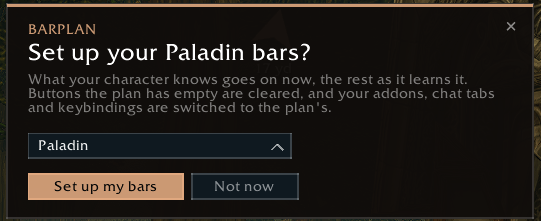
Discord_cvOKRwBzEc.png
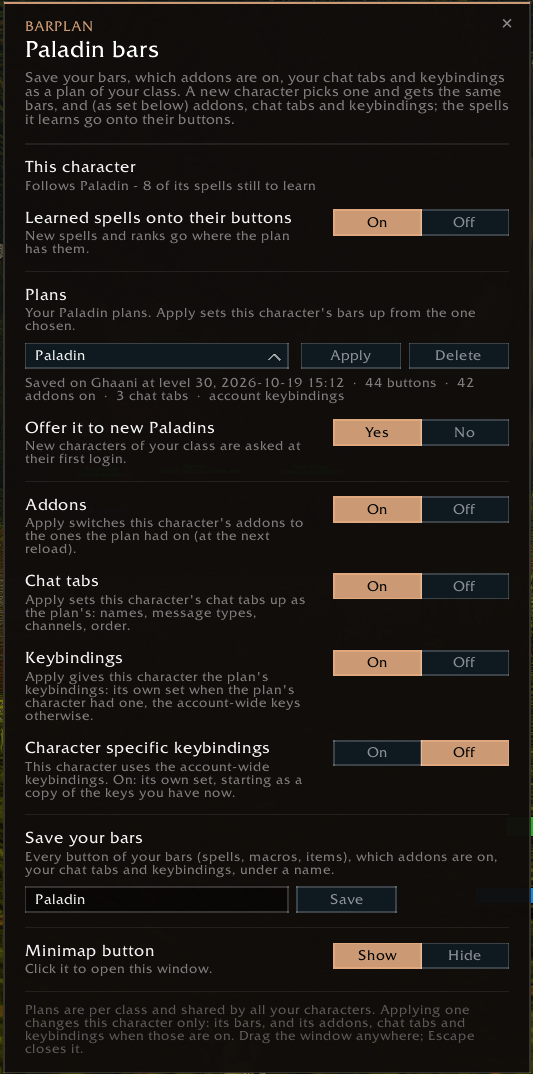
Discord_P3l7YEx3cl.png
Description
Save your action bars, addons, chat tabs and keybindings as a plan, and set up every new character of that class from it.
Set up one character's bars the way you like them, save them as a plan, and every new character of that class gets the same bars, including the spells it hasn't learned yet. Each spell goes onto its button the moment you learn it, and a new rank replaces the old one on the same button. No more dragging spells out of the spellbook every few levels.
What a plan keeps
- Your action bars: spells, macros and items, button by button. Macros with logic in them (stance swaps, mouseover, /startattack) are made on the new character when it doesn't have them.
- Single-spell placeholder macros (
#showtooltip X//cast X) are saved as the spell itself, so you can plan spells you can't learn yet without using up the new character's macro slots. - Which addons are on: applying the plan switches the new character's addons to match and offers a reload.
- Your chat tabs: names, message types, channels, font size, colour and order.
- Your keybindings: a character with its own keybindings passes them on; otherwise the new character uses your account-wide keys.
Addons, chat tabs and keybindings each have an On/Off switch, all on by default.
How to use it
/barplan(or the minimap button) opens the window.- On a character whose bars are done, type a name and click Save. Plans belong to their class.
- A new character of that class is asked at its first login, with your class's plans to pick from. Or choose a plan in the window and click Apply.
- Play. Learned spells go onto their buttons (after the fight if you learn one in combat).
A button you empty yourself after BarPlan filled it stays empty, and a button you put something else on stays yours.
Commands
| Command | |
|---|---|
/barplan |
the window |
/barplan save [name] / apply [name] |
save or apply a plan of your class |
/barplan status |
the plan this character follows, spells still to learn, addons that differ |
/barplan list / use <name> / delete <name> |
your class's plans, the one new characters are offered, delete one |
/barplan off / on |
stop / resume putting learned spells on the bars |
/barplan addons on|off, chat on|off, keys on|off |
what Apply also sets up |
/barplan minimap |
hide / show the minimap button |
Taking your plans along
Plans are account-wide and live in WTF\Account<account>\SavedVariables\BarPlan.lua. Copy that file (with the game closed) to take them to another WoW folder or account. Handy on launch day.
Questions and bug reports are welcome in the comments.
BarPlan Team