Barkeep
- By
Keeps your action bars: save them, see exactly what a load would change, and put them back with their keybinds and pet bar. Undo, automatic backups, and bars that follow your spec.
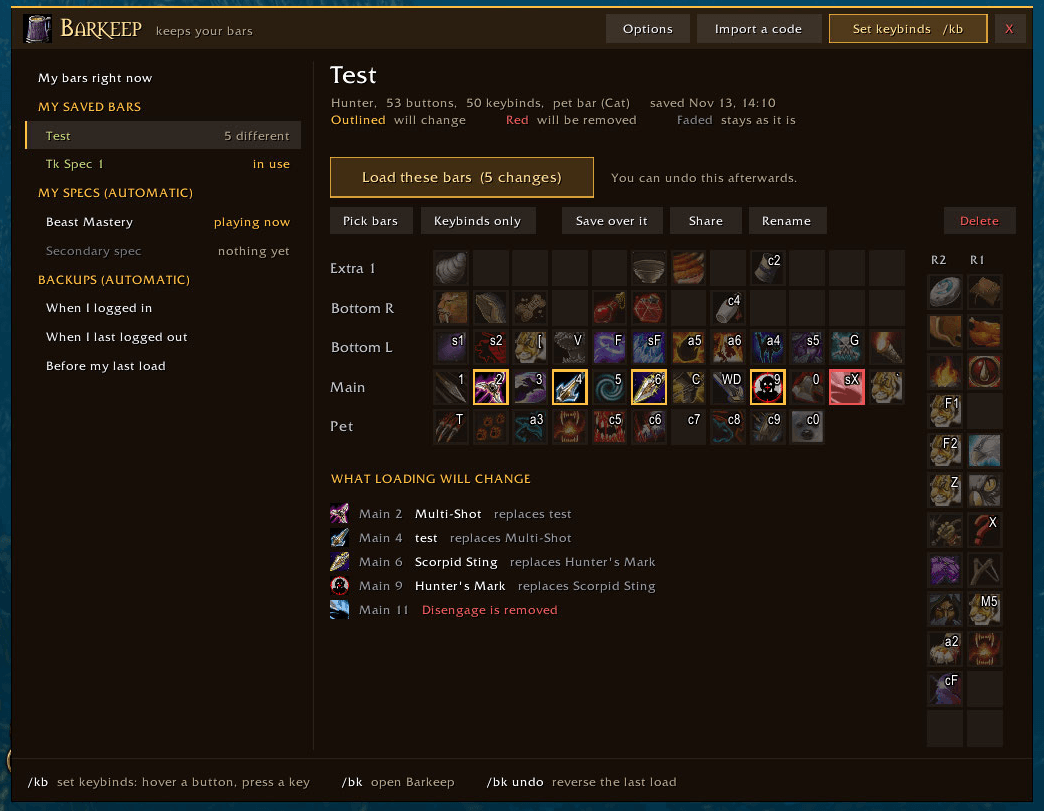
Buttons that would change are outlined, ones that would be removed are red, and every change is listed underneath before you load.
Description
Barkeep keeps your action bars. Save them, see exactly what a load would change before you do it, and put them back whenever you like, with their keybinds and your pet bar. Built for WoW Forever.
Two steps: save your bars, then load them whenever you want them back.
See before you load
Pick something you saved and Barkeep shows your bars as icons, laid out like your screen.
- Buttons that would change are outlined
- Buttons that would be removed are red
- A list underneath spells out every change: Main 3: Serpent Sting replaces Arcane Shot
- The Load button tells you how many buttons would change
No more loading a layout and hoping.
Nothing is ever lost
- Undo. Every load can be reversed with
/bk undo. - Automatic backups. Your bars are saved every time you log in and out. If they ever get messed up, one click puts them back.
Bars that follow your spec
With dual spec, each spec remembers its own bars and keybinds and gets them back when you swap. Nothing to set up.
And the rest
- Saves spells, macros, items, mounts and pets, the keybinds on them, and the order of your pet bar
- Load only some bars, or only the keybinds
- Drag a single button out of anything you saved, straight onto your bars
- Share your bars with a friend or your other account as a code
- Deleted macros are made again from the saved text
- A load started in combat waits and runs when the fight ends
/kbopens Quick Keybind Mode: hover a button, press a key
How to use it
- Type
/bk, or click the mug on your minimap - Press Save these bars
- Change your bars however you like
- Open Barkeep again, click what you saved, and press Load these bars
Good to know
- Barkeep only moves buttons when you load something
- It works alongside other bar addons that use the game's normal action slots
- This is a beta: bug reports and ideas are very welcome. A screenshot of any red error text is the most useful thing to send
Barkeep Team