promotional banner

Az Camera Immersion

- Turn/zoom the camera exactly where you want it. - Click Save on Camera 1-4. - Check any conditions that should trigger that camera. - Set that camera's delay from 1 to 30 seconds with -/+. - Preview smoothly moves toward the saved camera,
  • Turn/zoom the camera exactly where you want it.
    - Click Save on Camera 1-4.
    - Check any conditions that should trigger that camera.
    - Set that camera's delay from 1 to 30 seconds with -/+.
    - Preview smoothly moves toward the saved camera, then performs an exact correction after 1.0 second.
  • - Combat: in combat, whether moving or standing.
    - Moving: out of combat and moving.
    - Standing: out of combat and stationary.

    Each camera slot has its own independent timer. If Camera 1 and Camera 2 are both
    checked for Standing and use 3 sec / 10 sec, Camera 1 fires at 3 seconds and
    Camera 2 fires at 10 seconds if you remain standing.

  • Saved views first use Blizzard's smooth camera blend. After 1.0 second, the addon
    recalls that same saved view in instant mode to apply the exact saved yaw, pitch,
    and zoom, then restores smooth mode for the next camera move.

    If a newer camera move starts before an older correction is due, the older
    correction is discarded so it cannot snap the camera backward.

    MOUSE OVERRIDE
    While any mouse button is held, automatic camera switching is suspended.
    When the mouse button is released, the current state's timers restart from zero.

    COMMANDS
    /azcam         Toggle configuration window
    /azcamera      Same as /azcam
    /azcam reset   Reset addon conditions/delays/flags. This intentionally does not
                   erase Blizzard's saved camera view data.

The Az Camera Immersion Team

profile avatar
  • 6
    Projects
  • 3.1K
    Downloads

More from user_neqi7im8zdat59imView all

  • Az Buff Timers project image

    Az Buff Timers

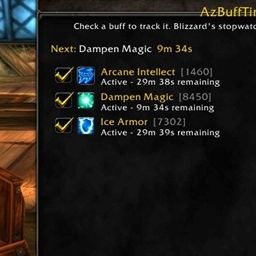
    - The window shows your current buffs plus buffs you have already added. - Check a buff to track it. - All tracked buffs count down internally. - Blizzard's built-in stopwatch displays the tracked buff that will expire next.

    • 8
    • September 22, 2026
  • Az Gather Hud project image

    Az Gather Hud

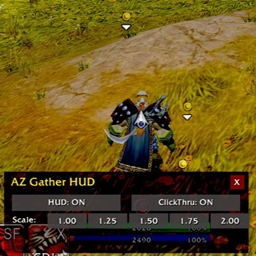
    Hud for gathering. /gh, /agh, /azgatherhud, /gatherhud for bar to appear for options

    • 1.0K
    • September 22, 2026
  • Az Sheathe project image

    Az Sheathe

    Use the slash commands /azs or /azsheathe to access the UI, where you can cycle through sheath modes

    • 531
    • September 22, 2026
  • Az Set Map project image

    Az Set Map

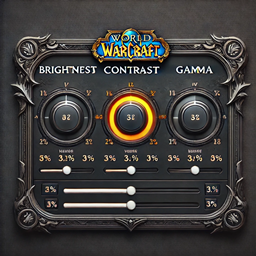
    This code lets you adjust the gamma, brightness, and contrast for different zones in World of Warcraft.

    • 211
    • September 22, 2026
  • Az Buff Timers project image

    Az Buff Timers

    - The window shows your current buffs plus buffs you have already added. - Check a buff to track it. - All tracked buffs count down internally. - Blizzard's built-in stopwatch displays the tracked buff that will expire next.

    • 8
    • September 22, 2026
  • Az Gather Hud project image

    Az Gather Hud

    Hud for gathering. /gh, /agh, /azgatherhud, /gatherhud for bar to appear for options

    • 1.0K
    • September 22, 2026
  • Az Sheathe project image

    Az Sheathe

    Use the slash commands /azs or /azsheathe to access the UI, where you can cycle through sheath modes

    • 531
    • September 22, 2026
  • Az Set Map project image

    Az Set Map

    This code lets you adjust the gamma, brightness, and contrast for different zones in World of Warcraft.

    • 211
    • September 22, 2026