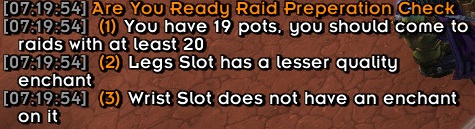
onscreen notication for Raid Prep Check
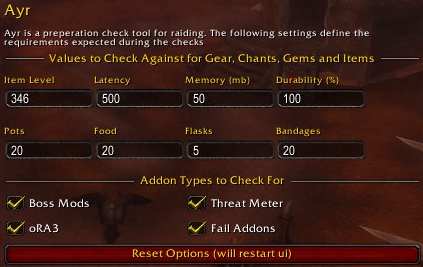
configurable options for Ayr

Ready Check Frame
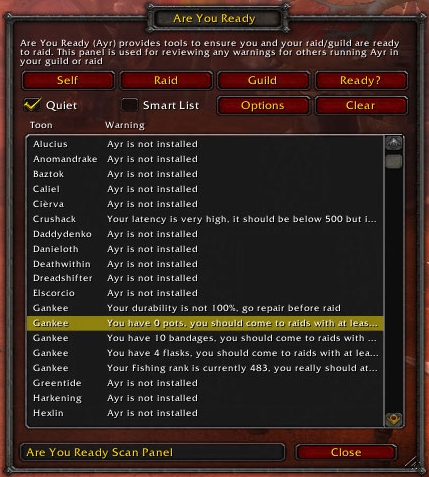
scan panel for Ayr
Description
Are You Ready
Simple Personal Checks for; Raid and Combat. Onscreen messages informing you of items you need to know about before you start raiding or click "yes" to a ready check.
Formerly Known As: Upys Raid Tools - Personal Edition
While able to run independantly is designed to work hand in hand with Upys Raid Tools and provide personal tools to assist you with raiding.
Current Features
Ready Check
Automatic self check when a ready check is called in a raid. Will check you have;
- +90 stam food
- Cata Flask (or 2 Elixirs)
- Healthsone (if a lock is in raid)
- Class Buff Checks (if that class is in raid) - MOTW, Fort, AI, Might, Kings
- Bad Buff Checks for Crusader Aura and Aspect of the Fail
- Pet check for autocast taunt abilities and aggressive settings.
- Channel Checks (your raiding channels like healing/tank etc)
Any fails will be presented on the Ready Check Frame, click the Ayr icon (hurricane) to hide the frame.
DID YOU KNOW: You can click on the buff icons to see what is actually missing!
Preperation Check
When triggered (either by someone in your guild/raid) Ayr will ensure you meet the defined "raid requirements" for the following things;
- Addon Version
- Required Addons
- Fail Addons are disabled
- Latency
- Memory
- Durability
- Professions
- Item Level
- Inventory Scan for Food, Pots, Flasks and Bandages
- Enchant and Gem Scans
Both of these scans can be triggered via the Scan Panel (available by clicking the Minimap or LDB Icon). You can define that Guild/Raid scans are "quiet", meaning you will recieve the data but they will not get any onscreen notices/warnings.
When a new requestor is identified you will now be prompted to make a choice on whether "Allow", "Ignore" or "Block". These lists can be managed within the options panel :)
UpysRaidTools Integration
These features will do nothing for those not working with UpysRaidTools but are supporting features to reduce the effort for key functions of the raid tools.
- MVP Voting so you dont need to type !mvp ToonName
- Cauldron Pickup notices to work with Cauldron Credits
Invalid Warnings & Feature Requests
Any Errors, Requests and Invalid Warnings should be logged as a ticket here http://wow.curseforge.com/addons/ayr/tickets/
Feature Requests - I'm happy to look at adding new features if you have anything in mind
Invalid Item Warnings - I.e. Ayr warns you that you're not carrying enough food but you believe you are. Please ensure you provide the item details but copying the contents of the Debugg Output /ayr itemcheck [itemLink or itemName] this will make it much easier to add.
Invalid Chant/Gem Warnings - I.e. you have a BiS chant but Ayr is warning you that you have a lesser quality chant. Please ensure you link the actual chant you're using from wowhead.
Slash Commands
/ayr scan - do a self consumable ready check
/ayr itemcheck [itemLink or itemName] - will output a string that can be used for adding new consumables etc to the database. Note: if you type the name enclose it in quotes like this /ayr itemcheck "Flask of the North"
/ayr buffcheck - will output a list of your current Buffs
The Ayr Team