Avid Angler
- By
Avid Angler is a modern fishing addon for Retail World of Warcraft, built to bring convenient fishing controls, catch tracking, equipment helpers and fishing guides together in one place.
Setup Wizard
Dashboard
Midnight Score
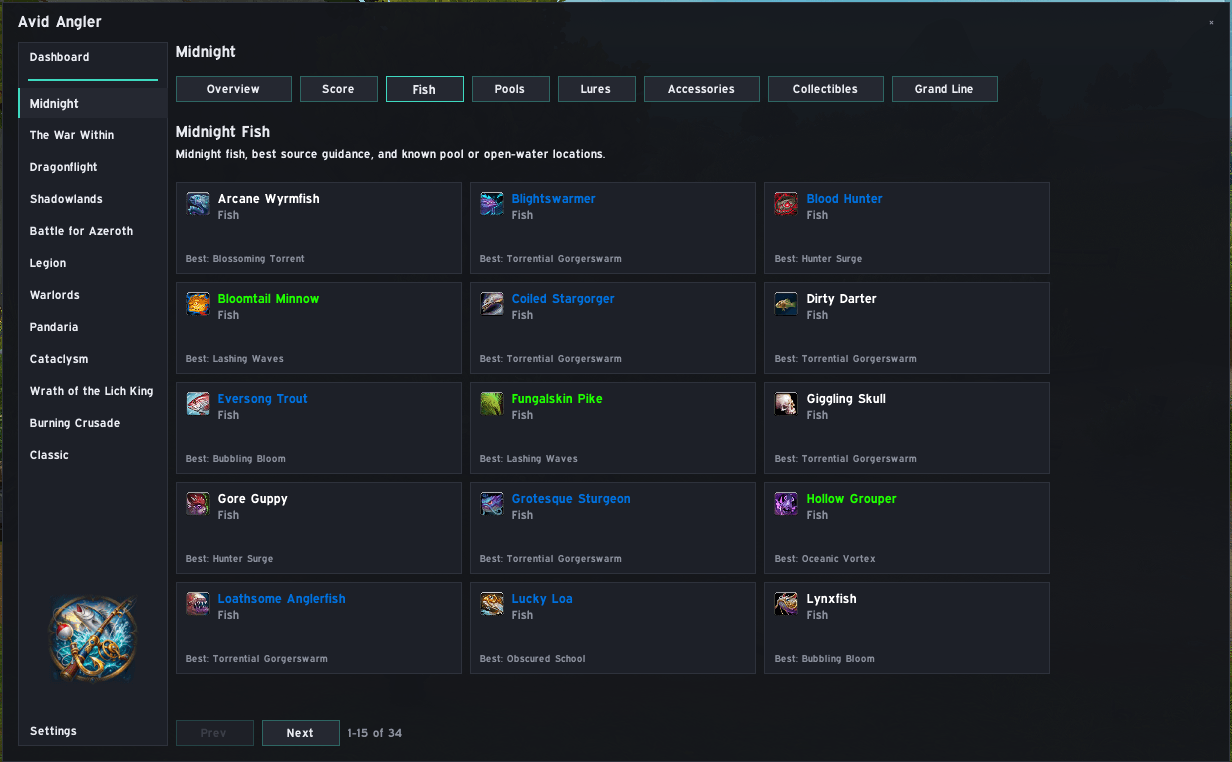
Midnight Fish
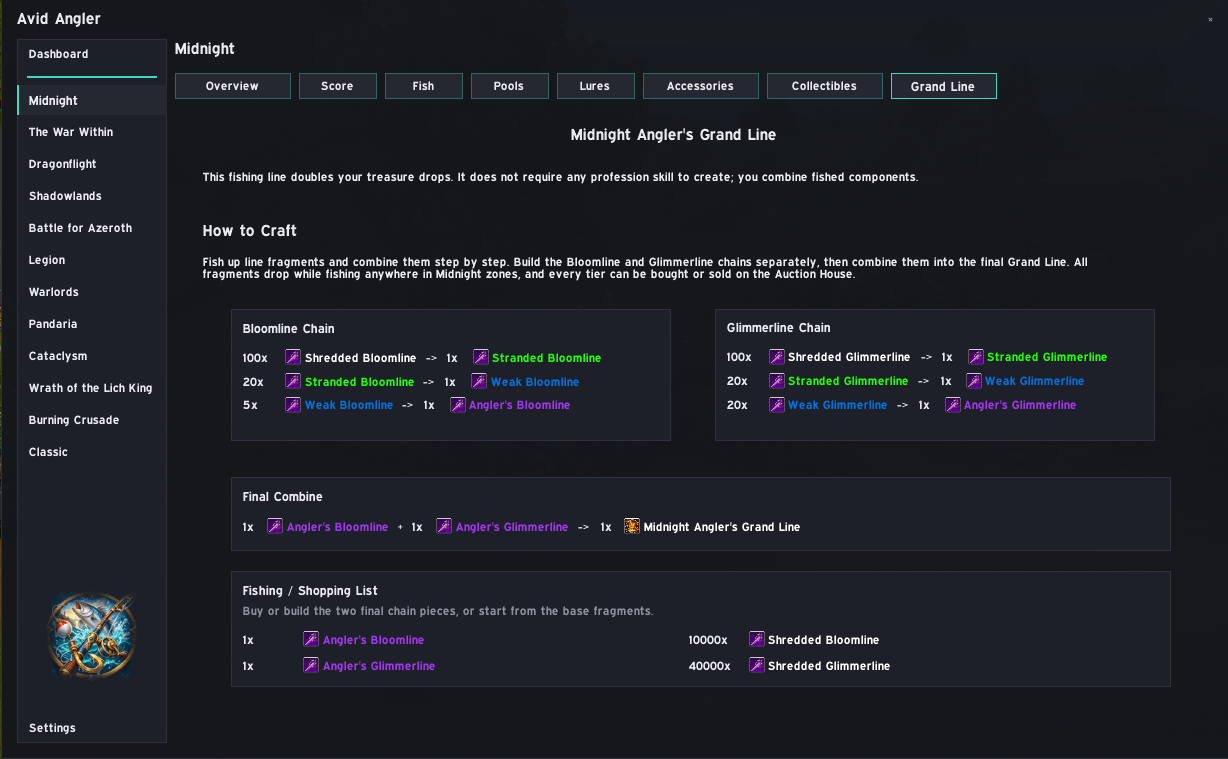
Midnight Grand Line
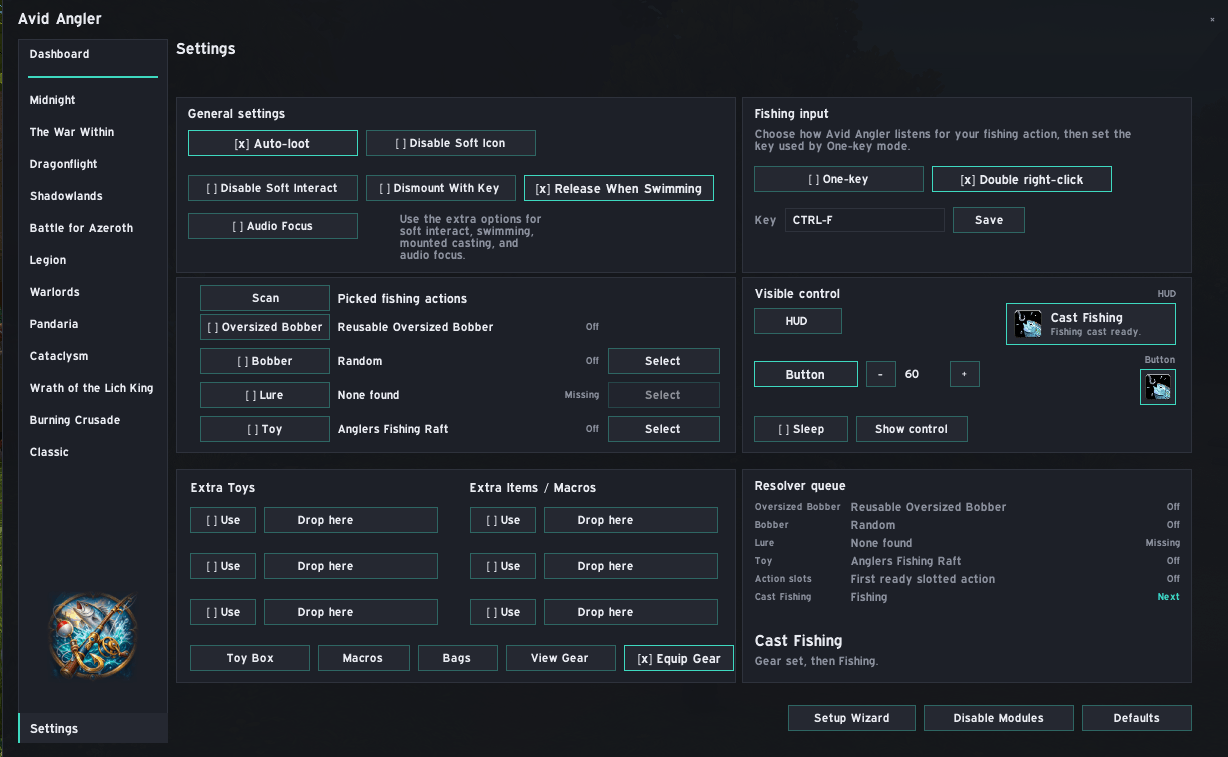
Settings

Hud

Button
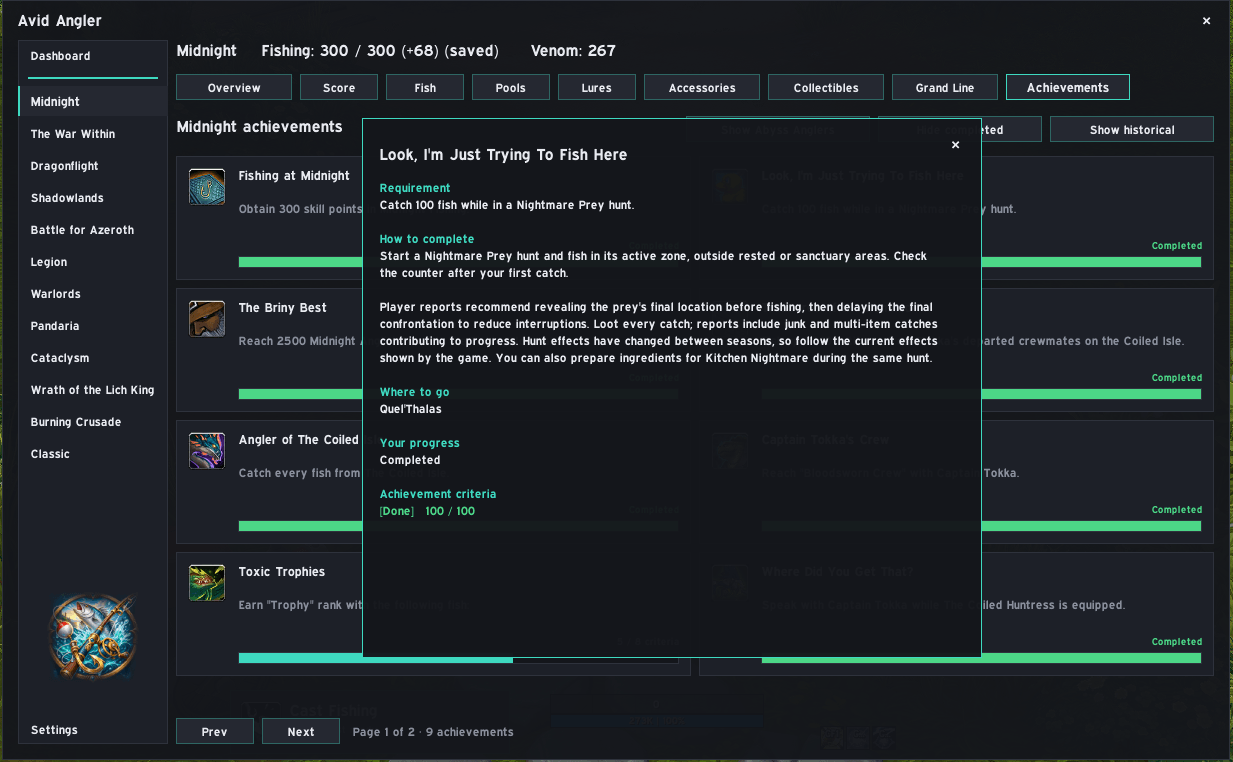
Achievements Guide
Description
Avid Angler
Avid Angler is a modern fishing addon for Retail World of Warcraft, built to bring convenient fishing controls, catch tracking, equipment helpers and fishing guides together in one place.
It brings together one-key or double right-click input, helper settings, gear swapping, catch tracking, expansion guides and Midnight Anglin' Score tools in one place.
Avid Angler is designed for ordinary fishing sessions and collectors alike. You can cast, reel, track catches, review useful pools, lures and collectibles, and work towards Midnight Anglin' Score goals while casting and reeling still require player input.
✨ Features
Avid Angler gives you a more useful fishing workspace than the standard WoW fishing button.
You can:
- Use one-key fishing or double right-click to cast, run ready helpers and interact with the bobber.
- Show a movable HUD or compact button for the next fishing action.
- Temporarily manage Auto Loot, Soft Interact, soft-target icons, water or mount behavior and Audio Focus around fishing.
- Save a fishing equipment set and equip or restore it around catches.
- Pick lures, wards, bobbers, oversized bobbers, toys and items from scanned character inventory, or configure a precast macro. Lures and wards have separate selections and are reapplied through your fishing input when their buffs are missing.
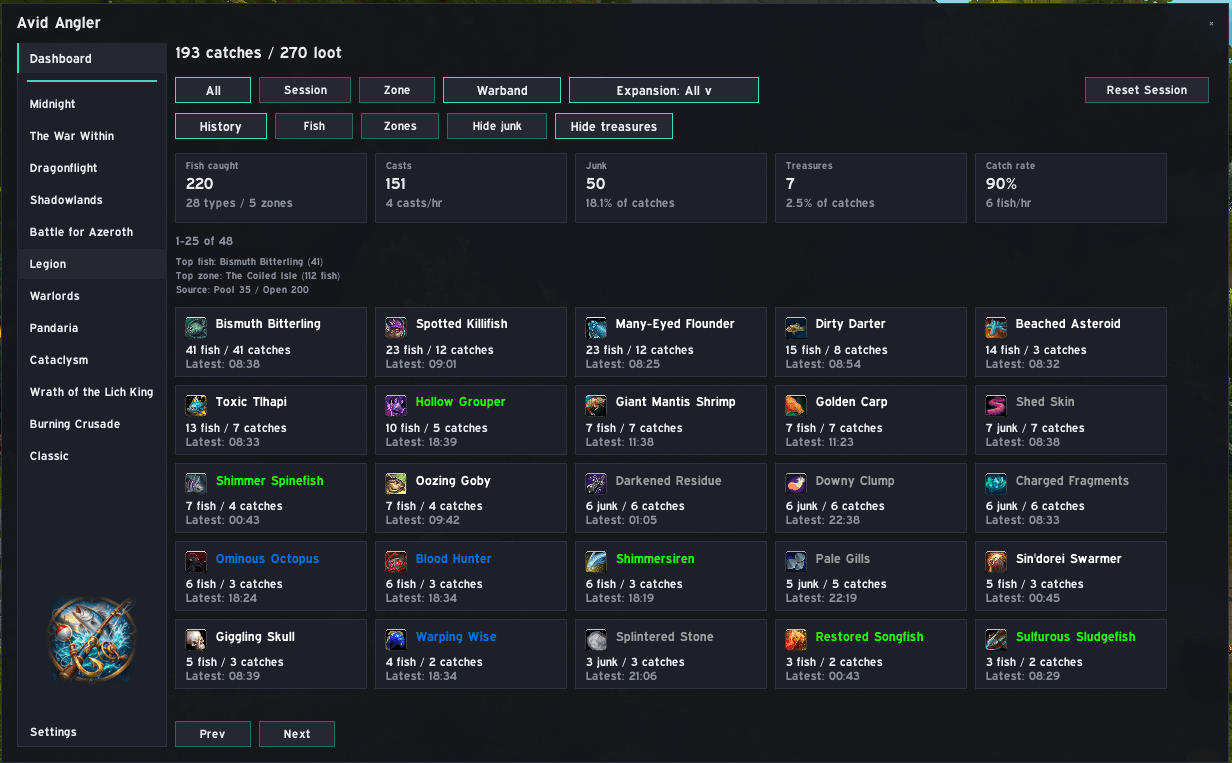
- Track catches, session history, fish, zones, sources, rates and dashboard summaries.
- View each expansion's fishing skill and bonuses, with saved levels when live data is unavailable.
- Track Venom on The Coiled Huntress in the fishing-tool slot and optionally receive conversion reminders.
- Browse expansion fishing guides for fish, pools, lures, accessories, collectibles and the Midnight Grand Line.
- Browse fishing achievements by expansion, with live progress and completion guides.
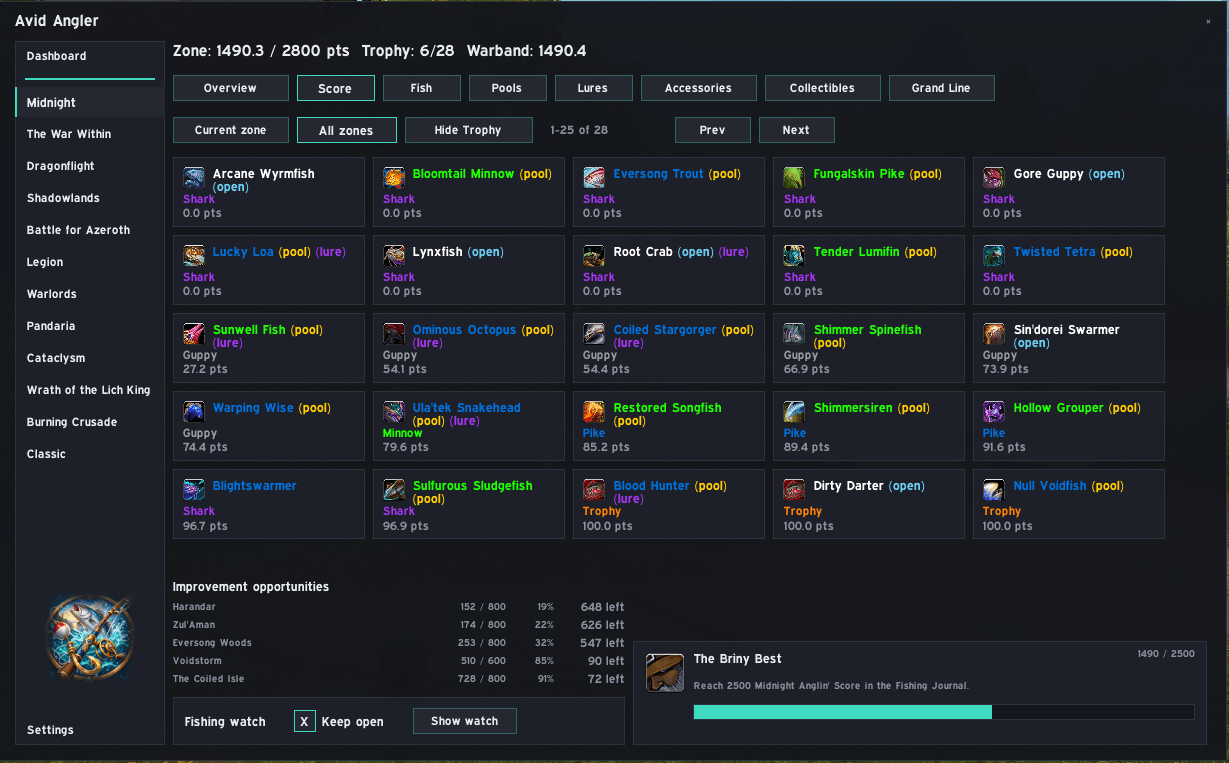
- Review Midnight Anglin' Score progress, opportunity targets, trophy filters, rank tooltips and score notifications.
👥 For Fishers
You do not need any special setup to use Avid Angler for normal fishing.
Fishers can:
- Open Avid Angler from the minimap button, Addon Compartment or
/aa. - Choose one-key, double right-click, HUD or button control from the setup wizard or Settings.
- Cast and reel through the current fishing action loop.
- Track current session and all-time catch history.
- Use dashboard and expansion pages to find fish, pools, lures, accessories and collectibles.
- Keep the Midnight score watch open while working on Midnight Anglin' Score.
- Reopen the setup wizard or fine-tune individual options from Settings at any time.
Everything remains opt-in and can be disabled where appropriate.
🛡️ For Collectors
Collectors get tools for longer fishing goals.
These include:
- Midnight fish score lists with current zone, all zones, trophy hiding and Warband score progress.
- Improvement opportunities showing useful Midnight targets.
- Midnight fish, pool, lure, accessory and collectible guides.
- The Midnight Grand Line crafting guide and shopping list.
- Catch history filters and paging to review farm results.
- Gear set automation and action-slot helpers for longer sessions.
- Locale-compatible UI strings and Blizzard ID-backed item and fish names where possible.
✅ Designed With Addon Safety in Mind
Avid Angler works within Blizzard's Retail addon restrictions rather than trying to bypass protected gameplay.
That means:
- Casting and reeling still happen through visible player input.
- Fishing controls pause and restore around combat, death and UI reloads.
- Temporary changes to equipment and supported game settings restore their previous state.
- When protected game data is unavailable, affected features stop or omit that information.
- Game content uses stable IDs and Blizzard API names where possible for locale compatibility.
- Destructive or large resets require user choice.
- The setup wizard has a skip/defaults path and can be reopened later.
The aim is to make fishing smoother without taking control away from the player.
🧭 Main Sections
| Section | What it's for |
|---|---|
| Dashboard | Current fishing status, recent catches, session and all-time summaries, fish and zone analytics |
| Midnight | Midnight score tools, fish targets, useful pools, lures, accessories, collectibles and Grand Line |
| Casting | One-key and double right-click input, visible HUD/button, action resolver, lures, bobbers, toys, macros and gear |
| Tracking | Catch history, filters, fish and zone views, catch sources and session reset |
| Scoring | Midnight Anglin' Score cards, ranks, opportunities, trophy filter, score watch and notifications |
| Settings | Setup wizard, module toggles, helper CVars, Auto Loot, Soft Interact, Audio Focus and defaults |
Fishing Achievements
Choose an expansion in /aa, then select Achievements. Each card shows
the achievement's description and live progress where Blizzard provides it.
- Left-click: open the completion guide, location advice and live criteria.
- Right-click: open the achievement in Blizzard's achievement window.
- Shift + right-click: track or stop tracking it in the objectives tracker.
Hover over a card for these controls. Use Show historical to include unobtainable achievements. Hide completed focuses the list on unfinished achievements; this setting is shared across expansions and remembered between logins. Select Show completed to restore the full list. Progressive achievements share one card showing the next unfinished step in that expansion. The guide lists the full chain and each step's state. Fully completed chains show their final step unless completed achievements are hidden. Where a guide has mapped coordinates, use its Waypoint button to navigate with TomTom when available, or Blizzard's built-in map pin otherwise. Midnight hides Abyss Anglers activity achievements by default. Use Show Abyss Anglers to include them; this Midnight-only preference is remembered between logins. Expansion placement follows the content, including Classic and Burning Crusade objectives added retrospectively in Wrath. Achievement actions and live updates pause during combat or protected content.
💬 Slash Commands
| Command | What it does |
|---|---|
/aa |
Open or close Avid Angler |
/avidangler |
Alias for /aa |
/aahistory |
Open catch history |
/aahistory session |
Open session catch history |
/aahistory zone |
Open current-zone catch history |
/aasession reset |
Reset the current tracking session |
/aascore |
Open Midnight scoring |
/aascore zone |
Open Midnight scoring for the current zone |
/aascore all |
Open Midnight scoring for all zones |
/aaone |
Show one-key fishing status |
/aaone on |
Enable one-key fishing |
/aaone off |
Disable one-key fishing |
/aaone key CTRL-F |
Set the one-key fishing binding to Ctrl+F |
/aagear save |
Save your current equipment as the fishing set |
/aagear equip |
Equip the saved fishing set |
/aaprecast |
Show precast macro status |
/aaprecast on |
Enable the precast macro |
/aaprecast off |
Disable the precast macro |
/aaprecast text /use item:12345 |
Set the precast macro text; replace 12345 with the intended item ID |
Most day-to-day options can also be changed through Settings.
For Venom reminders, set Venom alert at in Settings → General settings. The value is remembered per character; blank or 0 keeps reminders off. Closing a reminder silences it until another 25% of your threshold accumulates or you next log in. Converting below the threshold resets the reminder. Tracking must be enabled and The Coiled Huntress equipped in the fishing-tool slot. Reminders work with the main window closed and pause during combat or protected content.
📥 First-Time Setup
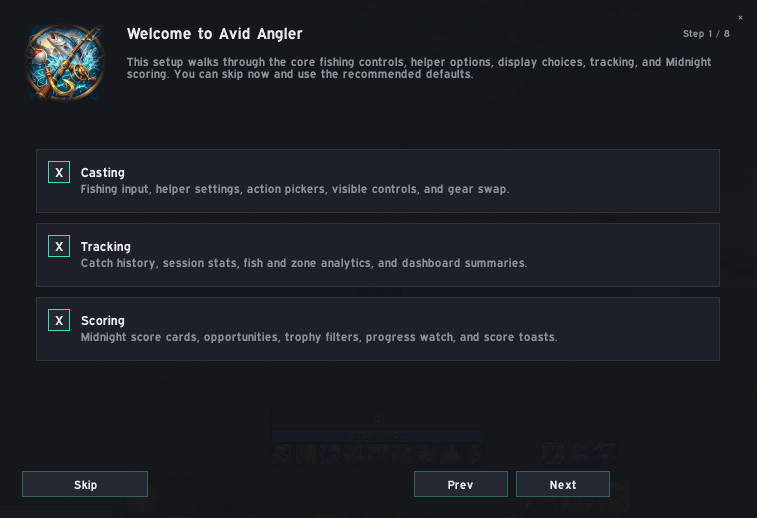
Avid Angler opens a setup wizard the first time it is installed, so you can choose the core fishing behavior before starting.
This can include:
- Casting, tracking and scoring modules
- One-key, double right-click or no input binding
- Auto Loot and Soft Interact helpers
- Mount, swimming and audio comfort options
- Fishing gear save and equip behavior
- HUD or compact button display
- Midnight score watch and trophy display options
Skip applies the recommended defaults. You can reopen the wizard or change individual options in Settings at any time.
📦 Installation
CurseForge
The easiest way to install Avid Angler is through the CurseForge app.
You can also download the latest release manually from CurseForge.
Manual Installation
Download the latest Avid Angler
.zip.Extract it into:
World of Warcraft/_retail_/Interface/AddOns/Make sure the addon folder is called:
AvidAnglerThe addon files should be directly inside that folder.
Restart World of Warcraft if it is already running.
🧩 Compatibility
- Game: Retail World of Warcraft
- Era: The War Within / Midnight-ready
- Dependencies: None required; Avid Angler is self-contained.
- Localization: Uses Blizzard-provided item and fish names where available, with support for localized interface text.
💬 Support
If you've found a bug, have a feature suggestion, want to see upcoming changes or would like access to beta builds, you're welcome to join the official Discord:
Earthenmist - Addon Hub
When reporting a bug, include what you were doing, what happened and any error message you received.
📜 License
All Rights Reserved.
❤️ Credits
Author: Earthenmist
Avid Angler is developed, tested and maintained by Earthenmist. AI-assisted development tools are used where helpful for coding, debugging and documentation, but the direction, decisions and final implementation remain human-led.
Avid Angler Team