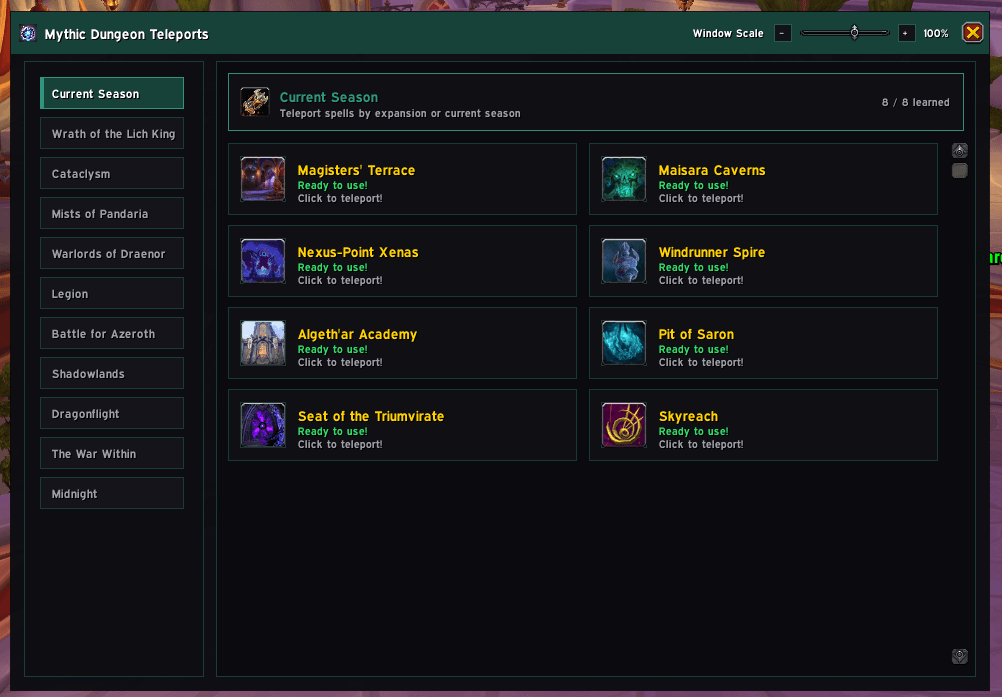
New UI for V2
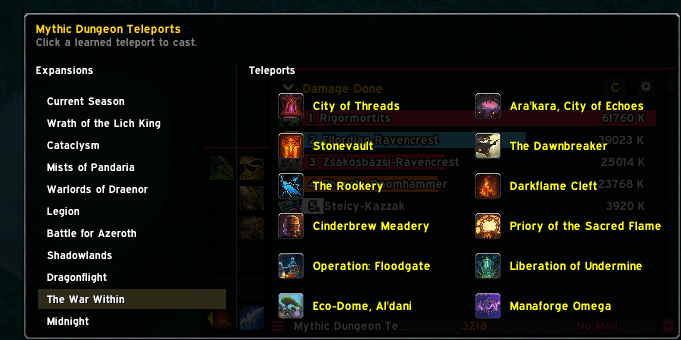
LDB Quick Cast Menu for supported broker displays (e.g. ElvUI DataTexts)
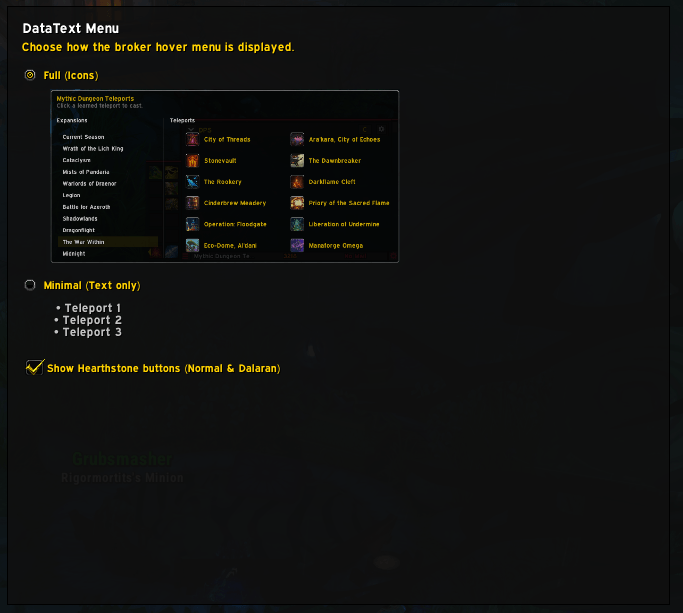
DatatextMenu in the addon options
Description
Mythic Dungeon Teleports
Mythic Dungeon Teleports is a Retail World of Warcraft addon that brings dungeon and raid teleports, keystone browsing and group reminders together in one place.
Browse the current season or an expansion, see which teleport spells you have learned, and check their cooldowns before travelling. Dungeon names come from Blizzard's localized client data where available.
Whether you are heading to your next Mythic+ group or checking keys across your characters, the addon keeps the relevant information close to your teleport buttons.
✨ Features
Mythic Dungeon Teleports gives you a dedicated place to browse your teleports and plan your next dungeon.
You can:
- Browse dungeon and raid teleports by current season or expansion.
- See learned and unlearned spells, with cooldown overlays and tooltips.
- Use a movable window with adjustable scale and a class-colored theme.
- Browse party, guild and saved character keystones in separate tabs.
- Search keys by player, realm or dungeon, filter by level, and sort the results.
- See when shared key information was updated and identify older cached entries.
- Teleport from a keystone row when you know the destination's spell.
- Show a Group Reminder after accepting a Mythic+ group invitation.
- Optionally insert your keystone when the dungeon's keystone window opens.
- Use a quick-cast hover menu through compatible broker displays.
👥 For Dungeon Runners
You can use the teleport window without configuring the optional helpers.
Dungeon runners can:
- Open the addon from the minimap button, Addon Compartment or
/dtp. - Choose Current Season or an expansion from the sidebar.
- Click a learned teleport spell to travel when it is ready.
- Check cooldown information on the teleport buttons and in their tooltips.
- Adjust the window scale and save its position.
- Choose whether the window closes after clicking a teleport.
- Open Settings with
/dtpconfigor by right-clicking the minimap button.
The addon uses teleport spells you have already learned; it does not unlock new teleports.
🗝️ For Groups and Alts
The keystone browser helps you compare the keys available to your group, guild and saved characters.
These tools include:
- Party, Guild and Characters tabs with player counts.
- Search by player, realm or localized dungeon name.
- Optional minimum and maximum key levels, plus Hide without keys.
- Sorting by player, key level, dungeon or Mythic+ rating.
- Dungeon icons, visible update times and hover details showing the data source.
- Teleport buttons for supported destinations whose spells you know.
- Remembered tab and filter settings, with Reset to clear the filters.
- Refreshes that keep your scroll position while updating the list.
Other players' keys appear when received through compatible addon sharing, including LibKeystone and AstralKeys. Cached keys may have changed. Old data marks entries at least a day old, while Not received yet is different from a confirmed No key.
✅ Designed With Addon Safety in Mind
Mythic Dungeon Teleports uses Blizzard's normal spell and addon interfaces.
That means:
- Teleport casts require your click on a spell button.
- Changes to secure teleport controls wait until combat ends.
- Cooldown information is omitted when protected data cannot be read safely.
- The main window and keystone sharing pause during Mythic+ runs.
- Dungeon matching uses stable Blizzard IDs, including faction-specific teleport spells.
- Optional helpers can be configured or disabled in Settings; automatic keystone insertion is off by default.
🧭 Main Sections
| Section | What it's for |
|---|---|
| Current Season | Teleports for the active seasonal dungeon selection |
| Expansions | Dungeon and raid teleports grouped by expansion |
| Keystones | Party, guild and saved character keys, filters, ratings and teleport buttons |
| Group Reminder | Your accepted group's dungeon, group details, applied role and destination teleport |
| Settings | Window preferences, minimap visibility, cooldowns, keystone helpers and optional modules |
🔔 Group Reminder
Group Reminder can display a popup and chat message when you accept a Mythic+ group invitation. Choose which details appear, including the dungeon name, group name, description and applied role.
The popup stays open when you press Escape. Close it with X, use the existing close-on-teleport setting, or let it close when you enter the matching destination instance. You can move the popup, reopen the last reminder from its chat link, and preview it with the test button in Settings.
The teleport button is available when you know the destination's spell. The reminder uses Blizzard's activity name and map identity to identify the dungeon across locales.
💬 Slash Commands
| Command | What it does |
|---|---|
/dtp |
Open or close Mythic Dungeon Teleports |
/dungeonteleports |
Alias for /dtp |
/dtpconfig |
Open the addon settings |
📦 Installation
CurseForge
Install Mythic Dungeon Teleports through the CurseForge app, or download the latest release manually.
Manual Installation
Download the Mythic Dungeon Teleports
.zip.Extract it into:
World of Warcraft/_retail_/Interface/AddOns/Make sure the addon folder is called:
DungeonTeleportsThe addon files should be directly inside that folder.
Restart World of Warcraft if it is already running.
🧩 Compatibility
- Game: Retail World of Warcraft.
- Content: Current-season and expansion dungeon/raid teleports.
- Dependencies: No separate library download is required; the addon includes its required libraries.
- Optional integrations: AstralKeys and compatible LibKeystone sharing, plus LibDataBroker displays for the quick-cast menu.
- Localization: Blizzard-provided dungeon names where available, with English fallbacks. Interface translations cover English, German, French, Spanish, Italian, Portuguese, Russian, Korean and Simplified/Traditional Chinese; untranslated interface strings fall back to English.
Community translations are welcome.
💬 Support
If you have found a bug, have a feature suggestion, want to see upcoming changes or would like access to beta builds, you are welcome to join the official Discord:
Earthenmist - Addon Hub
When reporting a bug, include what you were doing, what happened and any error message you received.
📜 License
All Rights Reserved. See LICENSE for the usage terms.
❤️ Credits
Author: Earthenmist
Mythic Dungeon Teleports is developed, tested and maintained by Earthenmist. AI-assisted development tools are used where helpful for coding, debugging and documentation, but the direction, decisions and final implementation remain human-led.
Bundled third-party libraries retain their respective licenses and credits.
Mythic Dungeon Teleports Team