AutoLFGScanner
- By
Automates dungeon group formation in TBC Classic by scanning level-appropriate players and queuing polite role-specific whispers.
2.png
1.png
3.jpg
1.jpg
Description
Important Notice & Best Practices
Please use this addon responsibly, especially on high-population realms or during peak hours.
⚠️Avoid Unsolicited Mass Whispers: Sending automated direct messages to a large number of players who aren't actively looking for a group can be viewed as intrusive or spammy by some community members.
⚠️Use Filtering Wise: On crowded servers, narrow down your filters or target specific roles rather than messaging entire level ranges to keep your communications relevant.
⚠️Avoid Penalties: Blizzard enforces automated chat moderation based on player reports. Excessive messaging to players who do not wish to be contacted may result in spam reports (`Report Spam`) and temporary account chat restrictions.
⚠️AutoLFGScanner is designed as a quality-of-life tool for low-population servers and off-peak hours to help players connect when LFG channels are quiet.
Auto LFG Scanner (TBC & Classic)
Playing at night and the LFG channel for the dungeon you need is completely dead? Tired of sitting in capital cities, spamming LFG channels and manually whispering every player you find through /who? Auto LFG Scanner automates the tedious part of putting a group together for both dungeons and open-world quests — so you can focus on playing!
🌟 What it does
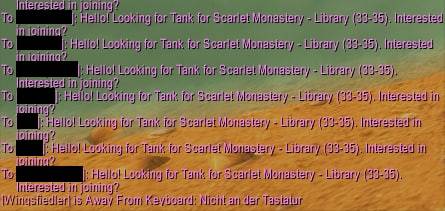
Instead of manually typing out search commands and messaging players one by one, this addon executes /who queries for your target dungeon or zone level range, filters candidates, and queues up automatic whispers.
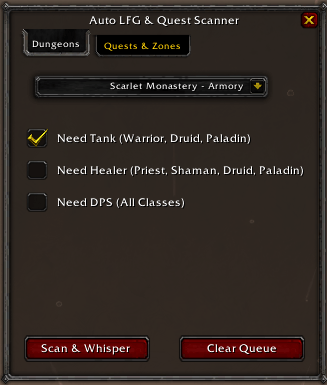
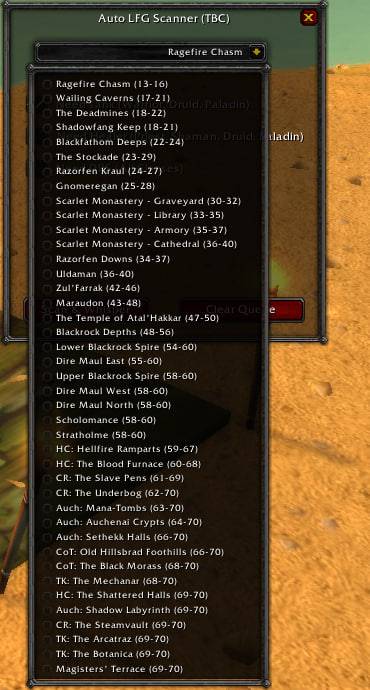
🏰 Targeted Dungeon Ranges: Pre-configured with accurate level brackets for every Classic and TBC dungeon (from Ragefire Chasm all the way to Magisters' Terrace and TBC Heroics).
🛡️ Smart Role Filtering: Select exactly what your group needs (Tank, Healer, or DPS). The addon automatically filters search results based on class capabilities.
📜 NEW — Quest & Zone Partner Finder:
Auto-Zone Detection: Automatically targets players in your current location within a $\pm 3$ level bracket.
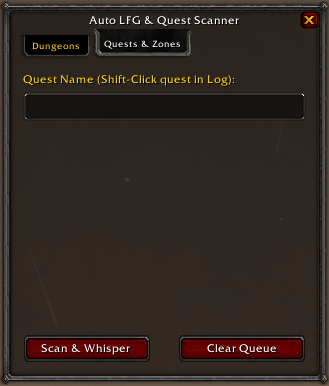
Custom Quest Text: Specify the exact quest name to send tailored, context-specific whisper messages.
Shift + Click Integration: Hold Shift and Left-Click any quest directly in your default Quest Log to instantly paste its name into the input box!
⏱️ Smart Whisper Queue: To prevent accidental disconnects or trigger chat filters, messages are sent safely with a built-in 2-second delay.
🧠 Anti-Spam Memory: Tracks who you’ve messaged so you don't send duplicate invites to the same player within 30 minutes.
📍 Sleek Minimap Icon:
Free Drag & Drop: Click and drag the minimap button to position it anywhere around your radar border.
Auto-Hide: Automatically hides when you move your cursor away, keeping your UI clean and clutter-free.
🎮 How to use it
-
Click the Minimap icon or type
/autolfg(or/alfg) to open the window. -
Choose your mode using the top tabs:
Dungeons: Select your dungeon, check required roles (Tank/Healer/DPS), and hit Scan & Whisper.
Quests & Zones: Shift-click a quest from your Quest Log (or type its name manually) and hit Scan & Whisper. -
The addon will handle the
/whoscan, filter players based on your criteria, and safely message eligible candidates one by one.
💬 Commands
/autolfg or /alfg — Toggle the main window.
Feedback and bug reports are always welcome! Feel free to leave a comment or submit an issue.
The AutoLFGScanner Team