AuraShelf - Retail and Forever buff notifier
- By
Boxes you place anywhere showing the buffs and debuffs you pick on you , with a sound when one lands. Drawn and played by the game itself, so they keep working in raid combat and M+ where the old buff trackers went dark.
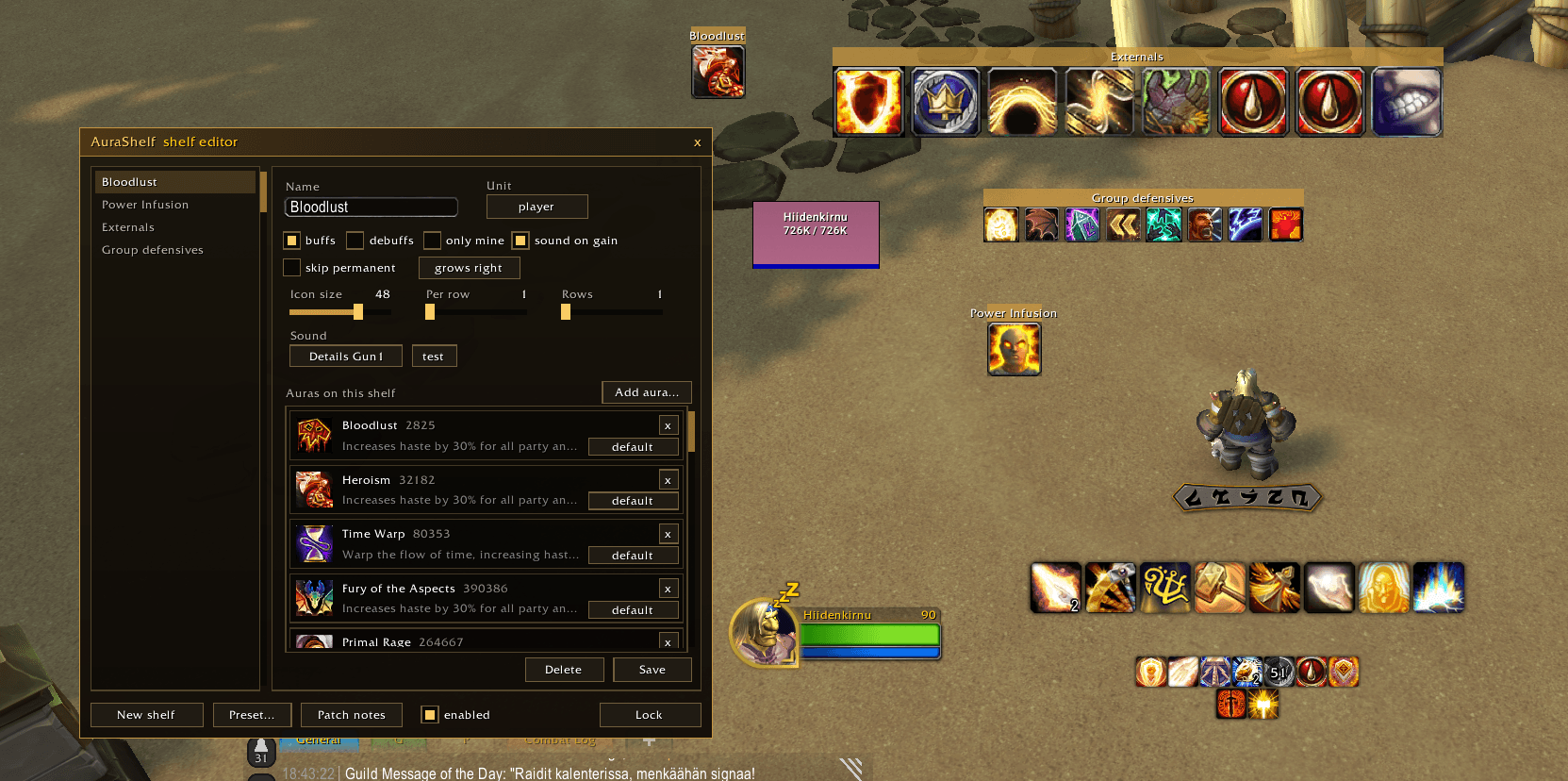
Testing mode displaying all buffs in each shelf
Description
AuraShelf - Buff and Debuff Boxes That Still Work in Raids
A shelf is a box you drag anywhere on screen and fill with the auras you care about. Make one for your target's debuffs, one for the externals people put on you, one with a single huge icon that only lights up when Spatial Paradox or Power Infusion lands, and give any of them a sound that plays the moment the buff arrives, mid fight included.
Since Midnight, addons cannot read auras in combat any more, which is why the old buff trackers went dark exactly when you needed them. AuraShelf is built on the aura display and aura sound systems Blizzard added in 12.1 instead: the game itself draws the icons and plays the sounds, the addon never reads a single aura during a fight, and so the shelves keep working in raids, dungeons and M+. Think of it as the buff icon half of what WeakAuras used to do for you, done the way the game now allows.
Shelves
/ash opens the shelf editor. Each shelf picks a unit (you, your target, focus or pet), buffs or debuffs, and whether only your own casts count. Set the icon size, how many per row and how many rows, then unlock, drag the box where you want it and lock again. Leave the aura list empty and the shelf shows everything the filter matches, a plain buff bar in your own spot. Pin spell ids to it and it shows nothing but those.
Finding the right aura
Nobody remembers spell ids, so the editor helps. Every aura tooltip in the game shows its spell id while AuraShelf is loaded, and the Add aura window records each distinct buff you gain until you stop it, so you cast the thing, or have it cast on you, and click it straight onto the shelf. Typing an id shows the spell's icon and name before you add it. Each pinned aura sits on the shelf as a card with its icon, name and Blizzard's description, hover for the full tooltip.
Sounds
Tick sound on gain and the shelf plays a sound whenever one of its pinned auras lands on its unit. Pick the shelf's sound from the built in set, or from every sound pack you have installed through LibSharedMedia, with a searchable picker where a click plays and picks. Any aura can carry its own sound instead of the shelf's, so the paradox can chime while the infusion rings. The sounds are registered with the game and played by it, which is what lets them fire in the middle of a boss fight.
Good to know
Shelf edits made in combat apply once it ends, the game does not allow changing aura displays while fighting. Shelves and their positions are saved per character. Without a LibSharedMedia pack you still get five built in sounds, and a shelf pointing at a sound whose pack you removed falls back to the first of them. /ash debug prints what every shelf is doing if something looks off.
Features
- Movable boxes showing filtered auras for player, target, focus or pet.
- Pin spell ids so a shelf shows only the auras you pick, or leave it open.
- Icons drawn by the game, so shelves keep working in raid combat and M+.
- A sound when a pinned aura lands, per shelf or per aura, in combat too.
- Built in sounds plus every LibSharedMedia sound pack, in a searchable picker.
- An aura log that records buffs as you gain them, one click adds them.
- Spell ids in every aura tooltip.
- Aura cards with icon, name and description in the editor.
AuraShelf - Retail and Forever buff notifier Team
Owner