Auctionizer Overview
Description
Auctionizer
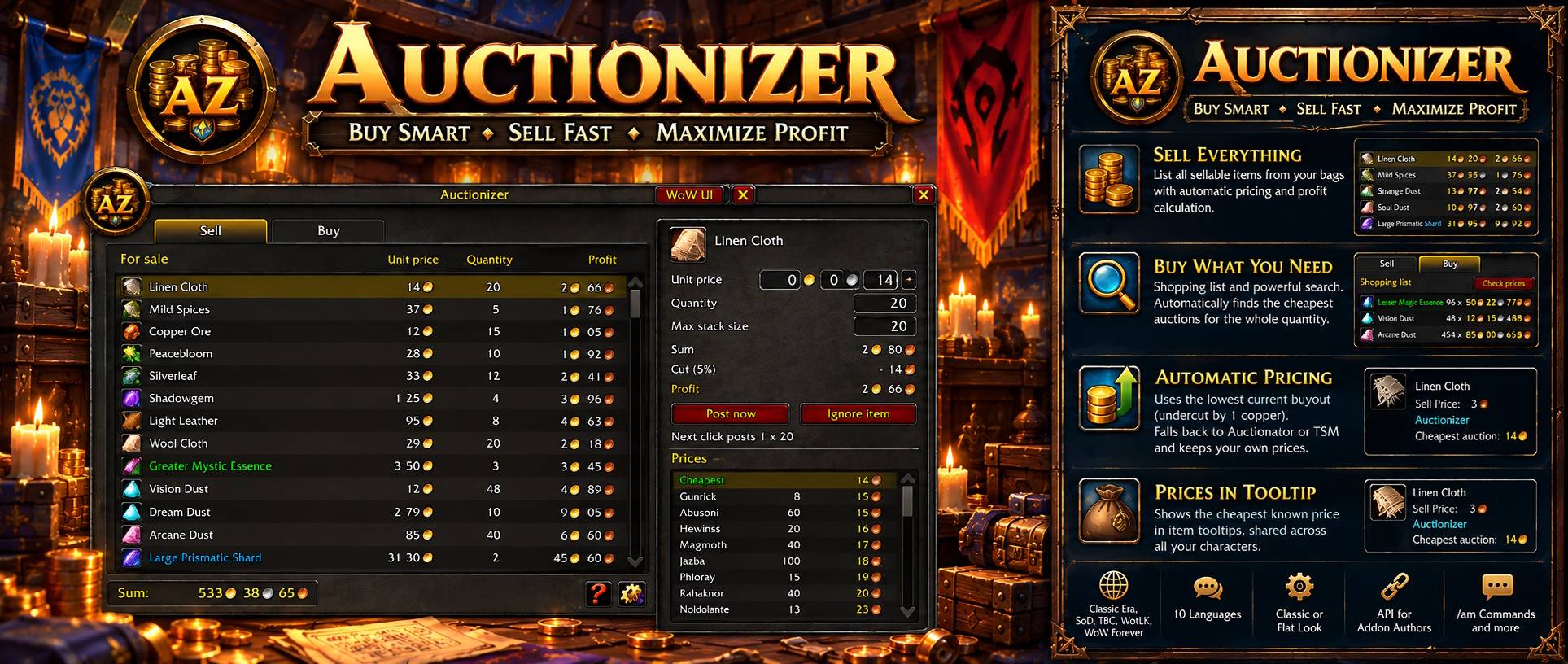
Auctionizer replaces the auction house window. Sell everything in your bags in a few clicks with automatic pricing, and buy what your shopping list needs from the cheapest auctions.
Formerly known as Auction Master.
Supports Classic Era and Season of Discovery, WoW Forever, Burning Crusade, Wrath of the Lich King and Titan Reforged. On Cataclysm and Mists of Pandaria the addon loads but leaves the auction house untouched.
Available in English, German, Spanish, French, Italian, Korean, Portuguese, Russian and Chinese.
Sell Tab
Open the auction house and every sellable item of your bags is already listed with its price, quantity and profit, the total profit at the bottom.
- Only items the auction house accepts are listed: bound items, quest items, conjured items and items with used charges are sorted out, damaged items show in red until you repair them
- Set quantity and stack size per item, the stack size is remembered for the next time
- Stacks are built for you: full stacks and one for the rest
- The list follows your bags, sold or moved items leave it by themselves
- Ignore an item from its sell panel, manage the ignored items on the settings page
Automatic Pricing
Every item gets the lowest current buyout undercut by one copper. Your own auctions keep their price, so you never undercut yourself.
When nothing is listed, the price comes from Auctionator or TradeSkillMaster if you use one of them, and you can always type your own price. The bid is set a little below the buyout, and the shown profit already has the auction house cut taken off.
Sell Panel
Click an item and its sell panel opens right next to the row. It lists every current offer with seller, quantity and unit price, your own auctions marked in green. A click takes its price, and one more click posts all stacks.
If a post fails, the stacks already posted leave the list and the rest waits for your next click.
Prices in Tooltips
Every item Auctionizer has seen on the auction house shows its cheapest price in the item tooltip, per unit for items that stack. Older prices show their age, all characters of the same realm and faction share them, and prices older than two weeks are dropped.
Buy Tab
The buy tab holds a shopping list per character and an auction search.
- Search by name, by shift click on an item link or by auction house category and subcategory
- Results are grouped by item with the quantity on offer and the best unit price
- Put an item on the shopping list with one click and type the quantity you need
- Check prices fetches the offers of the whole list and shows what every entry and the whole list cost right now
- Prices cover the whole wanted quantity, calculated from the cheapest stacks that hold it, not just the cheapest auction
- The auction house is read only as far as your quantity needs, so even common reagents are priced in a moment
Buy Panel
Click a list entry or a search result and the buy panel marks the auctions your purchase takes, cheapest first. Type the quantity, see what it costs and whether the stacks buy a few more than you wanted, then buy click by click and watch the remaining quantity go down.
An auction that is gone in the meantime is skipped and the next cheapest takes its place. An item leaves the shopping list once its quantity is bought.
Your Auctions and Bids
The auctions tab lists everything you have on sale and checks the cheapest price of the other sellers for every item. Undercut auctions come first in red, and the tab counts them.
- Cancel any auction with one click, cancel undercut takes them one after another
- An auction with a bid asks first, cancelling it costs part of the bid
- The bids tab shows your bids and marks the ones you were outbid on
Profession Master
Install the free companion addon Profession Master and its missing reagents become your shopping list with one click. Bank and mail are taken off first, so you only buy what is really missing.
Profession Master uses Auctionizer in return: the prices Auctionizer has seen show up as reagent prices in its windows, a click on a reagent searches it in the buy tab, and the search all buttons of its shopping list and its missing reagents window fill the Auctionizer shopping list with the missing amounts.
WoW Forever
On WoW Forever the addon works with the new auction house. Reagents and other commodities are posted as one auction of the whole quantity and bought by the unit, gear is posted and bought piece by piece, all with the same clicks as on the classic clients.
Classic or Flat Look
Pick the look of the window once, with a preview: the Classic look with the golden frame or the modern Flat look.
A scale slider in the settings sizes the window to your screen.
Default Auction House
The default window stays one click away: the WoW UI button or /az switches to it, and a button on the default window leads back.
Chat Commands
/azswitches between Auctionizer and the default auction house/az helpshows the help window with the commands/az logsshows the log window
API for Addon Authors
Other addons can use Auctionizer through the global table AuctionizerApi. It answers from login on and only ever grows, so an addon built on it keeps working with later versions.
IsReady(),IsSupported(),IsAuctionHouseOpen()andIsWindowShown()tell what the api can do right nowGetPrice(item)returns the cheapest auction house price Auctionizer has seen for an item and when it saw itGetOffers(item)returns the offers fetched during the current visit, cheapest firstSearchItem(item)searches an item in the buy tab,ShowTab(tab)switches between selling and buyingGetShoppingList(),AddToShoppingList(item, quantity),RemoveFromShoppingList(item)andClearShoppingList()manage the shopping list of your character
An item is an item id or an item link. Every function works with a dot or a colon call, and the actions return false instead of forcing anything when the auction house is closed or you switched to the default window.
Add ## OptionalDeps: Auctionizer to your TOC and check AuctionizerApi.Version for the functions you need:
local api = AuctionizerApi;
if (api and api.Version >= 1 and api.IsReady() and api.IsSupported()) then
    local price, seenTime = api.GetPrice(itemId); -- copper per unit, nil when never seen
    if (api.IsWindowShown()) then
        api.SearchItem(itemId);                     -- exact search in the buy tab
    end
    api.AddToShoppingList(itemId, 20);              -- works while the auction house is closed too
end
Feedback
Join the Discord server to report issues, suggest features, or give general feedback.

Support
If you enjoy using Auctionizer and want to support its continued development, a small donation would be greatly appreciated.
Thank you very much for your support!

The Auctionizer Team


Owner