Auction Tracker
- By
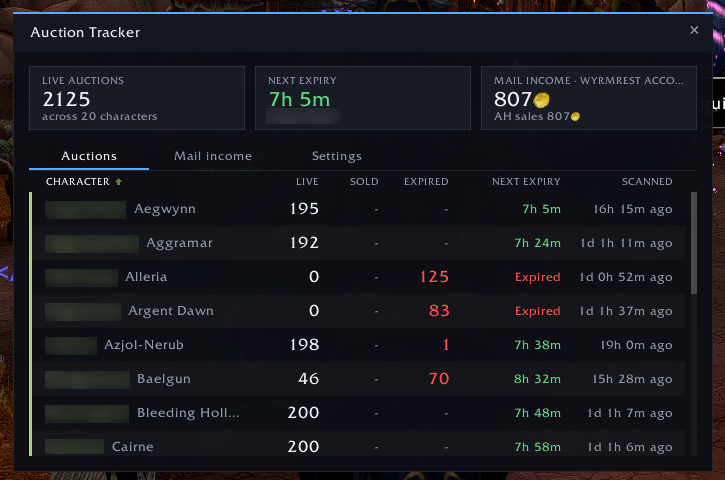
Tracks active Auction House listings and expiry times across all your characters and realms, and shows which realms earn the most from sales.
Auction Tracker 1.png
Auction Tracker 2.png
Auction Tracker 3.png
Description
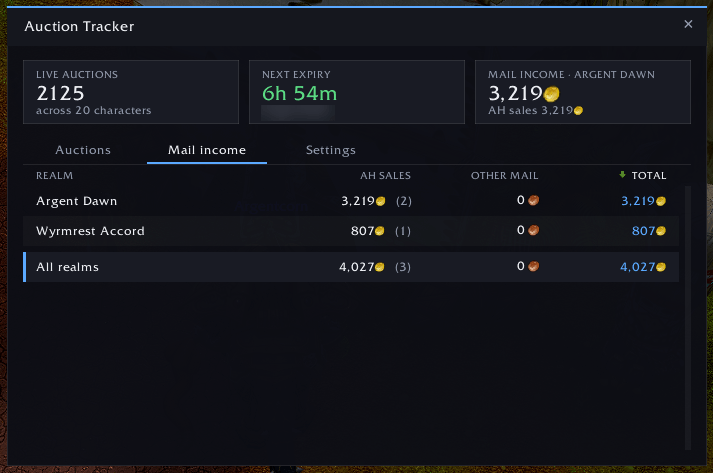
Auction Tracker keeps a record of the active auctions on every character across all your realms, so you can see what is listed, what is about to expire and what has already expired without logging into each one. It also totals the gold you collect from the mailbox per realm, so you can see which realms are earning the most.
It is built for flippers who run auctions across many characters and realms and need to know where to log in next and which realms are worth the effort.
Features
- Cross-realm overview: live auction count, next expiry time and time since the last scan for every character, with the realm shown next to each name.
- Realm earnings: mailbox income is totalled per realm, split into Auction House sales and other mail. The Mail income tab ranks realms by total, highest first, so your best-earning realms are at the top.
- Expired flag: a character whose logged auctions have all expired shows the expired count and “Expired” in red.
- Summary cards: total live auctions across all characters and the soonest expiry.
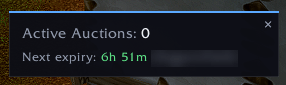
- Auction House popup: shows your active count and next expiry when the Auction House opens.
- Sortable columns: click a header to sort by character, live count, next expiry or last scanned (or realm, AH sales, other or total on the income tab). Click again to reverse.
- Live updates: the count updates as you post and cancel, then reconciles with the server list.
- Light on the Auction House: it queries at most once every 5 seconds and skips the query if another addon has already refreshed your auctions.
- Settings tab: toggles for the popup, minimap button and login chat summary, plus reset options with confirmation.
- Forget characters: hover a character’s name and click × to remove them.
- Login summary: a chat line with your live auction total and next expiry.
How it works
- The game only provides your auctions while the Auction House is open, so open it once on each character to start tracking. Saved data persists between logins.
- Expiry times are exact when the game provides them. Otherwise they are estimated from the time-left band and narrowed on repeat scans. Auctions that may already have expired are marked “+N?”.
- Realm earnings count gold from the moment you collect it from the mailbox, so a realm’s total reflects what you have collected, not what is still waiting in the mail.
What it does not do
Auction Tracker does not record item names, prices, undercuts or net profit. Income figures are gross mailbox gold and do not subtract deposits or purchases. It tracks auction counts, expiry timing and mailbox income only. Though not a requirement, I highly recommend using TSM alongside this tool.
Slash commands
/at: open or close the window/at settings: open the Settings tab/at summary: print a summary in chat/at forget Name-Realm: remove a character/at minimap: show or hide the minimap button/at popup: toggle the Auction House popup (/at popup resetresets its position)/at reset: clear all saved auction data/at mailreset: clear mailbox income totals
Auction Tracker Team