Description
asReady (Midnight)
Party Interrupt Tracker
Key Features
- While there are more complex methods to track who interrupted, this addon is designed to keep things simple by referencing basic interrupt event data to display information on screen.
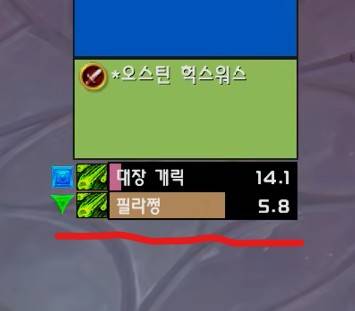
- Displays a 15-second bar (configurable, based on melee interrupt cooldowns) when a party member successfully interrupts a spell.
- Works exclusively against hostile targets inside dungeons.
- Displays raid target markers on the interrupted target.
- Displays the icon of interrupted spell.
- Does not track crowd control abilities like stuns—only successful standard interrupt spells are shown, and failed or missed interrupts are not displayed.
Configuration
Accessible via
ESC>Options>AddOns>asReady.Max Display Count: Default is 6.Max Display Duration: Default is 15 seconds.Move position: Type
/asConfigin the chat window.Reset position: Type
/asClearin the chat window to reset to default settings.
Support & Contacts
- Korean Users: Visit the
Inven asMOD Forum(https://www.inven.co.kr/board/wow/5288) - English Users: Visit the
YouTube asMOD Channel(https://www.youtube.com/@asmod-wow) orGitHub(https://github.com/aspilla/asMOD/)
asReady (한밤)
파티 차단 내용 확인
주요 기능
- 차단한 사람을 다소 정확하게 파악하는 방법이 있으나, 그냥 간단하게 차단 정보(비밀 값)을 참고하여 화면에 표시만 하도록 설계됨
- 파티원의 차단 스킬로 차단이 성공했을 경우 15초바 (설정 가능, 밀리 차단 기준)를 표시
- 던전에서만 적대적 대상에 대해서만 동작
- 차단 대상의 징표 표시
- 차단한 스킬의 아이콘을 표시
- 스턴등의 기술로 차단한 경우는 파악이 안됨, 차단 스킬을 사용하여 성공한 경우만 표시, 차단이 실패한 경우는 표시 안됨
설정
ESC>설정>애드온>asReady에서 설정 가능최대 표시 개수: 기본 6개최대 표시 시간: 기본 15초위치 이동 :
/asConfig명령어 채팅창에 입력위치 초기화 :
/asClear명령어 채팅창에 입력, 기본 설정으로 초기화
문의처
한글 유저:인벤 asMOD 포럼방문 (https://www.inven.co.kr/board/wow/5288)영문 유저:Youtube asMOD 채널방문 (https://www.youtube.com/@asmod-wow),Github방문 (https://github.com/aspilla/asMOD/)
asReady Team

Owner