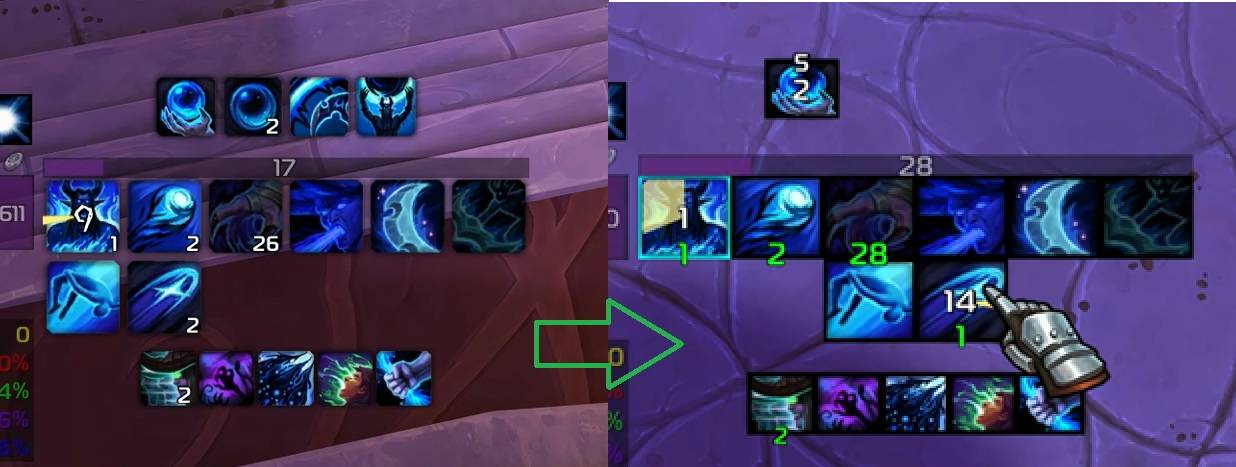
asCombatInfo_MN.jpg
Description
asCombatInfo (Midnight)
Enhances the Cooldown Manager.
Key Features
- Icon/Border Shape Modification * Charge Count Repositioning: Moved to the bottom and color changed to green.
- Hotkey Display: If duplicate skills are registered (e.g., Stances or Druid forms), the skill in the lower-numbered slot takes priority.
- Center Alignment for 2-Row Icons
- Font Replacement: Changes the font to the default WoW font.
- Buff/Debuff Borders: Adds a blue border during active buffs/debuffs.
- Buff Bar Skinning: Modifies the appearance of buff bars and displays them in class-specific colors.
- Combat Assistance Skill Highlighting

- Buff Bar Alignment (Top/Bottom) Top alignment has higher priority.
- Recommended for use with
asPowerBar.
Configuration
Adjustable via ESC > Options > AddOns > asCombatInfo
Common Settings
Transparency change out of combat(Default: On)Display hotkey(Default: On)Alert assisted spell(Default: Off)
Bar Settings
Change buff bar(Default: On)Buff bar class color(Default: On)Top aligned bar(Default: Off)Bottom aligned bar(Default: Off)Hide bar name(Default: Off)
Buff Settings
Aligned buff(Default: Off)Border width(Default: 2)Icon size rate(Default: 8, the height is 80% of the width)Milliseconds threshold (0.1s cooldown increments)(Default: 3s)
Spell Settings
Border width(Default: 2)Icon size rate(Default: 9, the height is 90% of the width)Milliseconds threshold (0.1s cooldown increments)(Default: 3s)
Contact Information
- Korean Users: Visit the Inven asMOD Forum.
- English Users: Visit the asMOD YouTube Channel or GitHub.
asCombatInfo (한밤)
쿨다운 메니저를 강화
주요 기능
- 아이콘/테두리 모양 변경
- 충전 횟수 하단 이동 및 녹색 변경
- 단축키 표시 : 태세/드루이드 폼 관련 같은 스킬이 중복해서 등록된 경우 Slot 번호가 작은 단축키 기준으로 단축키 표시
- 2열 아이콘 가운데 정렬
- 폰트를 와우 기본 폰트로 변경
- 강화/약화 버프시 파란색 테두리 추가
- 버프바 외형을 변경하고 직업 색상으로 표시
- 전투보조기능 스킬 강조
- 버프바 정렬 (위/아래) 위 정렬이 우선순위 높음
asPowerBar와 같이 사용하는 것을 추천
설정
esc >> 설정 >> 애드온 >> asCombatInfo 에서 설정 가능
공통 설정
비전투 시 투명도 변경(기본 On)단축키 표시 여부(기본 On)지원 스킬 알림(기본 Off)
바 설정
버프 바 변경(기본 On)버프 바 직업 색상(기본 On)위로 정렬 바(기본 Off)아래로 정렬 바(기본 Off)바 이름 숨기기(기본 Off)
버프 설정
버프 정렬(기본 Off)테두리 두께(기본 2)아이콘 크기 비율(기본 8, 높이가 가로길이의 80%)남은 쿨 소수점 최소 시간(기본 3초)
스킬 설정
테두리 두께(기본 2)아이콘 크기 비율(기본 9, 높이가 가로길이의 90%)남은 쿨 소수점 최소 시간(기본 3초)
문의처
한글 유저:인벤 asMOD 포럼방문 (https://www.inven.co.kr/board/wow/5288)영문 유저:Youtube asMOD 채널방문 (https://www.youtube.com/@asmod-wow),Github방문 (https://github.com/aspilla/asMOD/)
The asCombatInfo Team


Owner