Description
asStanceAlert (Midnight)
- Alerts for stealth, stances, and forms.
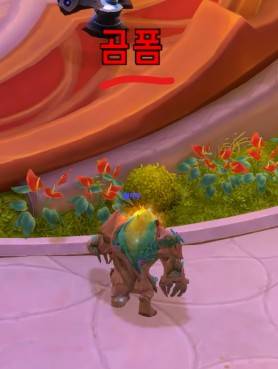
Text type (Default)
;
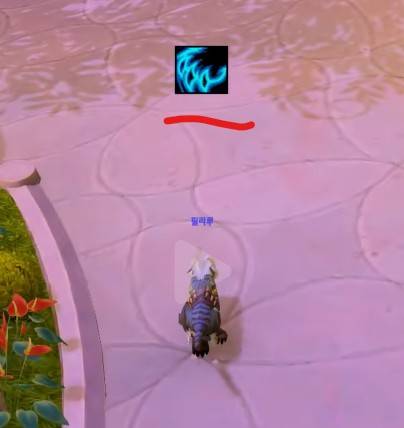
Button type (Configuration required)
;
Features
- Druid: Alerts when not in the current specialization's appropriate form.
- Rogue: Alerts when in
Stealth. - Warrior: Alerts when not in the current specialization's appropriate stance.
- Shadow Priest: Alerts when not in
Shadowform. - Shaman: Alerts when in
Ghost Wolfform.
Configuration
The text and buttons displayed in the center of the screen can be moved.
Move position: Type
/asConfigin the chat window.Reset position: Type
/asClearin the chat window to reset to default settings.Open
ESC>Options>AddOnstab and selectasStanceAlertto modify options.Show Button Instead of Text(Default: Off)Alert Text Size(Default: 30)Alert Button Size(Default: 40)
Support & Contacts
- Korean Users: Visit the
Inven asMOD Forum(https://www.inven.co.kr/board/wow/5288) - English Users: Visit the
YouTube asMOD Channel(https://www.youtube.com/@asmod-wow) orGitHub(https://github.com/aspilla/asMOD/)
asStanceAlert (한밤)
- 은신/태세/폼을 알림
글씨 형식 (기본)
;
버튼 형식 (설정 필요)
;
기능
- 드루이드 : 현 특성 폼이 아닌 경우 알림
- 도적 :
은신시 알림 - 전사 : 현 특성 태세가 아닌 경우 알림
- 암사 :
암흑 형상이 아닌 경우 알림 - 주술사 :
늑대폼인 경우 알림
설정
화면 중앙에 표시되는 글씨/버튼은 이동이 가능합니다.
위치 이동 :
/asConfig명령어 채팅창에 입력위치 초기화 :
/asClear명령어 채팅창에 입력, 기본 설정으로 초기화ESC>설정>애드온탭에서asStanceAlert를 찾아 옵션을 변경할 수 있습니다.글씨 대신 버튼 표시(기본 Off)알림 글씨 크기(기본 30)알림 버튼 크기(기본 40)
문의처
한글 유저:인벤 asMOD 포럼방문 (https://www.inven.co.kr/board/wow/5288)영문 유저:Youtube asMOD 채널방문 (https://www.youtube.com/@asmod-wow),Github방문 (https://github.com/aspilla/asMOD/)
asStanceAlert Team

Owner