ascooldownpulse.jpg

Description
asCooldownPulse (Midnight)
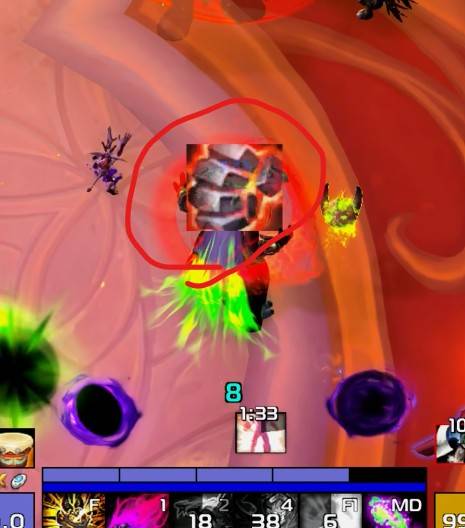
Displays icons for ready spell.
Displays cooldowns for trinkets, racial abilities, defensive spells, healthstones, and potions.
Key Features
- Ability, Trinket, Potion, Racial, and Usable Item Notifications: Skills registered in the spellbook (excluding stance/bundled abilities), racials, trinkets, potions, etc., after 15 seconds have elapsed since use (cooldown reductions caused by procs cannot be tracked).
- Voice Notifications(Default Off): Announces spell and item names via TTS voice. If you place a
SpellName.mp3file inside theSpellSoundfolder in the addon directory and turn off theAlert spell sound using TTSoption, you can customize sound alerts for specific skills. To use this feature, enable theSound notification for skill ready alertoption in the addon settings.
- Trinket Cooldown Display (Bottom of TargetFrame, Default off): Displays cooldowns for usable trinkets when equipped.
- Racial Ability Cooldown Display (Bottom of TargetFrame, Default off)
- Combat Potion Cooldown Display (Left): Displays the cooldown for major combat potions.
- Survival Potion Cooldown Display (Left): Displays the cooldown for major survival potions.
- Healthstone Cooldown/Count Display (Left): Only displayed when a Healthstone is in your inventory.
- Skill Cooldown Tracking (Right): Designed to track specific skills, Defensive or utility skills registered.
Configuration
Accessible via
ESC>Options>AddOns>asCooldownPulse.Icon size for skill ready alert (Default: 60, 0 for off).
Adjusts transparency when out of combat (Default: On).
Toggle display of trinket/racial cooldowns (Default: Off).
Icon size for trinket/racial cooldowns (Default: 28).
Toggle display of potion/Healthstone cooldowns (Default: On).
Icon size for potion/Healthstone cooldowns (Default: 28).
Toggle display of skill cooldown tracking (Default: On).
Icon size for skill cooldown tracking (Default: 28).
The time threshold at which the remaining cooldown begins displaying in 0.1-second increments (Default: 3 seconds).
The minimum time of cooldown to alert (Default: 15 seconds).
Alert spell sound using TTS (Default: On)
TTS ID (Default: Zira)
Sound Volume (Default: 70)
Sound notification for skill ready alert (Default: Off)
A
/reloadis required after changing sizes.You can register skills for cooldown tracking via
ESC>Options>AddOns>asCooldownPulse>Defensive Spell List.To find the
Spell ID, using an additional addon like ID Tip is recommended.
- Repositioning: Enter the
/asconfigcommand in the chat window. - Reset Position: Enter the
/asclearcommand in the chat window to reset to default settings.
Contact Information
- Korean Users: Visit the Inven asMOD Forum.
- English Users: Visit the asMOD YouTube Channel or GitHub.
asCooldownPulse (한밤)
준비된 스킬 아이콘으로 알림
생존기, 장신구, 종특, 생석, 물약 쿨 표시
주요 기능
- 스킬, 장신구, 물약, 종특, 사용가능 알림: '스킬북`에 등록 된 스킬(묶음 형태 스킬 제외), 종특 장신구, 물약등, 사용 후 15초 이상 지났을 경우(발동 등에 의해 쿨이 줄어든 경우는 파악 불가)
- 음성 알림 (기본 off) 스킬 명 아이템 명을 TTS 음성으로 알림, 애드온 폴더내
SpellSound폴더에스킬명.mp3파일 추가하고TTS 로 스킬 쿨 음성 알림옵션을 끄면 특정 스킬만 원하는 사운드로 알림 가능. 이 기능을 이용하기 위해서스킬 쿨다운시 알림음 재생옵션을 켜야 함.
- 장신구 쿨 표시(타켓 프레임 하단, 기본 off): 사용가능 장신구 착용시 장신구 쿨 표시.
- 종특 쿨 표시(타켓 프레임 하단, 기본 off)
- 전투 물약 쿨 표시(좌측) : 대표 물약 쿨만 표시
- 생존 물약 쿨 표시(좌측) : 대표 물약 쿨만 표시
- 생석 쿨/사용 가능 개수 표시(좌측) : 생석을 지니고 있을때만 표시
- 생존기 쿨 추적 (우측) : 직업 필수 생존기 추적
설정
ESC>설정>애드온>asCooldownPulse에서 설정 가능스킬 사용가능 알림 아이콘 크기 (기본 60, 0 이면 기능 끄기)
비전투시 투명도 변경 (기본 On)
장신구/종특 쿨 표시 여부 (기본 off)
장신구/종특 쿨 사이즈 (기본 28)
물약/생석 쿨 표시 여부 (기본 On)
물약/생석 쿨 사이즈 (기본 28)
스킬 쿨 추적 표시 여부 (기본 On)
스킬 쿨 추적 사이즈 (기본 28)
남은 쿨을 0.1초 단위로 보여줄 최소 시간 (기본 3초)
알림할 최소 쿨다운 시간(기본 15초)
TTS 로 스킬 쿨 음성 알림 (기본 On)
TTS ID (기본 Heami)
음성 크기 (기본 70)
스킬 쿨다운시 알림음 재생 (기본 Off)
크기 변경후
/reload필요ESC>설정>애드온>asCooldownPulse>생존기 스킬 목록에서 쿨 추적할 스킬 등록 가능스킬 번호(Spell ID)확인이 필요하여 ID Tip등 추가 애드온 사용
- 위치 이동 :
/asConfig명령어 채팅창에 입력 - 위치 초기화 :
/asClear명령어 채팅창에 입력, 기본 설정으로 초기화
문의처
한글 유저:인벤 asMOD 포럼방문 (https://www.inven.co.kr/board/wow/5288)영문 유저:Youtube asMOD 채널방문 (https://www.youtube.com/@asmod-wow),Github방문 (https://github.com/aspilla/asMOD/)
The asCooldownPulse Team


Owner