asInterruptHelper.jpg
asInterruptHelper_target.jpg
Description
asInterruptHelper (Midnight)
Displays cooldowns for Interrupt and Stun skills.
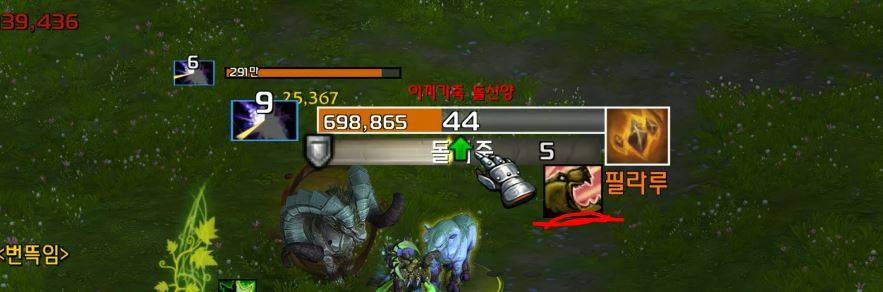
<For Target/Focus>
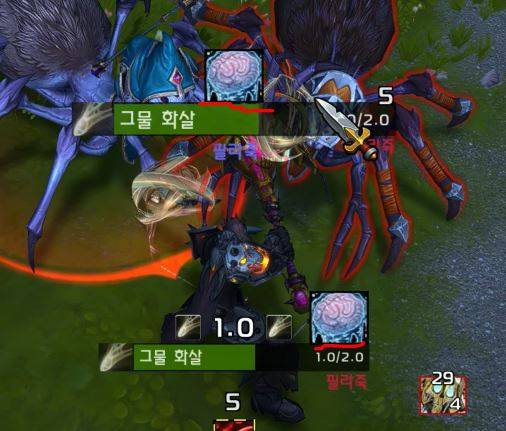
<For Mouseover Target>
Key Features
- Recommended to use alongside
asTargetCastBar
Displays interruptible skills right above the cast bars of your target or focus target. If a mouseover target exists, the icon will display directly over your mouse cursor.
When an Interruptible Skill is Cast
Displays your primary interrupt skill. If your interrupt is currently on cooldown, it displays a stun skill instead, provided the enemy unit is stunnable (i.e., non-boss units of equivalent level).
When an Uninterruptible Skill is Cast
Displays a stun skill if the enemy unit is stunnable (i.e., non-boss units of equivalent level).
Skill Display Priority
Skills with shorter cooldowns take higher priority. (If cooldowns are identical, the skill with the lower Spell ID is prioritized.)
Skill Range Indicator
When a skill is available, its icon turns red if the target is out of range.
Configuration
Settings can be modified via ESC > Options > AddOns > asInterruptHelper:
Display Target Interrupt Skill: Default: On.
Display Focus Target Interrupt Skill: Default: On.
Display Mouseover Target Interrupt Skill: Default: On.
Display in Red When Out of Range: Default: On.
Display Stun Skill When Interrupt is on Cooldown: Default: On.
Repositioning: Enter the
/asconfigcommand in the chat window.Reset Position: Enter the
/asclearcommand in the chat window to reset to default settings.
Contact Information
- Korean Users: Visit the Inven asMOD Forum.
- English Users: Visit the asMOD YouTube Channel or GitHub.
asInterruptHelper (한밤)
차단/스턴 스킬 쿨다운 표시
<주시/대상의 경우>
<마우스 오버 대상의 경우>
주요 기능
- asTargetCastBar 와 같이 사용 추천
주시대상, 대상 케스팅바 위에 차단 가능 스킬을 표시. 마우스 오버 대상이 있는 경우 마우스 커서 위에 표시.
- 차단 가능 스킬 시전 시
주 차단 스킬을 표시, 차단 스킬이 없는 경우 쿨일 경우 스턴이 가능한 몹 (Level이 동등한 몹) 인 경우 스턴 스킬을 표시.
- 차단 불가 스킬 시전 시
스턴이 가능한 몹 (Level이 동등한 몹) 인 경우 스턴 스킬을 표시.
- 스킬 표시 우선 순위
쿨이 짧은 스킬이 우선순위를 가짐. (쿨이 같은경우 ID 가 작은수 인 경우)
- 스킬의 유효 거리 표시
스킬이 사용 가능할 경우 유효 거리에 따라서 사거리 밖일 경우 붉은색으로 표시.
설정
ESC > 설정 > 애드온 > asInterruptHelper 에서 다음 설정 변경 가능
대상 차단 스킬 표시 여부 : 기본 On
주시 대상의 차단 스킬 표시 여부 : 기본 On
마우스 오버 대상의 차단 스킬 표시 여부 : 기본 On
사거리 밖이면 붉은색으로 표시 : 기본 On
차단 스킬이 쿨일 경우 스턴 스킬로 표시 : 기본 On
위치 이동 :
/asConfig명령어 채팅창에 입력위치 초기화 :
/asClear명령어 채팅창에 입력, 기본 설정으로 초기화
문의처
한글 유저:인벤 asMOD 포럼방문 (https://www.inven.co.kr/board/wow/5288)영문 유저:Youtube asMOD 채널방문 (https://www.youtube.com/@asmod-wow),Github방문 (https://github.com/aspilla/asMOD/)
asInterruptHelper Team

Owner