Are You Talented?
- By
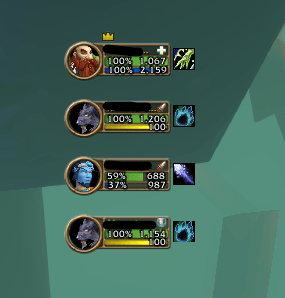
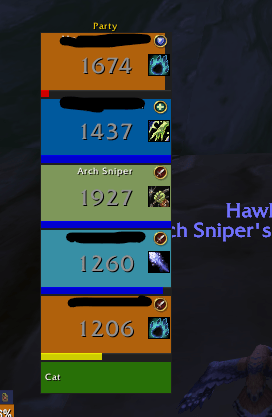
Shows each party member's talent spec on the party frames: the icon and name of the talent tree they put the most points in. No inspecting, no clicking. For WoW Forever.
party frames classic.png
party frames.png
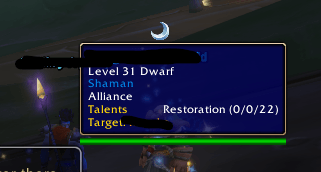
Tooltip.png
Description
See your group's specs at a glance
Are You Talented? puts each party and raid member's spec right on their frame: the icon of the talent tree they put the most points in. No inspecting, no clicking. Made for WoW Forever.
Know who does what
- Is the druid healing or tanking? Is the warrior Protection or Fury? One look at the frames tells you.
- Each member's spec shows a few seconds after they join, even when they're far away. A full raid takes about a minute.
- A grey question mark marks a member whose talents haven't been read yet.
On party and raid frames
- Spec icon: the talent tree's own icon, as in the talent window.
- Party frames, both kinds: beside the standard ones, and inside the raid-style ones, which show your own spec too.
- Raid frames: inside each member's frame, sized to the frame, with groups kept together or combined.
- You pick which side of a standard party frame the icon goes on, and how big it is.
On tooltips
- Hover any player, in your group or not, to see their spec's icon, name and talent points, like "Fury (5/41/5)".
- Size up a stranger before you invite them.
- For players outside your group, the line shows a moment after the mouse settles on them.
- Each can be turned off.
Stays up to date
- Talents are read again about once a minute in a party, every five minutes in a raid, and on every ready check, so a respec shows soon after.
- A spec stays on the frame when the member goes offline, and after you reload.
Good to know
- /ayt opens options. /ayt list prints a group spec Summary count plus each member's spec in chat.
- Talents are read while you're out of combat. Someone who joins mid-fight gets their icon when it ends.
- A member with no talent points spent gets no icon. With the same points in two trees, the first one shows.
- Players the game doesn't let you inspect get no tooltip line.
This addon was made with AI.
Feedback and bug reports are welcome in the comments.
Are You Talented? Team