Valyrie's The Expandables
- By
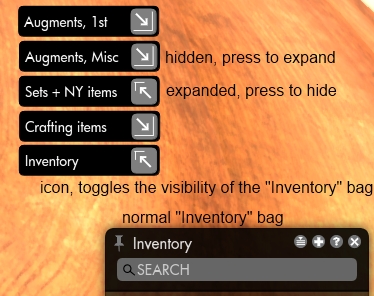
Let you hide/expand individual inventory bags to not be in the way
UI
Description
Valyrie's The Expandables
Donations
It takes a lot of time to develop an add-on, so if you really like this mod and want to support it then please consider donating any amount. Thank you!
Description
This add-on let you hide/expand individual inventory bags to make sure they are not in your way when interacting with the bank, vendors and similar.
What's new in this version
- Fix: Further adjustments to prevent icons resetting their positions
Current features
- Made as a separate add-on, this way it does NOT replace the "Backback2.swf" file as some of the other inventory mods does
- Each inventory bag will get a corresponding inventory icon that toggle the visibility (hidden/expanded) for that specific bag; the icons are only shown when the inventory is opened
- The icons can be repositioned individually anywhere on the screen simply by dragging with the mouse
- Adjust icon scale and background transparency
- Adjust the toggle buttons position (left or right side)
- Renaming/deleting an inventory bag will update/delete the corresponding icon after re-opening your inventory (being an add-on rather than a mod makes it unable to act on those actions immediately)
- Slash command support
Supports the following slash commands (typed into the chat window):
- '/vte reset/r' positions for all icons in a place on screen that should make them easy to find (for further repositioning using the mouse), also sets scale and transparency back to the default
- '/vte horizontal/h <StartPosX> <StartPosY>' Tiles all icons in a horizontal row, starting at position x,y
- '/vte vertical/v <StartPosX> <StartPosY>' Tiles all icons in a vertical column, starting at position x,y
- '/vte scale/s <value>' adjusts icon scale
- '/vte spacing/sp <value>' adjusts icon spacing
- '/vte transparency/t <value>' adjusts icon background transparency
- '/vte buttonpos/b <left/l/right/r>'adjusts the position (left/right) of the expand/minimize button
- '/vte save' creates a backup of the current configuration
- '/vte load' loads a backup of a previously saved configuration
- '/vte help' list the available slash commands
Example 1: '/vte h 10 30' will create a horizontal row, starting near the upper left corner of the widow Example 2: '/vte b l' will set all toggle buttons positions to the left side Example 3: '/vte t 10' will set the icons background transparency to 10 (almost fully transparent)
Installation
Unpack the .zip archive into <your Secret World Directory>\Data\Gui\Customized\Flash\ folder, overwrite if files already exists
If you are having problems using the slash commands then verify that the 'VTE' file is inside your <TSW installdir>\Scripts-folder, if not you have to copy it manually from the \TheExpandables\Scripts folder to the <TSW installdir>\Scripts folder
It should look like this:
- \Data\Gui\Customized\Flash\TheExpandables\CharPrefs.xml
- \Data\Gui\Customized\Flash\TheExpandables\Modules.xml
- \Data\Gui\Customized\Flash\TheExpandables\TheExpandables.swf
- \Data\Gui\Customized\Flash\TheExpandables\readme.txt
- \Data\Gui\Customized\Flash\TheExpandablesBackup\TheExpandablesBackup.swf
- \Data\Gui\Customized\Flash\TheExpandablesBackup\CharPrefs.xml
- \Data\Gui\Customized\Flash\TheExpandablesBackup\Modules.xml
- <TSW installdir>\Scripts\VTE
If you had TSW running when copying these files, then you must quit the game completely and then restart it or the add-on won't work properly!
Uninstallation
Delete the \Data\Gui\Customized\Flash\TheExpandables folder Delete the \Data\Gui\Customized\Flash\TheExpandablesBackup folder Delete the <TSW installdir>\Scripts\VTE file
/Valyrie
Valyrie's The Expandables Team