Outfit Control
- By
Enables changing of Sims' clothing through pie menu interactions, compatible with MC Dresser saved outfits (optional)
⚠️ Status: TESTED & COMPATIBLE with the September 22nd, 2026 Patch (PC/Mac: 1.128.90)
Outfit Control
by deadlystingnyc
You've spent hours building the perfect save. Carefully decorated lots, a lovingly played household (or two dozen), a whole world that feels just right - and then a townie walks by wearing a cocktail dress with hiking boots and a cowboy hat. Nobody invited her. Nobody knows where she came from. And yet here she is, ruining the vibe. Outfit Control adds a click menu to every Sim that lets you swap complete outfits from your MC Dresser pool or randomize individual clothing pieces on the fly, without ever opening CAS.
Why You Need This
Townies in The Sims 4 have always had a complicated relationship with fashion. Left to their own devices they'll combine formal wear with athletic shoes, layer accessories that have no business being in the same outfit, and generally dress like they don't own a mirror. And the longer your save runs, the more of them there are.
Outfit Control gives you the tools to fix it without breaking your flow. Click any Sim and swap just the offending piece - change the shoes without touching the rest, pull a whole curated outfit from your MC Dresser pool, or strip every accessory off at once and start fresh. It's the control the game should have given you in the first place.
What You Can Do
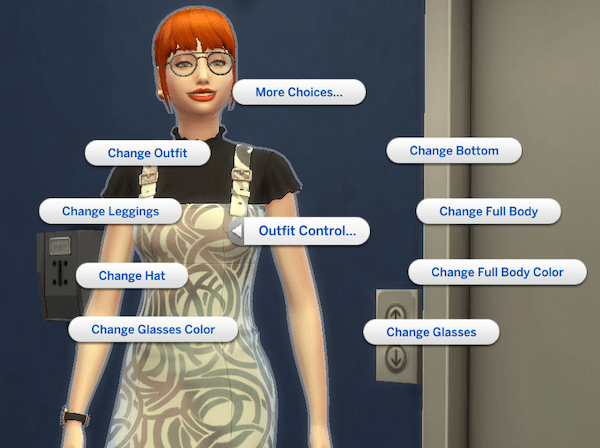
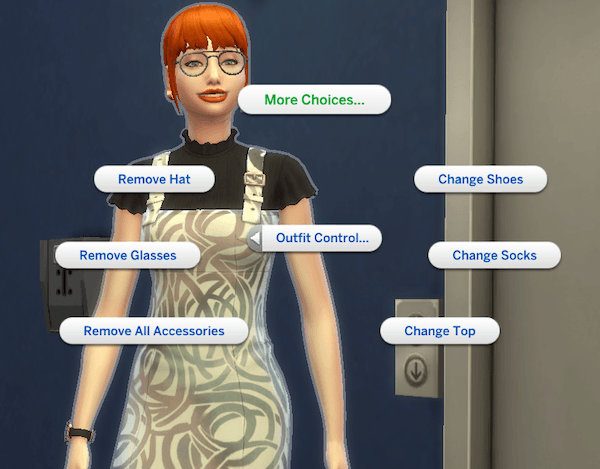
Click any Sim to open the Outfit Control submenu:
| Option | What It Does |
|---|---|
| Change Bottom | Randomizes the bottom. If the Sim was wearing a full-body outfit, a random top is also assigned. |
| Change Bottom Color | Randomizes the color swatch of the current bottom, keeping the same style. Hidden if Bottom item not worn or no alternate swatches exist. |
| Change Full Body | Randomizes a full-body outfit, removing the separate top and bottom first. |
| Change Full Body Color | Randomizes the color swatch of the current full-body outfit, keeping the same style. Hidden if Full Body item not work or no alternate swatches exist. |
| Change Glasses | Randomizes glasses. |
| Change Glasses Color | Randomizes the color swatch of the current glasses, keeping the same style. Hidden if slot is empty or no alternate swatches exist. |
| Change Hat | Randomizes hats. |
| Change Hat Color | Randomizes the color swatch of the current hat, keeping the same style. Hidden if slot is empty or no alternate swatches exist. |
| Change Leggings | Randomizes leggings/tights from the full game catalog. |
| Change Leggings Color | Randomizes the color swatch of the current leggings, keeping the same style. Hidden if slot is empty or no alternate swatches exist. |
| Change Outfit | Applies a random saved outfit from your MC Dresser pool matching the Sim's gender, age, and current outfit category. Hidden if no saved outfits match or if the Sim is wearing a situation, career, or special outfit. |
| Change Shoe Color | Randomizes the color swatch of the current shoes, keeping the same style. Hidden if slot is empty or no alternate swatches exist. |
| Change Shoes | Randomizes shoes. |
| Change Sock Color | Randomizes the color swatch of the current socks, keeping the same style. Hidden if slot is empty or no alternate swatches exist. |
| Change Socks | Randomizes socks from the full game catalog. |
| Change Top | Randomizes the top from the full game catalog. If the Sim was wearing a full-body outfit, a random bottom is also assigned. |
| Change Top Color | Randomizes the color swatch of the current top, keeping the same style. Hidden if Top item not worn or no alternate swatches exist. |
| Remove All Accessories | Strips glasses, jewelry, gloves, socks, leggings, piercings, and nails from the current outfit. Hidden if no accessories are worn. |
| Remove Glasses | Removes glasses from the current outfit. Hidden if the Sim isn't wearing glasses. |
| Remove Hat | Removes any hat from the current outfit. Hidden if the Sim isn't wearing a hat. |
| Remove Leggings | Removes leggings from the current outfit. Hidden if the Sim isn't wearing leggings. |
| Remove Shoes | Sets shoes to barefoot. Hidden if the Sim is already barefoot. |
| Remove Socks | Removes socks from the current outfit. Hidden if the Sim isn't wearing socks. |
Individual part randomization respects your MC Dresser blacklist and the Sim's current outfit category. Blacklisted parts are excluded and results are filtered to match the category the Sim is currently wearing.
Note: Change Outfit is hidden if no saved outfits match the Sim's gender, age, and outfit category, or if the Sim is wearing a situation, career, or special outfit.
MC Dresser Integration
Already using MCCC? No setup needed - the mod finds your mc_dresser.cfg automatically and pulls from your saved outfit pool.
Not using MCCC? No problem - the mod creates its own config file at deadlystingnyc_outfit_control.cfg in your Mods folder on first run. It uses MC Dresser cfg format, so community-made outfit pools from creators like BlackPanda and Tiasha can simply be pasted in.
⚠️ Community configs typically require all DLC to be installed. Outfits that reference content from missing packs may not apply correctly.
Requirements
- The Sims 4 (base game only)
- MC Command Center with MC Dresser (optional, enables the Change Outfit option using your saved outfit pool)
Installation
- Download and unzip
deadlystingnyc_outfit_control.zip - Drop the unzipped folder into your Mods folder:
Documents/Electronic Arts/The Sims 4/Mods/ - In-game, go to Game Options → Other and make sure Script Mods are enabled
⚠️ Both the
.ts4scriptand.packagefiles are required. The mod will not work if either is missing.
Troubleshooting
Open the cheat console with Ctrl+Shift+C, enter testingcheats true, then use:
| Command | What It Does |
|---|---|
dsn_outfit_state |
Show cfg path and loaded outfit and blacklist counts |
dsn_outfit_reload |
Clear cache and re-read cfg without reloading the game |
dsn_outfit_log |
Write a full diagnostic log to dsn_outfit_log.txt in your Sims 4 documents folder |
Change Outfit not showing up? Make sure your MC Dresser cfg has saved outfits that match the Sim's gender, age, and current outfit category.
Having an issue? Leave a comment below with your setup and I'll help troubleshoot.
Compatibility
- Compatible with MC Command Center and MC Dresser - no conflicts expected
- Does not override any tuning or game resources - should be broadly compatible with other mods
- CC clothing tagged for randomization is automatically included in the random pool; CC included in any pre-saved outfits will appear when those outfits are applied via Change Outfit
⚠️ CC clothing may produce unexpected results. The mod relies on outfit category tags to filter results correctly, but CC creators don't always tag their items accurately or consistently. If you see CC pieces appearing in the wrong outfit categories, this is likely the cause.
- Found a conflict? Please report it in the comments so I can investigate
🌐 Supported Translations:
French: French Translation by ElianasDiaries
Polish: Polish Translation by Aarathiel
Spanish: Spanish Translation by Monisims
About This Mod
One of a growing set of mods I'm making for The Sims 4 ranging from small quality-of-life fixes to more fully featured tools like this one. If Outfit Control saves you time and keeps you in the game, a rating helps other players find it. Thanks for the support!
If you enjoy my mods, consider supporting me on Patreon.
© 2026 deadlystingnyc. Free for personal use. Do not redistribute or reupload without permission.
Outfit Control Team

Owner