🛠️Custom Aspiration Categories (Utility Mod)
- By
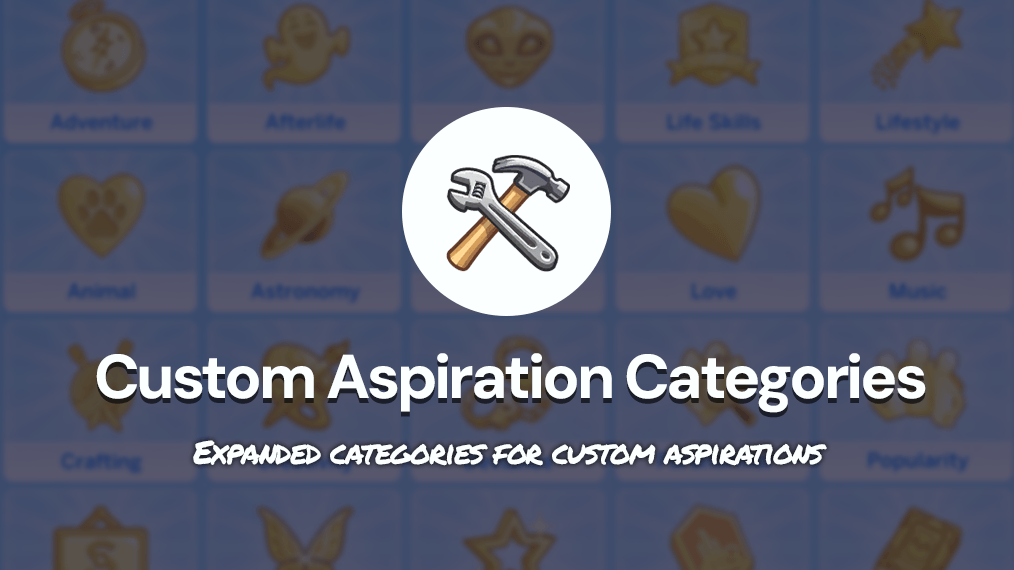
A Utility Mod that enables multiple new Shared Custom Aspiration Categories (for Players and Modders)
Categories.png
Description
🔄️ Public Update - September 24, 2026: v. 1.2! Added four new categories (Dynasty, Mermaid, PlantSim & Royalty) + updated many of the icons to better match each other's design (view pictures below). ✨👐
✅ Check Mod Status here
🌍 This mod is compatible with ALL in-game languages.
➡️ Download mod: Click the "Files tab" and download the latest version!
A Utility Mod for Organizing Custom Aspirations
Hi Sims friends! 💖👋 This is a brand‑new utility mod and a collaborative project I’ve started together with mod creator Midnitetech, who has contributed to some of the shared aspiration categories included in this mod. I’ve also chatted about this project with multiple other aspiration mod creators in the community! 🙌
The goal of this mod is simple: to make custom aspirations more organized, easier to navigate, and more enjoyable to use — for both players and mod creators.
✨ What Is This Mod?
This mod expands the available aspiration categories in The Sims 4. It’s designed as a shared utility mod that multiple mod creators can use, allowing us to place our custom aspirations into the same set of organized, consistent categories.
✨ Why Does This Mod Exist?
As I’ve been creating more aspiration mods, I realized the game’s default categories are very limited. When we players use multiple custom aspiration mods from different creators, the few existing categories quickly become to cluttered and messy.
This mod provides new, clean, reusable categories that any mod creator can use for their custom aspiration mod — making it easier for players to enjoy many aspirations at once without chaos.
🌟 Expanded Aspiration Categories (v. 1.2)
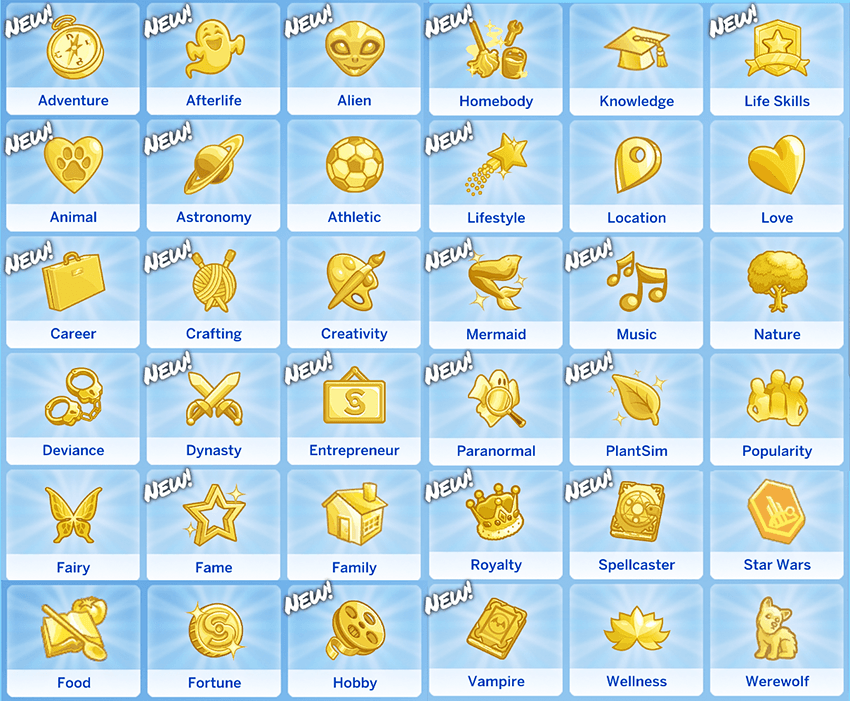
✨ Who Is This Mod For?
For Players
This mod doesn’t change gameplay on its own. However, when an aspiration mod requires this utility mod (like my optional Aspiration Overhaul and all my aspiration mods), you’ll see these expanded categories used in‑game.
Note: You’ll only see the new categories for mods that use them.
For Mod Creators
This mod is meant as a shared utility framework that gives us more category options and helps keep custom aspirations organized across creators. It reduces clutter, improves consistency, and makes it easier for players who use aspirations from multiple modders. Feel free to use these expanded aspirations categories for your upcoming aspirations and link to this mod as a mod dependency.
24 September 2026:
27 August 2026:
💫 Players: Recommended (100% Optional) Mod:
I really recommend using my Aspiration Overhaul mod together with this mod, since it also reorganizes several of the in‑game aspirations into the new expanded categories — for example, EA’s Vampire aspirations are placed in Vampire, Spellcasters in Spellcaster, and so on. This makes the in-game aspirations match the new system and keeps everything clean and consistent.
➡️ How Do I Install / Use It?
For Players:
Simply unzip and install this mod whenever another aspiration mod lists it as a required file 👐 It doesn’t change gameplay on its own — it just provides the shared categories that other mods rely on.
For Modders:
Use one of the aspiration category IDs listed below in your own aspiration mod, and link this mod as an required dependency for your aspiration mod (this applies to Curseforge mod-creators!). For all aspiration mods outside Curseforge, simply link to the official patreon mod page below:
🛠️ View the official patreon page for this mod here.
This mod will always remain free and publicly available for everyone. I'll also keep the mod updated regulary. 👐💖
📁 Available Category IDs (for modders):
- Adventure - 30875442
- Afterlife - 1751210762
- Alien - 1017362802
- Astronomy - 1958536121
- Career - 1172828392
- Crafting - 702715348
- Dynasty - 3303169887
- Entrepreneur - 2001517217
- Fame - 1133893456
- Hobby - 1964593674
- Homebody - 1370288399
- Life Skills (children focus) - 233502667
- Lifestyle - 2450118840
- Mermaid - 4272103060
- Music - 2387901371
- Paranormal - 82521093
- PlantSim - 957940434
- Royalty - 1924914899
- Spellcaster - 3715574419
- Vampire - 1311639367
All Categories to choose from (mod creators):
Adventure
- Perfect for travel, exploration, and discovery‑focused aspirations.
Afterlife
- Great for ghost gameplay, life‑and‑death themes, and supernatural afterlife content.
Alien
- For all alien‑related aspirations.
Animal (BG)
- The standard Animal category, now fully base‑game friendly so we can add multiple animal aspirations to this category and not only Cat & Dogs EP restricted ones.
Astronomy
- For space, rocket science, stargazing, and similar themes.
Career
- For aspirations centered around a single career path.
Crafting
- For crafting‑based aspirations of all kinds.
✨ Dynasty (NEW in v. 1.2)
- For aspirations centered around dynasties and rivalries.
- Note: There is also a new separate category for Royalties!
Entrepreneur
- For business‑oriented aspirations.
Fame
- For fame‑related aspirations inspired by Get Famous (or similar mods).
Hobby
- For hobby‑based aspirations.
Homebody
- For home improvement, upgrading, repairing, and cozy home‑focused gameplay.
Life Skills (by Midnitetech)
- A children‑focused life skills category.
Lifestyle (by Midnitetech)
- A category centered around lifestyle‑based aspirations.
✨ Mermaid (NEW in v. 1.2)
- Perfect for mermaid-focused aspirations.
Music
- For music‑focused aspirations — to separate aspirations from the Creative category to keep things tidy.
Paranormal
- Perfect for ghost hunting, séances, and supernatural investigation.
✨ PlantSim (NEW in v. 1.2)
- Perfect for PlantSim-focused aspirations.
✨ Royalty (NEW in v. 1.2)
<figure>
</figure>
- Perfect for royalty-focused aspirations
- Note: Works with basegame too.
Spellcaster
- For spellcaster‑focused aspirations.
Vampire
- For vampire gameplay and vampire‑focused aspirations.
⚠️ Mod Creators: Important General Note!
This is not related to this utility mod, but a general limitation in The Sims 4:
Pack‑restricted aspirations do not function correctly in the game and can cause UI errors in the aspiration panel. To avoid issues, always use base‑game friendly tunings for the core parts of your aspiration (the aspiration track & aspiration tuning including strings for these tunings) — or clearly require a specific pack if your aspiration tuning depends on it.
For aspiration overrides, make sure players only install the override for the packs they actually own otherwise the players will get UI errors.
🛠️ Mod Creators: Help Shape this mod with us!
If you’re a mod creator and feel that we should add more aspiration categories to this utility mod, you’re always welcome to reach out ! 😊 I’d love to keep expanding this system together with more modders so we can make custom aspirations even more organized and fun for everyone.
TECHNICAL DETAILS:
Mod Conflicts
No — this mod should not create any gameplay conflicts.
It does override the game’s original aspiration category tunings to make categories appear in alphabetical order (English only). However:
- If another mod also overrides these tunings, it’s not harmful — the categories simply won’t appear in the same order. The same applies the other way around. No important tuning data are overriden.
🌍 Languages:
- This mod works in all in-game languages!
➡️ Installation Help:
- Unzip and add the package file to your Mods folder, or any folder inside this folder (it can't be placed more than 5 folders deep though).
🔄️ Update Notes:
24 September 2026:
- Added four new categories: Dynasty, Mermaid, PlantSim & Royalty. Thanks to mod creator SimplyPepper for great ideas on additions! 💖
- Updated many of the icons to better match each other's design. ✨
- Added new translations (based on in-game words in each languages) for all categories - please let me know if anything looks off! 👐
27 August 2026:
- Important Translation fix! Added a missing string for the French translation of the "Entrepreneur" category! Please re-download to avoid issues. 👐
💖 Get Early Access & Exclusive Content
🩷💫 If you enjoy my work and aren’t a member yet, consider supporting me to get Early Access to new mods, save files, the All‑in‑One download bundle, and exclusive sneak peeks of my ongoing projects. Every new supporter truly helps my modding work grow and improve. Thank you for considering it — and a huge thank you to everyone already supporting me. I love creating mods for this community 🩷💫
🛠️Custom Aspiration Categories (Utility Mod) Team