CAS Part On Hover
- By
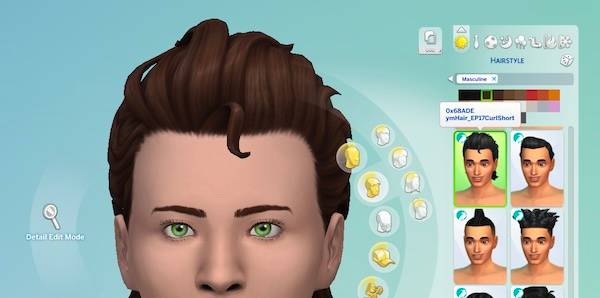
Hover any CAS part to see its hex ID and internal name, CC supported
⚠️ Status: TESTED & COMPATIBLE with the September 22nd, 2026 Patch (PC/Mac: 1.128.90)
CAS Part On Hover
by deadlystingnyc
Have you ever just wanted to give two Sims the same exact nose but you can't remember which one you used? Or spotted broken CC in CAS and needed the ID to look it up in Sims 4 Studio? CAS Part On Hover shows you the hex ID and internal name of any CAS part the moment you hover over it.
Why You Need This
Identifying CAS parts, especially custom content, normally means a lot of guesswork. You either know the creator and can dig through their package files in Sims 4 Studio, or you're stuck. This mod surfaces the information you need directly in CAS, with no need to save items on Sims or open external programs.
How It Works
On hover in CAS, EA content parts including (but not limited to) presets, hair, clothing, accessories, body hair, tattoos, skin details, makeup, and pelt patterns show their hex ID and internal name out of the box. No setup required for EA content.
Note: Co-branded and special-event items (e.g. Reaper's Rewards) currently keep their pre-existing tooltip text rather than showing the hex ID and internal name.
Custom content style parts (distinct new items with their own catalog tile, like a new hairstyle) show no tooltip by default until you run the optional CC naming command below. After that they show their hex ID and, when present, their internal name.
CC swatches (extra color options added to an existing style, such as a hair recolor) cannot be named. This is a limitation of the game's color-swatch UI and applies to EA swatches too. The hex ID alone is enough to look a part up in Sims 4 Studio.
Requirements
- The Sims 4 (base game only, no packs required)
Installation
The download unzips into a single deadlystingnyc_cas_part_on_hover folder. Drop that whole folder into your Mods folder: Documents/Electronic Arts/The Sims 4/Mods/
Then enable Script Mods under Game Options → Other.
Standard 2-column CAS (default)
After dropping the folder in, delete the More Columns Compatibility (optional) subfolder if you don't want a wider CAS catalog. That's it, you're done.
More Columns (optional)
Only if you want a wider CAS catalog (3, 4, 5, or 6 columns). Inside the mod's folder, open More Columns Compatibility (optional)/, then:
- Delete the default packages from the mod's folder:
deadlystingnyc_cas_part_on_hover.packagedeadlystingnyc_cas_part_on_hover_template.package
- Move
deadlystingnyc_cas_part_on_hover_caslibrary.packageup into the mod's folder (required for any column layout) - Open one column folder (
3column,4column,5column, or6column) and move both files inside it up into the mod's folder - Delete the
More Columns Compatibility (optional)folder
⚠️ Do not use more than one column folder. Do not install the standalone More Columns In CAS mod alongside this one. They will conflict.
Credit: The More Columns layouts include column-widening code from weerbesu's More Columns In CAS, bundled with permission. All credit for the extra column feature goes to weerbesu.
Optional: Bake Your Custom Content
To add hover names for your installed CC style parts:
- Load into a lot in live mode. The cheat console does not run commands while CAS is open.
- Open the cheat console with
Ctrl+Shift+C, entertestingcheats true - Type
dsn_cph_generateand press Enter - Wait for a confirmation message in the console output and an orange notification in your wall instructing you to quit, clear cache files, and restart the game.
- Quit the game, then delete these two cache files from your Sims 4 folder:
localthumbcache.packageavatarcache.package
- Restart the game and enter CAS. Your CC hexes and names now appear on hover.
Re-run whenever you add new CC.
⚠️ This command overwrites the mod's main package with your installed content added to the name map. It edits only that one file and never touches anything else. If anything goes wrong mid-write, your existing package is left intact.
⚠️ The baking command may fail due to access permissions, especially if your Sims 4 folder is installed in a non-default location. An error message detailing the workaround will be displayed if this happens.
⚠️ Updating the mod for new EA content does NOT preserve your baked CC names. You will need to re-bake after updating the mod files.
If the command reports it couldn't save
On some setups the bake command cannot complete due to access permissions. This will be detailed in the orange restart notification that shows after the bake command completes. If this happens, an error notification with the following workaround steps will display:
- Close The Sims 4 completely
- Delete the mod's
deadlystingnyc_cas_part_on_hover.package(or column variant) from your Mods folder - Delete
localthumbcache.packageandavatarcache.packagefrom your Sims 4 folder - Start the game, load a lot, and run
dsn_cph_generateagain
EA and pet fur names keep working from the shipped package the whole time, so this only affects your baked CC names.
Template packages are optional
The _template.package files are only used by dsn_cph_generate. If you never bake CC names, you can leave them out. Keeping them installed does no harm.
Troubleshooting
Having an issue? Leave a comment below with your setup and I'll help troubleshoot.
Compatibility
This mod replaces EA's cascustomizer UI resource. It will conflict with any other mod that overrides cascustomizer. Only one can be active: whichever loads last wins, and the other one's changes either break or stop working with no error message. If hover names stop appearing (or another CAS UI mod stops working), a cascustomizer conflict is the first thing to check.
More Columns In CAS (weerbesu): do NOT install the standalone More Columns In CAS package alongside this mod. Use the included optional 3+ column layout files as described above instead.
Color Sliders (thepancake1): compatible in its core form. The one exception is the optional Enable Eyebrow Sliders add-on (__thepancake1_ColorSlidersUI_EnableEyebrowSliders), which also overrides cascustomizer and therefore conflicts. Use either that add-on or this mod, not both.
About This Mod
One of a growing set of mods I'm making for The Sims 4, ranging from small quality-of-life fixes to more fully featured tools like this one. If this saves you time hunting down CAS parts, a rating helps other players find it. Thanks for the support!
If you enjoy my mods, consider supporting me on Patreon.
© 2026 deadlystingnyc. Free for personal use. Do not redistribute or reupload without permission. The bundled More Columns In CAS code is used with weerbesu's permission; please respect weerbesu's own terms for that mod.
The CAS Part On Hover Team


Owner