Max Cape (RuneSchema items)

The RuneSchema half of Max Cape: the Max Cape item, its Defense 2 and skillcape effects, and its Mystic Forge recipe. Needs the main Max Cape project.
12-forge-max.jpg

12-forge-max.jpg

4-max-tooltip.jpg

4-max-tooltip.jpg

Description

The item and recipe half of Max Cape

This is the RuneSchema half of Max Cape. It adds the Max Cape as an item, with its stats, its effects and its Mystic Forge recipe. Install the main project too: it has the design and the progress.

Needs UE4SS, RuneSchema and Max Cape.


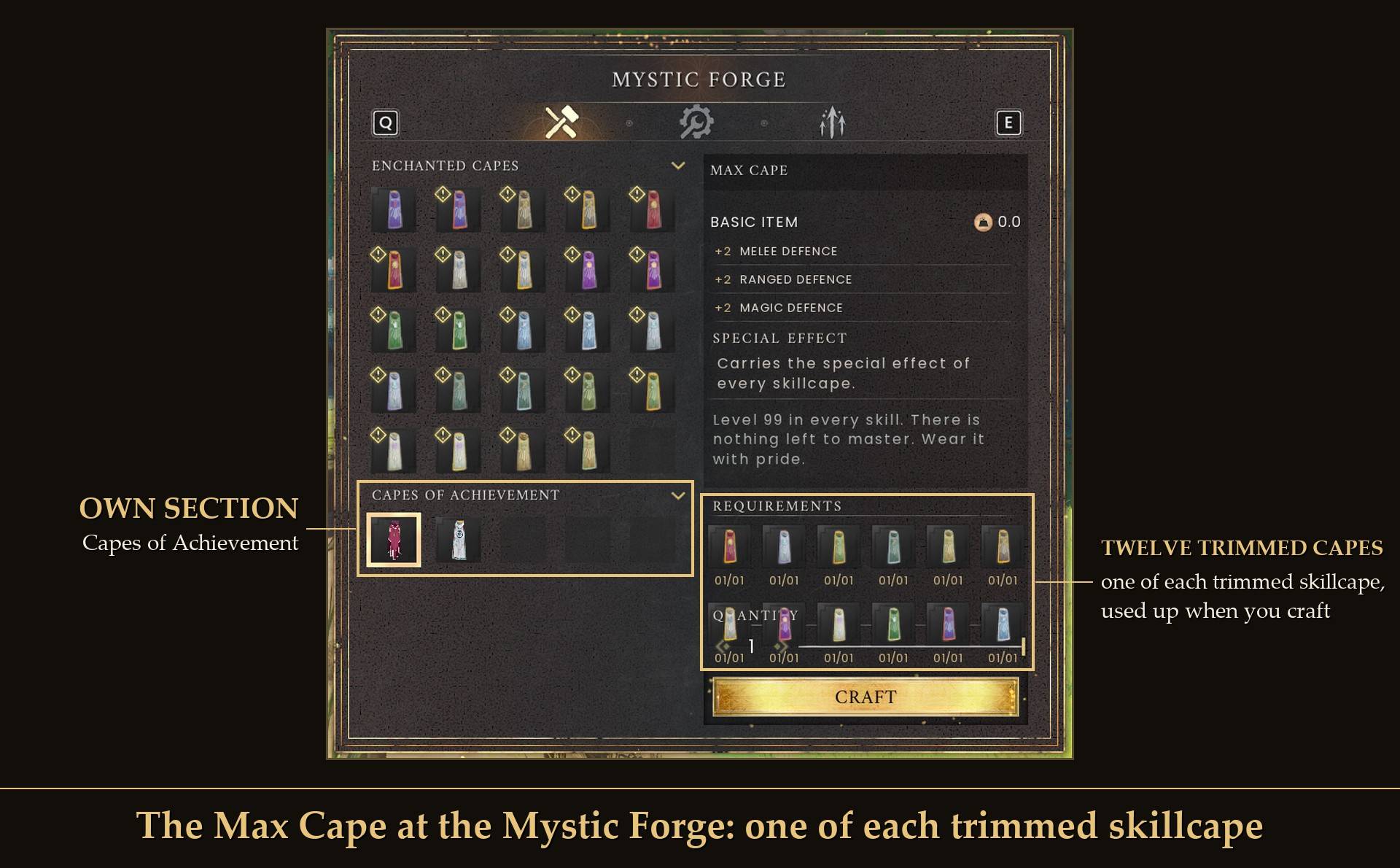
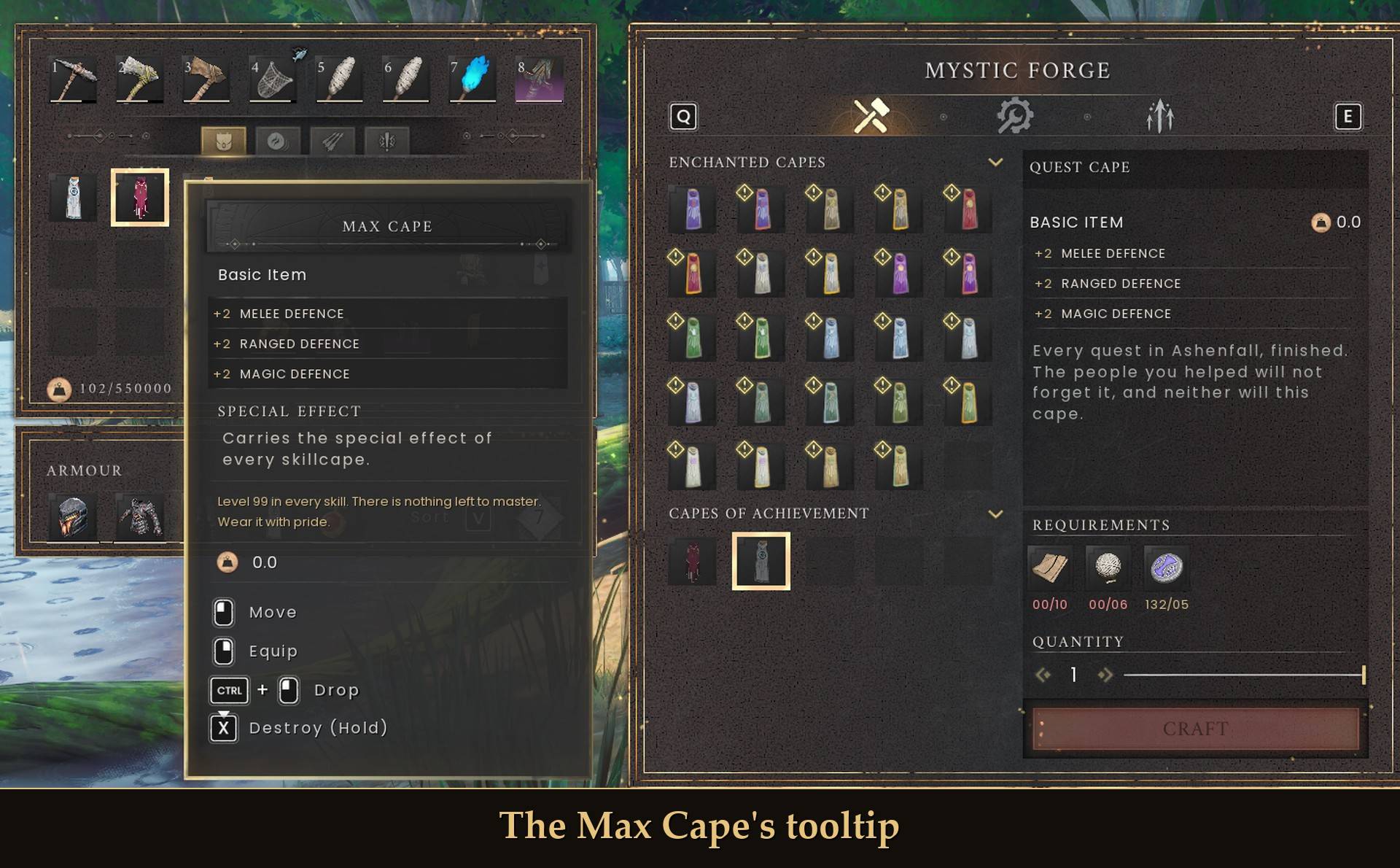
The Max Cape at the Mystic Forge: one of each trimmed skillcape

What's in this half

  • One item: the Max Cape, a new item. No skill level is needed to wear it.
  • Its stats: Defense 2, the same as every skillcape.
  • Its effects: the special effects of the eleven skillcapes that have one (the game's Fishing skillcape has none).
  • Its recipe: at the Mystic Forge, in the "Capes of Achievement" section: one of each of the twelve trimmed skillcapes, used up when you craft.

The design, the icon, the message and "Show my progress" are all in the main Max Cape project. That page has the pictures, the settings and the full details.

Why two projects?

The item and recipe are added through RuneSchema, and CurseForge keeps RuneSchema files in their own section. The rest of the mod goes in the UE4SS section. So the mod is split in two, and you need both.

Install

  1. Install UE4SS for RSDragonwilds. RuneSchema needs the UE4SS 3.0.1 "latest" build (f6d5f942), and that's the one I tested with.
  2. Install RuneSchema (link at the bottom of this page). I tested with 0.7.6.8 and 0.7.7.9m.
  3. Install the main Max Cape project (its page says where its folders go).
  4. Extract this project's zip into your game folder (the one that has RSDragonwilds inside). It puts one MaxCape folder into RSDragonwilds/Binaries/Win64/ue4ss/Mods/RuneSchema/mods/.

Read this before you uninstall. On any character that has made the Max Cape, keep RuneSchema and this project installed. If this project goes, what happens depends on your RuneSchema version:

  • RuneSchema 0.7.7.4 or newer: when the game starts, RuneSchema takes the items of removed mods out of your saves. Your Max Cape is deleted for good, and putting the project back doesn't bring it back. The skillcapes you made it from are gone too, the forge used them up.
  • Older RuneSchema, like 0.7.6.8: the game won't load a character whose save lists an item it doesn't know. It sends you back to the main menu, and nothing is lost. Dropping or destroying the cape first doesn't help, because your save keeps a list of every item your character has ever picked up. Putting this project back fixes it.

Removing it and putting it back later? RuneSchema rewrites RuneSchema\mods\runeschema.txt when the game starts and drops the line of any mod folder that is missing. After you reinstall, check that the line MaxCape : 1 is in that file, and add it if it isn't.

Delete this MaxCape folder only if no character you want to keep has made the cape.

Good to know

  • Nothing in the game is replaced. The cape and recipe are new. Your skillcapes stay as they are until you combine them.
  • Single player only, so far. I haven't tried it in co-op or on Game Pass.
  • Credits: RuneSchema by the RSDW Modding Community (jonesing4space) adds the item and recipe, and UE4SS runs the rest.

Links

Max Cape (RuneSchema items) Team

profile avatar
  • 2
    Followers
  • 63
    Projects
  • 16.1K
    Downloads

More from maxxfilthView all

  • Mod Menu project image

    Mod Menu

    One menu for all your mod settings. Press Esc, click MODS and change them with switches and sliders. 2.0 adds search, a health check that says why a mod isn't running, a keys page that shows clashes, and a Quick Panel for the settings you change most.

    • 3.5K
    • October 21, 2026
  • Vault Traps - Base Defense Build Pieces project image

    Vault Traps - Base Defense Build Pieces

    Six build-menu pieces made from the game's own traps: floor spikes, floor and wall fire jets, dart launchers, exploding plants and pressure plates. They hit hostile creatures only, never players, and kills give you loot and XP. Needs UE4SS and RuneSchema.

    • 7
    • October 21, 2026
  • Fishing Sliders project image

    Fishing Sliders

    Sliders for bite wait, fish fights, junk, spot refills and respawns, plus AFK fishing. Every setting starts at the normal game.

    • 597
    • October 21, 2026
  • Auto Equip Tool project image

    Auto Equip Tool

    Face a rock, tree, farm plot or fishing spot and press U: the right tool comes out of your bag, from any slot.

    • 259
    • October 21, 2026
  • Mod Menu project image

    Mod Menu

    One menu for all your mod settings. Press Esc, click MODS and change them with switches and sliders. 2.0 adds search, a health check that says why a mod isn't running, a keys page that shows clashes, and a Quick Panel for the settings you change most.

    • 3.5K
    • October 21, 2026
  • Vault Traps - Base Defense Build Pieces project image

    Vault Traps - Base Defense Build Pieces

    Six build-menu pieces made from the game's own traps: floor spikes, floor and wall fire jets, dart launchers, exploding plants and pressure plates. They hit hostile creatures only, never players, and kills give you loot and XP. Needs UE4SS and RuneSchema.

    • 7
    • October 21, 2026
  • Fishing Sliders project image

    Fishing Sliders

    Sliders for bite wait, fish fights, junk, spot refills and respawns, plus AFK fishing. Every setting starts at the normal game.

    • 597
    • October 21, 2026
  • Auto Equip Tool project image

    Auto Equip Tool

    Face a rock, tree, farm plot or fishing spot and press U: the right tool comes out of your bag, from any slot.

    • 259
    • October 21, 2026